
1. Introduction
The Meliconi Space System Turn 200 is a versatile TV wall mount designed for televisions ranging from 14 to 40 inches. It supports VESA standards 50, 75, 100, and 200, and can hold a maximum weight of 30 kg. This mount offers both vertical tilt (-5° to +20°) and horizontal swivel (±20°) capabilities, allowing for optimal viewing angles. Its robust design ensures secure mounting, even on plasterboard walls under specific conditions. This manual provides essential information for safe installation, operation, and maintenance.
2. Safety Information
Please read all instructions carefully before installation and use. Failure to follow these instructions may result in serious personal injury or property damage.
- Weight Capacity: Do not exceed the maximum load capacity of 30 kg (66 lbs). For plasterboard walls, the maximum load is 18 kg (40 lbs).
- Wall Type: Ensure the mounting surface can safely support the combined weight of the mount and the television. Consult a professional if unsure about your wall's integrity.
- Tools: Use appropriate tools for installation. Wear safety glasses.
- Children: Keep children away during installation. Small parts may be a choking hazard.
- Damage: Do not install if any parts are missing or damaged. Contact Meliconi support for replacement parts.
3. Package Contents
Verify that all components are present before beginning installation:
- Wall Plate Assembly
- TV Brackets (2 pieces)
- Mounting Hardware Kit (screws, anchors, washers for various TV and wall types)
- EVA Protective Grommets
- Instruction Manual
4. Specifications
| Compatible TV Sizes | 14 - 40 inches |
| VESA Compatibility | 50x50, 75x75, 100x100, 200x200 mm |
| Maximum Load Capacity | 30 kg (66 lbs) |
| Plasterboard Wall Load Capacity | 18 kg (40 lbs) for 12.5 to 25 mm thickness |
| Vertical Tilt Angle | -5° to +20° |
| Horizontal Swivel Angle | ±20° |
| Material | Metal |
| Product Dimensions | 5.31 x 11.22 x 2.56 inches (approximate) |
| Item Weight | 2.66 pounds (approximate) |
5. Setup and Installation
Before starting, ensure you have the necessary tools: drill, stud finder (if applicable), level, screwdriver, and pencil.
5.1 Pre-Installation Checks
- Identify your wall type (solid concrete, wood stud, plasterboard).
- Locate studs if mounting to a wood stud wall.
- Ensure no hidden electrical wires or plumbing are in the drilling path.
5.2 Attach TV Brackets
- Carefully place your TV face down on a soft, clean surface.
- Identify the VESA mounting holes on the back of your TV.
- Select the appropriate screws and spacers from the hardware kit that fit your TV's VESA holes.
- Attach the two TV brackets to the back of your TV, ensuring the EVA protective grommets are placed between the bracket and the TV to prevent scratches. Tighten securely.
5.3 Mark Wall Mounting Position
- Hold the wall plate assembly against the wall at your desired viewing height. Use a level to ensure it is perfectly horizontal.
- Mark the drilling points through the holes on the wall plate with a pencil.
5.4 Install Wall Plate
- Drill pilot holes at the marked positions. The drill bit size will depend on your wall type and the anchors/screws used.
- Insert wall anchors if required (e.g., for concrete or plasterboard).
- Securely fasten the wall plate assembly to the wall using the provided screws. Ensure it is firmly attached and level.
- For Plasterboard Walls (12.5-25mm thickness): Use specific plasterboard anchors (not always included, may need to be purchased separately) and ensure the TV weight does not exceed 18 kg. Distribute the load evenly.
5.5 Mount TV to Wall Plate (Fast Block System)
- With assistance, carefully lift the TV with the attached brackets.
- Align the TV brackets with the corresponding slots on the wall plate.
- Gently lower the TV until the brackets engage with the wall plate's "Fast Block" mechanism. You should hear a click or feel it securely lock into place.
- Verify that the TV is securely seated on the mount by gently pulling on the bottom edges.
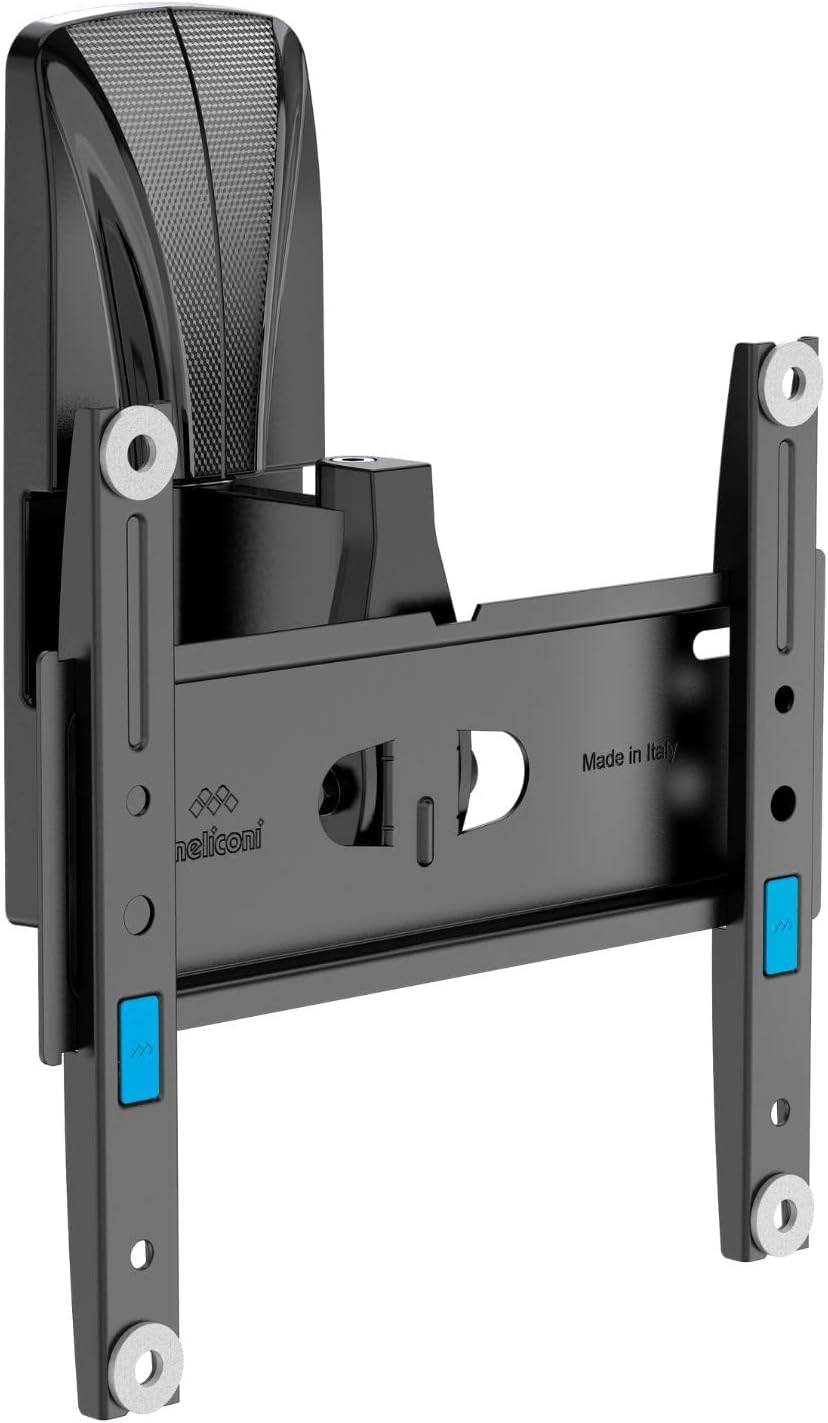
Image 1: The Meliconi Space System Turn 200 TV Wall Mount demonstrating its vertical tilt and horizontal swivel capabilities. The central arm connects to the wall plate, while the TV brackets (shown in light grey) can adjust their angle.
6. Operating Instructions
Once your TV is securely mounted, you can adjust its position to achieve the best viewing experience.
- Vertical Tilt: To adjust the vertical tilt, gently push or pull the top or bottom of your TV. The mount allows for a tilt range of -5° (downward) to +20° (upward). Adjust slowly and smoothly.
- Horizontal Swivel: To adjust the horizontal swivel, gently push or pull the side of your TV. The mount allows for a swivel range of ±20° (left or right).
- Ensure all cables are free and not pinched during adjustments.
7. Maintenance
Regular maintenance ensures the longevity and safe operation of your TV wall mount.
- Cleaning: Wipe the mount with a soft, dry cloth. Avoid abrasive cleaners or solvents.
- Periodic Checks: Periodically check all screws and bolts to ensure they remain tight and secure. Do not overtighten.
- Inspect for Damage: Inspect the mount for any signs of wear, corrosion, or damage. If any damage is found, discontinue use and contact Meliconi support.
8. Troubleshooting
If you encounter issues during or after installation, refer to the following common solutions:
- TV Not Level: Ensure the wall plate was installed perfectly level. If the TV brackets allow for minor adjustments, use them. Otherwise, the wall plate may need re-installation.
- Mount Feels Loose: Re-check all wall mounting screws and TV bracket screws for tightness. Ensure the wall type is appropriate for the weight.
- Difficulty Adjusting Tilt/Swivel: Ensure no cables are obstructing movement. The mechanism should move smoothly. Do not force adjustments.
- Missing Parts: Refer to the package contents list. Contact Meliconi support if parts are missing.
9. Warranty and Support
Meliconi products are manufactured to high-quality standards. For warranty information, technical support, or to inquire about replacement parts, please refer to the official Meliconi website or contact their customer service department. Keep your purchase receipt as proof of purchase.


