
Introduction
Thank you for choosing the Diablo V-Commander Ergonomic Office Chair. This manual provides detailed instructions for the assembly, operation, maintenance, and troubleshooting of your new chair. Designed for optimal comfort and support, the V-Commander combines elegance with modern ergonomics, making it ideal for office, study, or conference room use.
The Diablo V-Commander chair features high-quality materials for durability, extensive adjustability, a comfortable and adjustable seat, and integrated flexible lumbar support to promote ergonomic posture and prevent back pain. It is recommended for users between 150 cm and 200 cm tall and can support up to 140 kg.
Package Contents
Before assembly, please ensure all components are present and undamaged. If any parts are missing or damaged, please contact customer support.
- Backrest assembly
- Seat assembly
- Armrests (2)
- Headrest
- Gas lift cylinder
- Star base
- Casters (5)
- Hardware kit (screws, washers, Allen key)
Assembly Instructions
Follow these steps carefully to assemble your Diablo V-Commander office chair. It is recommended to assemble the chair on a soft, clean surface to prevent damage.
Step 1: Attach Casters to the Base
Insert each of the five casters into the holes at the end of each leg of the star base. Push firmly until they click into place.
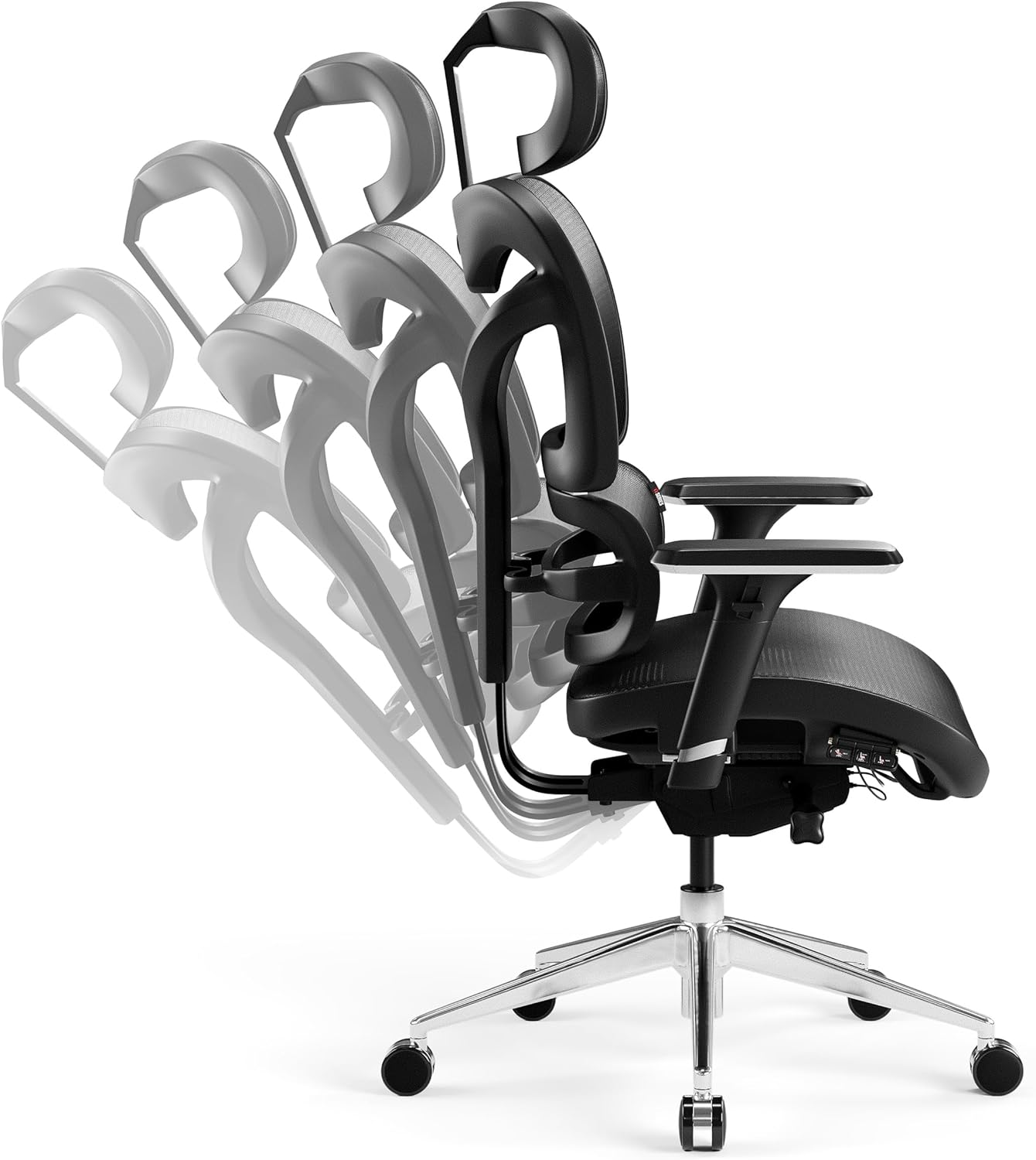
Figure 1: Chair base with casters. The durable aluminum base and rubber casters ensure stable and scratch-free movement.
Step 2: Insert Gas Lift into the Base
Place the gas lift cylinder into the center hole of the assembled star base. Ensure it is seated securely.
Step 3: Attach Armrests to the Seat
Align the armrests with the pre-drilled holes on the underside of the seat assembly. Secure them using the provided screws and Allen key. Do not overtighten initially.
Step 4: Attach Backrest to the Seat Assembly
Connect the backrest to the seat assembly using the designated mounting points and screws. Ensure a firm connection.
Step 5: Attach Headrest to the Backrest
Slide the headrest into the top of the backrest. It should click into place or be secured with a simple mechanism.

Figure 2: Adjustable headrest. The headrest can be adjusted to provide optimal neck support.
Step 6: Connect Seat Assembly to Gas Lift
Carefully place the assembled seat and backrest onto the gas lift cylinder. Apply gentle downward pressure to secure it.
Step 7: Final Tightening
Once all components are loosely assembled, go back and tighten all screws securely. Do not overtighten to avoid stripping threads.
Operating Instructions
The Diablo V-Commander chair offers multiple adjustment options to customize your seating experience for maximum ergonomic benefit.
1. Seat Height Adjustment
Locate the lever on the right side, beneath the seat (often marked "LIFT"). To raise the seat, lift the lever while taking your weight off the chair. To lower the seat, lift the lever while seated.

Figure 3: Seat adjustment controls. Levers control seat height, tilt, and recline lock.
2. Backrest Recline and Tilt Lock
The chair features an integrated tilt mechanism. Use the lever on the left side (often marked "TILT") to unlock the recline function, allowing the backrest to tilt freely. Push the lever back in to lock the backrest at your desired angle.

Figure 4: Backrest recline. The chair's backrest can be adjusted and locked at various angles for personalized comfort.
3. Lumbar Support Adjustment
The flexible integrated lumbar support can be adjusted vertically to match the natural curve of your spine. Gently push or pull the lumbar support section up or down to find the most comfortable position.

Figure 5: Lumbar support adjustment. The lumbar support can be moved vertically to provide tailored lower back support.
4. Armrest Adjustment
The 3D armrests offer multiple adjustment options: height, depth, and pivot. Use the buttons or levers on the armrests to adjust them to your preferred position, providing optimal support for your arms and shoulders.

Figure 6: 3D Armrest adjustments. Armrests can be adjusted for height, depth, and angle.
5. Headrest Adjustment
The headrest can be adjusted vertically and tilted to provide optimal support for your neck and head. Gently push or pull the headrest to adjust its height and angle.
Maintenance
Regular maintenance will extend the life and performance of your Diablo V-Commander chair.
- Cleaning: The mesh fabric is resistant and breathable. For general cleaning, wipe with a damp cloth. For spot cleaning, use a mild fabric cleaner and a soft cloth. Avoid harsh chemicals or abrasive materials.
- Moving Parts: Periodically check all screws and bolts to ensure they are tight. Lubricate moving parts (e.g., gas lift, tilt mechanism) with a silicone-based lubricant if they become stiff or noisy.
- Casters: Keep the casters clean from hair and debris to ensure smooth movement.
- Inspection: Regularly inspect the chair for any signs of wear or damage. If any part is damaged, discontinue use and contact customer support for replacement parts.
Troubleshooting
If you encounter any issues with your chair, refer to the following common problems and solutions:
| Problem | Possible Cause | Solution |
|---|---|---|
| Chair does not adjust height | Gas lift malfunction or lever not engaged. | Ensure the height adjustment lever is fully engaged. If the issue persists, the gas lift may need replacement. |
| Chair squeaks or creaks | Loose bolts or dry moving parts. | Tighten all assembly bolts. Apply silicone lubricant to moving parts and joints. |
| Casters do not roll smoothly | Debris caught in casters or damaged casters. | Remove any hair or debris from the caster wheels. If damaged, replace casters. |
| Backrest does not recline or lock | Tilt mechanism locked or damaged. | Ensure the tilt lock lever is disengaged. Check for any obstructions in the mechanism. |
If these solutions do not resolve the issue, please contact Diablo customer support.
Specifications
- Brand: Diablo
- Model: V-Commander
- Color: Black/Grey
- Material: Mesh fabric, Aluminum frame
- Product Dimensions (L x W x H): 68 x 68 x 142 cm (26.8 x 26.8 x 55.9 inches)
- Item Weight: 24 kg (52.9 lbs)
- Maximum Load Capacity: 140 kg (308 lbs)
- Recommended User Height: 150 cm - 200 cm (4'11" - 6'7")
- Special Features: Adjustable Armrest, Adjustable Headrest, Adjustable Backrest, Ergonomic Design, Seat Lock, Flexible Lumbar Support
Warranty and Support
For information regarding warranty coverage, please refer to the documentation provided with your purchase or contact the seller directly.
If you require further assistance, have questions about assembly, operation, or need to report a defect, please contact Diablo customer support through their official website or the retailer from whom you purchased the chair. Please have your model number (V-Commander) and proof of purchase ready.
