
TTEC AirBeat Snap
ttec AirBeat Snap True Wireless Bluetooth Earphones
Model: AirBeat Snap (2KM147) | Brand: TTEC
Introduction
The ttec AirBeat Snap True Wireless Bluetooth Earphones are designed to provide a superior audio experience for music and calls. Featuring advanced Bluetooth 5.3 connectivity, touch controls, and a lightweight, sweat-resistant design, these earbuds offer comfort and performance for daily use, gaming, and more.
This manual provides detailed instructions on setting up, operating, maintaining, and troubleshooting your ttec AirBeat Snap earphones. Please read it carefully before use to ensure optimal performance and longevity of your device.
Package Contents
Please check the box for the following items:
- 1 x ttec AirBeat Snap True Wireless TWS Bluetooth Earphones (Left and Right Earbuds)
- 1 x Earphone Charging and Storage Case
- 3 x Sets of Earbud Tips (Sizes: S, M, L)
- 1 x USB-A to USB-C Charging Cable
- 1 x User Manual (This document)
Setup
1. Initial Charging
Before first use, fully charge the earphones and the charging case.
- Place both earbuds into the charging case. Ensure they are correctly seated; the indicator lights on the earbuds should illuminate.
- Connect the USB-C charging cable to the charging port on the case and the other end to a USB power source (e.g., computer USB port, wall adapter).
- The charging indicator on the case will show charging status. A full charge typically takes approximately 1.5 hours.
- Once fully charged, disconnect the charging cable.

Image: ttec AirBeat Snap earbuds placed inside their white charging case, ready for charging or storage.
2. Pairing with a Device (Bluetooth 5.3)
The ttec AirBeat Snap uses Bluetooth 5.3 for a stable and fast wireless connection.
- Open the charging case. The earbuds will automatically enter pairing mode, indicated by flashing lights (if applicable, refer to specific light indicators in product documentation).
- On your device (smartphone, tablet, laptop), go to the Bluetooth settings.
- Turn on Bluetooth and search for available devices.
- Select "ttec AirBeat Snap" from the list of found devices.
- Once connected, you will hear a confirmation tone, and the earbud indicator lights will change (e.g., turn off or solid).
MonoSmart Technology: Both earbuds can be used independently. Simply take one earbud out of the case, and it will automatically connect to your paired device. If both are out, they will connect as a stereo pair.

Image: Illustration showing the ttec AirBeat Snap earbuds next to a smartphone with Bluetooth settings open, highlighting Bluetooth 5.3 and MonoSmart Technology for fast and easy connection.
Operating Instructions
Touch Controls
The ttec AirBeat Snap features intuitive touch sensors on each earbud for easy control of music, calls, and voice assistants.
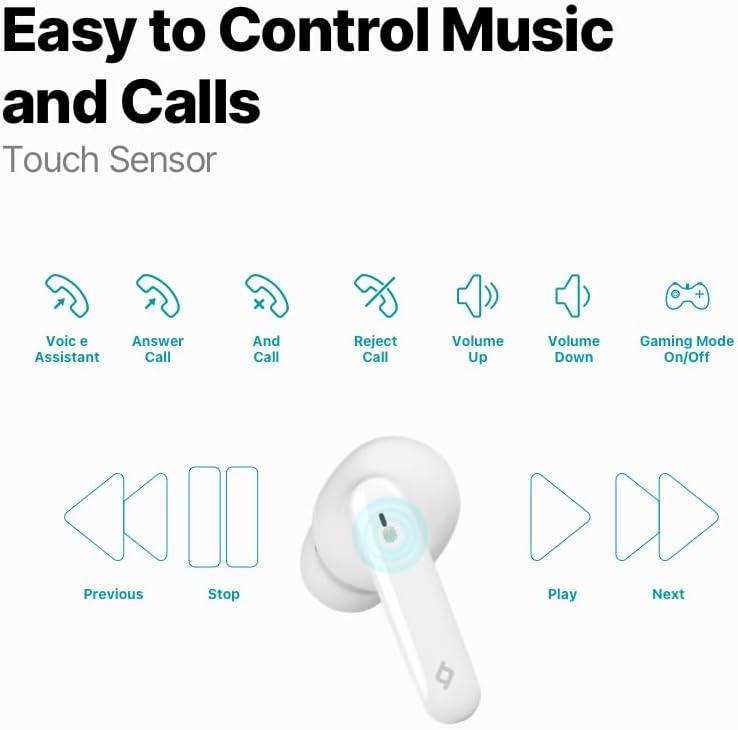
Image: Diagram illustrating the touch control functions for the earbuds, including voice assistant, answer/end/reject call, volume up/down, gaming mode on/off, previous/next track, play/stop.
| Action | Function |
|---|---|
| Single Tap (Left/Right) | Play/Pause Music, Answer/End Call |
| Double Tap (Left) | Previous Track |
| Double Tap (Right) | Next Track |
| Triple Tap (Left) | Volume Down |
| Triple Tap (Right) | Volume Up |
| Long Press (2 seconds) | Reject Call, Activate Voice Assistant |
| Quadruple Tap (Left/Right) | Toggle Gaming Mode On/Off |
Music Experience
Enjoy superior sound and deep bass for an impressive music experience.

Image: The ttec AirBeat Snap earbuds floating above their open charging case, with sound waves emanating, illustrating superior sound and deep bass.
Gaming Mode (60ms Low Latency)
Activate Gaming Mode for an outstanding gaming and video experience with ultra-low latency of 60ms, ensuring synchronized audio and visuals.

Image: The ttec AirBeat Snap earbuds positioned next to a smartphone displaying a mobile game, emphasizing the 60ms low latency feature for an enhanced gaming experience.
Battery Life and Charging
The earbuds provide up to 5 hours of battery life on a single charge. The ultra-compact USB-C charging case extends the total usage time up to 28 hours.
Charge&Go Feature: A quick 15-minute charge provides approximately 1.5 hours of usage.
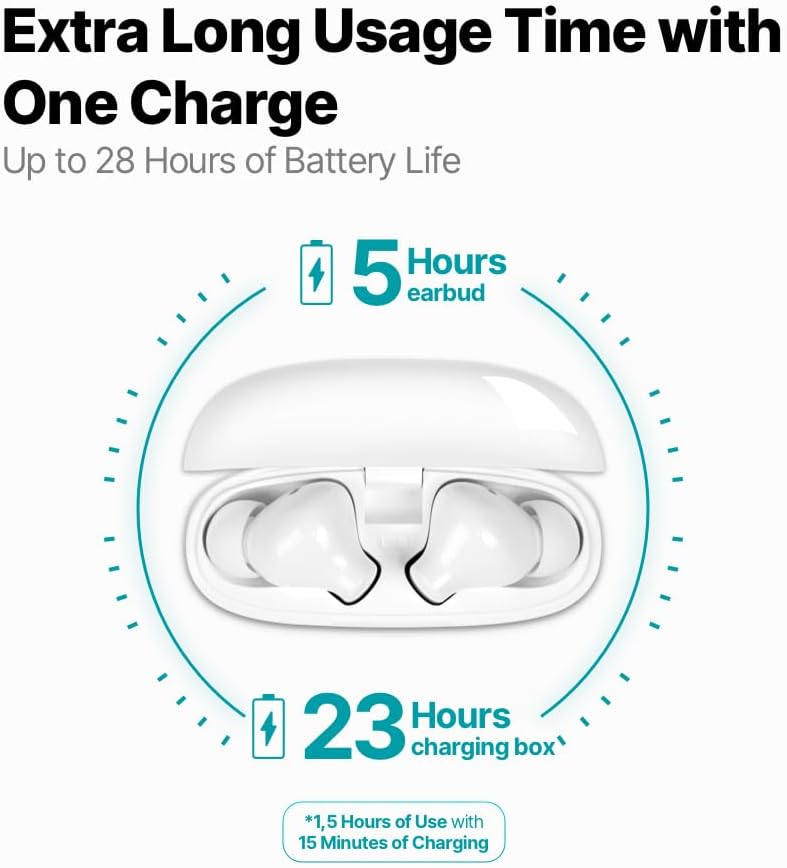
Image: An infographic showing the ttec AirBeat Snap earbuds in their charging case, indicating 5 hours of battery life for the earbuds and an additional 23 hours from the charging case, totaling 28 hours. It also highlights the Charge&Go feature.
Maintenance
Cleaning
- Regularly clean the earbuds and charging case with a soft, dry, lint-free cloth.
- Do not use abrasive cleaners, alcohol, or chemical solvents.
- Gently remove any earwax or debris from the earbud tips and speaker mesh using a small, soft brush or cotton swab.
- Ensure charging contacts on both earbuds and the case are clean and free of dust.
Storage
- When not in use, always store the earbuds in their charging case to protect them and keep them charged.
- Store the device in a cool, dry place, away from direct sunlight and extreme temperatures.
Water and Sweat Resistance (IPX6 Rated)
The ttec AirBeat Snap earbuds are IPX6 rated, meaning they are resistant to strong jets of water and sweat. This makes them suitable for workouts and outdoor activities.
- Do not submerge the earbuds in water.
- Do not expose the charging case to water, as it is not water-resistant.
- After exposure to sweat or water, wipe the earbuds dry before placing them back into the charging case to prevent damage to the charging contacts.

Image: A person wearing the ttec AirBeat Snap earbuds, demonstrating their sweat and water-resistant design with an IPX6 rating, suitable for active use.
Troubleshooting
| Problem | Possible Cause / Solution |
|---|---|
| Earbuds not pairing with device. |
|
| Only one earbud is working. |
|
| Low volume or poor sound quality. |
|
| Earbuds not charging. |
|
| Touch controls not responding. |
|
Specifications
| Feature | Detail |
|---|---|
| Model Name | AirBeat Snap |
| Product Model Number | 2KM147 |
| Brand | TTEC |
| Connectivity Technology | Wireless (Bluetooth 5.3) |
| Earbud Battery Life | Up to 5 hours |
| Charging Case Battery Life | Up to 23 hours (total 28 hours with earbuds) |
| Charging Time | Approx. 1.5 hours (for full charge) |
| Charge&Go Feature | 15 min charge for 1.5 hours use |
| Earbud Weight | 3.5 grams (each) |
| Charging Case Weight | 30 grams |
| Earbud Dimensions (L x W x H) | 32 x 21 x 2.3 mm |
| Charging Case Dimensions (L x W x H) | 57 x 23 x 44 mm |
| Operating Distance | Up to 10 meters |
| Water Resistance Level | IPX6 (Earbuds only) |
| Low Latency Gaming Mode | 60ms |
| Key Features | Touch Control, Lightweight, Microphone Included, Volume Control, Sweat Resistant, MonoSmart Technology |
| Compatible Devices | Mobile Phone, Laptop, Desktop Computer, Tablet |
| Color | White |
| ASIN | B0CQ7YZPFG |
Warranty and Support
For warranty information and customer support, please refer to the official TTEC website or contact your local retailer. Keep your proof of purchase for warranty claims.
Important Note: As per health and hygiene regulations, products that come into direct contact with the human body, such as earphones, can only be returned if their packaging has not been opened, the product has not been tried, damaged, or used.
Related documentsAirBeat Snap


Ask a question about this manual
Ask about setup, troubleshooting, compatibility, parts, safety, or missing instructions. Manuals+ will review the question and use this page’s manual context to help answer it.