
1. Product Overview
The halumao 14.6" Vanity/Makeup Mirror with Lights is designed to provide optimal lighting and clarity for makeup application and grooming. Featuring 11 dimmable LED bulbs and three color modes, this mirror offers versatile illumination to suit various needs. Its sturdy construction and adjustable design ensure stability and ease of use.

Image: halumao 14.6 inch Vanity Mirror with Lights, front view on a desk.
Key Features:
- Adjustable Brightness & 3 Color Modes: 11 dimmable LED bulbs with cool, warm, and natural light options. Eye protection feature included.
- Smart Touch Sensor: Intuitive touch buttons for power, light mode selection, and brightness adjustment.
- Optimal Size: Measuring 14.6"L x 11"W, it provides a clear view of your face, neck, and shoulders.
- Sturdy & Rotatable Design: Constructed with an aluminum frame and a robust U-shaped stand, allowing 360-degree rotation for desired angles.
2. Package Contents
Please verify that all items are present in the package:
- 1 x halumao 14.6" Vanity/Makeup Mirror with Lights
- 1 x Power Adapter
- 1 x User Manual (this document)
3. Setup
Follow these steps to set up your halumao vanity mirror:
- Unpack: Carefully remove all components from the packaging. Inspect the mirror for any damage.
- Placement: Place the mirror on a stable, flat surface such as a dresser or vanity. Ensure sufficient space around the mirror for optimal use and adjustment.
- Connect Power: Locate the DC power port on the back of the mirror. Insert the power adapter cable into the port and then plug the adapter into a standard electrical outlet.

Image: Close-up of the power adapter and other mirror features.
4. Operating Instructions
Your halumao vanity mirror features intuitive touch controls located at the bottom center of the mirror surface.

Image: Close-up of the touch control buttons.
4.1 Power On/Off
- Touch the Power Button (usually indicated by a circle with a vertical line) once to turn the mirror lights on or off.
4.2 Adjusting Light Modes (Color Temperature)
- With the lights on, short press the "M" Button to cycle through the three available light modes: cool light, natural light, and warm light.
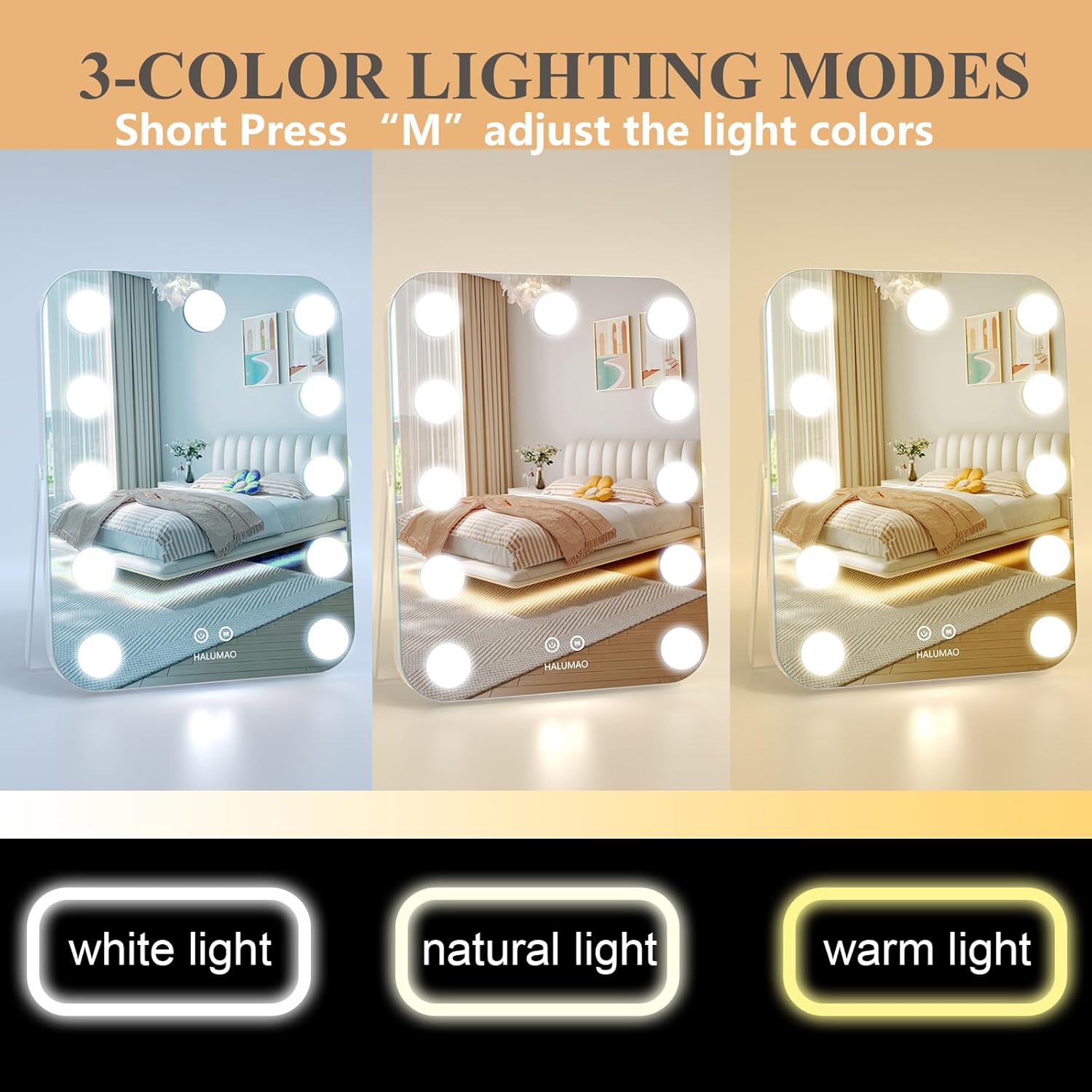
Image: Mirror displaying white, natural, and warm light modes.
4.3 Adjusting Brightness
- To adjust the brightness, long press the "M" Button. The brightness will gradually increase or decrease. Release the button when the desired brightness level is reached.

Image: Mirror demonstrating various brightness levels.
4.4 Adjusting Mirror Angle
- The mirror features a 360-degree rotation capability. Gently tilt the mirror to achieve your preferred viewing angle. The sturdy U-shaped stand will hold it in place.
5. Maintenance
Proper care will ensure the longevity and performance of your halumao vanity mirror.
- Cleaning the Mirror Surface: Use a soft, lint-free cloth and a non-abrasive glass cleaner. Spray the cleaner onto the cloth, not directly onto the mirror, to avoid liquid seeping into the electrical components.
- Cleaning the Frame: Wipe the aluminum frame with a soft, dry cloth. Avoid harsh chemicals.
- Bulb Care: The LED bulbs are integrated and designed for long-term use. Do not attempt to replace them. If a bulb malfunctions, contact customer support.
- Storage: When not in use for extended periods, unplug the mirror and store it in a dry, safe place away from direct sunlight and extreme temperatures.
6. Troubleshooting
If you encounter any issues with your mirror, please refer to the following table:
| Problem | Possible Cause | Solution |
|---|---|---|
| Lights do not turn on. | Power adapter not connected or faulty. | Ensure the power adapter is securely plugged into the mirror and the electrical outlet. Test the outlet with another device. |
| Lights flicker or dim unexpectedly. | Unstable power supply or loose connection. | Check power connections. Try plugging into a different outlet. |
| Touch controls are unresponsive. | Finger is wet or dirty, or a temporary software glitch. | Ensure your finger is clean and dry. Unplug the mirror for 30 seconds and then plug it back in to reset. |
| Mirror stand is loose. | Screws may need tightening. | Carefully check the screws on the stand and tighten them if necessary. Do not overtighten. |
7. Specifications
Detailed technical specifications for the halumao 14.6" Vanity/Makeup Mirror:

Image: Mirror dimensions and key features diagram.
| Feature | Detail |
|---|---|
| Brand | halumao |
| Model Number | RE-202302-W |
| Product Dimensions | 14.6"L x 11"W |
| Frame Material | Aluminum |
| Color | White |
| Mounting Type | Dresser Mount |
| Special Features | 3 Color Changing, Adjustable, Dimmable, Lighted, Touch Sensor |
| Number of LED Bulbs | 11 |
| Assembly Required | No |
| Item Weight | 4 Pounds |
| UPC | 706352522350 |
8. Safety Information
Please read and adhere to the following safety guidelines:
- Handle with care to avoid injury from sharp edges.
- Avoid exposing the mirror to excessive force or impact.
- Securely mount or place the mirror to prevent it from falling.
- Keep out of reach of children.
- Do not immerse the mirror or power adapter in water or other liquids.
- Unplug the mirror during electrical storms or when not in use for long periods.