
Important Safety Information
Please read and understand all instructions before assembling, installing, or operating this product. Failure to follow these instructions may result in electric shock, fire, property damage, or personal injury.
- Always unplug the electric fireplace from the power outlet before cleaning, performing maintenance, or moving the unit.
- Do not block air vents. Ensure proper clearance around the fireplace for adequate ventilation.
- Keep combustible materials such as furniture, pillows, bedding, papers, clothes, and curtains at least 3 feet (0.9 meters) from the front of the fireplace.
- Do not operate any fireplace with a damaged cord or plug, or if the heater has malfunctioned, been dropped, or damaged in any manner.
- Avoid placing the TV stand in direct sunlight or near heat sources to prevent material degradation.
- Ensure the TV stand is placed on a flat, stable surface to prevent tipping.
- Do not overload the shelves. Refer to the specifications for weight limits.
Product Overview
The JUMMICO Fireplace TV Stand (Model D-SD-0261) is designed to accommodate TVs up to 65 inches and features a built-in 23-inch electric fireplace. It includes four shelves for storage and organization of media devices and other items.

Image: The JUMMICO Fireplace TV Stand with a television placed on top, showcasing the integrated electric fireplace and side storage shelves.

Image: Diagram illustrating the recommended TV sizes for the stand, indicating compatibility with TVs up to 65 inches.

Image: The JUMMICO TV stand with fireplace integrated into a modern living room, demonstrating its aesthetic appeal and functionality.
Setup and Assembly
Assembly of the JUMMICO Fireplace TV Stand requires careful attention to detail. It is recommended to have two people for assembly. Ensure all parts are present before beginning.
1. Unpacking and Part Identification
- Carefully unpack all components from the packaging.
- Verify all parts and hardware are included against the provided parts list (not included in this manual, refer to product packaging).
- Place components on a soft, clean surface to prevent scratches.
2. Assembling the TV Stand Structure
- Follow the step-by-step instructions provided with your product for assembling the wooden frame and shelves.
- Ensure all screws and fasteners are tightened securely, but do not overtighten.
3. Electric Fireplace Installation
- Once the TV stand structure is complete, carefully insert the 23-inch electric fireplace into the designated central opening.
- Ensure the fireplace is seated correctly and securely within the stand.
- Connect the fireplace power cord to a standard 120V AC grounded outlet. Do not use extension cords or power strips.
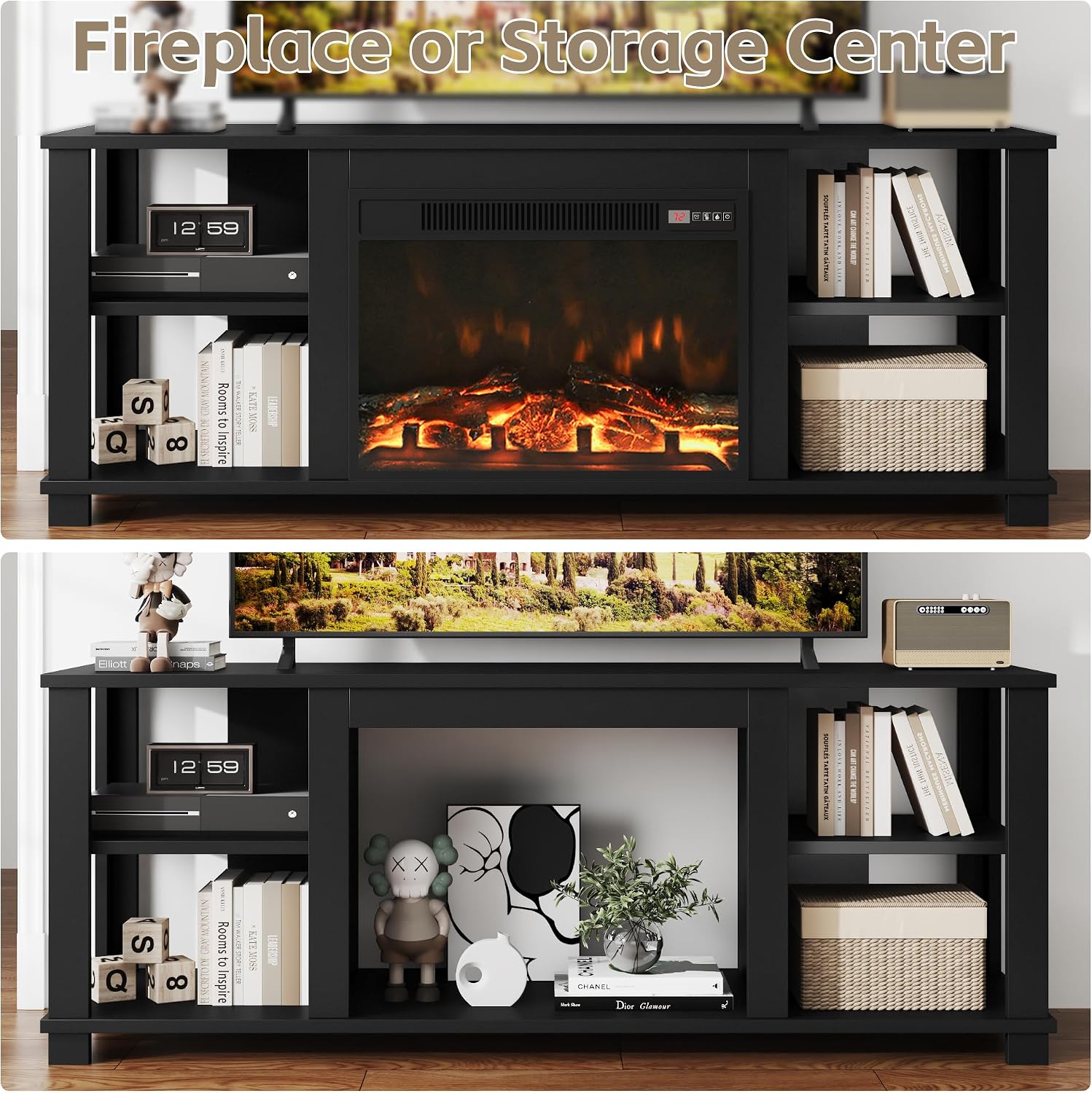
Image: Comparison showing the TV stand with the electric fireplace installed and an alternative configuration where the fireplace space is used for additional storage.
4. Shelf Configuration
The side shelves are designed for flexible configuration.

Image: Close-up showing the adjustable nature of the shelves, indicated by arrows, allowing for customized storage space.

Image: Detail of the shelves with items, highlighting the pre-drilled holes for shelf pins to adjust shelf height.
Operating the Electric Fireplace
The electric fireplace features several controls for a customizable experience.

Image: Close-up of the electric fireplace control panel, showing buttons for Flame Control, Power On/Off, Timer Control, and Heater Control.
- Power Button (On/Off): Press to turn the fireplace on or off.
- Flame Control (L1-L4): Adjust the flame brightness or effect. Multiple levels (L1 to L4) are available.
- Timer Control (0.5-6H): Set a timer for the fireplace to operate, ranging from 30 minutes to 6 hours.
- Heater Control (62°F-82°F): Adjust the desired temperature setting for the heater. The heater will cycle on and off to maintain the set temperature.
The fireplace can operate with or without the heater function, allowing you to enjoy the flame effect year-round.
Maintenance
TV Stand Care
- Wipe surfaces with a soft, damp cloth. Avoid harsh chemicals or abrasive cleaners.
- Periodically check all fasteners and tighten if necessary to ensure stability.
- Protect the surface from spills and excessive heat.
Electric Fireplace Care
- Ensure the fireplace is unplugged and cool before cleaning.
- Use a soft, damp cloth to clean the exterior surfaces.
- Do not spray water directly onto the fireplace.
- Periodically check the air intake and exhaust vents for dust or obstructions and clean as needed with a vacuum cleaner.
Troubleshooting
| Problem | Possible Cause | Solution |
|---|---|---|
| Fireplace does not turn on. | Not plugged in; power outlet issue; power switch off; internal fuse. |
|
| No heat output. | Heater function not activated; temperature setting too low; thermal cut-off activated. |
|
| Flame effect not working. | Flame control setting too low; internal component issue. |
|
| Squeaky noise from fireplace. | Fan motor issue; debris in fan. |
|
| Stand feels unstable after assembly. | Loose fasteners; uneven floor. |
|
Specifications
| Feature | Detail |
|---|---|
| Brand | JUMMICO |
| Model Name | JUMMICO Fireplace TV Stand |
| Model Number | D-SD-0261 |
| Product Dimensions (D x W x H) | 15.7"D x 59"W x 22.8"H |
| Material | Wood |
| Finish Type | Lacquered |
| Color | Black |
| Item Weight | 72.77 Pounds |
| Maximum Compatible TV Size | 65 Inches |
| Power Source | Corded Electric |
| Heating Element | Ceramic |
| Ventilation Type | Vent Free |
| Included Components | Fireplace |

Image: Detailed diagram showing the overall dimensions of the TV stand (59" W x 22.8" H x 15.7" D) and weight capacities for the top surface (150 lbs) and shelves (30 lbs).
Warranty Information
This JUMMICO product comes with a Limited Warranty. Please refer to the warranty card included with your purchase for specific terms, conditions, and duration of coverage. The warranty typically covers manufacturing defects under normal use.
Keep your proof of purchase for any warranty claims.
Customer Support
For any questions, missing parts, or assistance with assembly or operation, please contact JUMMICO customer support. Refer to your product packaging or the JUMMICO official website for contact details.
You can also visit the JUMMICO Store on Amazon for more information and product resources.