
1. Introduction
This manual provides detailed instructions for the ALLIMITY BN59-01301A Replacement IR Remote Control. This remote is designed to be compatible with various Samsung 2018 UHD Smart TV models, specifically those in the NU6950 series. Please read this manual carefully to ensure proper use and functionality.
2. Product Overview
The ALLIMITY BN59-01301A is an Infrared (IR) remote control, meaning it operates by sending infrared signals directly to your television's IR sensor. It features a standard layout for easy navigation and control of your Samsung TV.
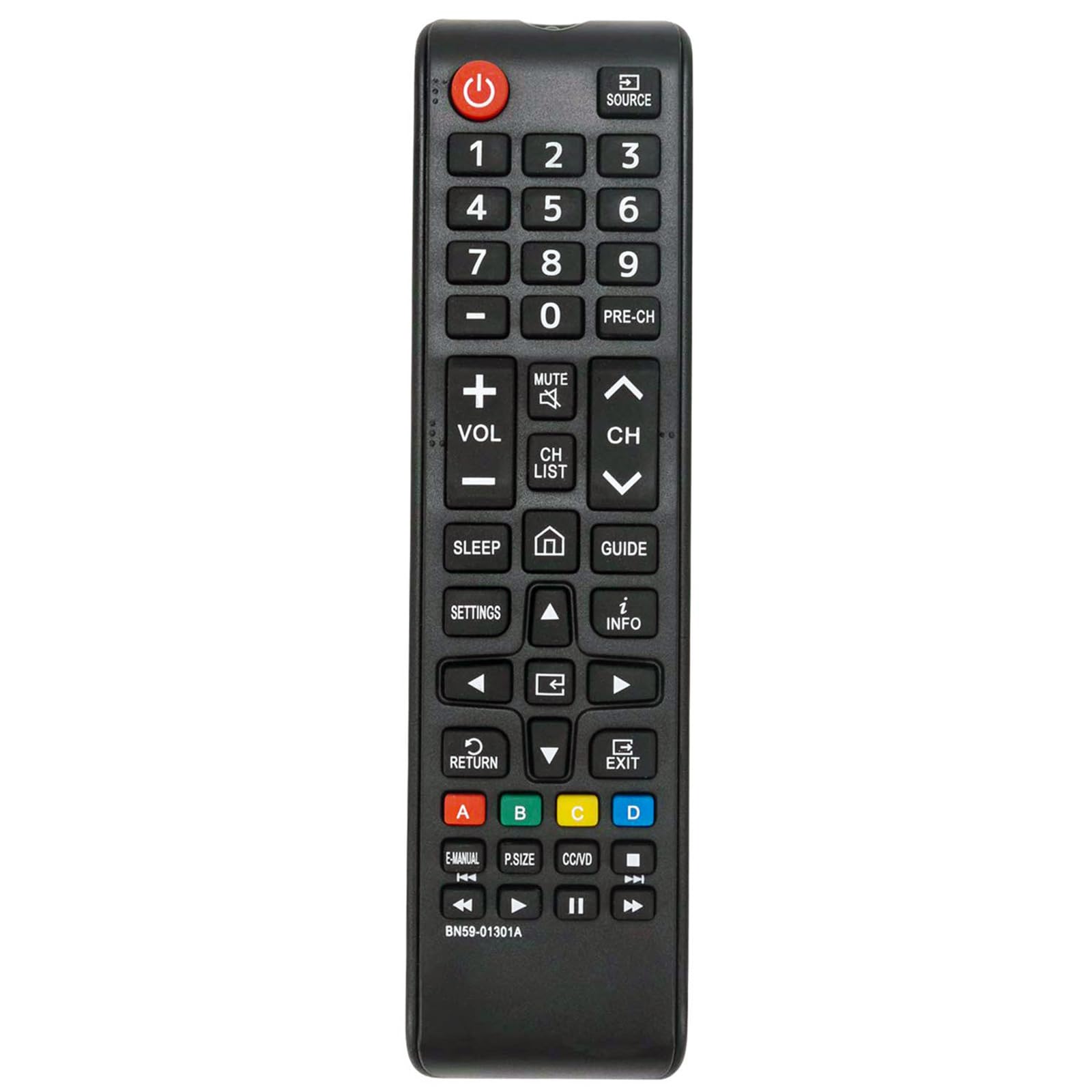
Image: Front view of the ALLIMITY BN59-01301A remote control, displaying all buttons and their labels.
Button Functions:
- Power (Red Circle with Line): Turns the TV on or off.
- SOURCE: Changes the input source (e.g., HDMI 1, HDMI 2, TV).
- Number Buttons (0-9): Directly selects channels or enters numerical values.
- PRE-CH: Returns to the previous channel.
- VOL (+/-): Adjusts the volume level up or down.
- MUTE: Mutes or unmutes the TV sound.
- CH LIST: Displays the channel list.
- CH (Up/Down Arrows): Changes channels up or down.
- SLEEP: Sets the sleep timer.
- Home (House Icon): Accesses the Smart Hub or Home screen.
- GUIDE: Displays the electronic program guide.
- SETTINGS: Opens the TV settings menu.
- INFO (i): Displays information about the current program or input.
- Directional Pad (Up, Down, Left, Right Arrows): Navigates through menus and options.
- RETURN: Returns to the previous menu or screen.
- EXIT: Exits the current menu or application.
- Colored Buttons (A, B, C, D): Provides access to specific functions within certain applications or menus.
- E-MANUAL: Accesses the electronic user manual (if supported by TV).
- P.SIZE: Adjusts the picture size/aspect ratio.
- CC/VD: Toggles Closed Captions or Video Description.
- Playback Controls (Rewind, Play/Pause, Fast Forward, Stop): Controls media playback.
3. Setup
Battery Installation:
- Locate the battery compartment on the back of the remote control.
- Slide the battery cover open.
- Insert two AAA batteries (not included), ensuring the positive (+) and negative (-) terminals align correctly with the markings inside the compartment.
- Slide the battery cover back into place until it clicks securely.
Initial Use:
This remote control is an infrared (IR) replacement and typically does not require any programming or pairing. Once batteries are installed, it should function directly with compatible Samsung TV models.
4. Operating Instructions
To operate your TV with the ALLIMITY BN59-01301A remote control, ensure there is a clear line of sight between the remote's IR emitter and the TV's IR sensor. Obstacles can block the signal.
- Turning On/Off: Press the Power button once.
- Changing Channels: Use the CH Up/Down buttons or the Number Buttons for direct channel entry.
- Adjusting Volume: Use the VOL +/- buttons.
- Accessing Menus: Press the SETTINGS or Home button to navigate TV menus.
- Selecting Input Source: Press the SOURCE button to cycle through available inputs.
5. Troubleshooting
Remote Not Responding:
- Check Batteries: Ensure batteries are inserted correctly with the correct polarity (+/-) and are not depleted. Replace with fresh batteries if necessary.
- Line of Sight: Make sure there are no objects blocking the path between the remote control and the TV's IR sensor.
- Distance: Ensure you are within the effective range of the remote control (typically up to 20 feet or 6 meters).
- TV Sensor: Verify that the TV's IR sensor is not obstructed or dirty.
Specific Buttons Not Working:
- If only certain buttons are unresponsive, try replacing the batteries. If the issue persists, the remote may require replacement.
6. Specifications
| Model Number | BN59-01301A |
| Brand | ALLIMITY |
| Connectivity Technology | Infrared (IR) |
| Compatible Devices | Samsung 2018 UHD Smart TVs (NU6950 series) |
| Product Dimensions | 5 x 1 x 0.6 inches |
| Item Weight | 1 ounce |
| Color | Black |
7. Support
For further assistance or if you cannot find your specific TV model listed as compatible, please contact ALLIMITY customer support via the platform where you purchased the product. They can help verify compatibility or assist with troubleshooting.
