
1. Introduction
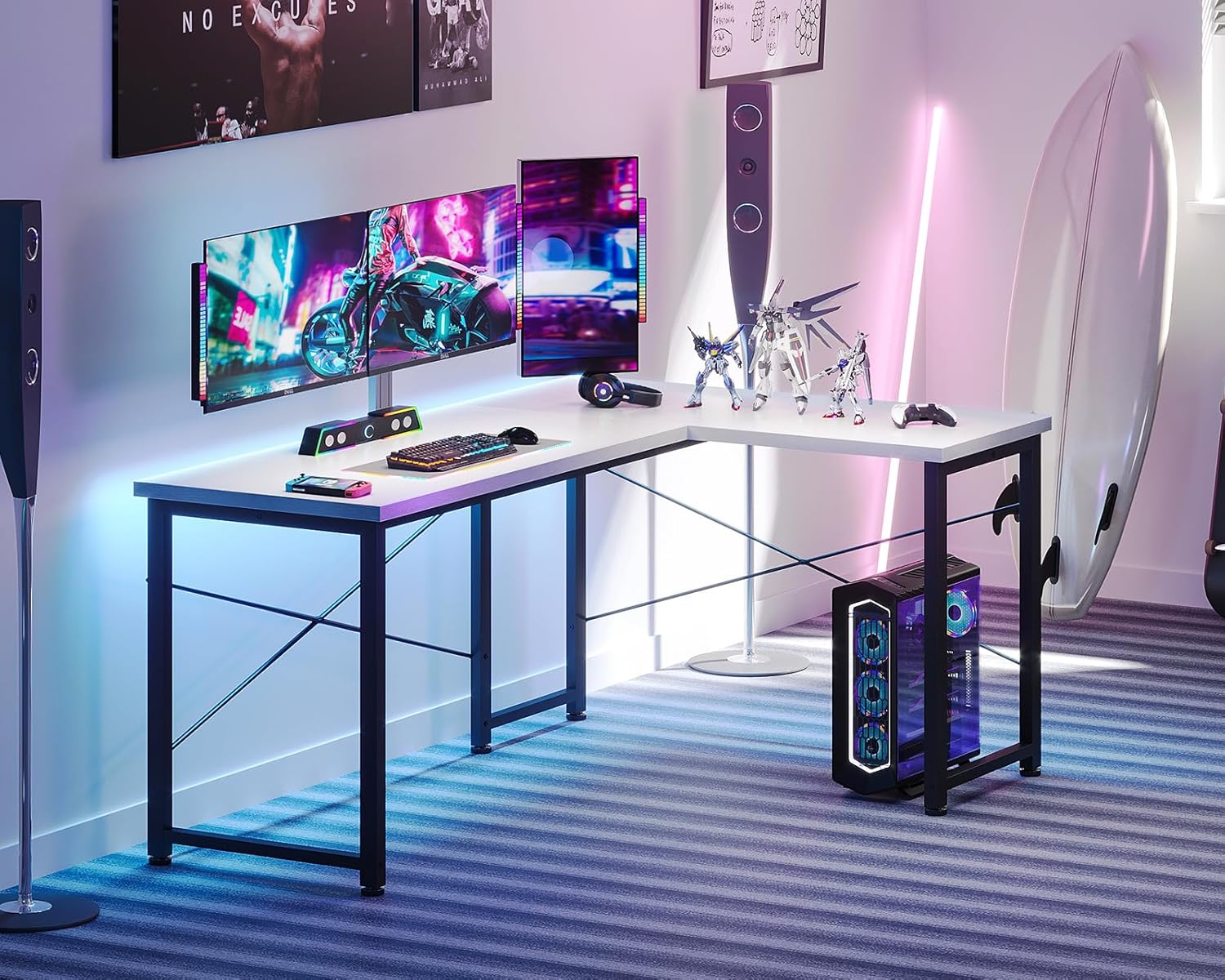
Thank you for purchasing the ODK L-Shaped Desk. This versatile desk is designed to provide ample workspace for various activities, including computing, gaming, telework, and study. Its reversible L-shaped design allows for flexible placement in any room, maximizing corner space. This manual provides essential information for safe assembly, operation, and maintenance of your new desk.
2. Product Features
- Reversible L-Shaped Design: The main desktop can be configured for left or right-hand orientation to suit your room layout and preference.
- Spacious Work Surface: A wide tabletop and open leg space ensure comfortable movement and ample room for multiple monitors, computers, and other peripherals.
- Sturdy Construction: Built with a high-strength steel frame and reinforcement pipes under the tabletop, providing excellent stability and a load capacity of approximately 50 kg. Cross-bracing prevents wobbling.
- Durable Materials: The desktop is made from high-strength melamine decorative board, offering resistance to dirt, scratches, heat, and moisture for long-lasting use.
- Adjustable Feet: Equipped with adjustable feet for fine height tuning, ensuring stable placement even on slightly uneven floors.
- Easy Assembly: Designed for straightforward assembly, with all necessary tools (a wrench) included. Clear instructions are provided to facilitate the process.
3. Safety Information
- The maximum load capacity for the desktop is approximately 50 kg. Do not exceed this weight limit to prevent damage or injury.
- During assembly, carefully follow the instructions and be mindful of your hands and fingers to avoid pinching.
- Ensure all bolts and screws are tightened securely after assembly to maintain stability.
- Place the desk on a level surface. Use the adjustable feet to compensate for minor unevenness.
4. Package Contents
Before beginning assembly, please ensure all items listed below are present in your package:
- Desktop Panels (Main and Side)
- Steel Frame Components (Legs, Crossbars)
- Adjustable Feet
- Assembly Hardware (Screws, Bolts, Washers)
- Assembly Tool (Wrench)
- Instruction Manual
If any parts are missing or damaged, please contact customer support.
5. Assembly Instructions
Assembly is designed to be straightforward. It is recommended to assemble the desk on a soft, clean surface to prevent scratches. A wrench is included; no additional tools are required.
- Attach Adjustable Feet: Screw the adjustable feet into the bottom of all steel frame leg components.
- Assemble Main Desktop Frame: Secure the long steel frame components to the underside of the main desktop panel using the provided bolts. Ensure they are aligned with the pre-drilled holes.
- Attach Side Frames: Connect the side steel frames to the main desktop assembly. Hand-tighten bolts initially.
- Install Crossbars: Attach the crossbars diagonally between the leg frames. These provide crucial stability. Fully tighten all bolts once the desk structure is complete.
- Assemble Side Desktop Frame: Similarly, attach the shorter steel frame components to the underside of the side desktop panel.
- Connect Desktop Panels: Align the main and side desktop panels to form the L-shape. Secure them together using the connecting plates and bolts provided.
- Final Tightening: Once all components are in place and aligned, fully tighten all bolts with the included wrench. Ensure the desk is stable and level.

6. Operating Instructions
The ODK L-Shaped Desk is designed for static use. Its primary function is to provide a stable surface for your work or gaming setup.
- Adjusting Desk Level: If the desk wobbles on an uneven floor, gently turn the adjustable feet at the bottom of each leg until the desk is stable and level.
- Reversing L-Shape: To change the orientation of the L-shape, you will need to disassemble the connecting plates and side frames, then reassemble them in the desired configuration. Refer to the assembly instructions for guidance.

7. Maintenance
To ensure the longevity and appearance of your ODK L-Shaped Desk, follow these simple maintenance guidelines:
- Cleaning: Wipe the desk surface with a damp cloth. For stubborn stains, use a mild soap solution and then wipe dry immediately. Avoid harsh chemicals or abrasive cleaners.
- Spills: Promptly wipe up any spills to prevent moisture damage to the melamine surface.
- Inspection: Periodically check all bolts and screws to ensure they remain tight. Re-tighten if necessary to maintain stability.
- Avoid Excessive Heat: Do not place hot items directly on the desk surface without a protective coaster.
8. Troubleshooting
If you encounter any issues with your ODK L-Shaped Desk, refer to the following common problems and solutions:
| Problem | Possible Cause | Solution |
|---|---|---|
| Desk is wobbly | Uneven floor or loose bolts. | Adjust the leveling feet. Ensure all assembly bolts are fully tightened. |
| Parts do not align during assembly | Incorrect orientation of parts or bolts not fully loosened. | Review the assembly steps carefully. Loosen all bolts slightly, adjust alignment, then re-tighten. |
| Scratches or damage on surface | Impact or abrasive cleaning. | Use coasters for hot items. Avoid dragging sharp objects. Clean with soft cloth and mild cleaner. |
9. Specifications
| Specification | Detail |
|---|---|
| Brand | ODK |
| Model Number | B02XS021601001JP |
| Shape | L-shaped |
| Product Dimensions (D x W x H) | 106 cm x 120 cm x 73.5 cm |
| Color | White |
| Base Material | Steel |
| Top Material Type | Wood (Melamine board) |
| Finish Type | Powder Coated |
| Special Feature | Compact, Reversible L-shape, Adjustable feet |
| Assembly Required | Yes |
| Included Components | Wrench |
| Recommended Uses | Gaming, Work, Study |
10. Warranty and Support
ODK is committed to providing high-quality products. This product comes with a standard manufacturer's warranty against defects in materials and workmanship. For specific warranty details, please refer to the documentation included with your purchase or contact ODK customer support.
If you have any questions, require assistance with assembly, or experience any issues with your desk, please do not hesitate to contact our customer support team. We are here to help.
Contact information can typically be found on the product packaging or the official ODK website.


