
1. Introduction and Overview
The HEXEH TC5530V is an advanced 3-axis CNC motion controller, serving as an upgraded version of the TC55. It features a 3.5-inch color screen, RS485 communication capabilities, and USB connectivity for enhanced usability. This controller is engineered for high reliability, accuracy, and low noise, making it suitable for various CNC applications, including routers, servo, and stepper motor control.
Key features include:
- Robust housing designed for extended operational life, ideal for electro-pneumatic power control.
- Wide range of applications, suitable for both household appliances and industrial equipment.
- Simplified installation and maintenance procedures.
- Reliable precision for diverse working environments.
2. Technical Specifications
| Specification | Value |
|---|---|
| Minimum Data Unit | 0.001 mm |
| Maximum Data Size | ± 99999.999 mm |
| Maximum Speed | 9000 mm/min (pulse is 0.001mm) |
| Maximum Pulse Output Frequency | 150 KHz |
| Axes Supported | 1, 2, 3 or 4 (X, Y, Z, C). X, Y, Z, C axes support linear interpolation; X, Y axes support circular interpolation. |
| Electric Gear | Numerator: 1-99999, Denominator: 1-99999 |
| System Main Functions | Automatic, Manual, Program Editing, System Parameters, Self-check, Settings, etc. |
| Maximum Commands per Program | 480 commands |
| Connectivity | USB Connection and upgrade, RS485 communication |
| Spindle Control | Stop and Start of Spindle motor |
| Extension Capabilities | PLC Extension, I/O Extension |
| I/O Port Features | Isolated I/O port, Self-defining of I/O port |
| Display Language | Chinese/English panel display |
| Boot Customization | Freeboot picture setting (can be set as pictures or company name) |
| Package Dimensions | 1.18 x 0.79 x 0.39 inches |
| Item Weight | 2.2 pounds |
3. Setup
Before operating the HEXEH TC5530V controller, ensure all necessary components are properly connected. This includes power supply, motor drivers, limit switches, and any other peripheral devices required for your CNC machine setup. Refer to your CNC machine's specific wiring diagrams for detailed connection instructions.

Figure 3.1: The HEXEH TC5530V controller shown with included USB cables and the user manual, indicating typical package contents.
The controller supports USB connection for program transfer and system upgrades. Connect the provided USB cable to the controller and your computer for data exchange.

Figure 3.2: A blue USB cable connected to the side port of the HEXEH TC5530V controller, illustrating its connectivity options.
4. Operating Instructions
The TC5530V utilizes a conversational programming method, guiding the user through the programming process. The system's main functions are accessible via the control panel, including automatic operation, manual control, program editing, system parameter adjustments, self-check diagnostics, and various settings.
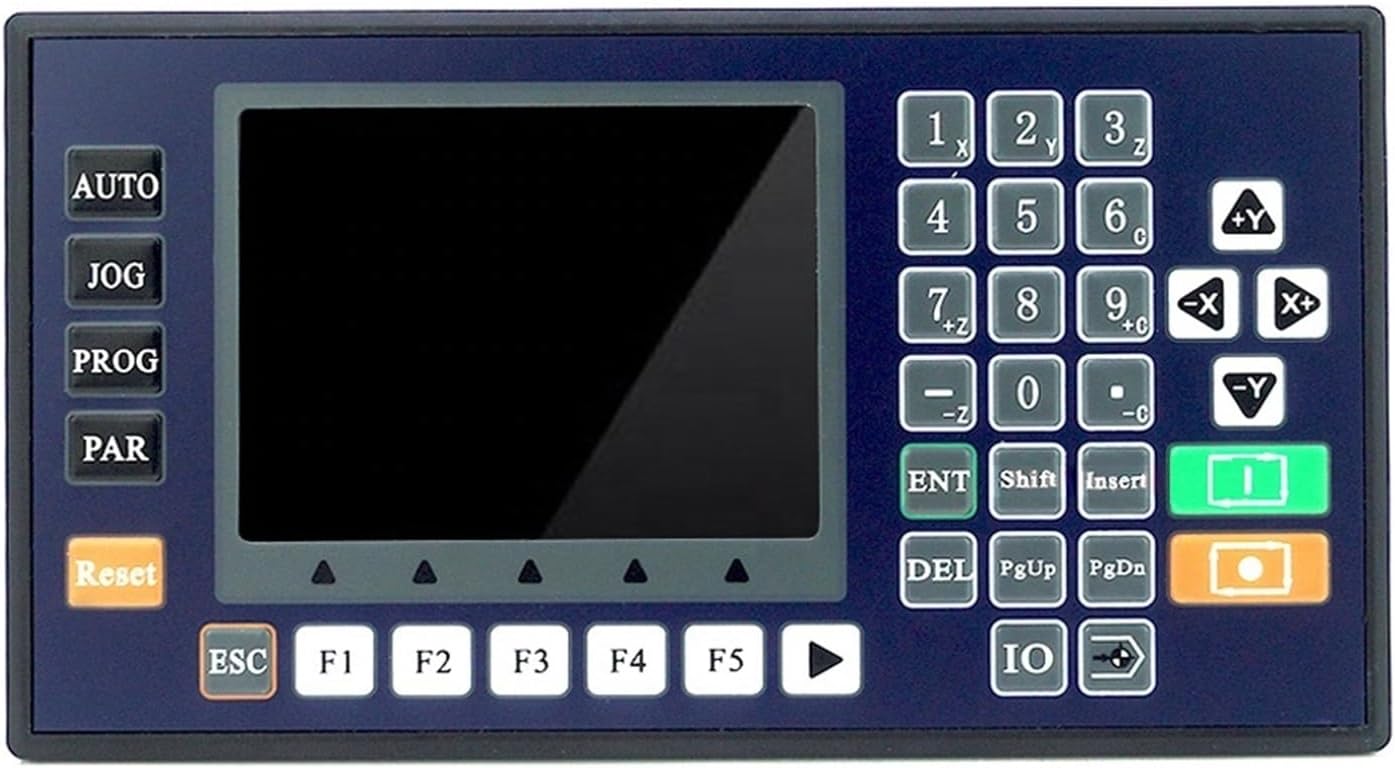
Figure 4.1: The front panel of the HEXEH TC5530V controller, showing the 3.5-inch color LCD screen and the integrated keypad for operation and programming.
4.1. Conversational Programming Code
The conversational programming method simplifies the creation of CNC programs by prompting the user for necessary inputs and guiding them through the sequence of operations.
4.2. Programming Function Introduction
Below is an overview of common programming codes and their interpretations:
- Incremental: Used for incremental programming, where coordinates are relative to the previous position.
- Absolute: Used for absolute programming, where coordinates are relative to the machine's origin.
- Pause: Halts program execution until a specified condition is met, then skips to a designated command.
- Output: Defines the on/off state of an output port, e.g., for spindle motor control (start/stop).
- Repeat: Returns to a specified command and repeats the sequence.
- Clockwise: Initiates clockwise circular interpolation (for incremental programming).
- Counter-clockwise: Initiates counter-clockwise circular interpolation (for incremental programming).
- Delay: Defines a specific time duration for a delay in program execution.
- Judge: Evaluates if a certain condition is met and, if true, skips to a designated command.
- Skip: Unconditionally skips to a designated command upon execution.
- Fast: Commands for rapid positioning.
- Machine Zero: Commands the machine to return to its defined zero position.

Figure 4.2: An angled view of the controller, highlighting the ergonomic layout of the keypad and the clear display of the LCD screen, facilitating easy operation.
5. Maintenance
To ensure the longevity and optimal performance of your HEXEH TC5530V controller, regular maintenance is recommended:
- Keep the controller clean and free from dust and debris. Use a soft, dry cloth for cleaning the exterior.
- Ensure proper ventilation around the unit to prevent overheating.
- Regularly check all cable connections for tightness and signs of wear.
- Avoid exposing the controller to excessive moisture, extreme temperatures, or direct sunlight.
- Perform periodic software updates as recommended by the manufacturer to ensure the latest features and bug fixes.
6. Troubleshooting
If you encounter issues with your HEXEH TC5530V controller, consider the following common troubleshooting steps:
- No Power: Verify that the power supply is correctly connected and providing the specified voltage. Check power cables for damage.
- Display Issues: If the screen is blank or flickering, ensure all internal connections are secure. Restart the controller.
- Motor Not Responding: Check motor wiring, driver connections, and ensure the correct pulse settings are configured in the controller. Verify emergency stop buttons are not engaged.
- Program Errors: Review your G-code or conversational program for syntax errors or logical inconsistencies. Ensure all parameters are set correctly.
- Communication Problems (USB/RS485): Verify cable integrity and driver installation on your computer. Ensure correct communication settings are selected on both devices.
For persistent issues, refer to the detailed troubleshooting section in the full product manual or contact HEXEH customer support.
7. Warranty and Support
The HEXEH TC5530V controller comes with a standard manufacturer's warranty. Please retain your proof of purchase for warranty claims. For detailed warranty terms and conditions, refer to the documentation included with your product or visit the official HEXEH website.
For technical support, product inquiries, or assistance with troubleshooting, please contact HEXEH customer service through the channels provided on their official website or in your product packaging. When contacting support, please have your model number (TC5530V) and purchase information readily available.