
1. Product Overview
The Raddy RE40 is a versatile 3-in-1 device combining a portable shortwave radio, an emergency radio, and a Bluetooth speaker. It features FM/AM/SW/WB band reception, a 4000mAh rechargeable battery, and multiple charging options including USB-C, hand-crank, and solar power. Additional features include a built-in flashlight, compass, SOS alarm, white noise function, and power bank capability for charging external devices.
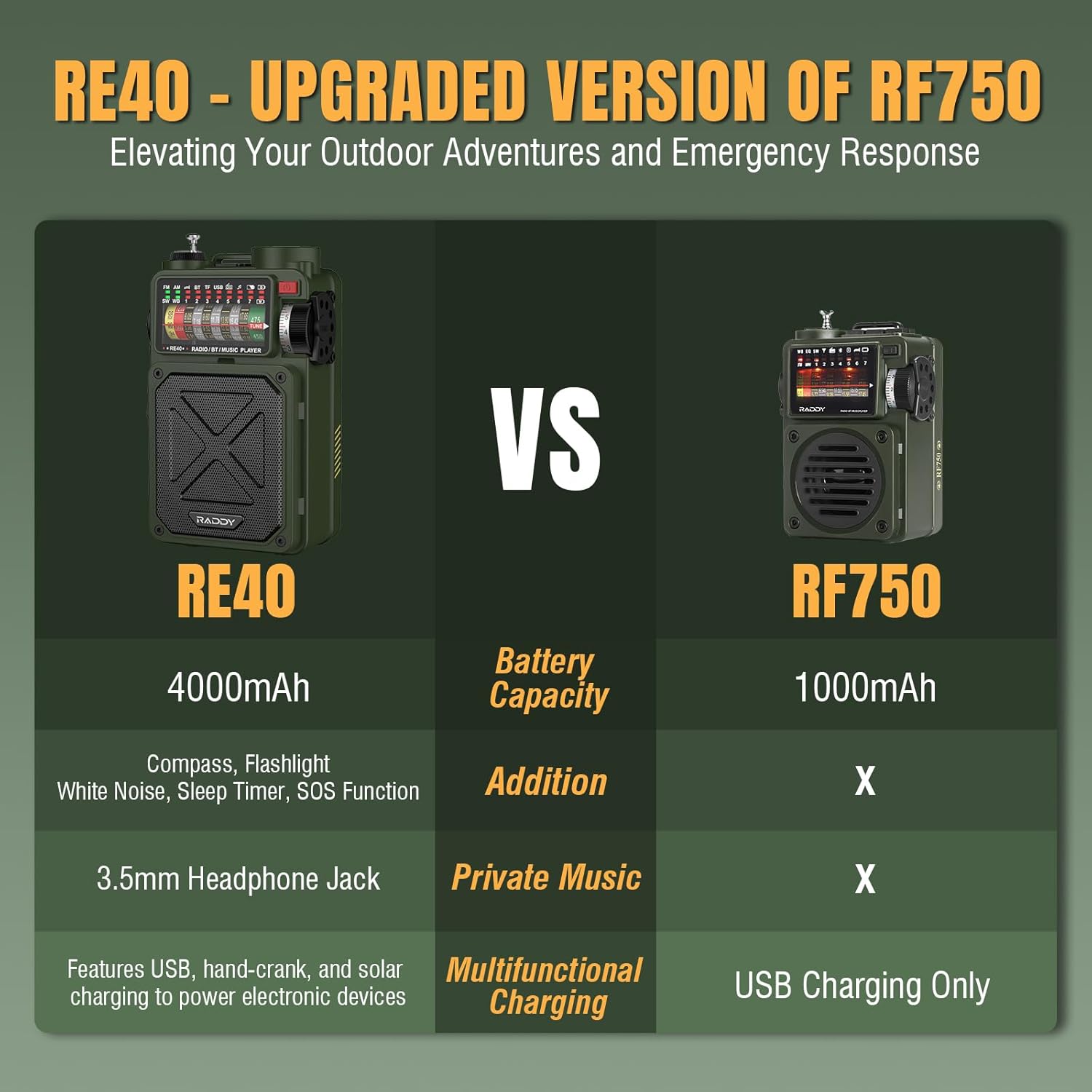
Image 1.1: The Raddy RE40 Portable Shortwave Radio and accompanying SSP4 Solar Panel.
2. What's in the Box
- Raddy RE40 Portable Shortwave Radio
- SP4 4W Portable Solar Panel
- USB-C Charging Cable
- User Manual
3. Setup
3.1 Initial Charging
Before first use, fully charge the Raddy RE40 radio. The radio offers three charging methods:
- USB-C Charging: Connect the provided USB-C cable to the radio's USB-C input port and a compatible USB power adapter (not included).
- Solar Charging: Place the radio or the SP4 solar panel in direct sunlight. The solar panel on the radio's back or the external SP4 panel will convert sunlight into energy to charge the internal battery.
- Hand-Crank Charging: Extend the hand-crank handle located on the side of the radio and rotate it clockwise or counter-clockwise to generate power. This method is ideal for emergency situations when other power sources are unavailable.

Image 3.1: Comparison highlighting RE40's enhanced features including 4000mAh battery, compass, flashlight, white noise, sleep timer, SOS function, 3.5mm headphone jack, and multifunctional charging.

Image 3.2: Visual representation of the three charging methods: hand-crank, solar, and USB-C.
3.2 Antenna Extension
For optimal radio reception, extend the telescopic antenna fully when operating in FM, SW, or WB modes.
4. Operating Instructions
4.1 Power On/Off
Press and hold the power button (usually located on the side or top) to turn the radio ON or OFF.
4.2 Radio Mode Selection and Tuning
Use the mode switch or button to select between FM, AM, SW, and WB (Weather Band) modes. Rotate the tuning knob to scan for stations. The frequency display will show the current station.

Image 4.1: The Raddy RE40 radio is capable of receiving 7 NOAA weather channels for emergency alerts.
4.3 Bluetooth Speaker Function
Switch the mode to 'BT' for Bluetooth. The radio will enter pairing mode. On your smartphone or other Bluetooth-enabled device, search for 'RE40' and connect. You can then play audio from your device through the radio's speaker. The radio features control buttons for play/pause, next/previous track.

Image 4.2: The Raddy RE40 can be used as a Bluetooth speaker, allowing audio playback from connected devices.
4.4 Music Playback (USB/TF/SD Card)
Insert a USB drive or TF/SD card (not included) into the respective port. The radio will automatically detect and play audio files. Use the control buttons for navigation.

Image 4.3: The Raddy RE40 features a USB output port, 3.5mm earphone jack, Type-C input port, and a TF card slot for various connectivity and playback options.
4.5 Flashlight and SOS Alarm
The RE40 includes a built-in flashlight. Press the dedicated flashlight button to turn it on/off. For emergencies, activate the SOS alarm function. This will emit a loud siren and flash the flashlight in a distress signal pattern.

Image 4.4: The RE40's flashlight provides illumination, and the SOS alarm can be activated for emergency signaling.
4.6 White Noise Function and Sleep Timer
The radio offers a white noise function with 7 soothing sounds to aid relaxation or sleep. Activate this feature and set the sleep timer (10-70 minutes) to automatically turn off the device after a set duration.

Image 4.5: The RE40 provides 7 white noise sounds for relaxation.

Image 4.6: The sleep timer feature allows automatic shutdown after a user-defined period.
4.7 Power Bank Function
The RE40 can act as a power bank. Connect your mobile phone or other USB-powered devices to the USB output port on the radio to charge them. This is particularly useful in emergency situations.

Image 4.7: The RE40 can charge external devices like smartphones via its USB output.
4.8 Compass
A small compass is integrated into the radio for basic navigation assistance.

Image 4.8: The RE40 features a built-in compass for navigation and a wrist strap for portability.
5. Maintenance
- Cleaning: Use a soft, dry cloth to clean the radio's exterior. Avoid abrasive cleaners or solvents.
- Storage: Store the radio in a cool, dry place away from direct sunlight and extreme temperatures.
- Battery Care: To prolong battery life, fully charge the radio at least once every three months if not in regular use. Avoid completely draining the battery frequently.
- Solar Panel: Keep the solar panel clean and free of obstructions for efficient charging.
6. Troubleshooting
- No Power: Ensure the battery is charged. Try charging via USB-C, solar, or hand-crank.
- Poor Radio Reception: Fully extend the telescopic antenna. Try repositioning the radio. In SW mode, external antenna connection might improve reception.
- Bluetooth Connection Issues: Ensure the radio is in Bluetooth mode and your device's Bluetooth is enabled. Move your device closer to the radio. Disconnect and re-pair if necessary.
- No Sound: Check the volume level. Ensure the correct mode (Radio, BT, USB/TF) is selected.
- Flashlight Not Working: Check if the radio is powered on and the flashlight button is pressed correctly.
7. Specifications
| Feature | Specification |
|---|---|
| Model Number | RE40 |
| Radio Bands Supported | AM, FM, SW, WB (NOAA) |
| Battery Capacity | 4000mAh |
| Power Sources | USB-C, Solar, Hand-Crank |
| Connectivity | Bluetooth, USB, TF/SD Card |
| Special Features | Built-In Flashlight, Compass, SOS Alarm, White Noise Function, Power Bank |
| Included Components | Raddy RE40 Portable Shortwave Radio, SP4 4W Portable Solar Panel |
8. Warranty and Support
For warranty information or technical support, please refer to the documentation provided with your purchase or contact the manufacturer directly. Keep your proof of purchase for warranty claims.


