
Landtek MILA40200
Landtek Automatic pH Controller Instruction Manual
Model: MILA40200
1. Product Overview
The Landtek Automatic pH Controller with Dosing Pump is an advanced system designed for precise pH level measurement and control in various water-based solutions, including hydroponic nutrient reservoirs, aquariums, and other industrial applications. It features dual relay outputs for automated pH adjustment, a comprehensive data chart display, and an Automatic Temperature Compensation (ATC) function for consistent readings.

Figure 1.1: Smart pH Controller with Dual Relay Output, designed for accurate pH regulation in various water solutions.
Key Features:
- pH Up and Down Controller: Equipped with dosing pumps for precise pH level measurement and control.
- Auto Dosing System with Dual Relay Output: Automatically balances pH levels by controlling pH up or pH down solutions.
- Data Records with Data Chart Display: Displays pH and temperature status over 3 days for trend analysis.
- Automatic Temperature Compensation (ATC): Ensures consistent pH readings regardless of temperature fluctuations.
- Multifunctional: Includes MAX/MIN/AVG and DOSE COUNT functions for comprehensive measurement analysis.

Figure 1.2: Visual representation of the pH controller's key features including Min/Max/Avg, Advanced Settings, Max Doses, ATC Function, Long Cable, pH Up/Down Control, Mix Time, and 2-Point Calibration.
Wide Application:
This pH controller is suitable for a variety of applications requiring precise pH monitoring and control:
- Hydroponic Gardens
- Aquaculture Farming
- Swimming Pools
- Industrial Sewage Treatment
- Laboratory Use
- Tap Water Monitoring

Figure 1.3: The pH controller is versatile, suitable for hydroponics, industrial sewage, swimming pools, aquaculture, tap water, and laboratory applications.
Product Components:

Figure 1.4: The main components of the Landtek pH Controller, including the central unit, pH probe, and dual dosing pumps.
- pH Controller Main Unit: The central processing unit with a digital display and control buttons.
- pH Sensor Probe: High-precision probe for accurate pH measurement.
- Peristaltic Dosing Pumps: Two pumps for dispensing pH Up and pH Down solutions.
- Power Plug: For connecting the unit to a power source.
Video 1.1: An overview of the Landtek pH Controller, demonstrating its dual relay output, adjustable settings, chart display, and reliable probe. This video highlights the product's features and components.
2. Setup
What's in the Box:
- 1 x pH Controller (main unit with socket)
- 1 x pH Sensor probe
- 1 x Peristaltic Dosing Pump (dual)
- 1 x L-bracket
- 1 x Silicone Tubing
- 1 x Fastening Nut
- 2 x Screws and Expansion screws
- English Instruction Manual
- Standard Factory Packaging

Figure 2.1: All items included in the product packaging, ready for assembly and installation.
Physical Connections:
- Connect the pH sensor probe to the designated 'Probe Socket' on the main unit.
- Connect the peristaltic dosing pump unit to the 'Pump Socket' on the main unit.
- Insert the silicone tubing into the pH Up and pH Down ports on the dosing pump unit. Ensure the tubing is securely fitted.
- Place the ends of the pH Up and pH Down tubing into their respective liquid reservoirs (e.g., pH Up solution, pH Down solution).
- Position the pH probe in the nutrient reservoir or aquarium. Ensure the probe is upright and the liquid level exceeds the minimum immersion line but does not immerse the entire probe.

Figure 2.2: Diagram illustrating the simultaneous dispense setup for pH Up and Down liquids into a hydroponic nutrient reservoir.

Figure 2.3: Important reminder: Do not immerse the entire pH probe in liquid. Observe the maximum liquid height level indicated on the probe.
Mounting the Unit:
The pH controller unit can be wall-mounted using the provided L-bracket, screws, and expansion screws. Choose a stable location near your water system, ensuring easy access to power and the pH probe/dosing pumps.

Figure 2.4: The pH controller unit features a mounting option for secure installation on a wall or other suitable surface.
3. Operating Instructions
Power On and Initial Display:
Once all connections are secure, plug the power cord into an electrical outlet. The unit will power on and display the current pH, temperature, and other relevant settings.
Adjustable pH Level:
The controller allows for an adjustable pH level range from 4.5 to 8.5 pH. This range covers most hydroponic and aquarium needs.
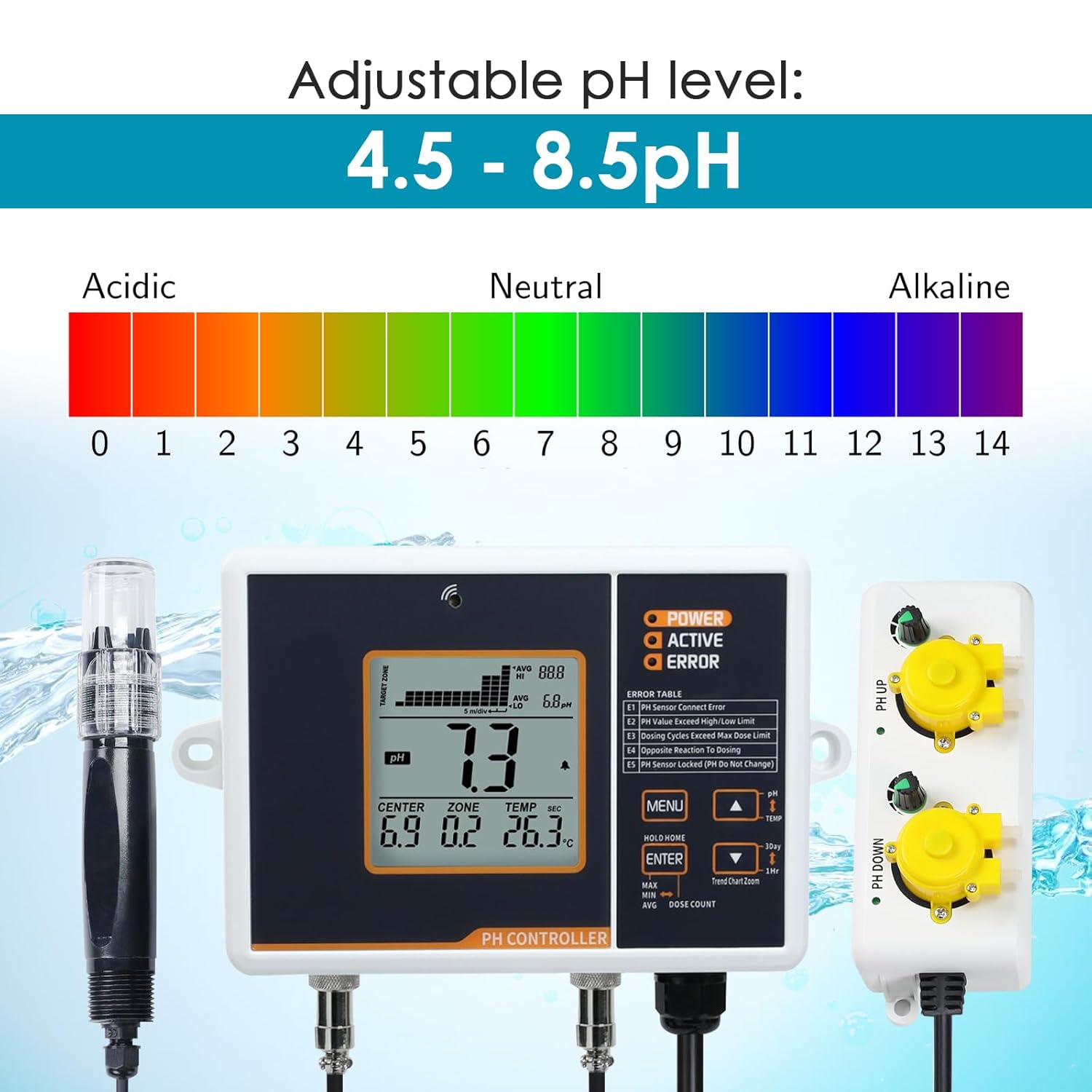
Figure 3.1: The pH controller supports an adjustable pH level from 4.5 to 8.5 pH, covering acidic, neutral, and alkaline ranges.
Setting Parameters:
Use the 'MENU' and arrow buttons to navigate through the settings. Press 'ENTER' to select and confirm changes.
| Setting | Factory Default | Range |
|---|---|---|
| Center | 6.0 | 4.5-8.5 |
| Zone | 0.2 | 0.2-1.0 |
| Dosing Time | 10 sec | 3-100 seconds |
| Mix Time | 4 min | 1-20 minutes |
| Calibrate 7.0 | 7.0 | Fixed at 7.0 |
| Calibrate 4.0 | 4.0 | Fixed at 4.0 |
| High pH Limit | 8.5 | 6.0-9.0 pH |
| Low pH Limit | 4.5 | 3.5-7.0 pH |
| Temperature | °C | °C or °F |
Data Chart Display:
The controller features a chart display that records pH and temperature readings over a span of 3 days. This allows users to monitor trends and make informed adjustments to their system.

Figure 3.2: The chart display shows pH and temperature readings, including MAX, MIN, and AVG values, over a 3-day period.
MAX/MIN/AVG and DOSE COUNT Functions:
These functions allow for easy identification of maximum, minimum, and average pH values, as well as tracking the number of dosing cycles. Access these by pressing the corresponding buttons on the unit.
4. Maintenance
pH Probe Care:
- Cleaning: Regularly clean the pH probe to remove any buildup that may affect accuracy. Use distilled water or a mild cleaning solution specifically designed for pH probes.
- Calibration: The unit supports 2-point calibration. While the factory calibration is set, periodic calibration with standard buffer solutions (e.g., pH 4.0 and pH 7.0) is recommended to maintain accuracy over time. Refer to the operating section for calibration steps.
- Storage: When not in use for extended periods, store the pH probe in a storage solution or a cap filled with pH 7.0 buffer solution to prevent the electrode from drying out.
Dosing Pump and Tubing:
- Tubing Inspection: Periodically inspect the silicone tubing for kinks, blockages, or wear. Replace tubing if necessary to ensure proper flow.
- Pump Maintenance: Ensure the dosing pumps are free from debris. If flow issues occur, check the pump mechanism for any obstructions.
5. Troubleshooting
If you encounter issues with your Landtek pH Controller, refer to the error table below and the suggested solutions.
| Error Code | Description | Suggested Solution |
|---|---|---|
| E1 | pH Sensor Contact Error | Check the pH sensor connection to the main unit. Ensure it is securely plugged in. Clean the probe connector if necessary. |
| E2 | pH Value Exceed High/Low Limit | The measured pH is outside the set high or low limits. Adjust the pH of your solution manually or check your dosing settings. |
| E3 | Dosing Cycles Exceed Max Dose Limit | The system has dosed more than the maximum allowed cycles. Check for leaks, incorrect solution concentrations, or a faulty probe. |
| E4 | Opposite Reaction To Dosing | The pH is moving in the opposite direction of the intended dosing. Verify that pH Up and pH Down solutions are connected to the correct pump inputs. |
| E5 | pH Sensor Locked (pH Do Not Change) | The pH sensor is not detecting changes. Clean the probe, recalibrate it, or consider replacing the probe if it's old or damaged. |
If the issue persists after attempting the suggested solutions, please contact Landtek customer support for further assistance.
6. Specifications

Figure 6.1: Detailed technical specifications for the Landtek pH Controller.
- pH Control Range: Adjustable 4.5-8.5 pH
- pH Resolution: 0.1
- pH Accuracy: ±0.2 pH
- Temperature Accuracy: ±1°C, 1°F
- Input Power: 100-240VAC, 50/60Hz
- Maximum Amperage: Max. 10A, 100-240VAC
- Input Power Cable Length: 150cm/5ft
- Output Power Cable Length: 100cm/3.2ft
- Dimension: 195 x 120 x 43mm (7.7 x 4.7 x 1.7 inches)
- Product Dimensions: 11.81 x 10.24 x 4.33 inches; 3.09 Pounds
- Item Model Number: MILA40200
7. Warranty and Support
For warranty information and technical support, please refer to the documentation included with your product or visit the official Landtek website. Protection plans may also be available for extended coverage.
You can visit the Landtek Store on Amazon for more information: Landtek Store
Ask a question about this manual
Ask about setup, troubleshooting, compatibility, parts, safety, or missing instructions. Manuals+ will review the question and use this page’s manual context to help answer it.