
Momcozy PF01
Momcozy Portable Stroller Fan PF01 User Manual
Model: PF01
Introduction
Thank you for choosing the Momcozy Portable Stroller Fan PF01. This manual provides essential information for the safe and efficient operation of your fan. Please read it thoroughly before use and retain it for future reference.

Image: The Momcozy Portable Stroller Fan PF01, showcasing its flexible tripod and compact design.
Safety Information
To ensure safe operation and prevent damage, please observe the following precautions:
- Keep the fan away from water and moisture.
- Do not insert fingers or foreign objects into the fan grille. The fan gap size is less than 5mm to protect small fingers.
- Do not disassemble, repair, or modify the fan yourself. Contact customer support for assistance.
- Use only the provided USB charging cable and a charging device with a standard voltage below 5V.
- Keep out of reach of infants and young children when not in use or when unsupervised.
- Avoid exposing the fan to extreme temperatures or direct sunlight for extended periods.
Package Contents
Verify that all items are present in your package:
- Momcozy Portable Stroller Fan PF01
- USB Charging Cable (1 meter)
- User Manual
Product Overview
Familiarize yourself with the components of your Momcozy Portable Stroller Fan PF01.
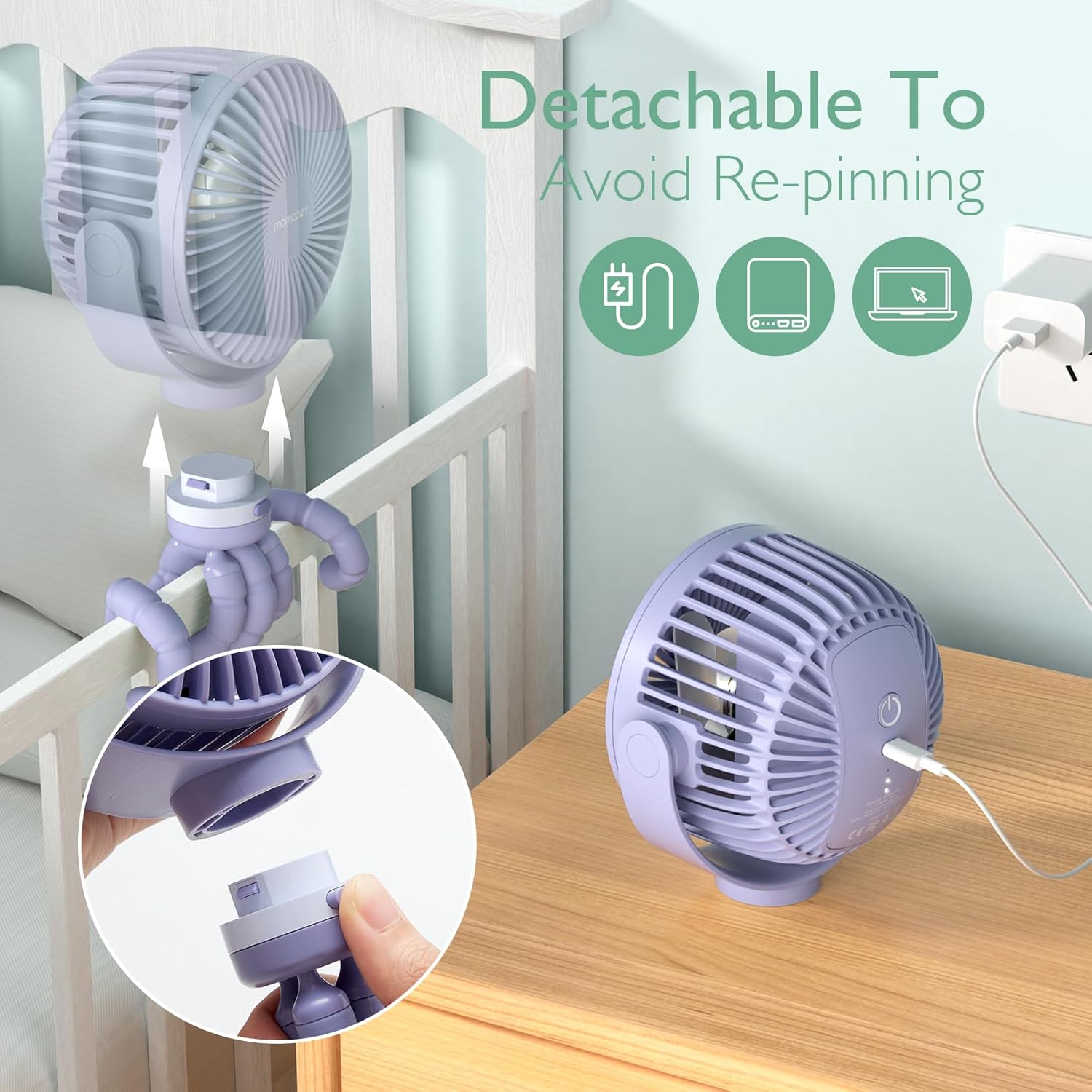
Image: The fan head can be detached from the tripod for charging or standalone use.
- Fan Head: Contains the motor, blades, control button, and LED light.
- Flexible Tripod: Bendable legs for gripping, wrapping, or standing the fan.
- Power Button: Controls power, fan speed, and LED light modes.
- USB Charging Port: Located on the fan head for recharging the internal battery.
Setup
The Momcozy Portable Stroller Fan PF01 is designed for versatile placement.
- Initial Charge: Before first use, fully charge the fan. Refer to the "Charging" section for details.
- Placement:
- Wrap: Use the flexible tripod legs to wrap around stroller handles, crib rails, car seat bars, or bicycle handlebars.
- Stand: Bend the tripod legs to form a stable base for tabletop use in bedrooms, offices, or other flat surfaces.
- Handheld: Detach the fan head from the tripod for convenient handheld use.

Image: Various applications of the fan, including attachment to a stroller, crib, and use on a desk.
Operating Instructions
The fan features a single control button for all functions.
- Power On/Off: Press the power button once to turn the fan on to the first speed. Press and hold the power button for 1.5 seconds to turn the fan off from any speed.
- Adjusting Fan Speed: Short press the power button to cycle through the 4 available speeds:
- 1st Speed: Soft wind (up to 27 hours battery life)
- 2nd Speed: Cool wind (up to 16 hours battery life)
- 3rd Speed: Strong wind (up to 12 hours battery life)
- 4th Speed: Natural wind (cycles through speeds, up to 16 hours battery life)
- Adjusting Fan Angle: The fan head can be rotated 360° horizontally and 200° vertically to direct airflow as needed.
- LED Night Light: Long press the power button for 1.5 seconds to activate the night light. Short press to cycle between two modes:
- White Light Mode: Provides a steady white illumination.
- Cycle Colored Light Mode: Cycles through various colors.

Image: Visual guide to the four fan speed settings and their approximate battery durations.

Image: The fan head offers extensive rotation for optimal airflow direction.
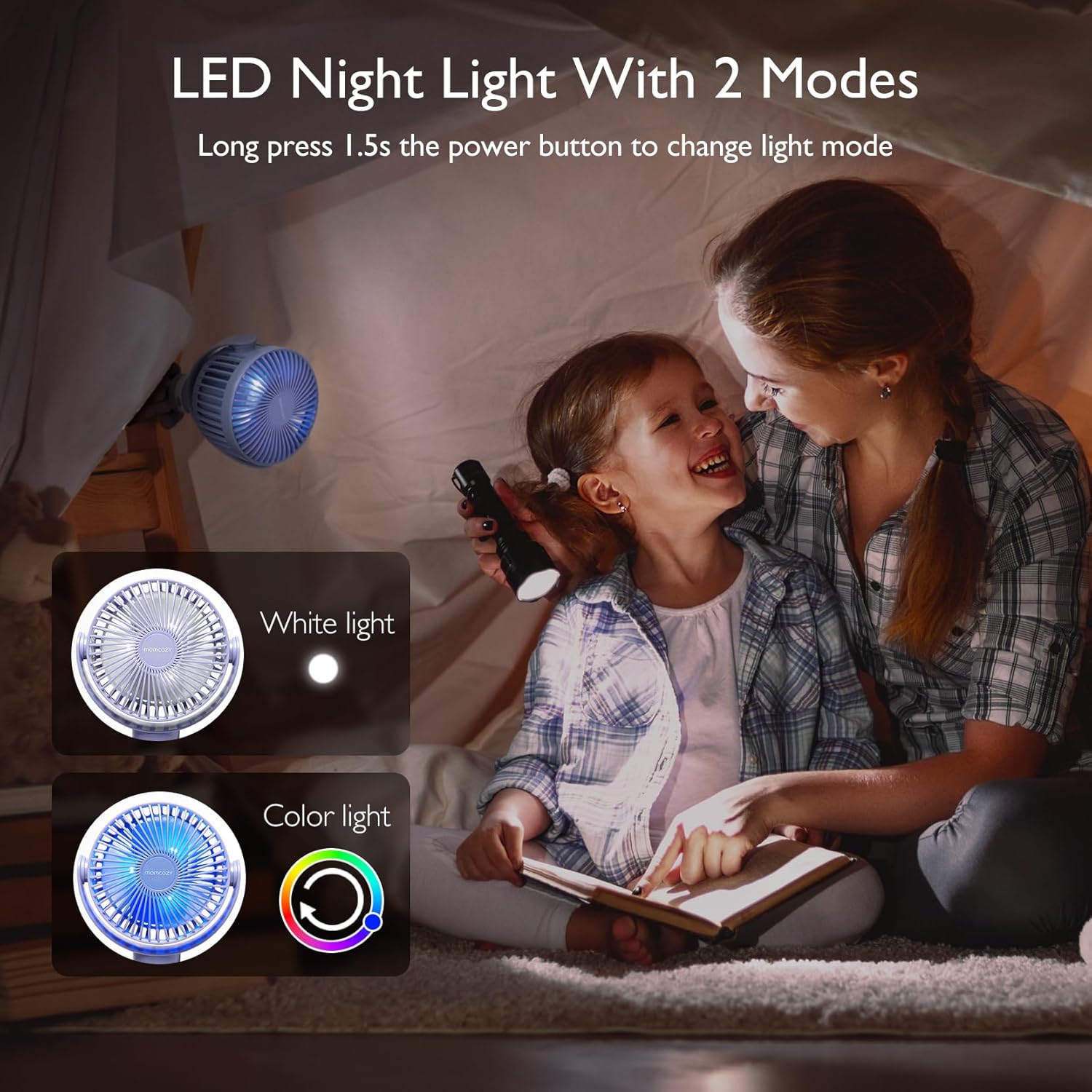
Image: The fan's LED night light offers both white and color-cycling options.
Charging
The fan is equipped with an 8000mAh battery for extended use.
- Connect the provided USB charging cable to the fan's charging port.
- Connect the other end of the USB cable to a compatible power source (e.g., computer, power bank, car charger, or wall adapter with standard 5V output).
- The charging indicator light will illuminate during charging and turn off when fully charged.
- A full charge typically takes approximately 4 hours.
- For optimal battery life, avoid completely draining the battery before recharging.

Image: The fan head can be easily detached for convenient charging.
Maintenance
Regular maintenance ensures the longevity and performance of your fan.
- Cleaning:
- Ensure the fan is turned off and unplugged before cleaning.
- The front grille of the fan can be opened for cleaning. Gently twist or unclip the front cover as indicated in the product diagram.
- Wipe the fan blades and interior with a soft, dry cloth. For stubborn dirt, a slightly damp cloth can be used, ensuring no water enters the motor.
- The front grille can be rinsed under water if necessary, but ensure it is completely dry before reattaching.
- Do not use abrasive cleaners or solvents.
- Storage: Store the fan in a cool, dry place when not in use.

Image: Steps for cleaning the fan, including opening the grille and wiping the blades.
Troubleshooting
If you encounter issues with your fan, refer to the following common problems and solutions:
| Problem | Possible Cause | Solution |
|---|---|---|
| Fan does not turn on. | Battery is depleted. | Charge the fan fully using the provided USB cable. |
| Fan runs weakly or inconsistently. | Low battery level. | Recharge the fan. |
| LED night light does not work. | Not activated correctly. | Long press the power button for 1.5 seconds to activate the light. Short press to cycle modes. |
| Fan makes unusual noise. | Obstruction in blades or loose parts. | Turn off and unplug the fan. Carefully check for any obstructions and remove them. Ensure the front grille is securely attached. If the issue persists, contact customer support. |
| Fan head detaches unexpectedly. | Not securely attached. | Ensure the fan head is firmly clicked into place on the tripod base. |
If the problem persists after trying these solutions, please contact Momcozy customer support for further assistance.
Specifications
| Feature | Detail |
|---|---|
| Brand | Momcozy |
| Model Name | PF01 |
| Color | Purple |
| Power Source | Battery Powered (8000mAh) |
| Battery Life | 12-27 hours (depending on speed) |
| Fan Speeds | 4 (Soft, Cool, Strong, Natural Wind) |
| Rotation | 360° Horizontal, 200° Vertical |
| Special Feature | LED Night Light (White, Cycle Color) |
| Fan Gap Size | <5mm |
| Product Dimensions | 6.02"D x 3.82"W x 6.1"H |
| Item Weight | 1 Pound |
| Material Type | Silicone (tripod) |
| Voltage | 5 Volts |
| Wattage | 27 watts |
Warranty and Support
Momcozy products are designed with quality and customer satisfaction in mind. For warranty information, technical support, or any questions regarding your product, please contact Momcozy customer service through their official website or the retailer where the product was purchased.
Please have your model number (PF01) and purchase details ready when contacting support.
Ask a question about this manual
Ask about setup, troubleshooting, compatibility, parts, safety, or missing instructions. Manuals+ will review the question and use this page’s manual context to help answer it.