
Introduction
Thank you for choosing the Jocca 2-Slice Toaster. This manual provides essential information for the safe and efficient operation, maintenance, and troubleshooting of your new appliance. Please read these instructions carefully before first use and keep them for future reference.
Important Safety Instructions
Always follow basic safety precautions when using electrical appliances to reduce the risk of fire, electric shock, and injury.
- Do not touch hot surfaces. Use handles or knobs.
- To protect against electrical hazards, do not immerse the cord, plugs, or toaster in water or other liquids.
- Close supervision is necessary when any appliance is used by or near children.
- Unplug from outlet when not in use and before cleaning. Allow to cool before putting on or taking off parts.
- Do not operate any appliance with a damaged cord or plug, or after the appliance malfunctions or has been damaged in any manner.
- Do not use outdoors.
- Do not let the cord hang over the edge of a table or counter, or touch hot surfaces.
- Do not place on or near a hot gas or electric burner, or in a heated oven.
- Do not use the appliance for other than intended use.
- Oversize foods, metal foil packages, or utensils must not be inserted into a toaster as they may involve a risk of fire or electric shock.
- A fire may occur if toasters are covered or touching flammable material, including curtains, draperies, walls, and the like, when in operation.
- Do not attempt to dislodge food when the toaster is plugged in.
- Do not operate unattended.
Product Overview
The Jocca 2-Slice Toaster is designed for ease of use and consistent toasting results. It features two wide slots, a browning control dial, and dedicated buttons for defrosting, reheating, and canceling.

This image displays the Jocca 2-Slice Toaster, highlighting its compact dimensions for easy placement in any kitchen.
Key Components:
- Toasting Slots: Two wide slots suitable for various bread types.
- Carriage Lever: Lowers bread into the toaster and initiates the toasting cycle.
- Browning Control Dial: Adjusts the desired level of toast browning (1-7).
- Defrost Button: For toasting frozen bread.
- Reheat Button: For warming previously toasted bread without further browning.
- Cancel Button: Stops the toasting cycle at any time.
- Removable Crumb Tray: Collects crumbs for easy cleaning.
Setup
- Unpack the toaster and remove all packaging materials.
- Place the toaster on a stable, flat, heat-resistant surface, away from flammable materials.
- Ensure the crumb tray is correctly inserted at the bottom of the toaster.
- Plug the power cord into a suitable electrical outlet.
- Before first use, operate the toaster without bread on the highest browning setting to burn off any manufacturing residues. A slight odor or smoke may be present; this is normal.
Operating Instructions
- Insert Bread: Place one or two slices of bread into the toasting slots. The centering system will automatically position the bread for even browning.
- Select Browning Level: Turn the browning control dial to your desired setting, from 1 (lightest) to 7 (darkest).
- Start Toasting: Press the carriage lever down until it locks into place. The toasting cycle will begin.
- Defrost Function: If toasting frozen bread, insert the bread, lower the carriage lever, and then press the 'DEFROST' button. The indicator light will illuminate.
- Reheat Function: To warm already toasted bread, insert the bread, lower the carriage lever, and then press the 'REHEAT' button. The indicator light will illuminate.
- Cancel Function: To stop the toasting cycle at any time, press the 'STOP' button. The bread will automatically eject.
- Completion: Once the toasting cycle is complete, the bread will automatically eject, and the toaster will switch off.

This close-up shows the toaster's control panel, featuring buttons for Defrost, Reheat, and Stop functions, along with a rotary dial for selecting one of the 7 browning levels.

The automatic ejection feature ensures toast is safely lifted from the slots once browning is complete, as demonstrated by these heart-shaped slices.
Demonstration Video:
This video demonstrates the Jocca toaster in action, showcasing its design, ease of use, and various functions like bread insertion, browning level selection, and crumb tray removal.
Maintenance and Cleaning
Regular cleaning ensures optimal performance and extends the life of your toaster.
- Unplug and Cool: Always unplug the toaster from the power outlet and allow it to cool completely before cleaning.
- Clean Crumb Tray: Pull out the removable crumb tray from the bottom of the toaster. Discard accumulated crumbs. Wipe the tray with a damp cloth and dry thoroughly before reinserting.
- Clean Exterior: Wipe the exterior of the toaster with a soft, damp cloth. Do not use abrasive cleaners or metal scouring pads, as they may scratch the surface.
- Clean Interior: Never insert any objects into the toasting slots to clean them. If food becomes lodged, unplug the toaster and carefully turn it upside down to shake out the food.
- Storage: When not in use, store the toaster in a clean, dry place.
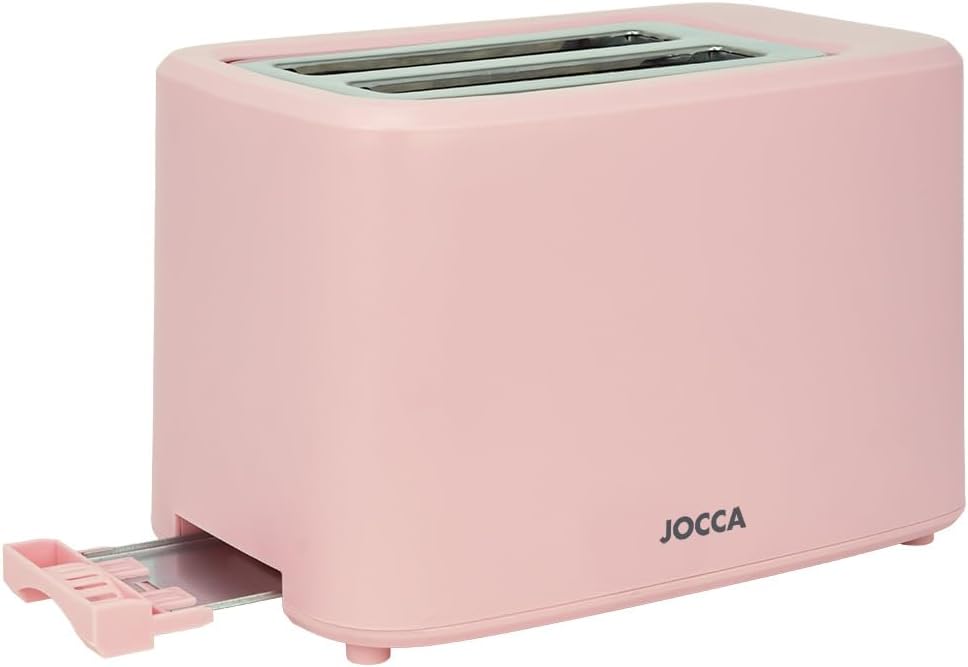
The removable crumb tray, shown here being pulled out, simplifies cleaning and maintenance of the toaster.
Troubleshooting
| Problem | Possible Cause | Solution |
|---|---|---|
| Toaster does not turn on. | Not plugged in; power outlet not working; carriage lever not fully depressed. | Ensure the toaster is securely plugged in. Check the power outlet with another appliance. Press the carriage lever down until it locks. |
| Bread is not toasting evenly. | Uneven bread thickness; first use (initial burn-off). | Ensure bread slices are of similar thickness. The toaster has an automatic centering system, but very irregular slices may toast unevenly. Allow for a few cycles for consistent performance. |
| Smoke coming from the toaster. | Crumbs accumulated in the crumb tray; food lodged in slots; manufacturing residue (first use). | Unplug immediately. Clean the crumb tray. If food is lodged, unplug and carefully remove it. This is normal during first use. |
| Toast is too light/dark. | Browning level setting is too low/high. | Adjust the browning control dial to a higher setting for darker toast or a lower setting for lighter toast. |
Specifications
| Feature | Detail |
|---|---|
| Brand | Jocca |
| Model | B0CQ2KY4DC |
| Power | 700 Watts |
| Voltage | 220V |
| Material | Polypropylene (PP) |
| Number of Slots | 2 |
| Browning Levels | 7 |
| Functions | Defrost, Reheat, Cancel, Automatic Ejection |
| Crumb Tray | Removable |
| Dimensions (L x W x H) | 27 cm x 15 cm x 16 cm (approx.) |
| Weight | 966 g |
Warranty and Support
For information regarding warranty coverage or technical support, please refer to the documentation provided at the time of purchase or visit the official Jocca brand store. Keep your proof of purchase for any warranty claims.
Official Jocca Store: Visit Jocca Store