XTRONS 12.3 Inch Android 14 Car Stereo User Manual
Model: B0CQ29PNDT
1. Introduction
This manual provides detailed instructions for the installation, operation, and maintenance of your XTRONS 12.3 Inch Android 14 Car Stereo. Please read this manual thoroughly before using the product to ensure proper functionality and to maximize your user experience. Keep this manual for future reference.
2. Applicable Models & Years
This XTRONS car stereo is designed for specific BMW models and years with the CCC system:
For BMW X5 E70 (2007-2010) with CCC System
For BMW X6 E71 (2007-2010) with CCC System
Important Note: This unit is compatible ONLY with the original X5 E70 and X6 E71 CCC system. Verify your vehicle's system before installation.
Figure 2.1: Applicable BMW models and visual identification of the CCC system, including the CD/DVD slot, 10-pin LVDS port, and BMW Car Communication Computer Interface.
Important Notes on Compatibility: If your car comes with NO audio AUX input, you may need to order an FM transmitter (e.g., XTRONS CA/ITR/FM02) to aid in the installation and audio output.
3. Product Overview & Features
The XTRONS 12.3 Inch Android 14 Car Stereo is an advanced in-car entertainment and navigation system designed to upgrade your driving experience while retaining original vehicle functionalities.
Figure 3.1: Key hardware and software features of the XTRONS Android 14 Car Stereo.
Memory & Storage: 4GB DDR4 RAM and 64GB Solid State ROM for responsive performance and ample app storage.
Display: 12.3-inch IPS Touch Screen with 1920x720 resolution, 178° viewing angle, and fully-laminated design for enhanced clarity and vibrant colors.
Connectivity: Global 4G LTE (Micro-SIM card not included, data only), Dual Wi-Fi Band (2.4GHz/5GHz), Bluetooth 5.0 for stable connections, and USB tethering for mobile network sharing.
Smartphone Integration: Built-in Wireless Car Play and Wireless/Wired Android Auto for seamless smartphone app display and voice commands (Siri/Google Assistant).
Multitasking: Multi-task Display and Picture-in-Picture (PIP) functionality to run multiple applications simultaneously.
Audio: Built-in DSP (Digital Signal Processor) for enhanced audio quality.
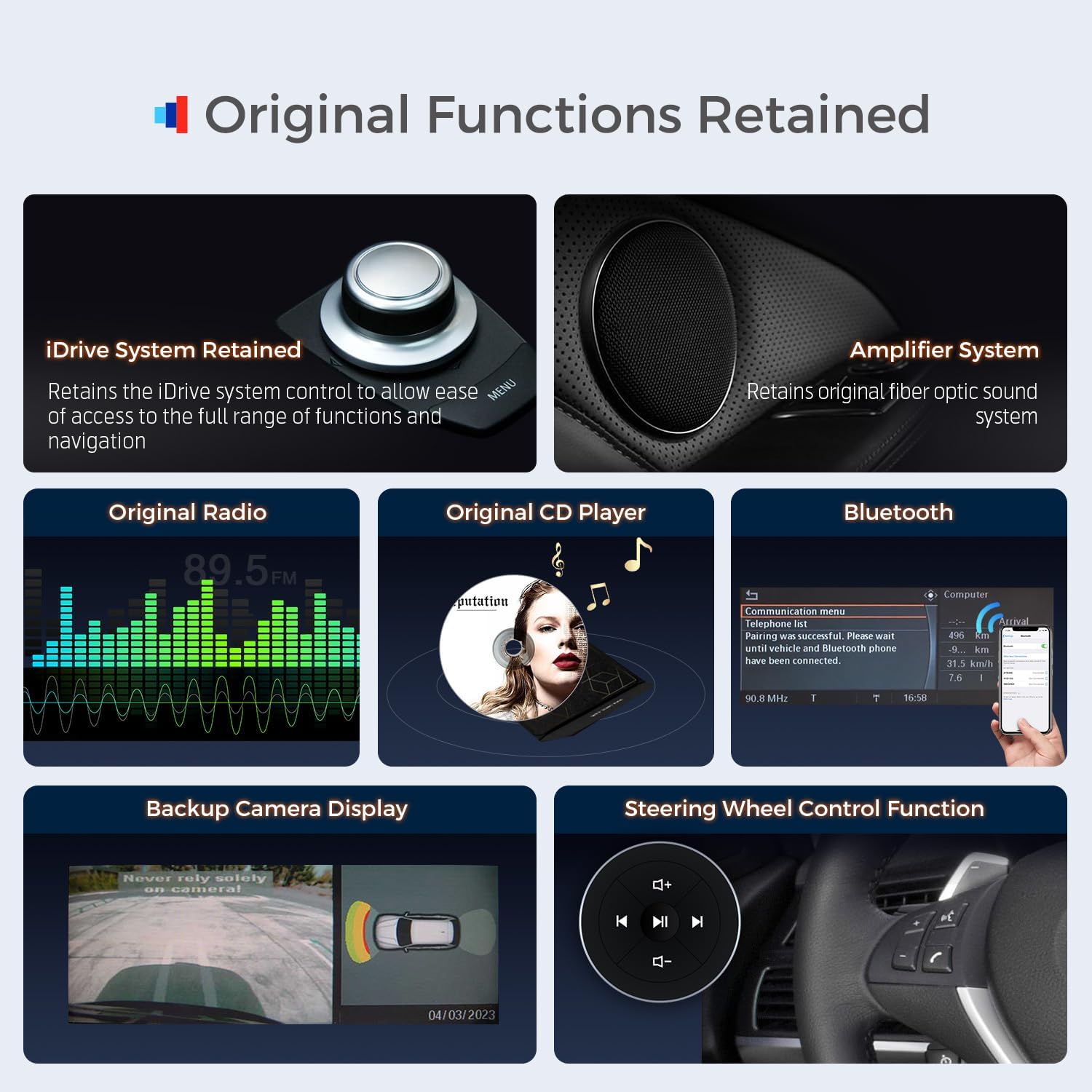
Original Car Function Retention: Seamlessly integrates and retains OEM car-centric functions such as iDrive system, original fiber optic sound system, original radio, original CD player, Bluetooth, backup camera display, and steering wheel controls.
4. What's in the Box
Please check the contents of your package against the list below:
1 x ISO Wiring Harness
1 x Audio Cable
1 x GPS Antenna
1 x Tweezers
1 x 4G Antenna
1 x USB Cable
1 x Installation Instruction Manual
1 x User Manual (this document)
Figure 4.1: Contents of the XTRONS car stereo package and unit dimensions.
5. Setup & Installation
Installation of this car stereo requires technical knowledge and experience. It is highly recommended to have the unit installed by a qualified professional to avoid damage to the product or your vehicle. Refer to the included Installation Instruction Manual for detailed, step-by-step guidance.
Wiring Harness Overview:
The wiring harness connects the new head unit to your vehicle's existing electrical system and original components. Familiarize yourself with the connections:
Figure 5.1: Wiring diagram for the XTRONS car stereo, detailing each connection point.
ISO port: Connects to the original CD player.
ISO wiring harness: Main power and speaker connections.
AUDIO OUT: Audio output.
REVERSE-IN: Reversing control cable.
P. CAM, Camera ACC: Power and control for parking camera.
ACC: Accessory power.
MIC: Microphone port.
CAM IN: Camera input.
USB port1 & USB port2: For USB devices.
4G antenna: For 4G LTE connectivity.
GPS antenna: For GPS navigation.
LVDS port: For video signal to the display.
4G SIM card slot: Insert Micro-SIM for 4G data.
Ensure all connections are secure and correctly routed to prevent damage or malfunction. Pay close attention to cable lengths and routing to avoid strain or interference with other vehicle components.
6. Operating Instructions
6.1 Powering On/Off
The unit will typically power on automatically with the vehicle's ignition. To manually power off or restart, refer to the on-screen controls or the vehicle's original power button if integrated.
The unit supports both Wireless Car Play for iPhones and Wireless/Wired Android Auto for Android phones.
Figure 6.1: Smartphone integration features including Wireless CarPlay, Android Auto, and Screen Mirroring.
Wireless Connection: Enable Bluetooth and Wi-Fi on your smartphone. Pair your phone with the car stereo via Bluetooth. Once paired, the system will prompt you to activate CarPlay or Android Auto wirelessly.
Wired Connection (Android Auto): Connect your Android phone to one of the USB ports using a compatible USB cable. Follow the on-screen prompts to initiate Android Auto.
Voice Control: Access Siri or Google Assistant directly from the head unit for navigation, calls, music, and more.
6.3 Internet Access (4G LTE, Wi-Fi, USB Tethering)
The unit offers multiple ways to connect to the internet:
Figure 6.2: Internet connectivity options for the XTRONS car stereo.
Global 4G LTE: Insert a Micro-SIM card (not included) into the designated slot. The unit supports 4G mobile broadband for data access. Note: This is for data only, not phone calls.
Dual Band Wi-Fi: Connect to available Wi-Fi networks (2.4GHz or 5GHz) for internet access.
USB Tethering: Connect your smartphone via USB and enable mobile network sharing/tethering on your phone to use its internet connection.
6.4 Retained Original Car Functions
The XTRONS unit is designed to integrate seamlessly with your BMW's existing systems, retaining many original functions.
Figure 6.3: Original BMW functions retained after XTRONS car stereo installation.
iDrive System: Retains the iDrive system control for accessing original functions and navigation.
Amplifier System: Retains the original fiber optic sound system.
Original Radio & CD Player: Continue to use your vehicle's original radio and CD player.
Bluetooth: Original Bluetooth functionality is retained.
Backup Camera Display: Original backup camera display is supported.
Steering Wheel Controls: Original steering wheel control functions remain operational.
Figure 6.4: Display of original car information on the XTRONS unit.
The unit also displays original car information such as speed, engine speed, fuel level, temperature, parking brake status, and seat belt reminders.
6.5 General Operation
Touch Screen: Navigate the Android interface using the responsive touch screen.
Multi-task Display: Utilize the split-screen feature to run two applications simultaneously (e.g., navigation and music).
PIP (Picture-in-Picture): Watch videos in a small window while using other apps.
7. Maintenance
Proper maintenance ensures the longevity and optimal performance of your car stereo.
Screen Cleaning: Use a soft, lint-free cloth specifically designed for electronics screens. Dampen the cloth slightly with water or a screen-safe cleaner if necessary. Avoid harsh chemicals or abrasive materials.
Software Updates: Periodically check for software updates provided by XTRONS to ensure you have the latest features, bug fixes, and performance improvements. Follow the on-screen instructions for updating.
Environmental Conditions: Avoid exposing the unit to extreme temperatures, direct sunlight for prolonged periods, or excessive moisture.
Cable Connections: Ensure all cables remain securely connected. Loose connections can lead to intermittent issues.
8. Troubleshooting
If you encounter issues with your XTRONS car stereo, refer to the following common troubleshooting steps:
No Power: Check all power connections, including the ISO wiring harness. Ensure the vehicle's ignition is on. Verify vehicle fuses.
No Sound: Check audio cable connections. Ensure the volume is not muted or set too low. Verify the correct audio source is selected. If using an FM transmitter for AUX input, ensure it is correctly configured.
Touch Screen Unresponsive: Try restarting the unit. If the issue persists, a factory reset might be necessary (note: this will erase user data).
GPS Signal Lost/Inaccurate: Ensure the GPS antenna is properly installed and has a clear view of the sky. Check antenna connection.
Bluetooth/Wi-Fi Connectivity Issues: Ensure Bluetooth/Wi-Fi is enabled on both the unit and your device. Try unpairing and re-pairing devices. Restart both devices.
CarPlay/Android Auto Not Connecting: Ensure your smartphone is compatible and its operating system is up to date. Check USB cable for damage if using a wired connection. Try restarting both the unit and your phone.
Original Functions Not Working: Double-check all connections to the original car system (e.g., iDrive, fiber optic cables). Ensure the unit is correctly configured to integrate with your specific BMW CCC system.
Installation Challenges: Some users have reported challenges with cable length and fuse box placement during installation. Careful planning and routing of cables are essential.
For persistent issues or complex problems, please contact XTRONS technical support.
9. Specifications
Feature
Specification
Model Number
B0CQ29PNDT
Operating System
Android 14
Processor
Octa-core (2x Cortex-A75 + 6x Cortex-A55)
RAM
4GB DDR4
ROM
64GB EMMC 5.1
Screen Size
12.3 Inches
Display Type
IPS Touch Screen, Fully-laminated
Resolution
1920x720
Connectivity
Global 4G LTE, Dual Band Wi-Fi (2.4GHz/5GHz), Bluetooth 5.0, USB
XTRONS provides a 1-year warranty for this unit, covering manufacturing defects and malfunctions under normal use.
For technical assistance, troubleshooting, or warranty claims, please do not hesitate to contact XTRONS professional technical support. You can reach us via Amazon email, and we will respond promptly to ensure your rights and interests are protected.
Ask about setup, troubleshooting, compatibility, parts, safety, or missing instructions. Manuals+ will review the question and use this page’s manual context to help answer it.