
1. Product Overview
The PARANNIC 22-Pin to 16-Pin OBD2 Adapter Cable is designed to facilitate the connection between older Toyota vehicles equipped with a 22-pin OBD1 diagnostic port and modern OBD2 diagnostic scanners. This cable acts as a bridge, allowing you to utilize standard 16-pin OBD2 diagnostic tools with your compatible Toyota vehicle for efficient vehicle diagnostics.

Image 1: PARANNIC OBD1 22-Pin to OBD2 16-Pin Adapter Cable for Toyota Vehicle. This image displays the full adapter cable, highlighting its two distinct connectors.
2. Key Features
- Wide Compatibility: Specifically designed for Toyota vehicles with a 22-pin OBD1 diagnostic port.
- Easy to Use: Connects directly to your vehicle's 22-pin port and a compatible 16-pin OBD2 diagnostic interface.
- Standard Specification: Manufactured to strict quality control standards for dependable use.
- High-Quality Materials: Constructed from high-quality ABS material for superior flexibility, durability, and stable performance.
3. Compatibility
This adapter cable is compatible with Toyota vehicles that utilize a 22-pin OBD1 diagnostic connector. It allows these vehicles to interface with standard 16-pin OBD2 diagnostic tools, including code readers and wireless OBD2 Bluetooth scanners. Please verify your vehicle's diagnostic port type before purchase.
4. Package Contents
- 1 x PARANNIC 22-Pin to 16-Pin OBD2 Adapter Cable
5. Setup and Connection
- Locate the Diagnostic Port: Identify the 22-pin OBD1 diagnostic port in your Toyota vehicle. This is typically located under the dashboard, near the steering column, or in the engine bay.
- Connect to Vehicle: Plug the 22-pin connector end of the adapter cable into your vehicle's 22-pin diagnostic port. Ensure a secure connection.
- Connect to Scanner: Plug the 16-pin OBD2 connector end of the adapter cable into your OBD2 diagnostic scanner.
- Power On: Turn on your vehicle's ignition (or start the engine, depending on your scanner's requirements) and power on your diagnostic scanner. The scanner should now be able to communicate with your vehicle.
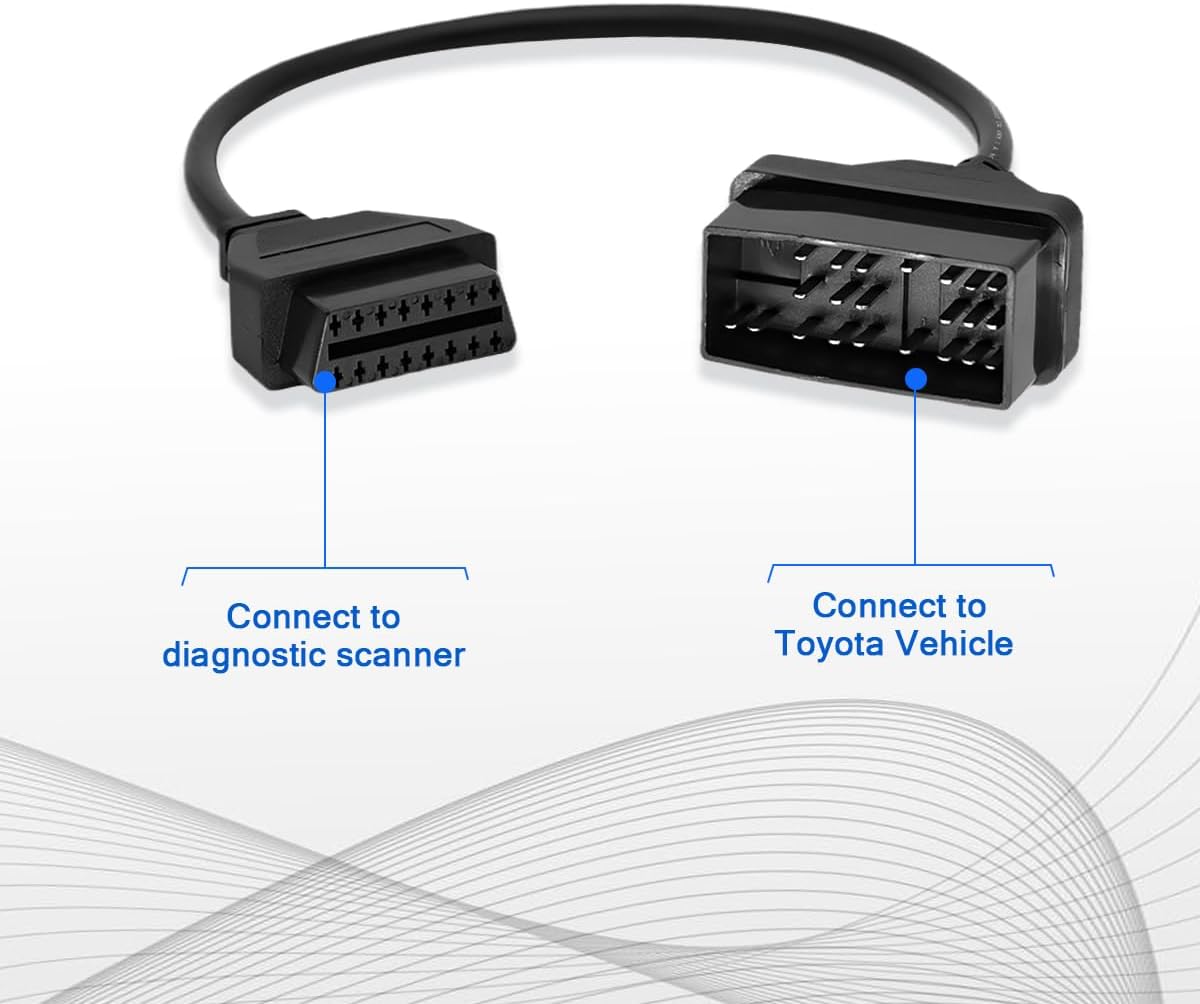
Image 2: Connection Diagram. This image illustrates how to connect the 16-pin end to a diagnostic scanner and the 22-pin end to a Toyota vehicle.

Image 3: Close-up of the OBDII (16-pin) female connector, which connects to your diagnostic scanner.

Image 4: Close-up of the 22-pin male connector, designed to plug into your Toyota vehicle's diagnostic port.
6. Pin Assignment
The following table details the pin assignment for the 22-pin to 16-pin adapter cable, illustrating how the OBDII (16-pin) connector maps to the 22-pin Toyota vehicle connector.
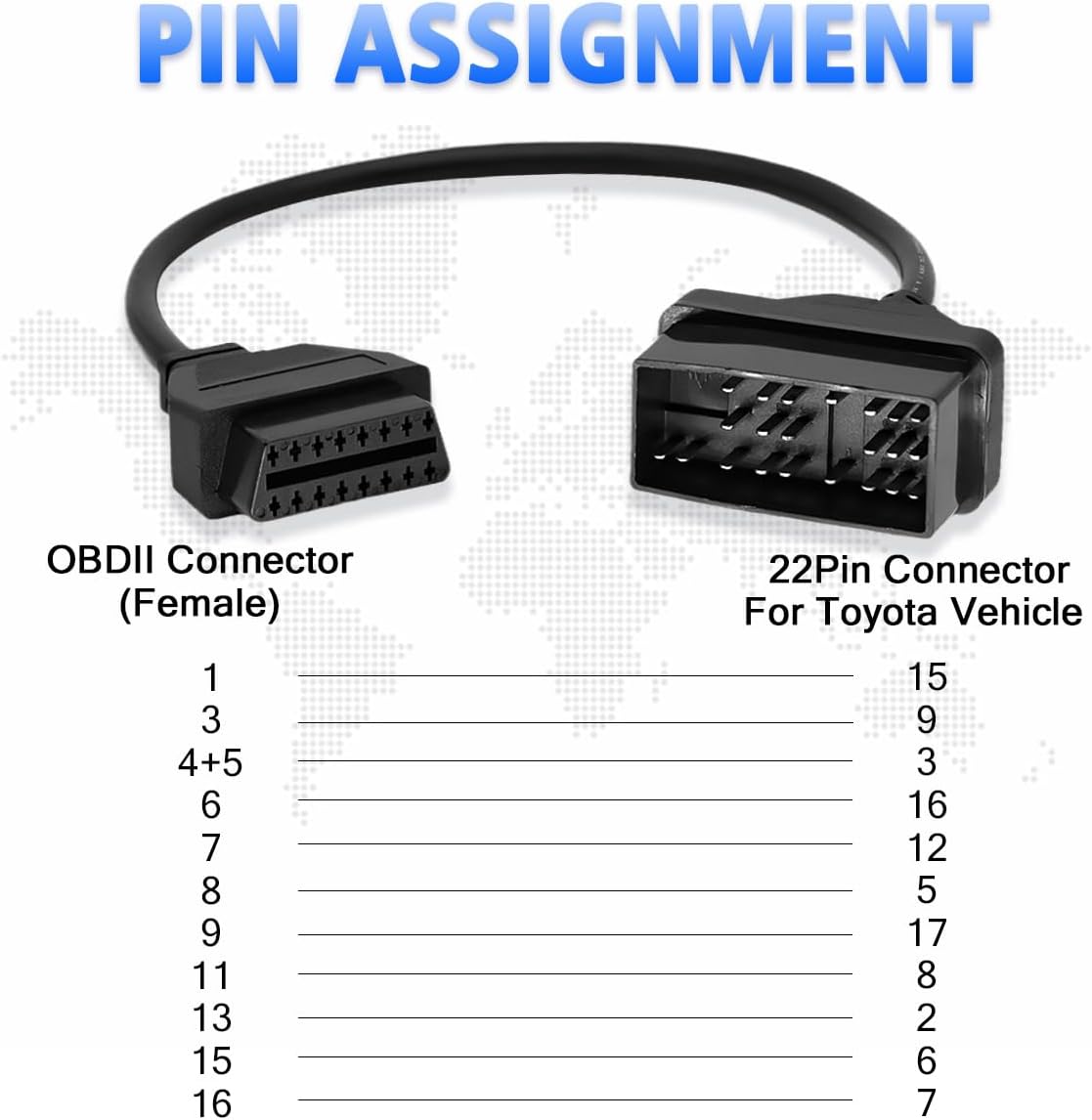
Image 5: Pin Assignment Diagram. This diagram visually represents the pin connections between the OBDII (16-pin) female connector and the 22-pin male connector for Toyota vehicles.
| OBDII Connector (Female) Pin | 22-Pin Connector For Toyota Vehicle Pin |
|---|---|
| 1 | 15 |
| 3 | 9 |
| 4+5 | 3 |
| 6 | 16 |
| 7 | 12 |
| 8 | 5 |
| 9 | 17 |
| 11 | 8 |
| 13 | 2 |
| 15 | 6 |
| 16 | 7 |
7. Material Quality
The PARANNIC adapter cable is manufactured using high-quality materials to ensure reliable performance and longevity. The internal wiring consists of pure copper with 20AWG thickness, providing excellent conductivity and signal integrity. This construction contributes to stable data transmission during diagnostic procedures.

Image 6: Pure Copper Wiring. This image shows a cross-section of the cable, revealing the multi-colored pure copper wires, emphasizing the high-quality construction.
8. Operating Instructions
Once the adapter cable is securely connected between your Toyota vehicle and the OBD2 diagnostic scanner, operate the scanner according to its specific user manual. The adapter cable simply provides the physical and electrical connection, allowing the scanner to read data from your vehicle's ECU (Engine Control Unit).
- Follow your scanner's instructions to read diagnostic trouble codes (DTCs).
- Use your scanner to view live data streams, freeze frame data, and perform other diagnostic functions.
- If your scanner supports it, you may be able to clear DTCs after addressing the underlying issue.
9. Maintenance
To ensure the longevity and proper function of your adapter cable, follow these maintenance guidelines:
- Store the cable in a clean, dry place away from direct sunlight and extreme temperatures.
- Avoid bending or kinking the cable sharply, as this can damage the internal wiring.
- Keep connectors clean and free of dirt or debris. Use a soft, dry cloth to wipe them if necessary.
- Do not expose the cable to water or other liquids.
10. Troubleshooting
If you encounter issues while using the adapter cable, consider the following:
- No Communication: Ensure both ends of the adapter cable are securely connected. Verify that your vehicle's ignition is on and your diagnostic scanner is powered. Check your scanner's manual for specific connection requirements.
- Incorrect Vehicle Type: Confirm that your Toyota vehicle indeed has a 22-pin diagnostic port. This adapter is not universal for all Toyota models or other vehicle brands.
- Scanner Compatibility: Ensure your OBD2 scanner is functioning correctly and is compatible with the OBD2 protocol.
- Damaged Cable: Inspect the cable for any visible signs of damage, such as cuts, frayed wires, or bent pins. If damaged, replace the cable.
11. Specifications
| Specification | Detail |
|---|---|
| Brand | PARANNIC |
| Connector Type | Custom (22-Pin OBD1 to 16-Pin OBD2) |
| Cable Type | OBD Diagnostic Cable |
| Compatible Devices | Toyota vehicles with 22-pin port |
| Special Feature | High Speed Data Transfer |
| Color | Black |
| Connector Gender | Male-to-Male |
| Item Weight | 3.87 ounces |
| Package Dimensions | 8.74 x 4.09 x 0.98 inches |
| Model Name | obd1 to obd2 adapter cable |
12. Warranty and Support
This PARANNIC product comes with a 36-month warranty covering all manufacturing defects. For any questions, technical assistance, or warranty claims, please contact PARANNIC customer support through the retailer's platform or the official brand website. We are committed to 100% customer satisfaction.