
1. Introduction
This manual provides instructions for the GOUYESHO AKB36097101 Replacement Remote Control. This remote is designed to function as a direct replacement for original LG DVD VCR Combo and DVD Recorder remote controls, specifically compatible with models such as RC897T, RC700N, RC797T, RC397HM, RC397H, and RC389H.
The remote control is constructed from durable ABS material with soft silicone buttons, offering a comfortable and reliable user experience. It features an ergonomic design for easy handling.

Image 1.1: The GOUYESHO AKB36097101 replacement remote control, designed for LG DVD VCR Combo and DVD Recorders.
Package Contents:
- 1 x GOUYESHO AKB36097101 Replacement Remote Control
- Note: AAA batteries are not included and must be purchased separately.
2. Setup
The AKB36097101 remote control is designed for immediate use without complex programming or pairing. Simply install the batteries, and it will be ready to operate your compatible LG device.
Battery Installation:
- Locate the battery compartment on the back of the remote control.
- Slide open the battery compartment cover.
- Insert two (2) AAA 1.5V alkaline batteries, ensuring correct polarity (+ and -) as indicated inside the compartment.
- Close the battery compartment cover securely.

Image 2.1: Proper installation of two AAA batteries into the remote control's battery compartment.
Once batteries are installed, the remote is ready for use. No additional setup or code entry is required for compatible LG DVD VCR Combo or DVD Recorder models.

Image 2.2: The remote control is ready to operate your device immediately after battery insertion.
3. Operation
The AKB36097101 remote control provides full functionality for your compatible LG DVD VCR Combo or DVD Recorder. Its intuitive layout with clearly labeled buttons ensures ease of use for all ages.
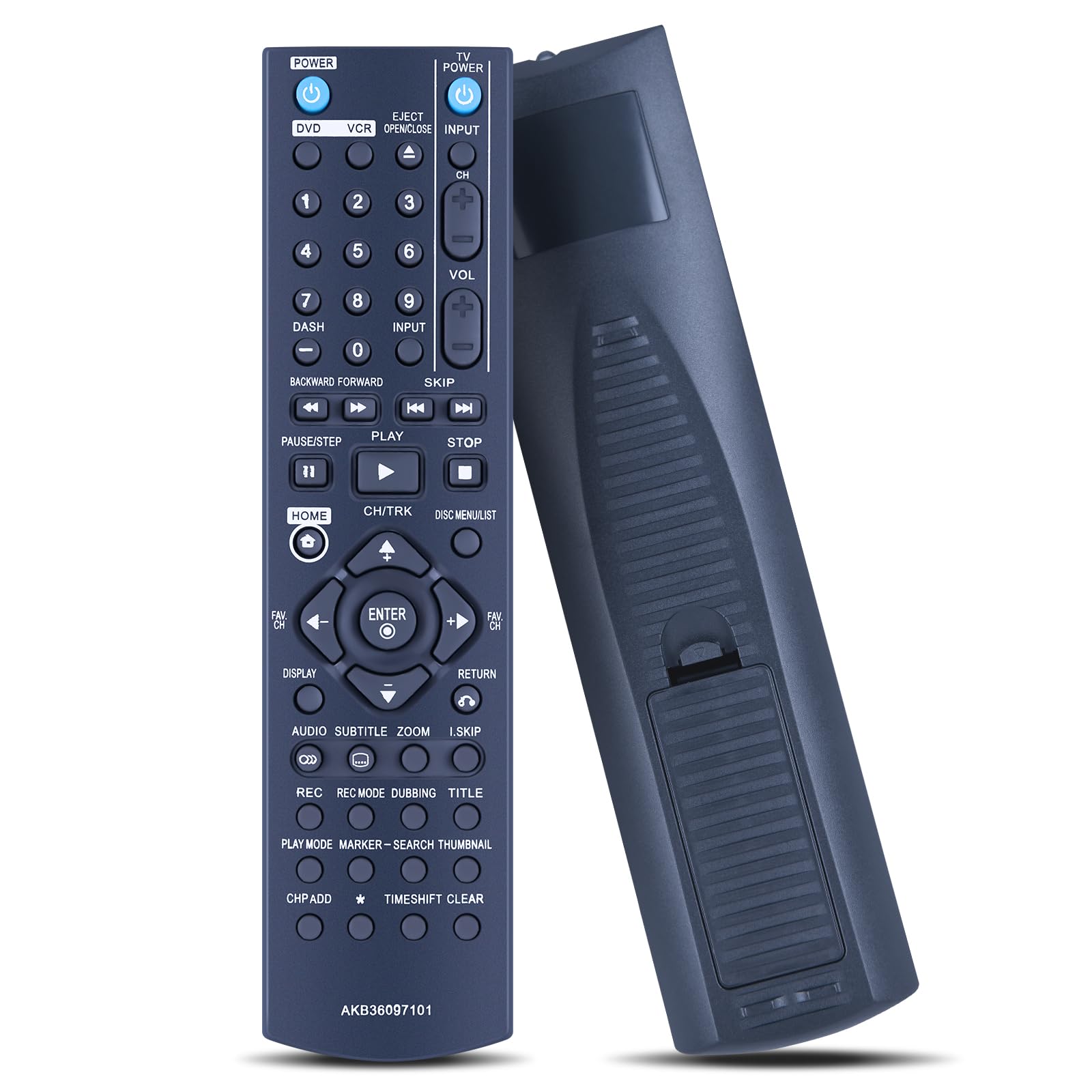
Image 3.1: Overview of the remote control's buttons and their functions.
Key Functions:
- POWER: Turns the device on or off.
- DVD/VCR: Selects between DVD and VCR modes.
- EJECT/OPEN/CLOSE: Opens or closes the disc tray.
- INPUT: Switches input sources on the connected display.
- Number Buttons (0-9): For direct channel selection or inputting numbers.
- VOL (+/-): Adjusts the volume level.
- CH (+/-): Changes channels.
- Playback Controls (PLAY, PAUSE/STEP, STOP, BACKWARD/FORWARD, SKIP): Controls media playback.
- HOME: Accesses the main menu or home screen.
- CH/TRK: Navigates through channels or tracks.
- DISC MENU/LIST: Accesses disc menus or lists.
- Navigation Pad (Up, Down, Left, Right, ENTER): For menu navigation and selection.
- DISPLAY: Shows on-screen display information.
- RETURN: Goes back to the previous screen or menu.
- AUDIO: Selects audio tracks or modes.
- SUBTITLE: Toggles or selects subtitle options.
- ZOOM: Adjusts screen zoom level.
- I.SKIP: Skips to specific intervals.
- REC, REC MODE, DUBBING, TITLE: Recording functions for VCR/DVD Recorder.
- PLAY MODE, MARKER, SEARCH, THUMBNAIL: Advanced playback and search functions.
- CH P ADD, TIMEShift CLEAR: Additional channel and time-shift related functions.
Note: Depending on your specific LG model, some functions may not be available or may operate differently than described. Refer to your device's original manual for detailed function descriptions.

Image 3.2: The ergonomic design ensures comfortable handling during use.
4. Maintenance
Cleaning:
- To clean the remote control, use a soft, dry cloth.
- For stubborn dirt, slightly dampen the cloth with water or a mild, non-abrasive cleaner.
- Do not use harsh chemicals, solvents, or abrasive cleaning pads, as these can damage the remote's surface and buttons.
- Ensure no liquid enters the remote control, especially around the buttons or battery compartment.
Battery Care:
- If the remote control will not be used for an extended period (e.g., one month or more), remove the batteries to prevent leakage and potential damage to the remote.
- Replace batteries when the remote's responsiveness decreases or it stops functioning.
- Dispose of used batteries responsibly according to local regulations.
Storage:
- Store the remote control in a cool, dry place, away from direct sunlight and extreme temperatures.
- Avoid dropping the remote or exposing it to excessive force, which could damage internal components.
5. Troubleshooting
Remote Control Not Responding:
- Check Batteries: Ensure batteries are inserted correctly with the proper polarity. Replace old or depleted batteries with new AAA alkaline batteries.
- Line of Sight: Make sure there is a clear line of sight between the remote control's infrared emitter and the device's IR receiver. Obstructions can block the signal.
- Distance: Ensure you are within the effective operating range (approximately 10 meters or 33 feet) of the device.
- Device Compatibility: Verify that your LG DVD VCR Combo or DVD Recorder model is listed as compatible (e.g., RC897T, RC700N, RC797T, RC397HM, RC397H, RC389H).
- Interference: Strong light sources (like direct sunlight or fluorescent lights) can sometimes interfere with IR signals. Try operating the remote in a different lighting condition.
Specific Buttons Not Working:
- Clean Buttons: Ensure the buttons are not stuck or obstructed by dirt. Gently clean around the buttons.
- Device Functionality: Some functions may not be supported by all compatible LG models. Refer to your device's original manual to confirm if the function is available for your specific model.
If you continue to experience issues after following these troubleshooting steps, please refer to the Support section for further assistance.
6. Specifications
| Model Number: | AKB36097101 |
| Brand: | GOUYESHO |
| Material: | ABS (Acrylonitrile Butadiene Styrene) |
| Connectivity Technology: | Infrared (IR) |
| Compatible Devices: | LG DVD VCR Combo, LG DVD Recorders (e.g., RC897T, RC700N, RC797T, RC397HM, RC397H, RC389H) |
| Power Source: | 2 x AAA 1.5V Alkaline Batteries (not included) |
| Maximum Range: | Approximately 10 meters (33 feet) |
| Color: | Black |
| Special Feature: | Ergonomic Design |

Image 6.1: Physical dimensions of the remote control.
7. Warranty and Support
Warranty Information:
This product comes with a 30-day unlimited return and refund service. Please retain your proof of purchase for warranty claims.
Customer Support:
If you have any questions, concerns, or require assistance with your GOUYESHO AKB36097101 Replacement Remote Control, please do not hesitate to contact our customer support team. We aim to respond to all inquiries within 108 hours during the working week.
For support, please contact the seller directly through your purchase platform or refer to the contact information provided with your order.