
1. Product Overview
The TIMEURE-2211 Talking Watch is designed for ease of use, particularly for individuals with visual impairments, seniors, and the elderly. It features clear voice announcements for time, date, and week, along with an automatic self-setting function for precise timekeeping.
- User-Friendly Operation: Announce time, date, and week with simple button presses.
- Hassle-Free Time Setting: Automatically adjusts overnight and supports four USA time zones (Pacific, Mountain, Central, Eastern).
- Effortless Wearability: Equipped with a comfortable stretch band (fits wrist sizes 170-230mm / 6.9-9.0 inches).
- Long Battery Life: Powered by a CR2032 battery with approximately 1 year of life.

Image: Key features of the TIMEURE-2211 Talking Watch, highlighting radio control, talking functions, 1-year battery life, and automatic summer/winter time adjustment.
2. Package Contents
Your TIMEURE-2211 Talking Watch package includes:
- 1 x TIMEURE-2211 Talking Watch (Silver)
- 1 x CR2032 Battery (pre-installed)
- 1 x Instruction Manual (this document)
3. Getting Started (Setup)
3.1 Activating from 'SHIP' Mode
When the watch is new, it may display "SHIP" on the screen. To activate the watch and exit 'SHIP' mode:
- Locate the 2 o'clock and 8 o'clock buttons on the watch.
- Press and hold both the 2 o'clock and 8 o'clock buttons simultaneously for approximately 5 seconds.
- The watch will activate and display the current time.
Video: This video demonstrates how to activate the TIMEURE-2211 Talking Watch from 'SHIP' mode by pressing and holding the 2 o'clock and 8 o'clock buttons.
3.2 Initial Time Zone Setting
The watch automatically sets itself overnight. You only need to set your accurate time zone. The watch supports four USA time zones:
- Pacific Time (-8)
- Mountain Time (-7)
- Central Time (-6)
- Eastern Time (-5)
Note: This watch does not support Hawaii or Alaska time zones.
Video: This video provides a quick and easy guide to setting the time zone on the Hearkent Talking Watch, which is applicable to the TIMEURE-2211 model.
4. Operating Instructions
4.1 Basic Button Functions
- 2 o'clock Button:
- Press once: Announces the current time.
- Press twice: Announces the current date and week.
- Press three times: Announces "USA time updated" or "USA time not updated".
- 4 o'clock Button:
- Press once: Announces the alarm time or ON/OFF status.
- Hold for 3 seconds: Enters settings mode.
- Crown: Do not use the crown to adjust the hands, as this may cause the analog hands and voice time to differ.
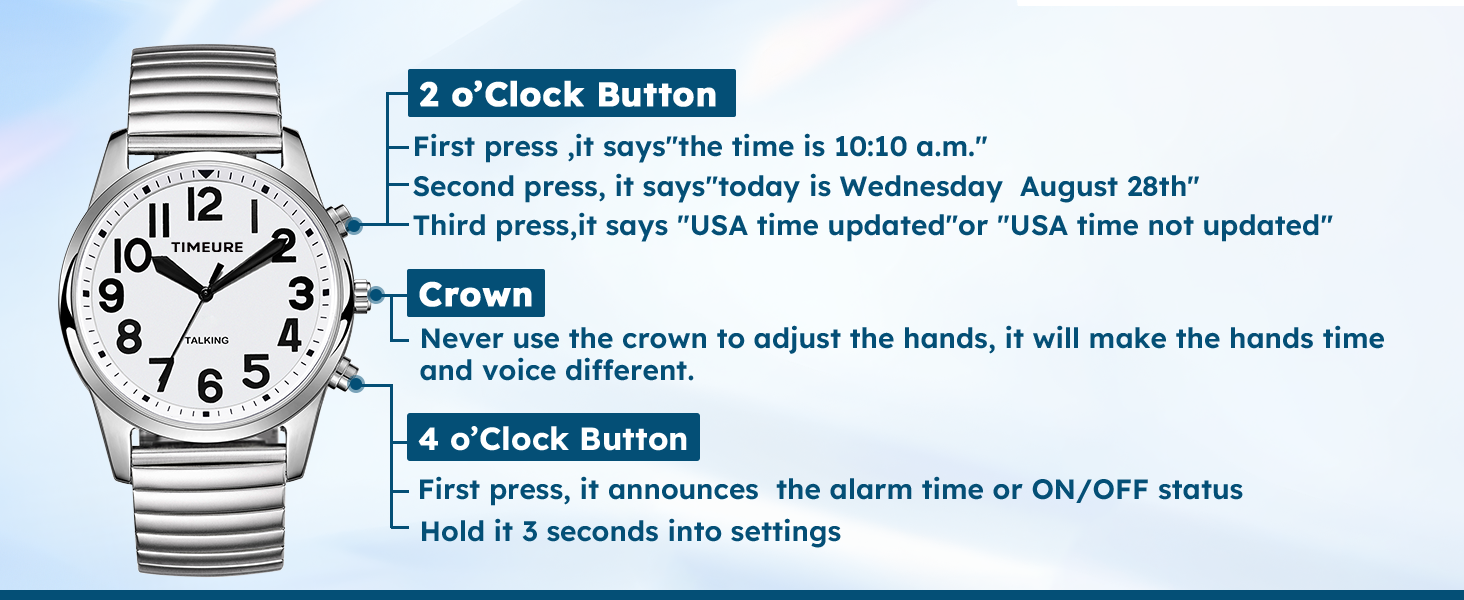
Image: Illustration of the watch's buttons and their primary functions for time announcement, date, and alarm status.
4.2 Setting Daily Alarm Time
To set the daily alarm time, follow the voice prompts after entering settings mode:
- Hold the 4 o'clock button for 3 seconds to enter setting mode. The watch will announce "Set Alarm".
- Press the 2 o'clock button repeatedly to set the desired hour.
- Press the 4 o'clock button repeatedly to set the desired minutes.
- Press the 8 o'clock button to confirm the alarm time.
Video: This video demonstrates how to set the daily alarm time on the Hearkent Talking Watch, which uses similar controls to the TIMEURE-2211.
4.3 Alarm ON/OFF
To toggle the alarm ON or OFF:
- Hold the 4 o'clock button for 3 seconds to enter setting mode.
- Press the 2 o'clock button to turn the alarm ON.
- Press the 4 o'clock button to turn the alarm OFF.
- Press the 8 o'clock button to confirm your selection.
Video: This video demonstrates how to turn the alarm ON or OFF on the Hearkent Talking Watch, which uses similar controls to the TIMEURE-2211.
4.4 Hourly Chime ON/OFF
To toggle the hourly chime ON or OFF:
- Hold the 4 o'clock button for 3 seconds to enter setting mode.
- Press the 2 o'clock button to turn the chime ON.
- Press the 4 o'clock button to turn the chime OFF.
- Press the 8 o'clock button to confirm your selection.
Video: This video demonstrates how to turn the hourly chime ON or OFF on the Hearkent Talking Watch, which uses similar controls to the TIMEURE-2211.
4.5 Sleep Mode (Do Not Disturb)
Once activated, the watch will remain silent and will not announce the time. This mode is useful for periods when voice announcements are not desired.

Image: The TIMEURE-2211 watch displaying its Sleep Mode, where it remains silent and does not announce the time.
5. Product Specifications
| Feature | Detail |
|---|---|
| Model Number | TU2211 |
| Display Type | Digital |
| Movement Type | Quartz |
| Power Source | Battery Powered (1 x CR2032, included) |
| Battery Life | Approximately 1 year |
| Case Material | Stainless Steel |
| Band Material | Alloy Steel (Stretch Band) |
| Band Length | 170-230mm / 6.9-9.0 inches (stretch band) |
| Case Diameter | 42.5 Millimeters |
| Case Thickness | 16 Millimeters |
| Water Resistance Level | Not Water Resistant |
| Weight | 0.11 Kilograms |
| Additional Features | Alarm, Automatic Self Wind, Easy Reader |

Image: Detailed information on the watch's dimensions (42.5mm diameter, 22.0mm band width, 16mm thickness) and suitable wrist size (170-230mm).
6. Care and Maintenance
- Battery Replacement: The watch uses one CR2032 battery. When the voice becomes faint or the display is dim, it's time to replace the battery. It is recommended to have a professional replace the battery to ensure proper sealing and function.
- Water Resistance: This watch is NOT WATER RESISTANT. Avoid exposure to water, including showering, swimming, or heavy rain, to prevent damage.
- Cleaning: Wipe the watch with a soft, dry cloth to remove dust and smudges. Avoid using harsh chemicals or abrasive materials.
- Storage: Store the watch in a cool, dry place away from direct sunlight and extreme temperatures.
7. Troubleshooting
- Time Not Updating Automatically:
- Ensure the watch is in an area with good signal reception, preferably near a window, especially overnight.
- Verify that the correct time zone is set.
- If the time is still incorrect, try manually setting the time zone as described in Section 3.2.
- Voice Announcements are Faint or Unclear:
- This may indicate a low battery. Replace the CR2032 battery.
- Alarm Not Sounding:
- Check if the alarm is set to ON (refer to Section 4.3).
- Verify that the alarm time is correctly set (refer to Section 4.2).
8. Warranty and Support
The TIMEURE-2211 Talking Watch comes with a Limited Warranty. For specific details regarding the warranty period and coverage, please refer to the warranty information provided with your purchase or contact TIMEURE customer support.
Additionally, Amazon.ca offers a 30-day right of return for many products. Please consult Amazon.ca's return policies for exceptions and conditions.
For further assistance or inquiries, please contact TIMEURE customer service through your Amazon purchase history.