
1. Introduction
This manual provides detailed instructions for the TIMEURE Pedometer Watch TU2308. This standalone digital watch is designed for fitness enthusiasts and seniors seeking a simple, practical, and mobile-free way to track daily activity. It features step counting, calorie tracking, distance measurement, time, date, alarm, stopwatch, and a countdown timer, all without requiring smartphone connectivity or frequent charging.
2. Key Features
- Independent Pedometer: Tracks steps, calories burned, and distance (switchable between kilometers and miles) without any app or smartphone connection.
- Large Display with EL Backlight: Ensures effortless readability in all lighting conditions, including dimly lit environments.
- 50M Water Resistance: Suitable for handwashing, swimming, and cold showers.
- Multiple Functions: Includes time, date, week display, alarm, hourly chime, stopwatch, and countdown timer.
- Comfortable Design: Crafted with a sleek stainless steel ring and a soft, comfortable PU strap, adjustable for wrist sizes from 6.29 to 9.44 inches.
- Long Battery Life: Operates on a CR2430 battery, providing extended usage without the need for frequent recharging.

Figure 2.1: Overview of key features displayed on the watch face.
3. Setup
3.1. Initial Inspection
Upon unboxing, ensure all components are present: the TIMEURE Pedometer Watch and the Quick Start Guide. This model does not require charging or app installation for its core functions.
3.2. Button Functions
Familiarize yourself with the watch buttons:
- LIGHT: Activates the EL backlight.
- MODE: Cycles through different display modes (Time, Pedometer, Stopwatch, Countdown, Alarm).
- START: Used to start/stop functions in Stopwatch mode, or adjust settings.
- RESET: Used to reset values in Pedometer/Stopwatch mode, or confirm settings.
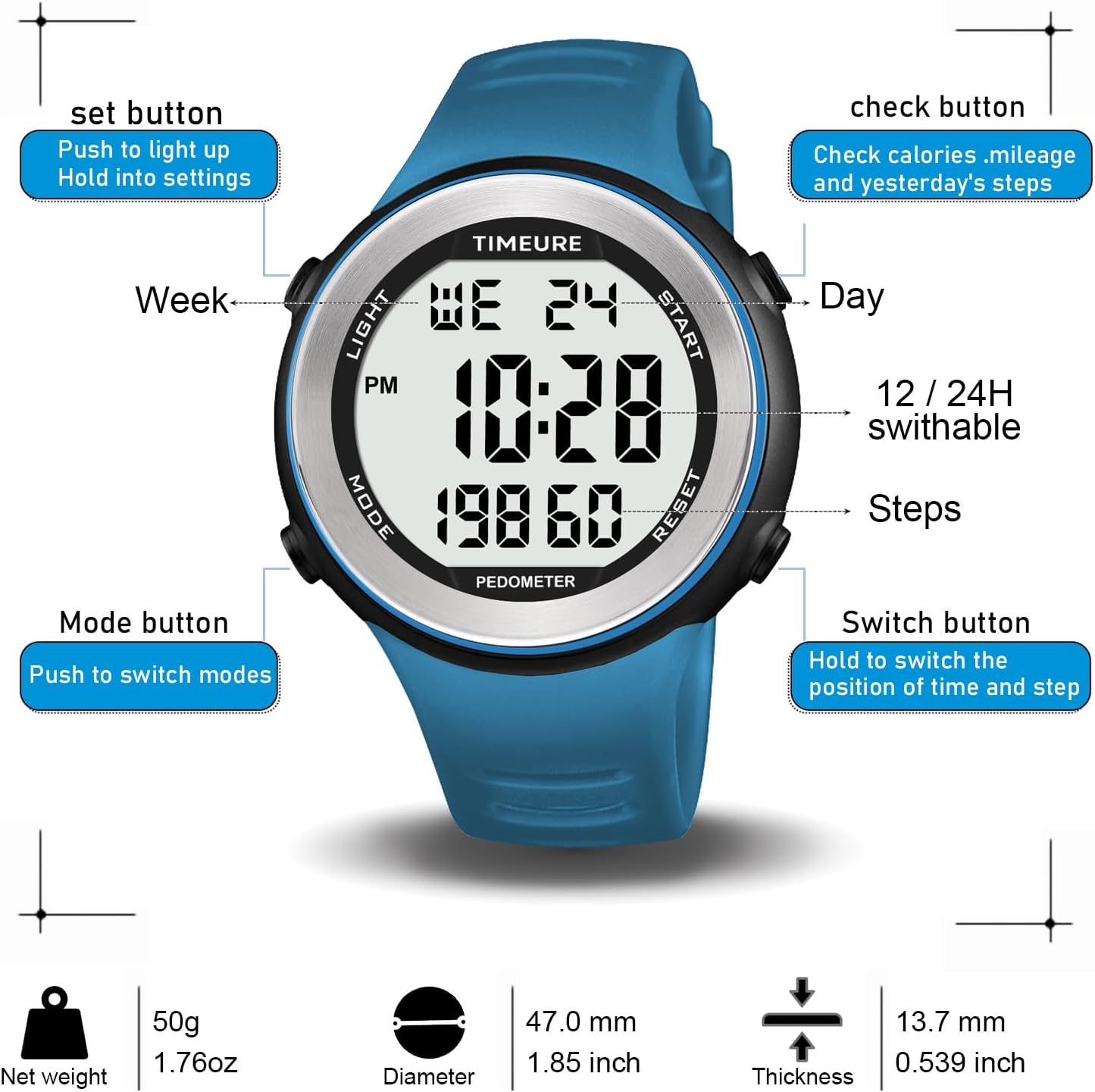
Figure 3.1: Watch button layout and functions.
3.3. Setting Time and Date
- In Time mode, press and hold the MODE button until the display flashes.
- Use the START button to adjust the flashing value (e.g., hour, minute, year, month, day).
- Press the MODE button to move to the next setting.
- Press RESET to confirm and exit setting mode.

Figure 3.2: Watch display showing time, date, and steps, and how to switch display focus.
4. Operating Instructions
4.1. Navigating Modes
Press the MODE button repeatedly to cycle through the following modes:
- Time/Date Display
- Pedometer (Steps, Calories, Distance)
- Stopwatch
- Countdown Timer
- Alarm
4.2. Pedometer Function
In Pedometer mode, the watch displays your current step count, calories burned, and distance traveled. The watch automatically tracks these metrics throughout the day.
- Viewing Yesterday's Steps: The watch stores the previous day's step count, which can be accessed in Pedometer mode.
- Resetting Pedometer: To reset your daily step count, press and hold the RESET button in Pedometer mode.
4.3. Stopwatch
- Navigate to Stopwatch mode using the MODE button.
- Press START to begin timing.
- Press START again to pause.
- Press RESET to clear the stopwatch.
4.4. Countdown Timer
- Navigate to Countdown Timer mode using the MODE button.
- Press and hold START to set the countdown duration.
- Use START to adjust values and MODE to switch between hours, minutes, and seconds.
- Press RESET to confirm the setting.
- Press START to begin the countdown.
4.5. Alarm
- Navigate to Alarm mode using the MODE button.
- Press and hold START to set the alarm time.
- Use START to adjust values and MODE to switch between hours and minutes.
- Press RESET to confirm the setting.
- Press START to toggle the alarm ON/OFF.
4.6. EL Backlight
Press the LIGHT button to illuminate the display for approximately 5 seconds, enhancing visibility in dark conditions.
Video 4.1: Demonstration of the TIMEURE Pedometer Watch features, including time display, step tracking, calorie count, and water resistance.
5. Maintenance
5.1. Water Resistance
The TIMEURE Pedometer Watch has a 50-meter water resistance rating. This means it is suitable for:
- Daily use, such as handwashing and splashes.
- Swimming in shallow water.
- Taking cold showers.
Note: Not suitable for hot water, diving, or prolonged submersion at depths exceeding 50 meters. Avoid pressing buttons underwater.

Figure 5.1: The watch demonstrating its 50M water resistance.
5.2. Battery Replacement
The watch operates on a CR2430 high-capacity battery, offering a long battery life of up to 15 months. When the display dims or functions become erratic, it may be time to replace the battery. It is recommended to have battery replacement performed by a qualified watch technician to ensure water resistance is maintained.
5.3. Cleaning and Care
Wipe the watch regularly with a soft, damp cloth. Avoid using harsh chemicals or abrasive materials that could damage the watch face or strap. Store the watch in a cool, dry place when not in use.
6. Troubleshooting
- Display is blank or dim: The battery may be low. Replace the CR2430 battery.
- Steps are not counting accurately: Ensure the watch is worn snugly on your wrist. Movement patterns can affect accuracy.
- Time/Date is incorrect: Refer to Section 3.3 for instructions on how to set the time and date.
- Buttons are unresponsive: Ensure the watch is not in a locked mode (if applicable, refer to the Quick Start Guide for specific lock features). If issues persist, a battery replacement might be needed.
7. Specifications
| Feature | Specification |
|---|---|
| Model Name | Pedometer Watch |
| Part Number | TU2308 |
| Brand | TIMEURE |
| Color | Blue |
| Material | Stainless Steel |
| Item Weight | 50 Grams |
| Water Resistance | 50 Meters |
| Screen Size | 40 Millimeters |
| Wrist Size Compatibility | 6.29 inches to 9.44 inches (160mm to 240mm) |
| Battery Type | CR2430 Lithium Metal |
| Special Feature | Pedometer, EL Backlight |
8. Warranty and Support
TIMEURE is committed to providing quality products and customer satisfaction.
- Warranty: 1-Year after-sales warranty.
- Returns: 30-Day no-reason return policy.
- Customer Service: 12-Hour online customer service available for inquiries and support.
- Transparency: Each item includes a unique code for verification before shipping.

Figure 8.1: TIMEURE after-sales and support details.