
1. Introduction
The LEAUDIO TRN Conch In-Ear Monitors are designed to deliver high-fidelity audio with a focus on clarity and customization. Featuring a 10mm dual-magnetic-circuit DLC composite diaphragm and interchangeable tuning filters, these monitors offer a versatile listening experience. This manual provides essential information for setup, operation, maintenance, and specifications to ensure optimal performance and longevity of your device.

Image 1.1: LEAUDIO TRN Conch In-Ear Monitors showcasing their high-performance design.
Video 1.1: An overview of the LEAUDIO TRN Conch In-Ear Monitors, highlighting key features and design elements.
2. Package Contents
Please check the package for the following items:
- TRN Conch In-Ear Monitors (Left and Right units)
- Audiophile-grade detachable cable (4-core silver-plated copper wounded and oxygen-free copper braided)
- Swappable connectors (3.5mm, 2.5mm, 4.4mm)
- Three pairs of interchangeable tuning nozzle filters (Reference, Translucent, Atmosphere Enhancement)
- Multiple sets of silicone and foam ear tips for various sizes and preferences
- Storage case
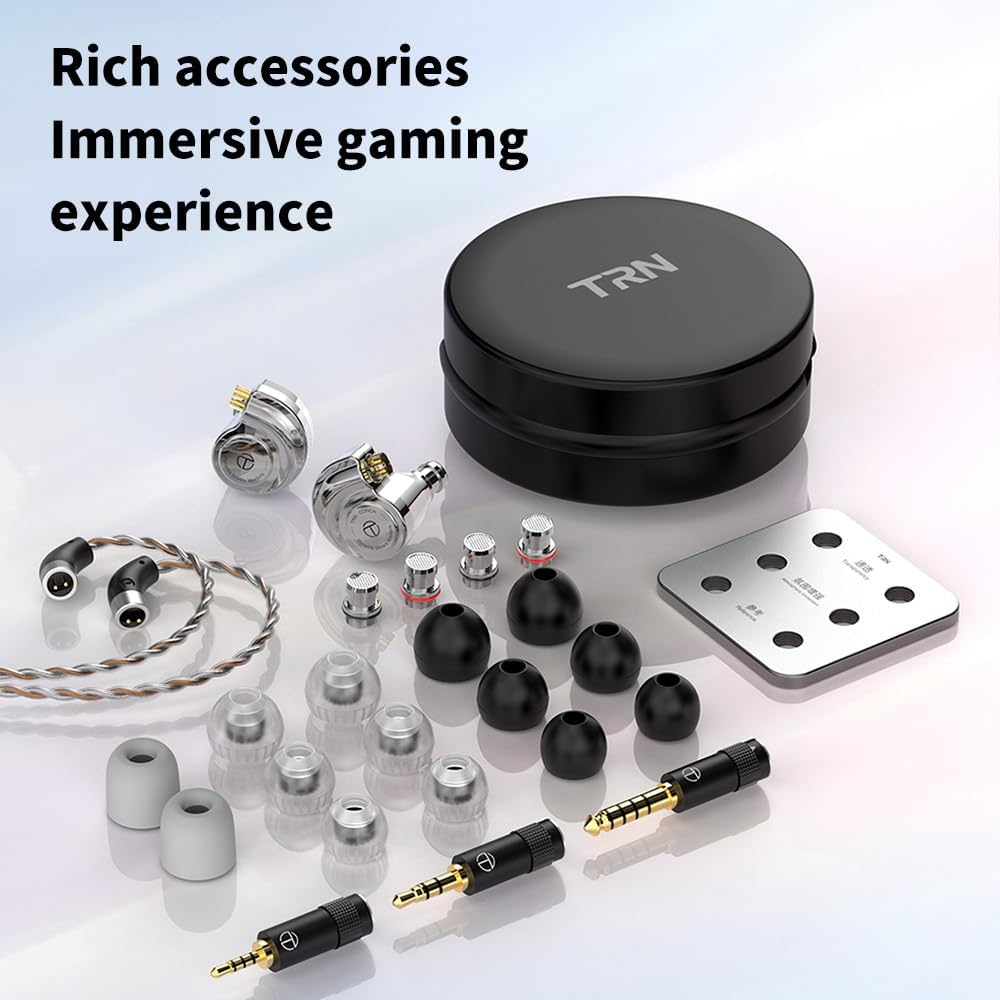
Image 2.1: Comprehensive view of all included accessories for the TRN Conch In-Ear Monitors.
3. Product Features
- High-Performance DLC Diamond Diaphragm Dynamic Driver: Equipped with a 10mm dual-magnetic-circuit DLC (Diamond-Like Carbon) composite diaphragm for enhanced sound resolution and clarity.
- Liquid Metal Cavity Design: The earphones feature a durable and acoustically optimized liquid metal cavity.
- Professional HIFI Tuning: Engineered for a balanced and detailed audio signature.
- Detachable Cable System: Allows for easy replacement and upgrade of the cable.
- Audiophile-Grade Cable: A 4-core silver-plated copper wounded and oxygen-free copper braided cable ensures efficient signal transmission and minimizes interference.
- Swappable Connectors: Includes 3.5mm, 2.5mm, and 4.4mm gold-plated 2Pin Type connectors for broad device compatibility.

Image 3.1: Visual representation of the core technological features of the TRN Conch.

Image 3.2: Detailed view of the internal driver structure, emphasizing the powerful dual-circuit design.

Image 3.3: Illustration of the optimized sound cavity structure for an immersive audio experience.
4. Setup and Wearing
4.1 Connecting the Cable
- Identify the left (L) and right (R) earphone units and cable connectors. The cable connectors are typically marked.
- Align the 2-pin connector on the cable with the corresponding socket on the earphone unit. Ensure the pins are correctly oriented.
- Gently push the connector into the socket until it is firmly seated. Do not force the connection.
- Repeat for the other earphone unit.
4.2 Choosing and Attaching Ear Tips
Selecting the correct ear tips is crucial for sound quality and comfort. Experiment with different sizes and materials (silicone or foam) to find the best fit. A good seal ensures optimal bass response and passive noise isolation.
- Gently remove the pre-installed ear tips by pulling them off the nozzle.
- Select a desired ear tip size and material.
- Push the new ear tip onto the earphone nozzle, ensuring it is securely attached and forms a tight seal around the nozzle.
4.3 Wearing the Earphones
The TRN Conch features an ear-hook design for stable and comfortable wearing.
- Insert the earphone unit into your ear canal.
- Guide the cable over the top of your ear, allowing the pre-formed ear-hook section to rest securely behind your ear.
- Adjust the earphone and cable for a snug and comfortable fit.

Image 4.1: Proper wearing technique demonstrating the stable ear-hook design.
5. Operating Instructions
5.1 Basic Audio Playback
Once connected to your audio source (e.g., smartphone, digital audio player, computer) via the appropriate connector, simply play your desired audio. Adjust the volume on your source device.
5.2 Using Interchangeable Tuning Nozzles
The TRN Conch comes with three interchangeable tuning nozzle filters, allowing you to customize the sound signature to your preference. Each filter has a different internal diameter and net, which affects specific audio frequencies.
- Gently unscrew the currently installed nozzle filter from the earphone unit.
- Select a new tuning nozzle filter.
- Carefully screw the new filter onto the earphone nozzle until it is secure. Do not overtighten.
- Listen and compare the sound profiles to determine your preferred tuning.
5.3 Swapping Connectors
The cable features swappable connectors for compatibility with various audio devices.
- Gently pull the currently attached connector (e.g., 3.5mm) from the cable.
- Align the desired connector (e.g., 2.5mm or 4.4mm) with the cable's connection point.
- Push the new connector firmly into place until it clicks or feels secure.
6. Tuning Nozzle Filters Explained
The three interchangeable tuning nozzle filters provide distinct sound profiles:
- Reference (Black Sealing Ring): Offers a balanced and neutral sound signature, ideal for critical listening.
- Translucent (Blue Sealing Ring): Provides a slightly brighter sound with enhanced treble, suitable for those who prefer more detail in the high frequencies.
- Atmosphere Enhancement (Red Sealing Ring): Delivers a warmer sound with boosted bass, creating a more immersive and impactful listening experience.
Refer to the included frequency response graph to visualize the impact of each filter on the audio spectrum.

Image 6.1: The three tuning nozzle filters and their corresponding frequency response curves.
7. Maintenance
7.1 Cleaning the Earphones
- Regularly clean the ear tips and earphone nozzles to prevent wax buildup, which can affect sound quality.
- Remove ear tips and wipe them with a soft, damp cloth. Allow them to dry completely before reattaching.
- Use a small, soft brush or a cleaning tool (if provided) to gently remove any debris from the earphone nozzles.
- Wipe the earphone bodies with a dry, soft cloth. Avoid using harsh chemicals or abrasive materials.
7.2 Cable Care
- Avoid sharp bends or excessive pulling on the cable.
- When storing, coil the cable loosely to prevent tangling and damage.
- Keep the cable away from extreme temperatures and moisture.
7.3 Storage
When not in use, store your TRN Conch In-Ear Monitors in the provided storage case to protect them from dust, impacts, and tangling.
8. Troubleshooting
If you encounter any issues with your TRN Conch In-Ear Monitors, please refer to the following common solutions:
- No Sound or Intermittent Sound:
- Ensure the cable is securely connected to both the earphones and the audio source.
- Check the audio source's volume level and ensure it is not muted.
- Test with a different audio source or cable to rule out device or cable issues.
- Inspect the 2-pin connectors for any bent or damaged pins.
- Poor Sound Quality (e.g., lack of bass, tinny sound):
- Ensure the ear tips provide a proper seal in your ear canal. Try different sizes or materials.
- Clean the earphone nozzles to remove any obstructions.
- Verify that the tuning nozzle filters are securely attached.
- Uncomfortable Fit:
- Experiment with different ear tip sizes and materials.
- Adjust the ear-hook section of the cable to fit comfortably over your ear.
If the issue persists after trying these steps, please contact customer support.
9. Specifications
| Feature | Specification |
|---|---|
| Brand | LEAUDIO |
| Model Name | CONCH |
| Ear Placement | In Ear |
| Form Factor | In Ear |
| Connectivity Technology | Wired |
| Headphone Jack | 3.5 mm Jack (swappable connectors for 2.5mm, 4.4mm included) |
| Audio Driver Type | Dynamic Driver |
| Audio Driver Size | 10 Millimeters (DLC composite diaphragm) |
| Impedance | 30 Ohms |
| Sensitivity | 114 dB |
| Frequency Range | 20Hz-20000Hz |
| Cable Length | 1.2 meters |
| Item Weight | 17.8 grams (total) |
| Enclosure Material | Metal (Liquid Metal Cavity) |
| Additional Features | Detachable Cable, Interchangeable Tuning Nozzle Filters, Ear Hook Design |
10. Warranty and Support
10.1 Warranty Information
The LEAUDIO TRN Conch In-Ear Monitors come with a 1-year warranty from the date of purchase. This warranty covers manufacturing defects. It does not cover damage caused by misuse, accidents, unauthorized modifications, or normal wear and tear.
10.2 Customer Support
For technical assistance, warranty claims, or any other inquiries, please contact LEAUDIO customer support through the retailer where you purchased the product or visit the official LEAUDIO website for contact information.