
radius HP-H100BT
radius HP-H100BT Wireless Open-Ear Earphones
Model: HP-H100BT
Brand: radius
Introduction
Thank you for purchasing the radius HP-H100BT Wireless Open-Ear Earphones. This manual provides essential information for the safe and effective use of your new earphones. Please read it thoroughly before use and retain it for future reference.
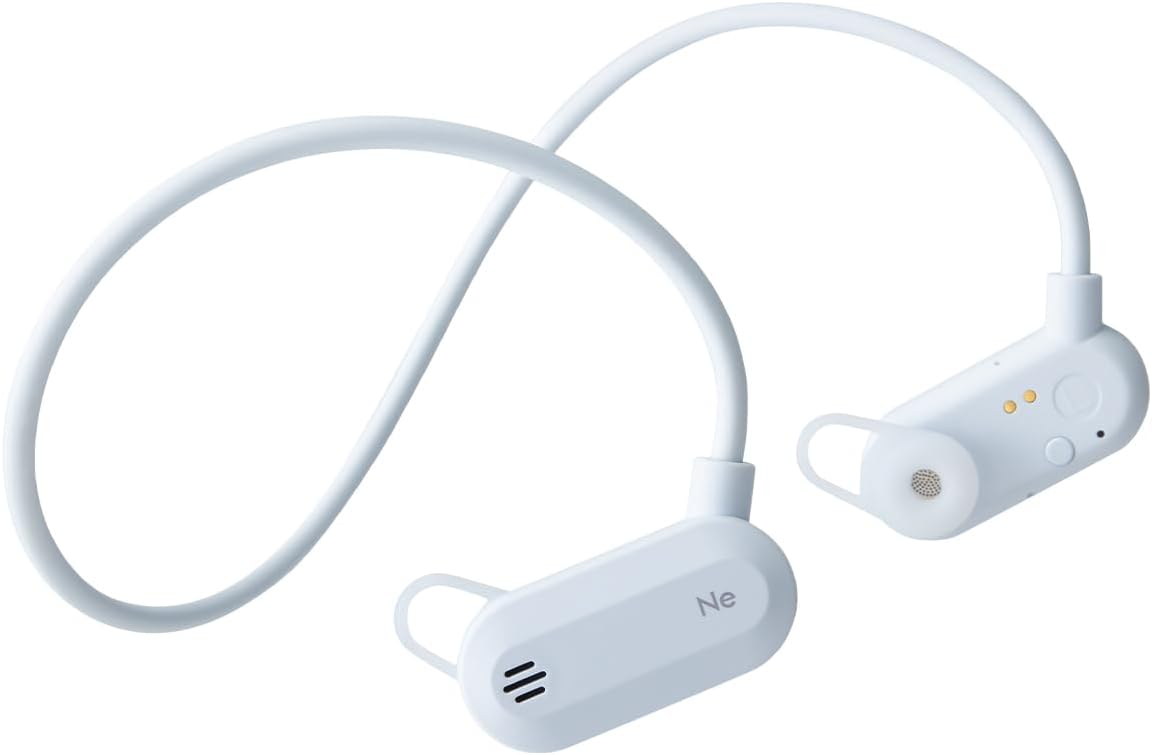
The HP-H100BT earphones are designed for active use, allowing you to enjoy audio while remaining aware of your surroundings. Key features include:
- Open-Ear Design: Allows ambient sounds to be heard for enhanced safety during outdoor activities.
- "Listen-While-You-Hear" Structure: Ensures your ears are not fully blocked.
- Carbon Fiber Paper Dome Dynamic Driver: Delivers rich bass and clear mid-high tones.
- Lightweight and Compact: Features a shape-memory neckband for easy portability and storage.
- IPX4 Drip-Proof: Suitable for sports and exercise, resistant to sweat and light rain.
Safety Information
To ensure safe operation and prevent damage, please observe the following precautions:
- Do not disassemble, modify, or attempt to repair the device. This may void the warranty and cause electric shock or fire.
- Keep the earphones away from water, moisture, and extreme temperatures.
- Avoid prolonged exposure to high volume levels to prevent hearing damage.
- Do not use the earphones in situations where inability to hear ambient sounds could be dangerous, such as driving or cycling in traffic. The open-ear design helps, but caution is still advised.
- Keep out of reach of children and pets. Small parts may pose a choking hazard.
IPX4 Drip-Proof Rating
The HP-H100BT earphones are rated IPX4, meaning they are protected against splashing water from any direction. This makes them suitable for use during exercise where sweat may occur, or in light rain. Note: IPX4 does not mean the device is fully waterproof. Do not submerge the earphones in water.

Package Contents
Verify that all items are present in the package:
- radius HP-H100BT Wireless Open-Ear Earphones
- Earpieces (S, M, L sizes - 1 set each)
- Charging Cable
- Carrying Case
- Instruction Manual (with Warranty Card)

Product Overview
Familiarize yourself with the components of your HP-H100BT earphones.

Controls and Indicators
The earphones feature intuitive controls for power, volume, and call management. Refer to the diagrams on the product packaging or official website for specific button locations.
Setup
1. Charging the Earphones
Before first use, fully charge the earphones. Use the dedicated magnetic charging cable provided.
- Connect the charging cable to a USB power source (e.g., computer USB port, USB wall adapter).
- Align the magnetic end of the charging cable with the charging connector on the L-side earphone unit. The magnets will attract, and charging will begin.
- The indicator light will show charging status (e.g., red for charging, blue for fully charged).

2. Bluetooth Pairing
To connect your earphones to a device:
- Ensure the earphones are powered off.
- Press and hold the power button until the indicator light flashes (e.g., alternating red and blue), indicating pairing mode.
- On your device (smartphone, tablet, etc.), enable Bluetooth and search for available devices.
- Select "HP-H100BT" from the list of found devices.
- Once connected, the indicator light will change (e.g., solid blue) and a confirmation tone may sound.
3. Wearing the Earphones
The HP-H100BT features an open-ear design with a neckband for a secure and comfortable fit.
- Place the neckband around the back of your neck.
- Position the earphone units over your ears, ensuring the earpieces rest gently without fully blocking your ear canals.
- Adjust the fit for comfort and stability. The flexible neckband will conform to your head shape.


Operating Instructions
Power On/Off
- Power On: Press and hold the power button for approximately 3 seconds until the indicator light illuminates.
- Power Off: Press and hold the power button for approximately 5 seconds until the indicator light turns off.
Music Playback
- Play/Pause: Press the multi-function button once.
- Next Track: Double-press the multi-function button.
- Previous Track: Triple-press the multi-function button.
Call Management
- Answer/End Call: Press the multi-function button once during an incoming call or active call.
- Reject Call: Press and hold the multi-function button for 2 seconds during an incoming call.
Volume Control
- Volume Up: Press the Volume + button.
- Volume Down: Press the Volume - button.
Maintenance
Cleaning
Regular cleaning helps maintain performance and hygiene.
- Wipe the earphones with a soft, dry cloth.
- For stubborn dirt, lightly dampen the cloth with water and wipe gently, then dry thoroughly.
- Do not use abrasive cleaners, alcohol, or solvents, as these can damage the surface.
- Clean the earpieces regularly with a soft cloth.
Storage
When not in use, store the earphones in the provided carrying case to protect them from dust and damage. The shape-memory neckband allows for compact folding.

Troubleshooting
If you encounter issues, try the following solutions:
| Problem | Possible Cause | Solution |
|---|---|---|
| Cannot power on | Battery is low or depleted. | Charge the earphones fully. |
| Cannot pair with device | Earphones not in pairing mode; Bluetooth off on device; device too far. | Ensure earphones are in pairing mode. Turn on Bluetooth on your device. Move device closer to earphones. |
| No sound or low volume | Volume too low; earphones not connected; audio source issue. | Increase volume on earphones and device. Reconnect Bluetooth. Check audio source. |
| Sound cuts out | Interference; device too far; low battery. | Move closer to device. Avoid strong interference sources. Charge earphones. |
If the problem persists, please refer to the support section or contact customer service.
Specifications
| Brand | radius |
| Model Number | HP-H100BT |
| Color | Blue Grey |
| Ear Placement | Open-Ear |
| Headphone Style | Earphones |
| Impedance | 16 ohms |
| Included Components | Earpieces (S, M, L) x 1 set each, Case, Charging Cable, Instruction Manual (Warranty Card) |
| Age Range | Adult |
| Noise Control | None |
| Water Resistance | IPX4 (Water Resistant) |
| Additional Features | Sports & Exercise, Microphone, Shape Memory, Lightweight, Waterproof/Drip-proof |
| Connectivity Technology | Wireless |
| Wireless Type | Bluetooth |
Warranty and Support
Quality Assurance
radius products undergo inspection, firmware updates, and periodic recharging before shipment to ensure quality. Therefore, some products may appear to have been temporarily opened; however, they are unused and their quality is not affected. We appreciate your understanding.
Warranty Information
The warranty for radius products applies to items purchased from authorized radius retailers, such as the official radius store, Kojima, Sofmap, e☆earphone, and Yamada Denki. Products purchased from other sellers are not covered by our warranty. Please confirm the seller before making a purchase.
For detailed warranty terms and conditions, please visit the official radius website.
Customer Support
For further assistance or inquiries, please visit the official radius support page or contact your local authorized service center. Contact details can typically be found on the official radius website or your product's warranty card.
Related documentsHP-H100BT


Ask a question about this manual
Ask about setup, troubleshooting, compatibility, parts, safety, or missing instructions. Manuals+ will review the question and use this page’s manual context to help answer it.