
Introduction
Thank you for purchasing the LDNIO Portable Wireless Bluetooth Speaker GTS-1393. This manual provides essential information for the safe and efficient use of your speaker. Please read these instructions carefully before use and retain them for future reference.
Important Safety Information
- Do not expose the speaker to extreme temperatures, direct sunlight, or high humidity.
- Avoid dropping or subjecting the speaker to strong impacts.
- Do not disassemble, repair, or modify the speaker yourself. Contact qualified service personnel for any repairs.
- Keep the speaker away from water and other liquids.
- Use only the specified charging cable and power adapter.
- Dispose of the battery and speaker according to local regulations.
Package Contents
Please check that all items are present in your package:
- LDNIO Portable Wireless Bluetooth Speaker GTS-1393
- USB Charging Cable (x1)
- Rechargeable Lithium Battery (500mAh)
- Remote Control
- Holder
- User Manual (this document)
Product Overview
Familiarize yourself with the speaker's components and controls. Note: The image below displays a similar model (GTS-1173) for illustrative purposes. The functionality described in this manual applies to the GTS-1393 model.
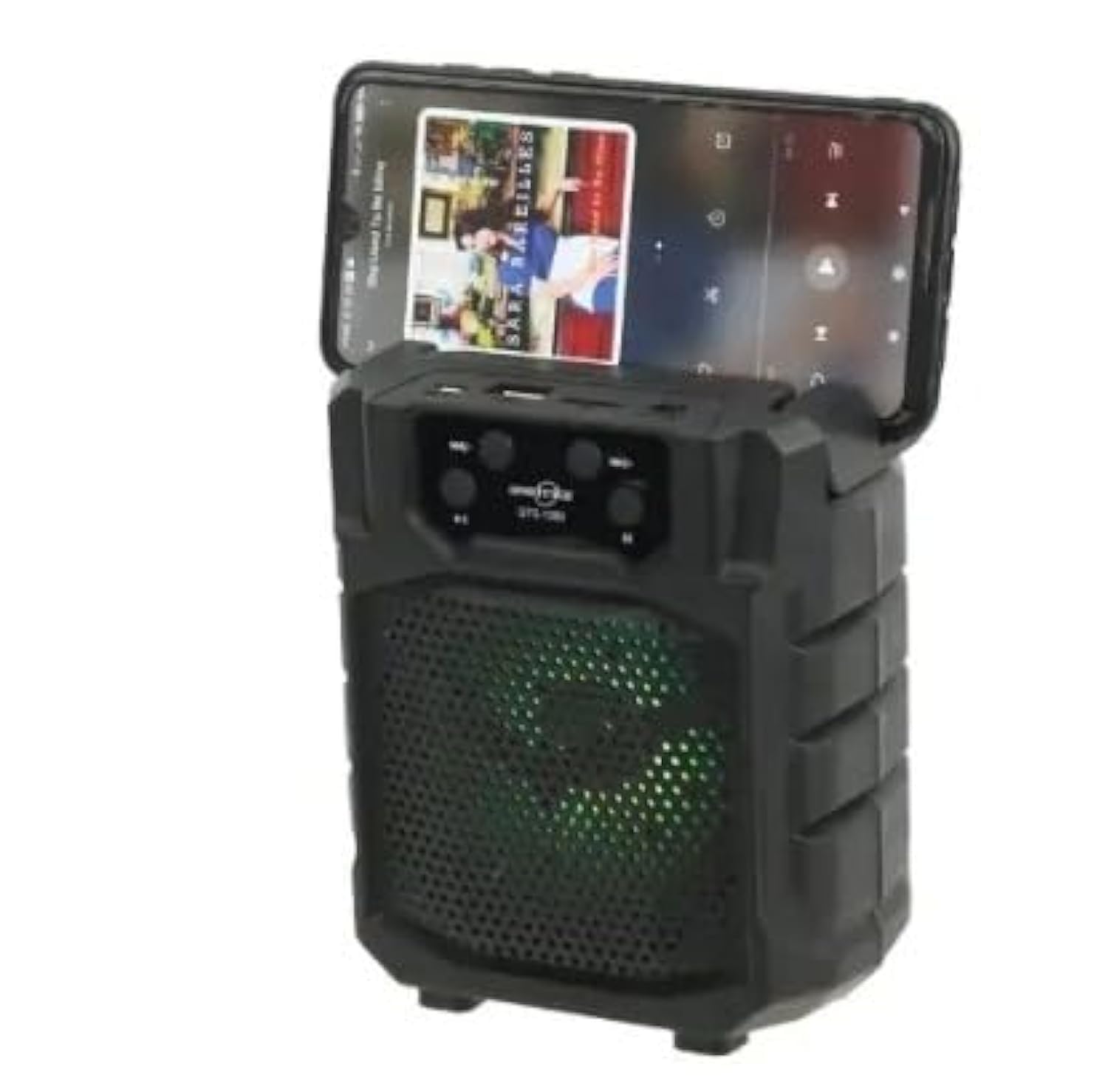
Image: Front view of a portable wireless Bluetooth speaker, model GTS-1173, featuring control buttons at the top and a speaker grille with multi-color LED lights. This image is for illustrative purposes, showing a similar product design to the GTS-1393.
Controls and Ports (Based on typical speaker design and OCR from image):
- Power Button: Usually long press to turn on/off.
- Mode Button (M): Short press to switch between Bluetooth, FM Radio, USB, and TF card modes.
- Play/Pause Button: Controls media playback.
- Previous Track / Volume Down (-): Short press for previous track, long press to decrease volume.
- Next Track / Volume Up (+): Short press for next track, long press to increase volume.
- USB Port: For USB flash drive playback.
- TF Card Slot: For MicroSD/TF card playback.
- Charging Port: For connecting the USB charging cable.
Setup
1. Charging the Speaker
- Connect the small end of the provided USB charging cable to the charging port on the speaker.
- Connect the larger end of the USB cable to a USB power adapter (not included) or a computer's USB port.
- The charging indicator light will illuminate (color may vary) to show that the speaker is charging.
- Once fully charged, the indicator light may change color or turn off. Disconnect the charging cable.
2. Powering On/Off
- To power on: Long press the Power Button until you hear an audible prompt or see the indicator lights activate.
- To power off: Long press the Power Button again until the speaker powers down.
Operating Instructions
1. Bluetooth Mode (Default)
- Ensure the speaker is powered on. It will typically enter Bluetooth pairing mode automatically, indicated by a flashing LED light and an audible prompt.
- On your mobile device (smartphone, tablet, etc.), enable Bluetooth and search for available devices.
- Select "GTS-1393" (or similar name) from the list of devices.
- Once paired, the speaker will emit an audible confirmation, and the LED light will stop flashing.
- You can now play audio from your device through the speaker. Use the speaker's controls or your device's controls to adjust volume and navigate tracks.
2. USB/TF Card Playback
- Insert a USB flash drive or TF (MicroSD) card containing MP3 audio files into the respective port.
- Press the Mode Button (M) to switch to USB or TF card mode. The speaker will automatically begin playing audio from the inserted storage device.
- Use the Play/Pause, Previous Track, and Next Track buttons to control playback.
3. FM Radio Mode
- Press the Mode Button (M) repeatedly until you enter FM Radio mode.
- To auto-scan for stations: Long press the Play/Pause Button. The speaker will scan and save available FM stations.
- To switch between saved stations: Use the Previous Track (-) and Next Track (+) buttons.
4. TWS (True Wireless Stereo) Function
The TWS function allows you to connect two GTS-1393 speakers together for a stereo sound experience.
- Ensure both speakers are powered off.
- Power on both speakers simultaneously. They should both enter Bluetooth pairing mode.
- On one of the speakers, long press the Mode Button (M) or a dedicated TWS button (if available) until you hear a confirmation tone, indicating they are paired with each other.
- Now, connect your mobile device to one of the speakers via Bluetooth as described in "1. Bluetooth Mode". The audio will play in stereo through both connected speakers.
Maintenance
- Cleaning: Use a soft, dry cloth to wipe the speaker. Do not use abrasive cleaners or solvents.
- Storage: Store the speaker in a cool, dry place away from direct sunlight and extreme temperatures.
- Battery Care: To prolong battery life, avoid fully discharging the battery frequently. Charge the speaker regularly, even if not in use for extended periods.
Troubleshooting
| Problem | Possible Solution |
|---|---|
| Speaker does not power on. | Ensure the battery is charged. Connect the speaker to a power source using the USB cable. |
| No sound from the speaker. | Check the volume level on both the speaker and your connected device. Ensure the speaker is in the correct mode (Bluetooth, USB, TF, FM). |
| Cannot pair via Bluetooth. | Ensure the speaker is in Bluetooth pairing mode (flashing LED). Turn off and on Bluetooth on your device. Move your device closer to the speaker. Forget the device from your phone's Bluetooth list and try pairing again. |
| USB/TF card not playing. | Ensure the card is inserted correctly. Verify that the audio files are in a supported format (e.g., MP3). Press the Mode button to select the correct input. |
| Poor FM radio reception. | Relocate the speaker to an area with better signal. Extend any built-in antenna if available. |
Specifications
| Brand: | LDNIO |
| Model Name: | GTS-1393 |
| Maximum Speaker Output Power: | 5 Watts |
| Connectivity Technology: | Wireless (Bluetooth) |
| Audio Output Mode: | Stereo |
| Installation Type: | Tabletop |
| Speaker Type: | Outdoor (Portable) |
| Special Feature: | Portable |
| Recommended Uses: | Smartphones, Tablets, Music Players, Computers |
| Compatible Devices: | Tablet, Laptop, Smartphone |
| Speaker Diameter: | 4 inches |
| Color: | Black |
| Control Method: | Remote |
| Power Source: | Battery Powered |
| Driver Type: | Dynamic Driver |
| Included Components: | Remote control, Holder |
| Number of Items: | 1 |
| Surround Sound Channel Configuration: | 2 |
| Wireless Communication Protocol: | Bluetooth |
| Battery Capacity: | 500 mAh |
Warranty and Support
For warranty information or technical support, please refer to the documentation provided with your purchase or contact your retailer. Keep your proof of purchase for warranty claims.