
Lorex AZT2KIDPT-E
Lorex 4MP Pan & Tilt Indoor Smart Security Camera User Manual
Model: AZT2KIDPT-E
1. Product Overview
The Lorex 4MP Pan & Tilt Indoor Smart Security Camera (Model: AZT2KIDPT-E) is a wireless 2K Wi-Fi camera designed for indoor surveillance. It features person detection, a privacy mode, two-way talk functionality, and smart home compatibility. With its 360° pan and tilt view, it offers comprehensive coverage for your indoor spaces. The camera includes a 16GB Micro SD card for local storage, eliminating the need for monthly fees.

Figure 1.1: Lorex 4MP Pan & Tilt Indoor Smart Security Camera, including its retail packaging and the bundled 16GB Micro SD card.
2. What's Included
Verify that all components listed below are present in your package:
- Indoor Wi-Fi Camera
- 16GB MicroSD Card
- Power Cable & Adapter
- Mounting Bracket & Template
- Camera Mounting Kit & Quick Start Guide

Figure 2.1: Contents of the Lorex camera package, showing the camera, power supply, 16GB MicroSD card, mounting hardware, and quick start guide.
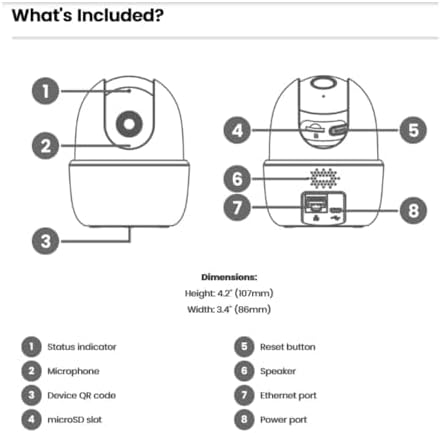
Figure 2.2: Detailed diagram of the camera's components and their functions, including ports and indicators.
3. Key Features
- Person Detection: Receive notifications when a person is detected, minimizing unnecessary alerts.
- 2-Way Talk: Communicate with individuals near the camera using the Lorex Home app.
- Pan and Tilt: The camera swivels horizontally and tilts vertically for expanded coverage. Digital zoom is available via the Lorex app. Night vision extends up to 32ft (10m).
- Smart Home Monitoring: Plug and Play setup with compatibility for Alexa and Google Assistant. Operates on 2.4 GHz Wi-Fi networks.
- Local Storage: Secure your footage with the included 16GB MicroSD card (upgradable to 256GB), with no monthly fees.

Figure 3.1: Visual comparison demonstrating the enhanced clarity and detail of 2K Quad HD resolution compared to 1080p.

Figure 3.2: The camera's pan and tilt feature allows for a 360° view, providing extensive coverage of your indoor environment.

Figure 3.3: Smart AI Motion Detection provides instant alerts, such as when a person is detected in the camera's view.

Figure 3.4: Enable Privacy Mode through the Lorex app to temporarily disable recording and live view for enhanced privacy.

Figure 3.5: The camera supports local storage via a MicroSD card, ensuring your footage is kept private and secure without recurring fees.

Figure 3.6: The 2-Way Talk feature allows for instant communication through the camera, enabling you to hear and speak to those on the other end.
4. Setup Guide
Follow these steps to set up your Lorex 4MP Pan & Tilt Indoor Smart Security Camera:
- Download the Lorex Home App: Search for "Lorex Home" in your smartphone's app store (available for Android and iOS).
- Create an Account: Open the Lorex Home app and follow the on-screen instructions to create a new account or log in to an existing one.
- Power On the Camera: Connect the provided power cable and adapter to the camera and plug it into a power outlet. The camera will power on and initiate its startup sequence.
- Add Device: In the Lorex Home app, tap the '+' icon to add a new device. Select your camera model from the list.
- Scan QR Code: Use your phone's camera to scan the QR code located on the bottom of the camera (refer to Figure 2.2).
- Connect to Wi-Fi: Follow the app's prompts to connect the camera to your home Wi-Fi network. Ensure you are connecting to a 2.4 GHz Wi-Fi band.
- Mount the Camera (Optional): If desired, use the included mounting bracket and kit to securely install the camera in your preferred indoor location.
- Complete Setup: Once connected, the app will guide you through any final setup steps, including naming your camera and adjusting initial settings.
5. Operating Instructions
Utilize the Lorex Home app to control and manage your camera:
- Live View: Access the live video feed from your camera anytime, anywhere.
- Pan & Tilt Control: Use the directional controls within the app to remotely adjust the camera's viewing angle (360° pan and tilt).
- Digital Zoom: Pinch to zoom on the live view to get a closer look at details.
- 2-Way Talk: Tap the microphone icon in the app to speak through the camera's speaker and hear audio from the camera's microphone.
- Privacy Mode: Activate Privacy Mode via the app to temporarily disable video and audio recording for personal moments.
- Person Detection: Configure motion detection settings to specifically alert you when a person is detected.
- Local Recording: Footage is automatically recorded to the installed 16GB MicroSD card upon event detection. You can review recorded events through the app's timeline.
- Night Vision: The camera automatically switches to night vision in low-light conditions, providing clear black and white video up to 32 feet.
Video 5.1: Demonstration of the Lorex W462 camera's panning capabilities, showcasing its wide field of view.
6. Maintenance
To ensure optimal performance and longevity of your Lorex camera:
- Cleaning: Gently wipe the camera lens and body with a soft, dry cloth. Avoid using harsh chemicals or abrasive cleaners.
- Firmware Updates: Regularly check the Lorex Home app for available firmware updates. Updates often include performance improvements and security enhancements.
- MicroSD Card Management: Periodically check the storage status of your MicroSD card in the app. While the camera overwrites old footage, you may want to back up important recordings.
- Network Stability: Ensure your Wi-Fi network is stable and provides a strong signal to the camera for consistent performance.
7. Troubleshooting
If you encounter issues with your Lorex camera, refer to the following common solutions:
| Problem | Possible Solution |
|---|---|
| Camera not connecting to Wi-Fi: |
|
| Poor image quality: |
|
| Two-way talk echo or distortion: |
|
| Camera loses connectivity intermittently: |
|
For further assistance, visit the Lorex support website or contact customer service.
8. Specifications
| Feature | Detail |
|---|---|
| Brand | Lorex |
| Model Number | AZT2KIDPT-E |
| Connectivity Technology | WiFi (2.4 GHz band only) |
| Video Capture Resolution | 2K |
| Special Features | Adjustable, Night Vision, PTZ Control, Two-Way Audio, Person Detection |
| Number of Channels | 1 |
| Memory Storage Capacity | 16 GB (MicroSD card included, upgradable to 256GB) |
| Color | White |
| Power Source | Corded Electric |
| Item Dimensions (L x W x H) | 5 x 6 x 5 inches |
| Operating System Compatibility | Android, iOS |
| Recommended Uses | Indoor |
| Field of View | 125° (diagonal) |
| Night Vision Range | Up to 32 Feet (10m) |
| Frame Rate | 30 fps |
| Recording Mode | Event, Manual |
| Optical Sensor Technology | CMOS |
| Hardware Interface | 802.11 ac/b/g/n |
| Lens Type | Fixed |
| Item Weight | 1.04 pounds |
9. Warranty and Support
For detailed warranty information and technical support, please visit the official Lorex website or contact their customer service. You can find more resources and contact options at the Lorex Brand Store on Amazon.
Related documentsAZT2KIDPT-E


Ask a question about this manual
Ask about setup, troubleshooting, compatibility, parts, safety, or missing instructions. Manuals+ will review the question and use this page’s manual context to help answer it.