
Introduction
This manual provides essential information for the proper setup, operation, and maintenance of your DEWIN 5V 7W Solar Panel. This device is designed to provide continuous power to compatible 5V Type-C devices, such as security cameras, mobile phones, and other small electronic devices, by converting solar energy into electricity. Please read these instructions carefully before use to ensure optimal performance and longevity of your solar panel.
Product Features
- High Compatibility: Features a Type-C interface, suitable for various 5V devices including security cameras, small fans, GPS watches, and smartphones.
- High Conversion Efficiency: Utilizes Grade A Monocrystalline Silicon to achieve up to 20.5% solar energy conversion efficiency.
- Durable and Weatherproof: Constructed with industrial-grade PET material, offering IP67 waterproof and dustproof protection against rain, snow, and extreme temperatures.
- Optimal Performance: Delivers 7W output power (max) for stable device operation. Includes a 5-meter long power cord for flexible camera placement.
- Easy Installation: Comes with a 360° adjustable bracket to maximize sunlight exposure and simplify mounting.

The DEWIN 5V 7W Solar Panel providing power to a security camera via its Type-C connector.
Setup Instructions
- Choose a Location: Select an outdoor location that receives maximum direct sunlight throughout the day. Ensure the location is clear of obstructions like trees or buildings that could cast shadows.
- Mount the Bracket: Use the provided mounting bracket, 4 screws, and 4 plastic expansion tubes to securely attach the bracket to a wall, fence, or other stable surface.
- Attach the Solar Panel: Secure the solar panel to the adjustable bracket.
- Adjust the Angle: Utilize the 360° adjustable feature of the bracket to orient the solar panel directly towards the sun for optimal energy capture.
- Connect Your Device: Plug the Type-C connector of the solar panel's 5-meter cable into your compatible 5V device (e.g., security camera, mobile phone).

Illustration of the easy installation process, showing the solar panel being mounted on a fence.

The 360-degree adjustable stand allows for flexible positioning to maximize sunlight exposure.
Operating Instructions
The DEWIN 5V 7W Solar Panel operates by converting sunlight directly into electrical current. It does not contain an internal battery for energy storage. Therefore, it must be exposed to direct sunlight to provide power to your connected device.
- Direct Sunlight: For continuous power, ensure the solar panel is positioned to receive maximum direct sunlight. Cloudy conditions or indirect light will reduce charging efficiency.
- Device Connection: Connect your 5V Type-C compatible device to the solar panel's output cable. The panel will begin supplying power as soon as sufficient sunlight is available.
- Optimal Performance: The panel is designed to provide a stable 5V output with a current greater than 1200mA under ideal sunlight conditions.

The solar panel can be used to power various outdoor devices such as security cameras, street lights, and even small electronic products.
Maintenance
Regular maintenance ensures the longevity and efficiency of your solar panel.
- Cleaning: Periodically clean the surface of the solar panel with a soft, damp cloth to remove dust, dirt, or debris that may accumulate and reduce efficiency. Avoid abrasive cleaners or harsh chemicals.
- Inspection: Regularly inspect the panel and its connections for any signs of damage, wear, or loose wiring.
- Weather Resistance: The IP67 rating ensures the panel is protected against water and dust. However, ensure the Type-C connection point on your device is also adequately protected if exposed to the elements.

The solar panel is designed with IP67 waterproof and dustproof features, making it suitable for various outdoor weather conditions.
Troubleshooting
- Device Not Charging:
- Ensure the solar panel is in direct sunlight.
- Check that the Type-C cable is securely connected to both the solar panel and your device.
- Verify that your device is compatible with a 5V Type-C power input.
- Clean the solar panel surface if it is dirty or covered.
- Slow Charging:
- Charging speed is directly dependent on sunlight intensity. Cloudy days or partial shading will reduce output.
- Ensure the panel is angled optimally towards the sun.
- Note that this 7W panel is primarily designed for maintaining charge on low-power devices like security cameras, not for rapid charging of high-capacity devices like smartphones.
- Physical Damage: If the panel or cable appears damaged, discontinue use and contact customer support.
Specifications
| Parameter | Value |
|---|---|
| Wafer Type | Grade A Monocrystalline Silicon |
| Color | Black |
| Power Output | 7W (Max) |
| Line Length | Approx. 5 meters |
| Panel Weight | 200g |
| Product Size (Panel) | 208 x 140 x 5 mm |
| Efficiency of Components | 20.5% |
| Output Interface | Type-C |
| Working Voltage | 6V |
| Open Circuit Voltage | >6.36V |
| Working Current | >1033mA |
| Short Circuit Current | >1062mA |
| Output Voltage (Stabilized) | 5V |
| Output Current (Stabilized) | >1200mA |
| IP Rating | IP67 (Waterproof & Dustproof) |
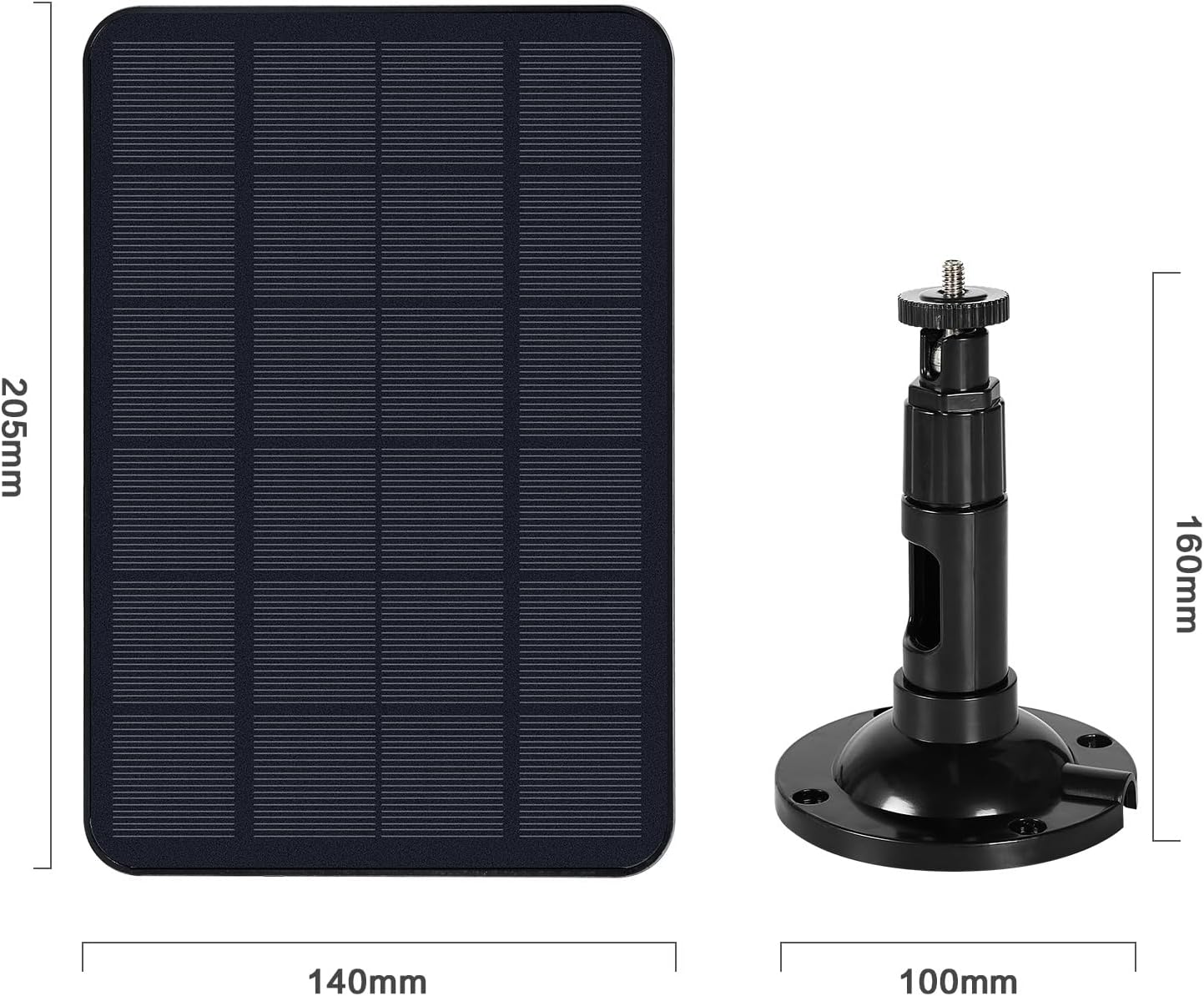
Dimensions of the solar panel (208mm x 140mm) and the mounting bracket (160mm height, 100mm base diameter).

The internal structure of the Grade A Monocrystalline silicon, highlighting its efficiency and robust design.
Package Contents
The following items are included in your package:
- 1 x DEWIN 5V 7W Solar Panel (with integrated 5m Type-C cable)
- 1 x Mounting Bracket (360° adjustable)
- 4 x Screws
- 4 x Plastic Expansion Tubes
Safety Information
- Do not attempt to disassemble or modify the solar panel.
- Avoid exposing the panel to fire or extreme heat.
- Keep out of reach of children.
- Ensure all connections are secure before use.
- Handle with care to prevent damage to the panel surface.
Warranty and Support
For warranty information and technical support, please refer to the documentation provided with your purchase or contact DEWIN customer service directly. Keep your purchase receipt as proof of purchase for any warranty claims.