
1. Overview
This manual provides instructions for the RETROSUN BN59-01303A replacement remote control, designed for use with various Samsung Smart TV models. This remote utilizes infrared technology and requires no programming or pairing for operation.
Compatible TV Models:
- UA43NU7090, UA50NU7090, UA55NU7090, UA65NU7090
- UA43NU7100, UA49NU7100, UA55NU7100, UA65NU7100, UA75NU7100
- UE40NU7122, UE40NU7172, UE40NU7192
- And other compatible Samsung Smart TV models.
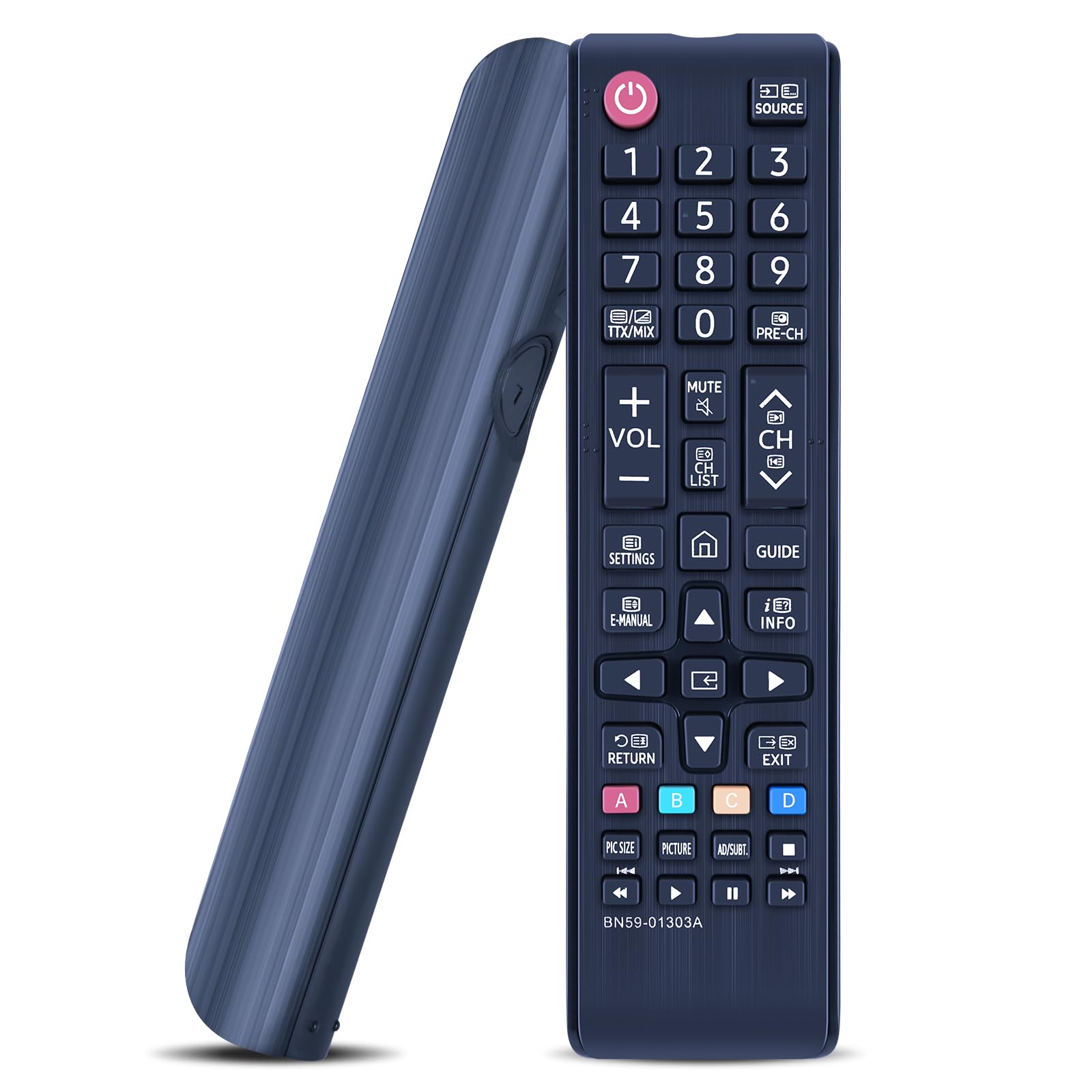
2. Setup
No Setup Required
The RETROSUN BN59-01303A remote control is designed for immediate use. No programming or pairing is required. Simply install the batteries, and the remote will function with your compatible Samsung Smart TV.

Battery Installation
The remote control requires two (2) AAA alkaline batteries (not included).
- Locate the battery compartment cover on the back of the remote control.
- Slide the cover downwards or press the latch (if present) to open the compartment.
- Insert two AAA batteries, ensuring the positive (+) and negative (-) terminals align correctly with the markings inside the compartment.
- Replace the battery compartment cover until it clicks securely into place.

3. Operating Instructions
The remote control features responsive buttons and operates using infrared technology, providing a control distance exceeding 26 feet (8 meters) and a wide control angle of over 120 degrees.

Button Functions
The remote control includes standard buttons for navigating your Samsung Smart TV:
- Power (Red button): Turns the TV on or off.
- Source: Selects input sources (HDMI, AV, etc.).
- Number Buttons (0-9): Direct channel selection.
- VOL (+/-): Adjusts volume up or down.
- CH (up/down): Changes channels.
- MUTE: Mutes or unmutes TV sound.
- SETTINGS: Accesses TV settings menu.
- E-MANUAL: Opens the electronic manual (if supported by TV).
- INFO: Displays information about the current program.
- Directional Pad (Up/Down/Left/Right) & Enter: Navigates menus and confirms selections.
- RETURN: Returns to the previous screen or menu.
- EXIT: Exits the current menu or application.
- Color Buttons (A, B, C, D): Access specific functions within certain applications or menus.
- Playback Controls (Play, Pause, Stop, Fast Forward, Rewind): Controls media playback.
4. Maintenance
- Cleaning: Use a soft, dry cloth to clean the remote control. Do not use liquid cleaners or abrasive materials.
- Battery Care: Replace batteries when the remote's performance degrades. Remove batteries if the remote will not be used for an extended period to prevent leakage.
- Storage: Store the remote in a cool, dry place away from direct sunlight and extreme temperatures.
5. Troubleshooting
- Remote not responding:
- Ensure batteries are inserted correctly with the correct polarity.
- Replace old batteries with new AAA alkaline batteries.
- Check for any obstructions between the remote control and the TV's infrared receiver.
- Ensure the remote is pointed directly at the TV.
- Short control distance:
- Replace batteries with fresh ones.
- Ensure there are no strong light sources (like direct sunlight) interfering with the infrared signal.
6. Specifications
| Feature | Detail |
|---|---|
| Brand | RETROSUN |
| Model Number | BN59-01303A |
| Connectivity Technology | Infrared |
| Compatible Devices | Samsung Smart Televisions |
| Power Source | 2 x AAA Batteries (not included) |
| Maximum Range | 8 Meters (26 feet) |
| Special Feature | Ergonomic design, No setup required |
| Material | ABS |
| Button Quantity | 25 |

7. Warranty and Support
Warranty Information
This product comes with a 90-day warranty from the date of purchase. This warranty covers manufacturing defects under normal use.
Customer Support
If your TV model is not listed as compatible, or if you encounter any issues with the remote control, please contact the seller via the Amazon messaging tool for assistance. We are available to help check compatibility and provide support.