
1. Product Overview
The Vrabocry A550 RGBCCT High Speed Amplifier is designed to extend the reach and maintain the brightness of LED strips controlled by a PWM LED controller. This 5-channel amplifier ensures that LED strips retain their intended brightness and color consistency over longer distances by amplifying the control signal and power. It supports DC5-24V input and provides a total output current of 50A (5 channels x 10A per channel), making it suitable for various RGBWW, RGBW, and CCT LED lighting applications.
The amplifier features a high-speed design to minimize signal delay, allowing for seamless synchronization when multiple units are cascaded. Its aluminum shell provides durability and efficient heat dissipation.
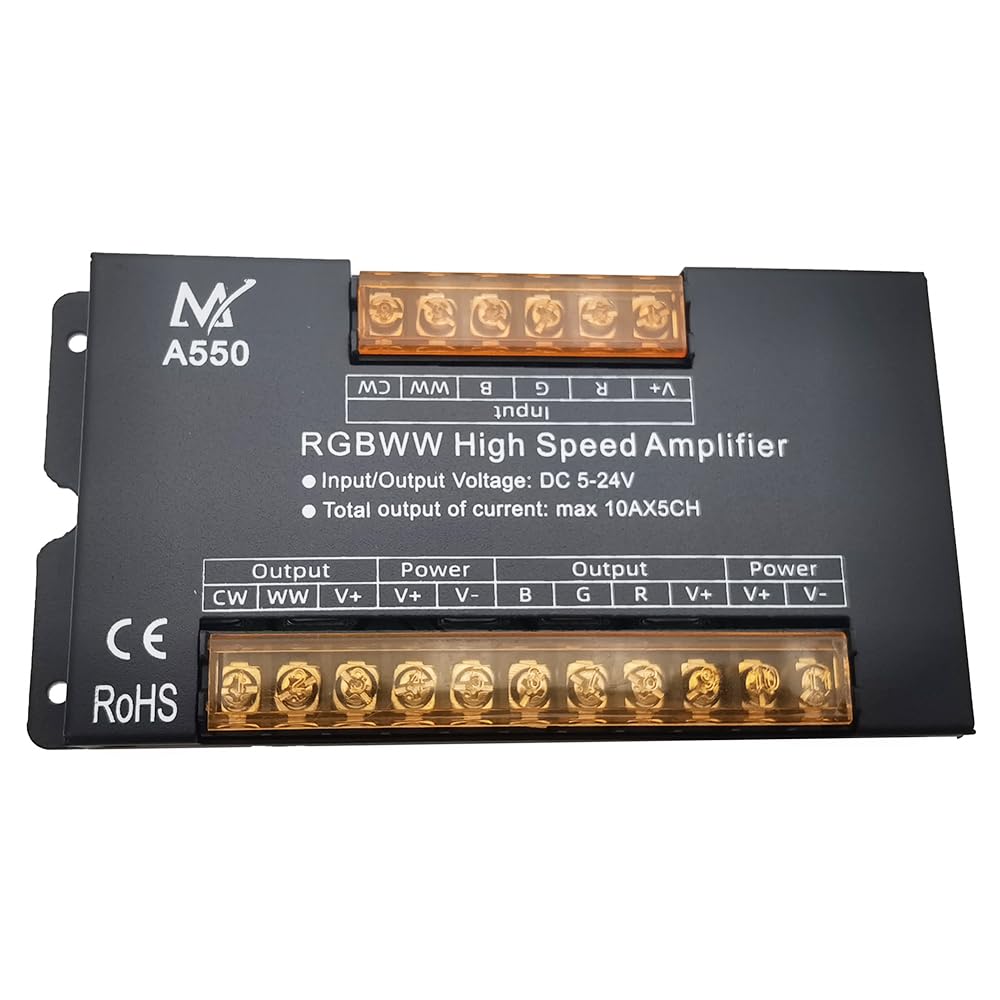
Figure 1.1: Front angled view of the Vrabocry A550 RGBCCT High Speed Amplifier. This image shows the overall design of the amplifier, including its robust aluminum casing and connection terminals.
2. Setup and Installation
Proper installation is crucial for the safe and effective operation of the amplifier. Please follow these steps carefully:
- Power Supply: Ensure you have a stable DC5-24V power supply appropriate for your LED strip and amplifier's total load.
- Controller Connection: Connect the output of your PWM LED controller to the 'Input' terminals of the amplifier. Ensure correct polarity (V+, R, G, B, CW, WW or similar channels depending on your LED type).
- LED Strip Connection: Connect your LED strips to the 'Output' terminals of the amplifier. Match the channels (V+, R, G, B, CW, WW) from the amplifier to the corresponding inputs on your LED strip.
- Cascading (Optional): For longer LED installations, multiple amplifiers can be cascaded. Connect the output of the first amplifier to the input of the next amplifier, and ensure each amplifier has its own adequate power supply.

Figure 2.1: Wiring diagram illustrating the connection of the amplifier with a power supply and an RGBWW controller. This diagram shows how to connect the AC power supply to a DC power supply, which then powers both the controller and the amplifier, with the amplifier extending the signal to additional LED strips.

Figure 2.2: Top view of the Vrabocry A550 amplifier, highlighting the clearly labeled input and output terminals. The input terminals are on the left, and the output terminals are on the right, with power connections for both sections.
Important Warnings:
- Always confirm that the power supply voltage is correct (DC5-24V) before connecting.
- Never connect two wires directly to avoid short circuits.
- Ensure all lead wires are correctly connected with proper polarity.
3. Operating Instructions
The Vrabocry A550 amplifier operates by receiving a PWM control signal from your LED controller and amplifying both the signal and the power to drive longer lengths of LED strips. It does not have independent controls; its function is entirely dependent on the connected PWM LED controller.
- Once properly wired, power on your DC power supply.
- Operate your LED controller as usual. The amplifier will automatically repeat the signal, ensuring consistent brightness and color across all connected LED segments.
- When cascading multiple amplifiers, ensure each amplifier is powered by an independent power supply capable of handling its respective LED load.
4. Maintenance
To ensure the longevity and optimal performance of your amplifier, follow these maintenance guidelines:
- Cleaning: Keep the amplifier clean and free from dust. Use a dry, soft cloth for cleaning. Do not use liquid cleaners.
- Environment: Operate the device within its specified working temperature range of -20°C to 60°C. Avoid exposure to extreme temperatures, high humidity, or direct water contact.
- Ventilation: Ensure adequate airflow around the amplifier, especially if it is enclosed, to prevent overheating. The aluminum shell is designed for heat dissipation.
- Connections: Periodically check all wiring connections to ensure they are secure and free from corrosion.
5. Troubleshooting
If you encounter issues with your amplifier, consider the following troubleshooting steps:
- No Power/Lights:
- Verify that the power supply is correctly connected and providing the specified DC5-24V.
- Check all input and output wiring for correct polarity and secure connections.
- Ensure the LED controller is functioning correctly and sending a signal.
- Flickering Lights or Incorrect Colors:
- Confirm that the lead wires for each color channel (R, G, B, CW, WW) are correctly matched between the controller, amplifier, and LED strip.
- Check for loose connections or damaged wires.
- Ensure the power supply is sufficient for the total load of the LED strips connected to the amplifier. An undersized power supply can cause flickering.
- Amplifier Overheating:
- Reduce the load on the amplifier if it exceeds the maximum 50A.
- Ensure the amplifier is in an area with adequate ventilation.
If problems persist after following these steps, please contact customer support.
6. Specifications
| Model | A550 |
| Input Voltage | DC5-24V |
| Max Output Current | 5 x 10A (Total 50A) |
| Number of Channels | 5 |
| High Speed | 1 Mbit/s |
| Working Temperature | -20°C to 60°C |
| Material | Aluminum |
| Product Dimensions (L x W x H) | 168mm x 82mm x 21mm |
| Package Dimensions (L x W x H) | 170mm x 85mm x 24mm |
7. Warranty Information
This product comes with a one-year warranty from the date of purchase. The warranty covers manufacturing defects under normal use. It does not cover damage resulting from:
- Artificial damage (e.g., physical impact, improper handling).
- Overload operation beyond the specified maximum current (50A total).
- Incorrect wiring or connection to an unsuitable power supply.
- Unauthorized repairs or modifications.
Please retain your proof of purchase for warranty claims.
8. Customer Support
For technical assistance, warranty claims, or any questions regarding the Vrabocry A550 RGBCCT High Speed Amplifier, please contact your retailer or the manufacturer directly. Provide your product model number (A550) and a detailed description of the issue to facilitate support.