
Important Safety Instructions
Please read and save these important safety instructions before using your humidifier. Failure to follow these instructions may result in electric shock, fire, or serious injury.
- Always place the humidifier on a firm, flat, water-resistant surface at least 6 inches (15 cm) away from walls and appliances.
- Do not block air vents or place the humidifier on a soft surface like a bed or sofa, as this could block the air inlets.
- Unplug the humidifier from the power outlet before cleaning, refilling, or moving it.
- Keep the humidifier out of reach of children and pets.
- Never immerse the humidifier base, power cord, or plug in water or other liquids.
- Use only clean, cool tap water in the water tank. Do not add hot water.
- Do not add water through the air vents or fan grille.
- Do not operate the humidifier if the cord or plug is damaged, or if the unit has been dropped or damaged in any way.
- Only use attachments or accessories specified by the manufacturer.
Product Overview
The SPT SU-4023B is a 1-gallon evaporative humidifier designed to provide comfortable humidity levels in your living space. It operates by drawing dry air through a moisture-laden wick filter and circulating moist air throughout the room.
Key Features
- Evaporative humidification with air circulation.
- Two convenient ways to refill water: top refill and water tank refill.
- Simple 1-knob operation for ease of use.
- Wick filter (included) captures minerals and deposits, preventing white dust.
- 1-gallon (3.7 liters) water tank capacity.
- Three adjustable fan speeds.
- Integrated essential oil compartment for aromatherapy.
- Low water level indicator with automatic shut-off for safety.
Components

The humidifier consists of a main unit with a fan and controls, and a removable water tank with a wick filter. The control knob allows you to select fan speed and power.

The main unit houses the fan and electronic components. The water tank holds the water and the wick filter, which absorbs water for evaporation.
Setup
Unpacking
- Carefully remove the humidifier from its packaging.
- Remove all packing materials, including any protective films or tapes.
- Inspect the unit for any signs of damage. If damaged, do not operate and contact customer support.
Placement
Choose a suitable location for your humidifier. It should be placed on a flat, stable, and water-resistant surface. Ensure there is adequate space around the unit for proper air circulation.
Initial Water Fill
- Ensure the humidifier is unplugged from the power outlet.
- Remove the top cover of the humidifier.
- Carefully pour clean, cool tap water directly into the water tank through the top opening. Fill up to the 'MAX' indicator line.
- Alternatively, you can remove the entire water tank from the base and fill it at a sink.
- Replace the top cover securely.

The humidifier offers a convenient top-fill design, allowing for easy replenishment of water without needing to remove the tank.
Operation
Power On/Off and Speed Adjustment
- After filling the water tank, plug the power cord into a standard electrical outlet.
- Turn the control knob clockwise to select your desired fan speed: '1' for low, '2' for medium, or '3' for high. The humidifier will begin operating.
- To turn off the humidifier, turn the control knob counter-clockwise to the '0' position.
Low Water Level Indicator
The humidifier is equipped with a low water level indicator light. When the water level in the tank is too low, the indicator will illuminate, and the unit will automatically shut off to prevent damage. Refill the water tank to resume operation.
Essential Oil Compartment
The humidifier features a dedicated compartment for essential oils, allowing you to enjoy aromatherapy while humidifying your space.
- Locate the essential oil compartment on the top of the unit.
- Open the compartment cover.
- Add a few drops of your preferred essential oil onto the aroma pad (if included) or directly into the designated area.
- Close the compartment cover securely.
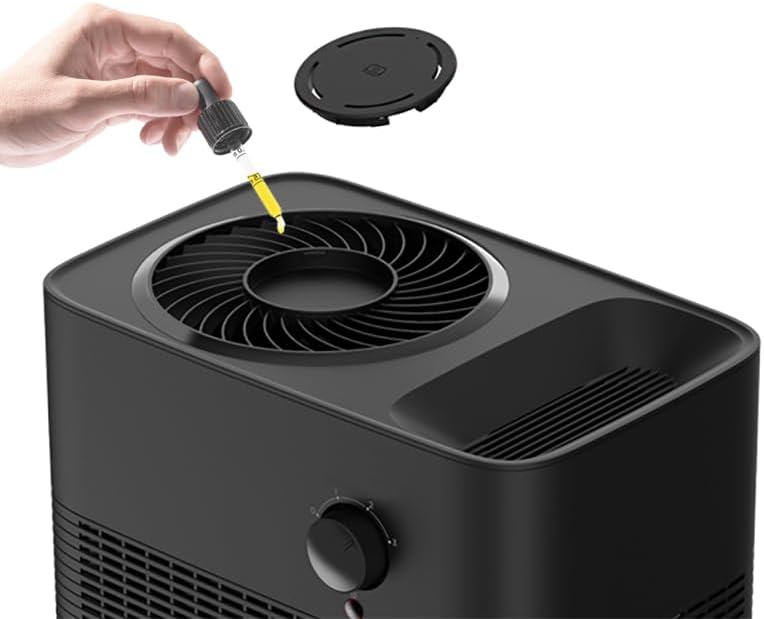
Adding essential oils is a simple process, enhancing your environment with pleasant aromas.
Maintenance
Regular cleaning and maintenance are crucial for optimal performance and longevity of your humidifier.
Cleaning the Unit
- Always unplug the humidifier before cleaning.
- Empty any remaining water from the tank and base.
- Wipe down the exterior surfaces with a soft, damp cloth.
- For the water tank and base, use a mild detergent and warm water. Rinse thoroughly to remove any soap residue.
- To remove mineral buildup, fill the tank with a mixture of white vinegar and water (1:1 ratio) and let it soak for 20-30 minutes. Scrub with a soft brush if necessary, then rinse well.
- Allow all parts to air dry completely before reassembling.
Wick Filter Replacement
The wick filter is designed to capture minerals and deposits from the water. Over time, it will become discolored and less effective. Replace the wick filter regularly for best performance, typically every 2-3 months depending on water hardness and usage.
- Replacement Wick Filter F-4023 (Set of 2) is available for purchase.
- To replace, remove the top cover and the old wick filter from the water tank.
- Insert the new wick filter into the designated slot in the water tank.
- Ensure the filter is properly seated before refilling the tank and replacing the top cover.
Troubleshooting
If you encounter issues with your humidifier, refer to the following common problems and solutions:
| Problem | Possible Cause | Solution |
|---|---|---|
| Humidifier not turning on | No power; Water tank not properly seated; Low water level. | Ensure unit is plugged in; Re-seat water tank firmly; Refill water tank. |
| No humidification/Low output | Wick filter dry or clogged; Insufficient water; Fan speed too low. | Ensure wick filter is saturated; Refill water tank; Increase fan speed. |
| Unusual noise | Unit not on a flat surface; Obstruction in fan; Mineral buildup. | Place on a stable surface; Check for and remove obstructions; Clean the unit. |
| Unpleasant odor | Stagnant water; Dirty wick filter; Mineral buildup. | Empty and clean water tank regularly; Replace wick filter; Clean unit thoroughly. |
Specifications
Technical specifications for the SPT SU-4023B 1-Gallon Evaporative Humidifier:
| Feature | Detail |
|---|---|
| Brand | SPT |
| Model Name | 1-Gallon Evaporative Humidifier |
| Model Number | SU-4023B |
| Color | BLACK |
| Filter Type | Wick |
| Water Tank Capacity | 1 Gallon (3.7 Liters) |
| Floor Area Coverage | 270 Square Feet |
| Product Dimensions (D x W x H) | 8.5"D x 12.5"W x 11.5"H |
| Item Weight | 4.3 Pounds |
| Voltage | 120 Volts |
| Included Components | Wick Filter F-4023 (Set of 2) |
| UPC | 810012681872 |

The compact design of the humidifier makes it suitable for various room types including office, living room, and bedroom.
Warranty and Support
SPT products are manufactured to the highest quality standards. This product is covered by a limited warranty against defects in material and workmanship. Please refer to the warranty card included with your purchase for specific terms and conditions.
For technical support, replacement parts, or warranty inquiries, please contact SPT customer service. Keep your purchase receipt as proof of purchase for warranty claims.
- Manufacturer: SPT
- Website: Visit the SPT Store on Amazon
