
1. Introduction
Thank you for choosing the Aptkdoe HD65 Wireless Earbuds. These earbuds are designed to provide a high-quality audio experience with features tailored for active lifestyles, including secure ear hooks, IPX7 waterproofing, and ENC noise-cancelling microphone technology. Please read this manual carefully to ensure proper use and optimal performance of your device.
2. Package Contents
- Aptkdoe HD65 Wireless Earbuds (Left and Right)
- Charging Case
- USB-C Charging Cable
- Multiple Sizes of Ear Tips
- User Manual (this document)
3. Product Overview
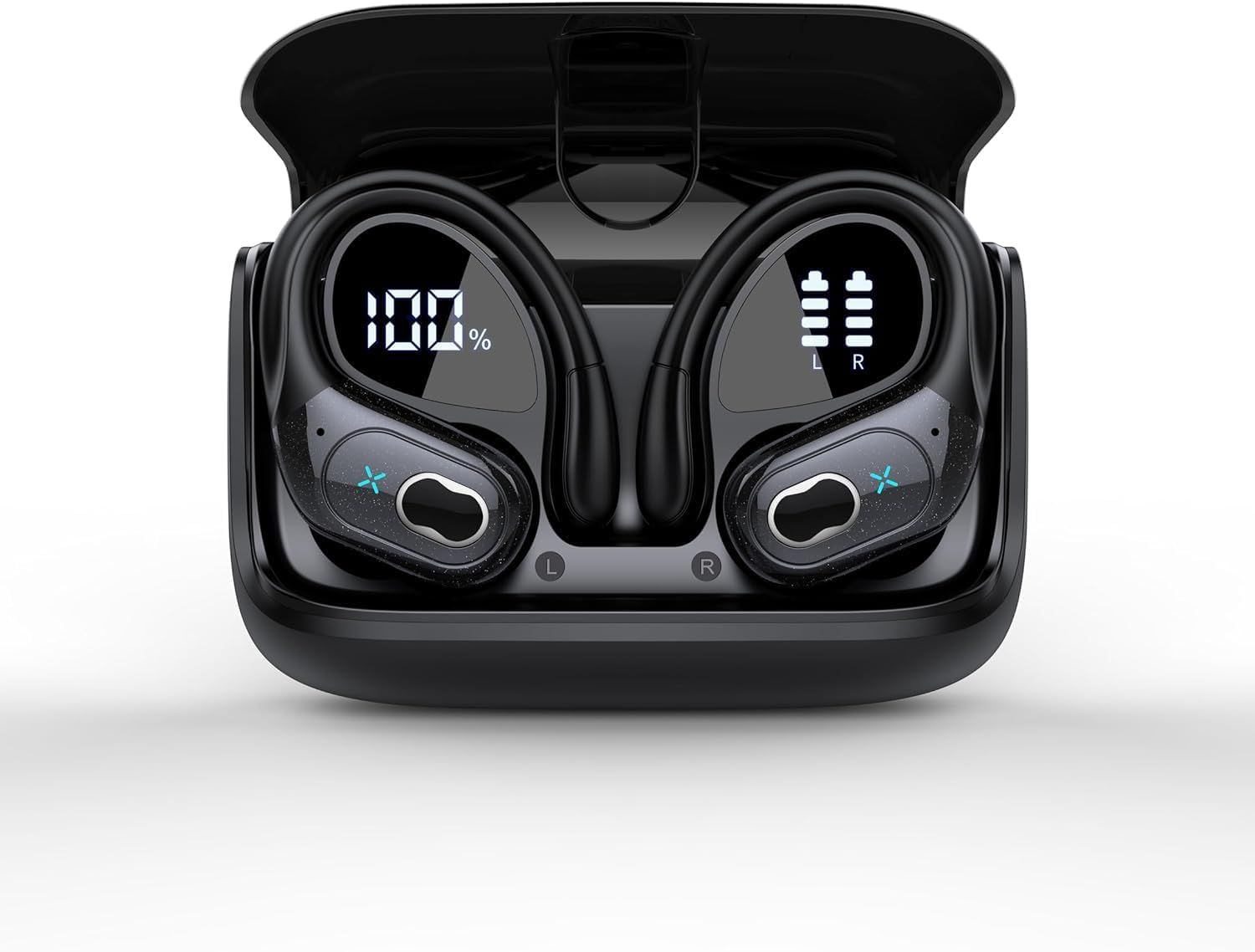
Image 1: Aptkdoe HD65 Wireless Earbuds in their charging case. The case features a digital display showing the battery percentage of the case (100%) and individual battery levels for the left (L) and right (R) earbuds.
The Aptkdoe HD65 earbuds feature an over-ear hook design for secure fit during activities. The charging case includes a digital display to show the battery status of both the case and individual earbuds. Each earbud has touch controls for media playback and call management.
4. Setup and First Use
4.1 Charging the Earbuds and Case
- Place both earbuds into the charging case. Ensure they are correctly seated.
- Connect the USB-C charging cable to the charging port on the case and to a compatible USB power source (e.g., wall adapter, computer USB port).
- The digital display on the charging case will show the current battery percentage of the case and the charging status of each earbud.
- Allow the earbuds and case to fully charge before first use. A full charge provides up to 75 hours of total playtime with the charging case.
Note: It is recommended to fully charge the device before initial use to maximize battery life.
4.2 Pairing with a Bluetooth Device
- Open the charging case. The earbuds will automatically enter pairing mode, indicated by a flashing LED light on the earbuds.
- On your device (e.g., smartphone, tablet), enable Bluetooth.
- Search for "HD65" in the list of available Bluetooth devices.
- Select "HD65" to connect. Once connected, the LED indicator on the earbuds will stop flashing.
- The earbuds will automatically reconnect to the last paired device when removed from the case, if Bluetooth is enabled on the device.
Note: If pairing fails, ensure the earbuds are charged and within range of your device. Try turning Bluetooth off and on again on your device.
4.3 Wearing the Earbuds
- Identify the Left (L) and Right (R) earbuds.
- Gently place the earbud into your ear canal.
- Adjust the over-ear hook to fit securely around your ear. The flexible hook ensures stability, especially during physical activities.
- Experiment with the different sizes of ear tips provided to find the most comfortable and secure fit for optimal sound quality and noise isolation.
5. Operating Instructions
5.1 Touch Controls
The Aptkdoe HD65 earbuds feature intuitive touch controls for easy management of audio and calls. Specific functions may vary slightly, but generally include:
- Single Tap: Play/Pause music, Answer/End call.
- Double Tap (Left Earbud): Previous track.
- Double Tap (Right Earbud): Next track.
- Triple Tap (Left Earbud): Volume Down.
- Triple Tap (Right Earbud): Volume Up.
- Long Press (2 seconds): Reject call, Activate voice assistant.
5.2 Power On/Off
- Power On: Open the charging case, or long-press the touch area on both earbuds for 3 seconds.
- Power Off: Place the earbuds back into the charging case and close the lid, or long-press the touch area on both earbuds for 5 seconds.
5.3 Noise Cancellation (ENC)
The earbuds are equipped with Environmental Noise Cancelling (ENC) microphone technology. This feature enhances call clarity by reducing background noise during phone conversations, ensuring your voice is heard clearly by the other party.
5.4 Water Resistance (IPX7)
With an IPX7 waterproof rating, your earbuds are protected against sweat and rain, making them suitable for workouts and outdoor activities. Note: The charging case is not waterproof. Do not submerge the earbuds or charging case in water. Ensure earbuds are dry before placing them back into the charging case to prevent damage.
6. Maintenance and Care
- Cleaning: Regularly clean the earbuds, ear tips, and charging contacts with a soft, dry, lint-free cloth. Avoid using harsh chemicals or abrasive materials.
- Storage: When not in use, store the earbuds in their charging case to protect them and keep them charged. Store in a cool, dry place away from extreme temperatures.
- Battery Care: To prolong battery life, avoid fully discharging the earbuds and charging case frequently. Charge them regularly, even if not in constant use.
- Water Exposure: After exposure to sweat or water, ensure the earbuds are completely dry before placing them back into the charging case to prevent corrosion of charging contacts.
7. Troubleshooting
| Problem | Possible Solution |
|---|---|
| Earbuds not pairing |
|
| No sound or low volume |
|
| Earbuds not charging |
|
| Poor call quality |
|
8. Specifications
- Model Name: HD65
- Connectivity Technology: Bluetooth 5.3, Wireless
- Wireless Communication Technology: Bluetooth
- Bluetooth Range: 10 Meters
- Battery Life: Up to 75 Hours (with charging case)
- Water Resistance Level: IPX7 (Earbuds only)
- Noise Control: Active Noise Cancellation (ENC for microphone)
- Ear Placement: Over Ear
- Form Factor: In Ear
- Control Type: Media Control, Remote
- Compatible Devices: Cellphones
- Manufacturer: Aptkdoe
- Item Weight: 5.3 ounces
9. Warranty and Support
For warranty information and customer support, please refer to the warranty card included in your product packaging or visit the official Aptkdoe website. You may also contact Aptkdoe customer service directly for assistance with product inquiries, technical support, or warranty claims.
Please retain your proof of purchase for warranty purposes.