
1. Product Overview
The TERRAMASTER F4-424 Pro is a high-performance 4-bay Network Attached Storage (NAS) solution designed for small and medium-sized business users. It features a powerful Intel Core i3-N305 8-core 8-thread CPU, 32GB DDR5 RAM, dual 2.5GbE ports, and dual M.2 NVMe slots for SSD caching, delivering enhanced application speed and high-speed connectivity.

Figure 1: TERRAMASTER F4-424 Pro NAS device, front view.

Figure 2: Key specifications of the F4-424 Pro, highlighting the Intel Core i3-N305 8-core CPU, 32GB DDR5 RAM, 2.5GbE ports, and M.2 NVMe slots.
2. Setup and Installation
2.1 Package Contents
Before proceeding, ensure all components are present:
- TERRAMASTER F4-424 Pro NAS Unit
- Power Adapter and Power Cord
- Ethernet Cable
- Accessory Kit (screws, etc.)
- Quick Installation Guide
2.2 Hard Drive Installation
The F4-424 Pro features tool-free hard disk trays and a Push-Lock design for easy installation.
- Gently pull the hard drive tray out from the front of the NAS.
- Place your 3.5-inch HDD into the tray. The tray's design allows for tool-free installation by snapping the drive into place. For 2.5-inch drives, use the provided screws to secure them.
- Slide the tray back into the NAS until the Push-Lock mechanism secures it.

Figure 3: Illustrates the tool-free installation of a hard drive into the F4-424 Pro's tray.
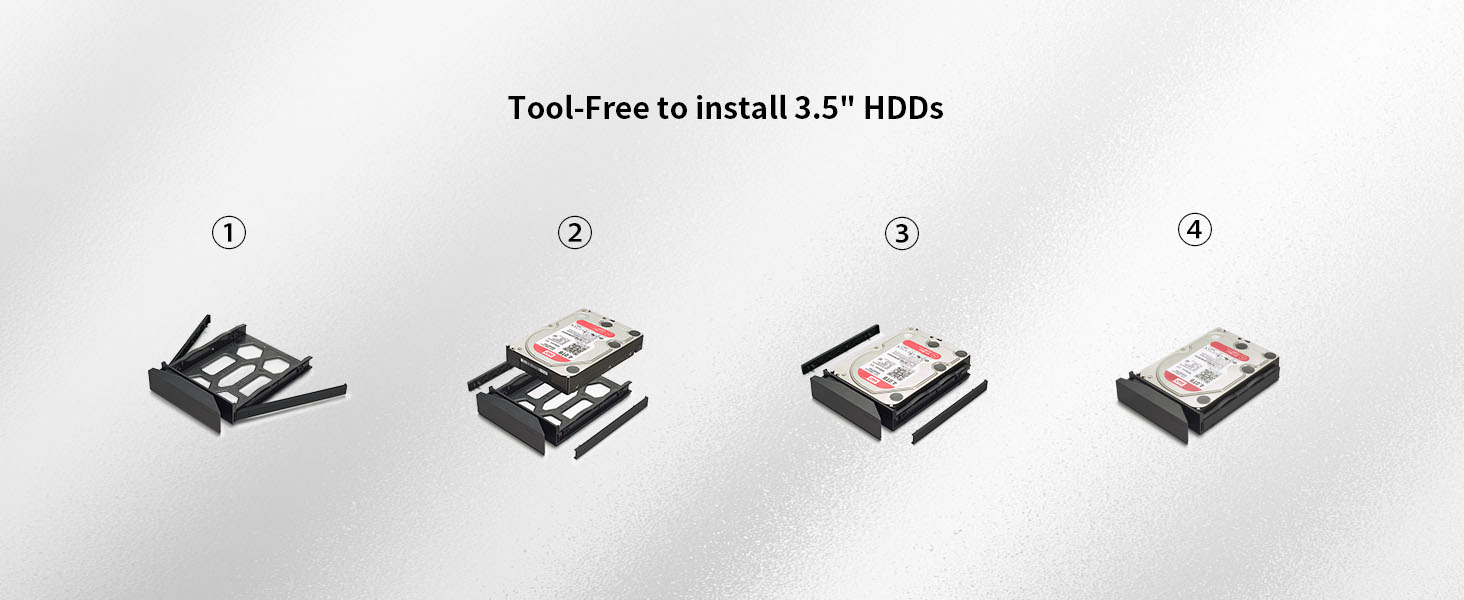
Figure 4: Step-by-step guide for installing a 3.5-inch HDD without tools.
2.3 M.2 NVMe SSD Installation
The F4-424 Pro includes dual M.2 NVMe slots for SSD caching, accessible via a side-sliding cover.
- Locate the side-sliding cover on the NAS unit.
- Gently push aside the cover to reveal the M.2 NVMe slots.
- Insert the M.2 NVMe SSD into the slot and secure it with the provided screw.
- Slide the cover back into place.

Figure 5: Visual guide for installing an M.2 SSD by sliding open the side panel.
2.4 RAM Installation (if applicable)
The F4-424 Pro comes with 32GB DDR5 4800MHz memory which is non-ECC and non-upgradable. Therefore, no RAM installation or upgrade is required or possible for this model.
2.5 Initial Connection
- Connect the NAS to your network router or switch using the provided Ethernet cable.
- Connect the power adapter to the NAS and plug it into a power outlet.
- Press the power button on the rear of the NAS to turn it on.
- Refer to the Quick Installation Guide for initial software setup and network configuration.
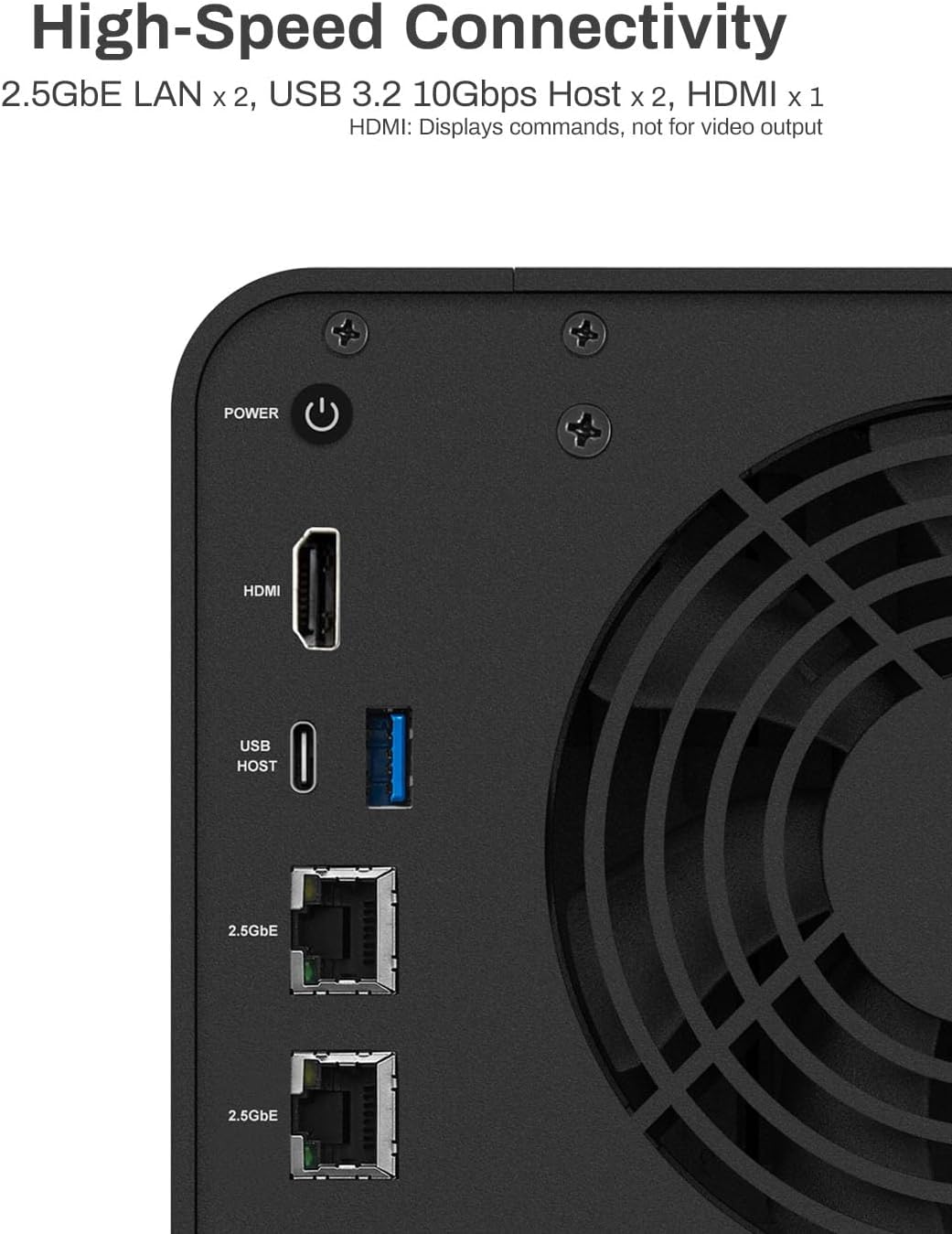
Figure 6: Rear panel of the F4-424 Pro, displaying dual 2.5GbE LAN ports, USB 3.2 10Gbps ports, and HDMI output (for commands, not video).
2.6 Setup Video Guide
For a visual walkthrough of the installation process, please refer to the following video:
Video 1: Installation guide for HDD, NVMe SSD, and RAM on a similar TERRAMASTER NAS model (F4-424 Max). The steps are largely applicable to the F4-424 Pro.
3. Operating the F4-424 Pro
3.1 TERRAMASTER Operating System (TOS)
The F4-424 Pro operates on TERRAMASTER's TOS, providing a user-friendly interface for managing your NAS. Access the TOS through a web browser by entering the NAS's IP address.
3.2 Data Management and Backup Solutions
The F4-424 Pro offers a variety of backup and synchronization tools to protect your data:
- Centralized Backup: For backing up data from multiple devices (PCs, servers, VMs) to the NAS.
- Duple Backup: Creates a second backup of your NAS data to another remote NAS or cloud service.
- Snapshot: Point-in-time copies of your data for quick recovery.
- CloudSync: Synchronizes data with various cloud storage services.
- TFM Backup: A professional backup tool for comprehensive data protection.
- USB Copy: Easily back up data from USB devices to the NAS.
- TerraSync: Cross-platform file synchronization for seamless collaboration.

Figure 7: Overview of integrated backup applications like Centralized Backup, Duple Backup, TerraSync, Snapshot, CloudSync, and USB Copy.

Figure 8: Diagram showing data synchronization capabilities across various devices and platforms using TerraSync and CloudSync.
3.3 Multimedia Server
The F4-424 Pro supports various multimedia applications, allowing it to function as a powerful media server for 4K/8K video decoding. It is compatible with Plex, Emby, Jellyfin, DLNA, Roku, and iTunes.

Figure 9: The F4-424 Pro functions as a powerful multimedia server, supporting platforms like Emby and Plex.
3.4 Surveillance Manager
Utilize the Surveillance Manager application to connect and manage IP cameras, enabling real-time viewing, recording, and playback of surveillance footage.

Figure 10: The Surveillance Manager interface, showing options for live view, recording, camera management, and snapshots.
3.5 Virtualized Applications
The F4-424 Pro supports virtualized applications like Docker, allowing users to deploy and manage various containerized services.

Figure 11: Illustration of virtual machine storage space expansion with VMware vSphere and Windows Hyper-V.
4. Maintenance
4.1 Cooling and Noise Reduction
The F4-424 Pro is designed with a smart fan system and strategically placed side and bottom vents to ensure efficient heat dissipation, extending the lifespan of the device. Special sound-absorbing panels are integrated into the structure to minimize operational noise.
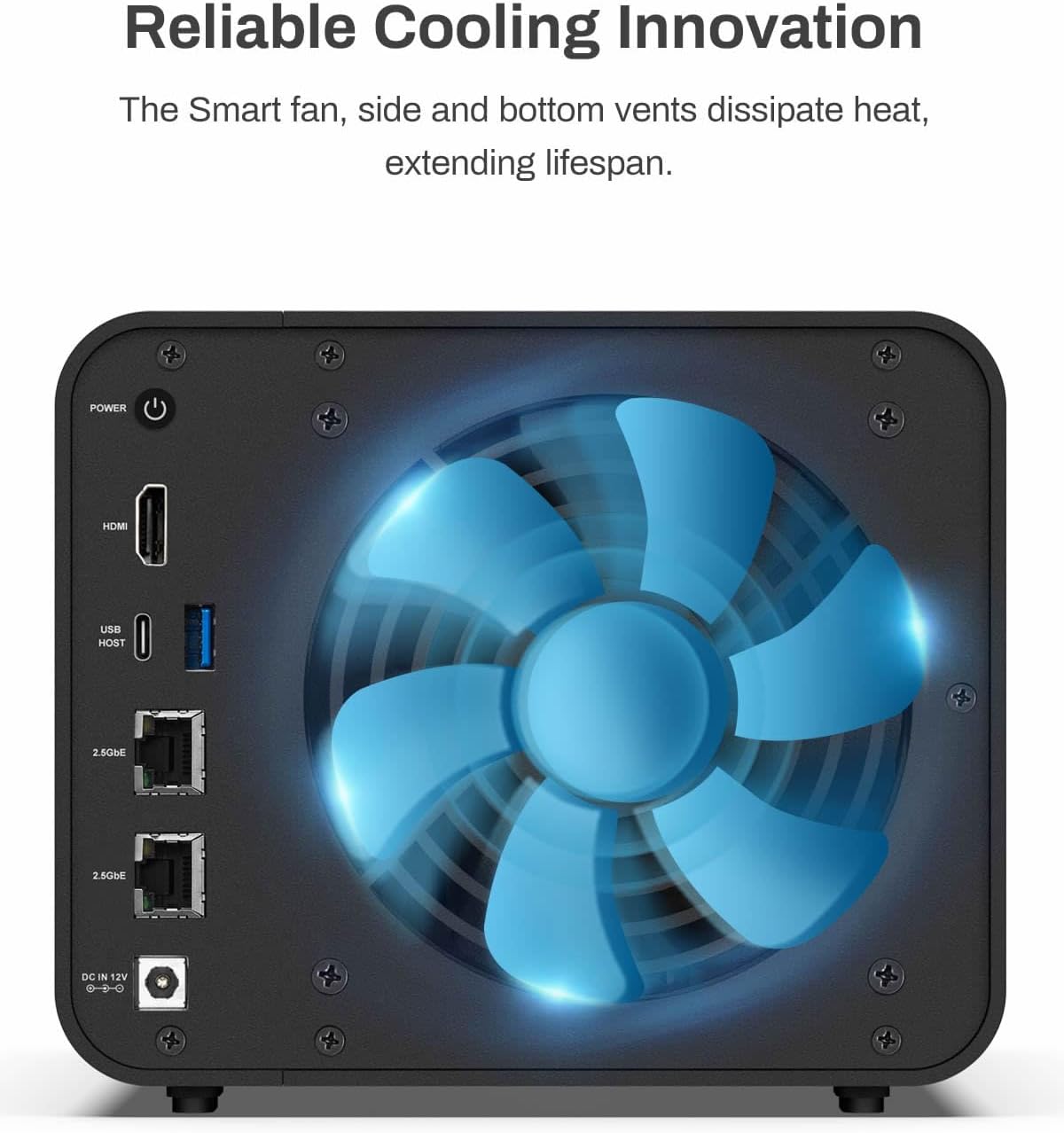
Figure 12: Rear view of the F4-424 Pro highlighting the cooling fan and vents for reliable heat dissipation.

Figure 13: Internal view of the NAS chassis, illustrating the sound-absorbing panels designed to reduce noise levels.
4.2 Software Updates
Regularly check for and install the latest TOS updates to ensure optimal performance, security, and access to new features. Updates can typically be managed through the NAS's web interface.
4.3 Data Integrity
The F4-424 Pro supports various RAID types (RAID 0/1/5/6/10/JBOD/Single) and TRAID (TerraMaster RAID) for flexible data protection and storage management. TRAID offers optimized storage utilization and redundancy.

Figure 14: Comparison of TRAID and RAID 5, demonstrating TRAID's flexible space utilization and protection across different drive sizes.
5. Troubleshooting
This section provides general guidance for common issues. For detailed troubleshooting, refer to the official TERRAMASTER support website or contact customer service.
5.1 Power Issues
- No Power: Ensure the power cable is securely connected to both the NAS and the power outlet. Verify the power adapter is functioning correctly.
- Unexpected Shutdowns: Check for proper ventilation and ensure the NAS is not overheating. Review system logs for error messages.
5.2 Network Connectivity Problems
- Cannot Access NAS: Verify Ethernet cable connections. Check router/switch status. Ensure the NAS has a valid IP address and that your computer is on the same network.
- Slow Network Speeds: Confirm 2.5GbE connections are active and properly configured. Check for network congestion or faulty cables.
5.3 Drive-Related Issues
- Drive Not Detected: Ensure drives are correctly seated in their trays. Check drive health status in the TOS interface.
- RAID Degradation: If a drive fails, replace it promptly according to the system's instructions to maintain data redundancy.
6. Specifications
| Feature | Specification |
|---|---|
| Model | F4-424 Pro |
| CPU | Intel Core i3-N305 8-core 8-thread (up to 3.8GHz) |
| GPU | Integrated UHD Graphics (up to 1.25GHz) |
| RAM | 32GB DDR5 4800MHz (non-ECC, non-upgradable) |
| Drive Bays | 4 x 3.5"/2.5" SATA HDD/SSD |
| M.2 Slots | 2 x M.2 NVMe slots for SSD caching |
| Ethernet Ports | 2 x 2.5GbE LAN |
| USB Ports | 2 x USB 3.2 10Gbps |
| HDMI Output | 1 (for commands, not video output) |
| RAID Support | RAID 0, 1, 5, 6, 10, JBOD, Single, TRAID |
| Dimensions (H x W x D) | 8.74 x 7.05 x 6.06 inches (22.2 x 17.9 x 15.4 cm) |
| Weight | 4.2 pounds (1.9 kg) |
| Material | Metal |
| Color | Black |
7. Warranty and Support
TERRAMASTER products typically come with a manufacturer's warranty. Please refer to the warranty card included in your product packaging or visit the official TERRAMASTER website for detailed warranty terms and conditions.
For technical support, software downloads, and further assistance, please visit the official TERRAMASTER support portal. You can also find FAQs and community forums for common issues.
8. Product Overview Video
Watch this video for a comprehensive overview of the TERRAMASTER F4-424 Pro NAS:
Video 2: An official overview of the TERRAMASTER F4-424 Pro, highlighting its features and capabilities.


