
Introduction
Thank you for choosing the Misik MH612-B Wireless In-Ear Headphones. These headphones feature True Wireless Stereo (TWS) technology, Bluetooth connectivity, sweat resistance, and a portable charging case. This manual will guide you through the setup, operation, and maintenance of your new device to ensure optimal performance and longevity.
Package Contents
Please check the package for the following items:
- Misik MH612-B Wireless In-Ear Headphones (Left and Right earbuds)
- Portable Charging Case
- USB Charging Cable (Type-C, typically)
- User Manual (this document)

Image: The retail packaging for the Misik MH612-B headphones, displaying the earbuds and their transparent charging case.
Setup
1. Charging the Headphones and Case
Before first use, fully charge the headphones and the charging case.
- Place the earbuds into the charging case. Ensure they are correctly seated in their respective slots (L for left, R for right).
- Connect the USB charging cable to the charging port on the case and plug the other end into a USB power adapter (not included) or a computer's USB port.
- The indicator light on the charging case will illuminate to show charging status. Once fully charged, the light may change color or turn off.
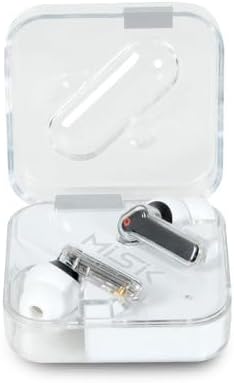
Image: The Misik MH612-B earbuds resting inside their transparent charging case, ready for charging.
2. Bluetooth Pairing
Follow these steps to pair your headphones with your device:
- Ensure the earbuds are charged. Open the charging case. The earbuds will automatically enter pairing mode, indicated by a flashing LED light on one or both earbuds.
- On your smartphone, tablet, or other Bluetooth-enabled device, go to the Bluetooth settings.
- Search for available devices. You should see "Misik MH612-B" or a similar name appear in the list.
- Select "Misik MH612-B" to connect. Once connected, a voice prompt will confirm the successful pairing, and the LED indicator on the earbuds will stop flashing.
- After initial pairing, the headphones will automatically connect to the last paired device when taken out of the case, provided Bluetooth is enabled on your device.

Image: The Misik MH612-B earbuds, showing their in-ear design and transparent stems, ready to be worn.
Operating Instructions
Music Playback Control
- Play/Pause: Tap the touch control area on either earbud once.
- Next Track: Double-tap the touch control area on the right earbud.
- Previous Track: Double-tap the touch control area on the left earbud.
- Volume Up: Triple-tap the touch control area on the right earbud.
- Volume Down: Triple-tap the touch control area on the left earbud.
Call Management
The integrated microphone allows for hands-free calls.
- Answer/End Call: Tap the touch control area on either earbud once.
- Reject Call: Press and hold the touch control area on either earbud for 2 seconds.
Voice Assistant
- Activate Voice Assistant: Press and hold the touch control area on either earbud for 3 seconds (e.g., Siri, Google Assistant).
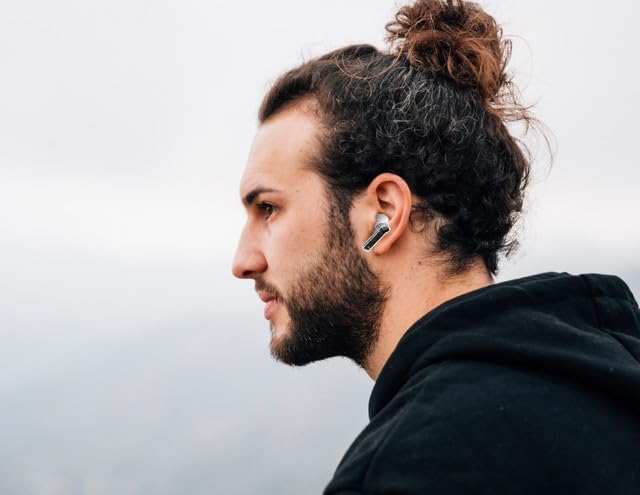
Image: A user wearing a Misik MH612-B earbud, illustrating how the product fits in the ear during use.
Maintenance
Proper maintenance ensures the longevity and performance of your Misik MH612-B headphones.
- Cleaning: Use a soft, dry, lint-free cloth to clean the earbuds and charging case. Do not use abrasive cleaners, alcohol, or chemical solvents.
- Sweat Resistance: While the headphones are sweat-resistant, it is recommended to wipe them dry after intense workouts to prevent moisture buildup.
- Storage: When not in use, always store the earbuds in their charging case to protect them from dust, damage, and to keep them charged.
- Avoid Extreme Temperatures: Do not expose the headphones or charging case to extreme temperatures (hot or cold) or direct sunlight for extended periods.
Troubleshooting
If you encounter any issues, please refer to the following common solutions:
- Headphones not pairing:
- Ensure both earbuds are charged.
- Turn off and on your device's Bluetooth.
- Forget/delete "Misik MH612-B" from your device's Bluetooth list and try pairing again.
- Place earbuds back in the case, close it, wait a few seconds, then open it again to re-enter pairing mode.
- No sound from one earbud:
- Ensure both earbuds are charged.
- Try placing both earbuds back in the case, closing it, and then taking them out again.
- Perform a factory reset if available (refer to specific instructions if provided with the product, or contact support).
- Charging case not charging:
- Check the USB cable and power adapter for damage.
- Ensure the charging cable is securely connected to both the case and the power source.
- Try a different USB cable or power adapter.
Specifications
| Model Name | MH612-B |
| Connectivity Technology | Wireless (Bluetooth) |
| Wireless Communication Technology | Bluetooth |
| Ear Placement | In-Ear (Intraurales) |
| Control Type | Volume Control |
| Special Features | Volume Control, Sports & Exercise, Lightweight, Built-in Microphone |
| Water Resistance Level | Sweat Resistant (A prueba de agua - implies resistance, not full submersion) |
| Power Source | Battery |
| Rechargeable Battery Included | Yes |
| Product Dimensions | 10 x 10 x 10 cm; 90 g |
| Compatible Devices | Laptops, Music Production Equipment, Motorcycles, Tablets, Cell Phones, Television, Car Audio Systems, Phones, Desktop Computers, Video Game Consoles, Smart Speakers |
Warranty and Support
Warranty Information
The Misik MH612-B Wireless In-Ear Headphones come with a 3-year warranty from the date of purchase. This warranty covers manufacturing defects under normal use. Please retain your proof of purchase for warranty claims.
Customer Support
For further assistance, technical support, or warranty claims, please contact Misik customer service through their official website or the retailer where you purchased the product. Please have your model number (MH612-B) and proof of purchase ready when contacting support.


