
LENCENT PA050USUS
LENCENT Multi Plug Outlet Extender with USB (Model PA050USUS) - Instruction Manual
Model: PA050USUS | Brand: LENCENT
1. Product Overview
The LENCENT Multi Plug Outlet Extender is designed to expand a single wall socket into multiple power and charging options. This compact device features 4 AC outlets and 4 USB charging ports (2 USB-C and 2 USB-A), allowing for simultaneous charging of up to 8 devices. It supports a maximum capacity of 1875 Watts (125 Volts, 15 Amps) and is built with fireproof materials for safety.
Its non-surge protection design makes it suitable for use on cruise ships, complying with major cruise line regulations.

Image: The LENCENT Multi Plug Outlet Extender with various devices connected to its AC and USB ports, demonstrating its 8-in-1 functionality.
2. Setup Instructions
- Unpack the Device: Carefully remove the LENCENT Multi Plug Outlet Extender from its packaging.
- Locate a Wall Outlet: Identify a standard N American 2 or 3 prong wall outlet where you intend to use the extender.
- Plug In the Extender: Insert the extender directly into the wall socket. Ensure it is firmly seated. No additional installation is required.
- Verify Power: Once plugged in, the extender is ready for use.
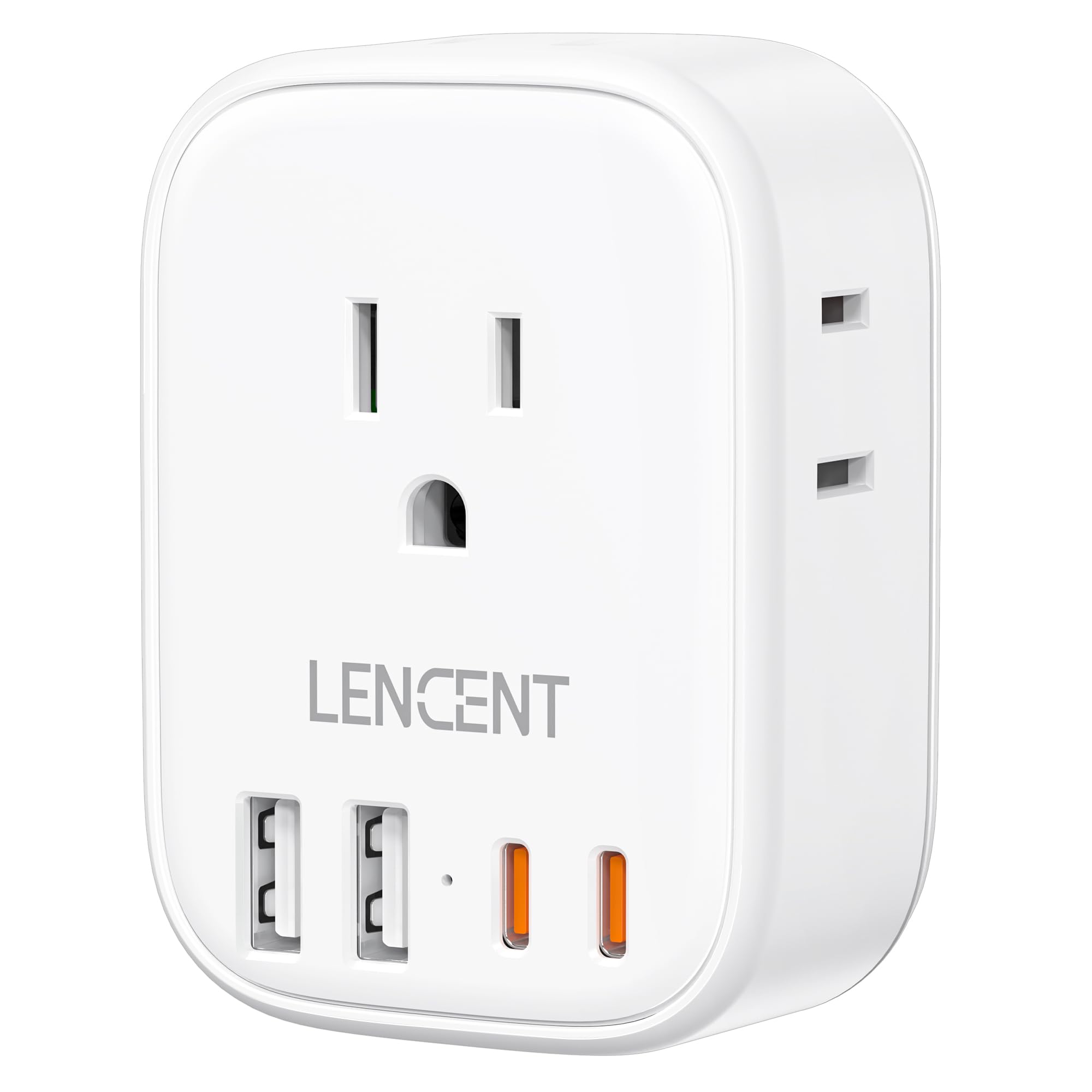
Image: The LENCENT Multi Plug Outlet Extender plugged into a standard wall outlet.
3. Operating Instructions
3.1 Using AC Outlets
- The extender provides 4 AC outlets. Plug your devices directly into these outlets.
- The total maximum capacity for all AC outlets combined is 1875W (125V, 15A). Do not exceed this limit to prevent overload.
- The side-facing outlets are designed for convenience, especially in tight spaces or behind furniture.

Image: The LENCENT Multi Plug Outlet Extender with side outlets, positioned behind furniture for easy access.
3.2 Using USB Charging Ports
- The extender includes 2 USB-C ports and 2 USB-A ports.
- USB-C Ports: Each USB-C port provides up to 5V/3A (15W) output. These are suitable for fast charging compatible devices like smartphones, tablets, and other USB-C powered electronics.
- USB-A Ports: Each USB-A port provides up to 5V/2.4A (12W) output. These are suitable for charging a wide range of USB-A powered devices.
- The total maximum output for all USB ports combined is 5V/3.5A (17.5W).
- Connect your device's USB charging cable to the appropriate USB port on the extender.

Image: Close-up of the LENCENT extender showing the USB-C and USB-A ports.
Video: Official LENCENT video demonstrating the Multi Plug Outlet Extender with 2 USB-C and 2 USB-A ports in use, highlighting its charging capabilities for various devices.
4. Maintenance
- Cleaning: Disconnect the extender from the wall outlet before cleaning. Use a soft, dry cloth to wipe the surface. Do not use liquid cleaners or aerosols.
- Storage: When not in use, store the extender in a cool, dry place away from direct sunlight and moisture.
- Inspection: Periodically inspect the extender for any signs of damage, such as frayed cables, cracked casing, or loose connections. If damage is found, discontinue use immediately.
5. Troubleshooting
| Problem | Possible Cause | Solution |
|---|---|---|
| Device not charging via AC outlet. |
|
|
| Device not charging via USB port. |
|
|
| Extender feels warm. | Normal operation under load. | If it becomes excessively hot or emits smoke/odor, unplug immediately and discontinue use. |
6. Specifications
| Feature | Detail |
|---|---|
| Model Number | PA050USUS |
| AC Outlets | 4 (N American 2 or 3 prong flat pin) |
| USB-C Ports | 2 (5V/3A, 15W Max per port) |
| USB-A Ports | 2 (5V/2.4A, 12W Max per port) |
| Total USB Output | 5V/3.5A, 17.5W Max |
| Max AC Capacity | 1875W (125V, 15A) |
| Product Dimensions | 3.07 x 2.24 x 2.52 inches |
| Item Weight | 4.6 ounces |
| Material | Fireproof material (rated 1382℉) |
| Safety Features | Short-Circuit Protection, Over-Temperature Protection, Over-Voltage Protection, Over-Current Protection, Overload Protection, Fire Resistance. Non-surge protected. |
| Certifications | CE, FCC |
7. Warranty Information
LENCENT products are designed for reliability and performance. For specific warranty details regarding your Multi Plug Outlet Extender (Model PA050USUS), please refer to the warranty card included with your purchase or visit the official LENCENT website. The warranty typically covers manufacturing defects under normal use conditions.
8. Customer Support
Should you encounter any issues or have questions about your LENCENT Multi Plug Outlet Extender, please contact our customer support team. You can reach us through the following channels:
- Official Website: Visit the LENCENT official website for FAQs, product registration, and support contact forms.
- Email Support: Send an email to our support team for assistance.
- Amazon Chat: For purchases made on Amazon, you may use the Amazon chat feature to connect with our support.
Please have your model number (PA050USUS) and purchase details ready when contacting support.
9. Important Safety Notes
- Non-Surge Protection: This adapter is designed without surge protection, making it compliant with most cruise line policies. Do not use where surge protection is required.
- Not a Voltage Converter: This product does not convert voltage. Ensure your devices are compatible with the local voltage (125V in North America) before plugging them in. This is especially critical for high-power devices like hair dryers, electric shavers, and hair straighteners when traveling internationally.
- Indoor Use Only: This device is intended for indoor use in dry locations only.
- Avoid Overloading: Do not exceed the maximum rated power of 1875W.
- Children and Pets: Keep out of reach of children and pets.
Ask a question about this manual
Ask about setup, troubleshooting, compatibility, parts, safety, or missing instructions. Manuals+ will review the question and use this page’s manual context to help answer it.