
Fafrees F20 X-MAX
Fafrees F20 X-MAX Electric Bicycle User Manual
Model: F20 X-MAX
1. Introduction
Thank you for choosing the Fafrees F20 X-MAX Electric Bicycle. This manual provides essential information for the safe operation, maintenance, and troubleshooting of your e-bike. Please read this manual thoroughly before your first ride to ensure proper use and to maximize your riding experience.
The Fafrees F20 X-MAX is a versatile folding electric fatbike designed for various terrains, offering a powerful motor, long-range battery, and a comfortable triple suspension system.
2. Safety Information
Your safety is paramount. Always adhere to the following safety guidelines:
- Always wear a helmet and appropriate safety gear when riding.
- Familiarize yourself with local traffic laws and regulations regarding electric bicycles.
- Perform a pre-ride inspection before each use, checking brakes, tires, battery, and lights.
- Do not ride under the influence of alcohol or drugs.
- Adjust your speed to suit road conditions, weather, and your riding ability.
- Ensure all folding mechanisms are securely locked before riding.
- Keep hands and feet away from moving parts, especially the chain and wheels.
- Do not exceed the maximum load capacity of 150 kg.
3. Components Overview
Understand the main parts of your Fafrees F20 X-MAX electric bicycle.
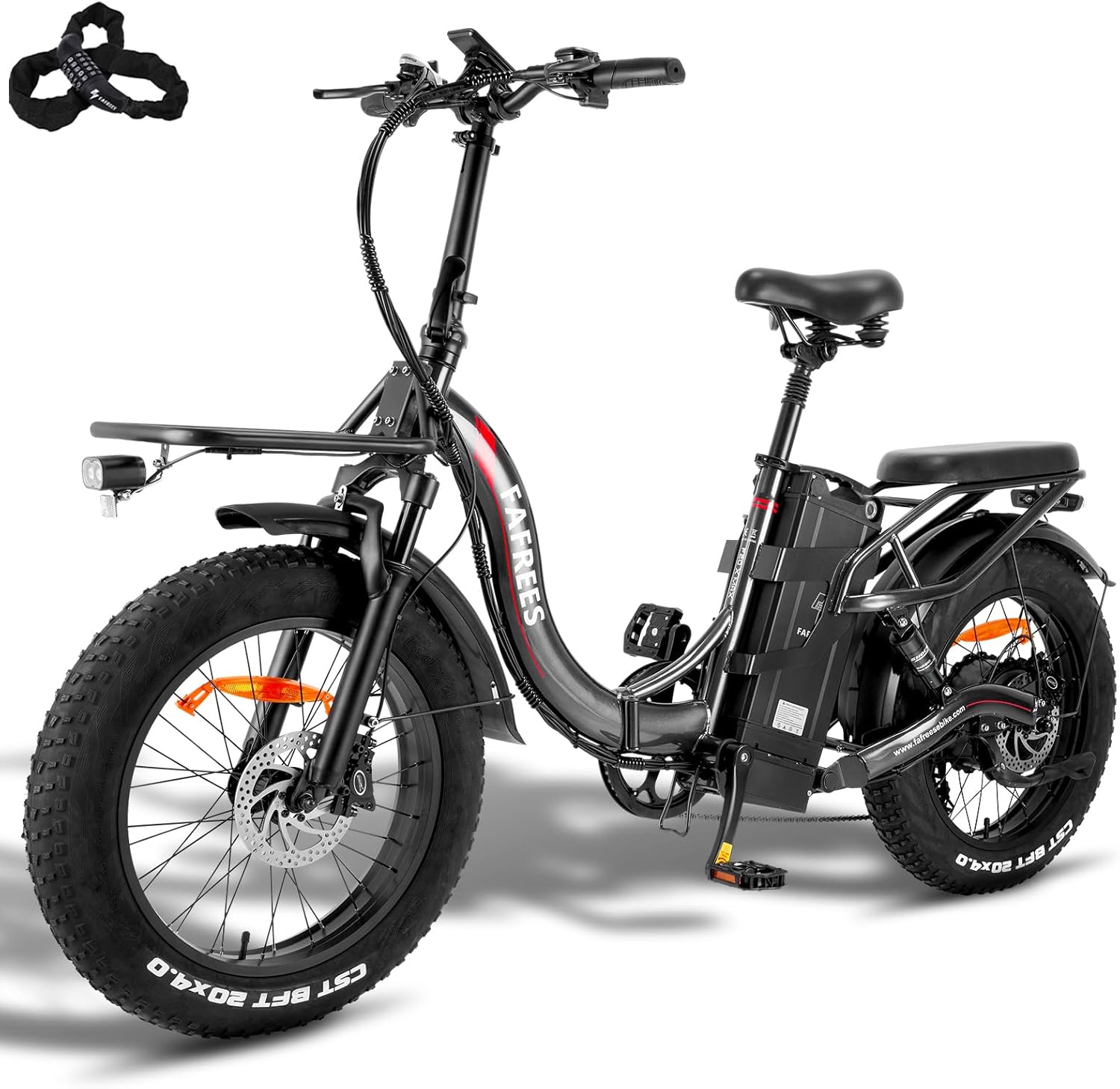
Figure 3.1: Overview of the Fafrees F20 X-MAX Electric Bicycle, showcasing its fat tires, folding frame, and integrated battery.
- Frame: High-strength steel folding frame.
- Motor: Rear hub brushless motor with 65 Nm torque.
- Battery: Removable 48V 30Ah (1440 Wh) Samsung cell lithium-ion battery.
- Display: High-resolution color LCD display with USB charging port.
- Brakes: Hydraulic disc brakes (160mm pads).
- Suspension: Triple suspension system (front fork, rear shock, seat post shock).
- Tires: 20 x 4.0 inch pneumatic fat tires.
- Gears: Shimano 7-speed derailleur.
- Lights: LED headlight with horn, rear light with brake light and turn signal.
- Racks: Practical front carrier and stable rear luggage rack.
4. Setup and Assembly
Your Fafrees F20 X-MAX comes partially assembled. Follow these steps for final setup:
- Unpacking: Carefully remove the e-bike and all accessories from the packaging. Check the contents against the packing list. The package includes the F20 X-Max e-Bike, charger, tool kit, user manual, and a gift box with inner tube, valve caps, spokes, wheel reflectors, battery fuses, brake pads, and a keychain.
- Unfolding the Frame:Locate the main frame hinge. Release the safety latch and unfold the frame until it clicks into place. Secure the locking mechanism firmly.
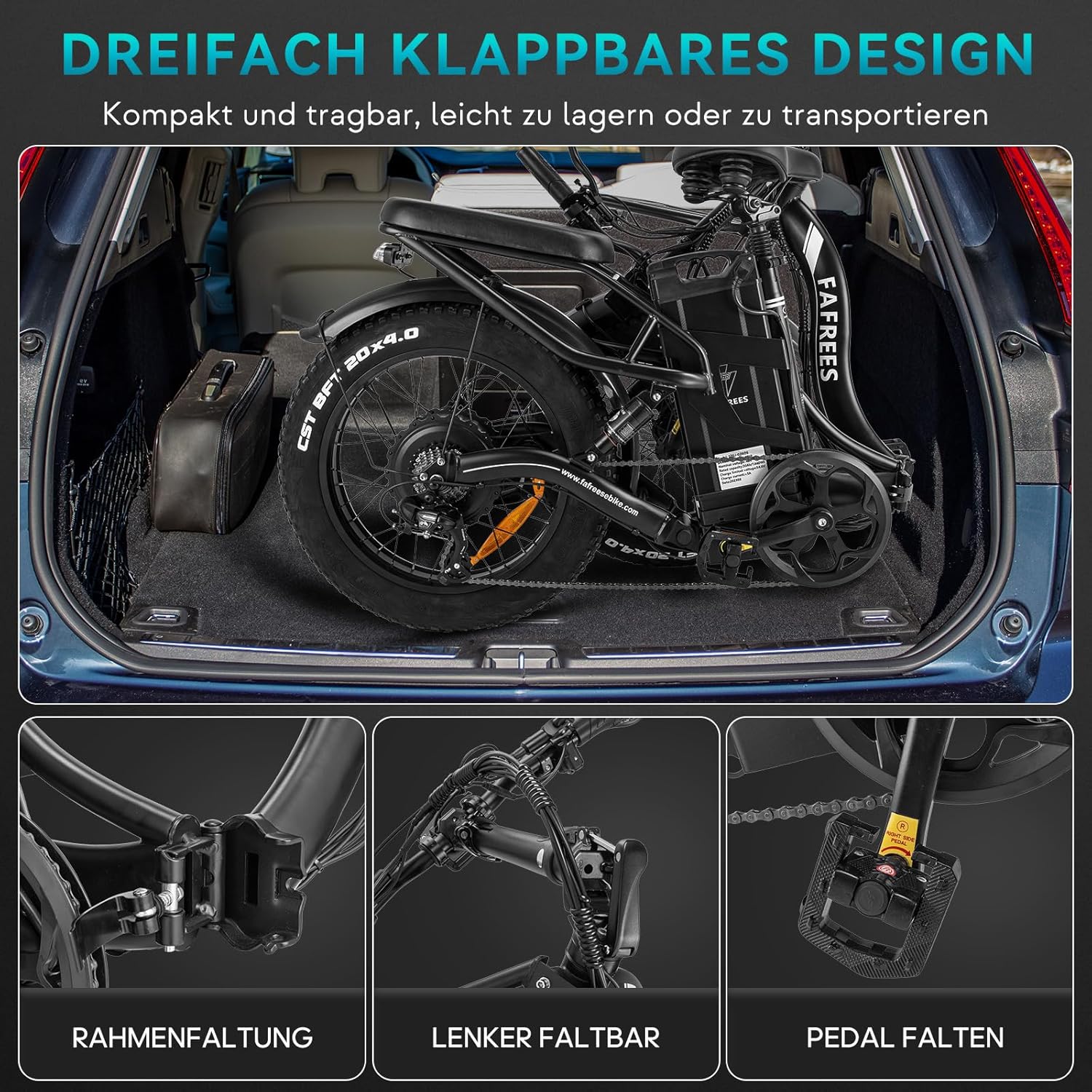
Figure 4.1: The triple folding design of the Fafrees F20 X-MAX, showing the frame, handlebar, and pedal folding points for compact storage and transport.
- Handlebar Assembly: Insert the handlebar stem into the fork tube and tighten the quick-release lever or bolts. Adjust the handlebar height (116-132 cm) for comfortable riding. Ensure the handlebar is aligned with the front wheel.
- Pedal Installation: Identify the left (L) and right (R) pedals. Thread the pedals into the crank arms. Note that the left pedal has a reverse thread. Tighten them securely with a wrench.
- Seat Post Adjustment: Insert the seat post into the frame. Adjust the seat height (86-106 cm) to allow for a slight bend in your knee when your foot is at the bottom of the pedal stroke. Secure the quick-release lever. The seat post also features integrated shock absorption for added comfort.
- Battery Installation: Ensure the battery is fully charged before first use. Insert the battery into its compartment and lock it securely. The battery is removable for convenient charging.
- Tire Inflation: Inflate tires to the recommended pressure, typically found on the tire sidewall.
5. Operating Instructions
Learn how to operate your Fafrees F20 X-MAX electric bicycle.
5.1. Battery Charging
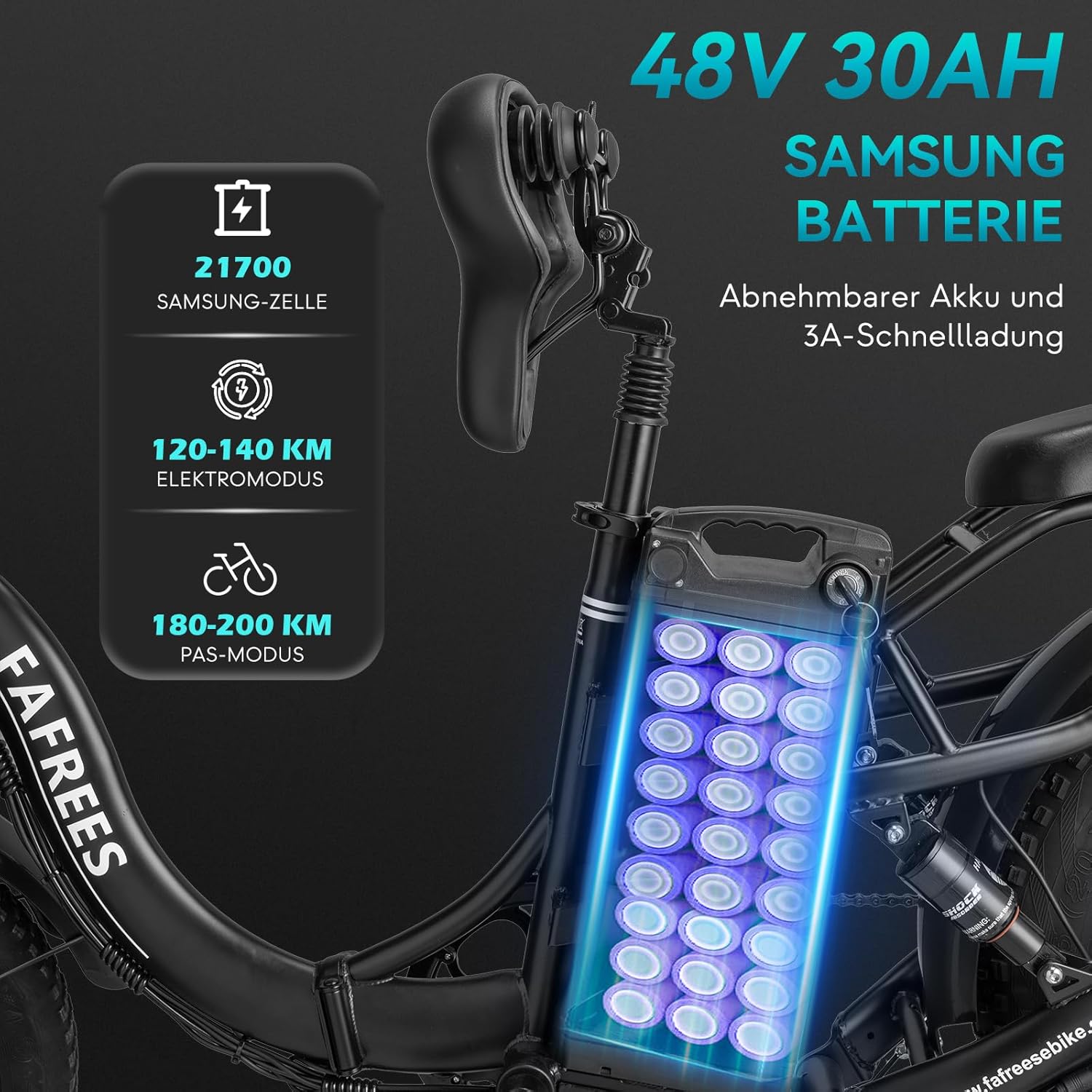
Figure 5.1: The 48V 30Ah Samsung battery, highlighting its removable design and 3A fast charging capability. The image shows the internal cell structure.
- Connect the charger to the charging port on the battery or directly to the battery if removed from the bike.
- Plug the charger into a standard power outlet.
- The charging indicator on the charger will show the charging status. A full charge takes approximately 9 hours.
- Disconnect the charger once charging is complete.
5.2. LCD Display and Controls
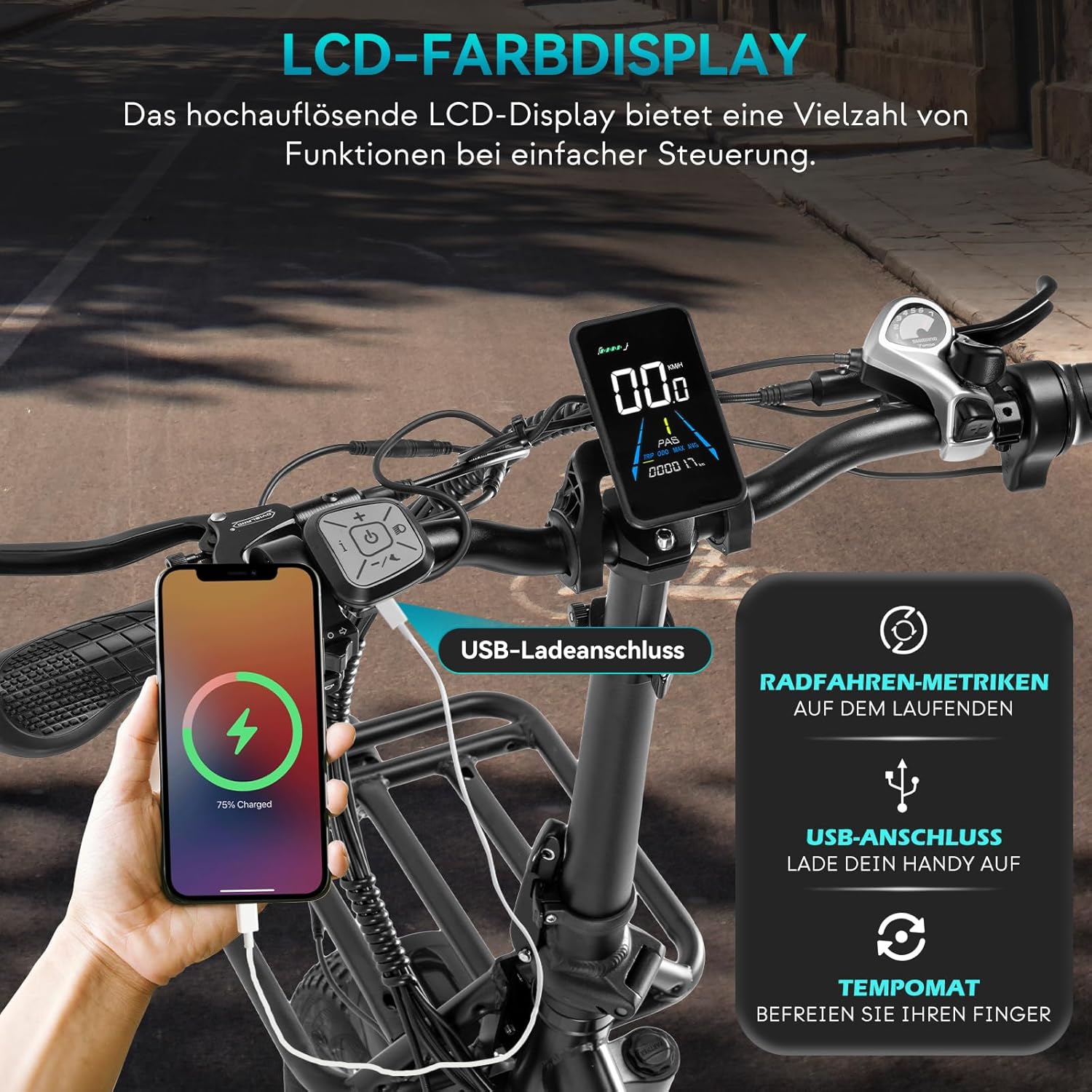
Figure 5.2: The high-resolution color LCD display, showing various riding metrics and featuring a built-in USB charging port for mobile devices.
The LCD display provides real-time information and allows control over the e-bike's functions:
- Power On/Off: Press and hold the power button on the display to turn the bike on or off.
- Speed Levels (PAS): Use the '+' and '-' buttons to cycle through the 0-3 levels of pedal-assist. Level 0 is no assist, Level 3 is maximum assist.
- Information Display: The screen shows speed, battery level, mileage, and current gear.
- Cruise Control: The display features a cruise control function for maintaining a consistent speed.
- 6 km/h Walk Mode: Activate this mode for easy maneuvering when walking alongside the bike.
- USB Charging Port: A built-in USB port allows you to charge your mobile devices while riding.
5.3. Riding Modes
The F20 X-MAX offers three riding modes:
- Human Mode (Pedal Only): Ride the bike like a traditional bicycle without any electric assistance.
- Pedal-Assist Mode (PAS): The motor provides assistance as you pedal. Choose from 3 levels of assistance. This mode offers a range of 180-200 km.
- Pure Electric Mode: Use the throttle to propel the bike without pedaling. This mode offers a range of 120-140 km.
6. Maintenance
Regular maintenance ensures the longevity and safe operation of your e-bike.
- Cleaning: Clean the bike regularly with a damp cloth. Avoid high-pressure washing directly on electrical components.
- Lubrication: Lubricate the chain and other moving parts periodically.
- Brakes: Check brake pads for wear and replace as needed. Ensure brake levers are firm and responsive. Hydraulic disc brakes provide excellent stopping power.
- Tires: Check tire pressure before each ride. Inspect tires for cuts or punctures.
- Battery Care: Store the battery in a cool, dry place. If storing for extended periods, charge it to 50-70% every 2-3 months.
- Fasteners: Periodically check all bolts and nuts for tightness, especially on the folding mechanisms, wheels, and handlebars.
- Suspension: Inspect the front fork, rear shock, and seat post shock for proper function and cleanliness.
7. Troubleshooting
This section addresses common issues you might encounter with your Fafrees F20 X-MAX.
| Problem | Possible Cause | Solution |
|---|---|---|
| Bike does not power on. | Battery not charged, battery not properly seated, power cable loose. | Charge the battery. Ensure battery is fully inserted and locked. Check all cable connections. |
| Motor not assisting. | PAS level is 0, brake levers engaged, motor cable loose. | Increase PAS level. Release brake levers. Check motor cable connection. |
| Brakes feel weak. | Worn brake pads, air in hydraulic system, misaligned calipers. | Inspect and replace brake pads. Consult a professional for hydraulic system bleeding or caliper adjustment. |
| Unusual noises from drivetrain. | Dry chain, misaligned derailleur, loose components. | Lubricate the chain. Adjust derailleur. Check for loose bolts. |
| Short battery range. | Under-inflated tires, frequent use of pure electric mode, riding uphill often, cold weather. | Ensure tires are properly inflated. Use pedal-assist more often. Battery performance can be reduced in cold temperatures. |
If you encounter issues not listed here or require further assistance, please contact Fafrees customer support.
8. Specifications
Detailed technical specifications for the Fafrees F20 X-MAX Electric Bicycle.
| Feature | Specification |
|---|---|
| Battery Type | Samsung 21700 Lithium-ion Cell |
| Battery Capacity | 48V / 30Ah / 1440 Wh |
| Charging Time | Approx. 9 hours (with 3A fast charger) |
| Max Range (PAS Mode) | 180 - 200 km (112 - 124 miles) |
| Max Range (Pure Electric Mode) | 120 - 140 km (75 - 87 miles) |
| Motor Location | Rear Hub Drive |
| Max Torque | 65 Nm |
| Max Climbing Ability | 25° |
| Front Fork Travel | 50 mm |
| Rear Shock Travel | 15 mm |
| Display Type | Color LCD Display |
| PAS Levels | 0-3 |
| Derailleur | Shimano 7-speed |
| Brake Type | Hydraulic Disc Brakes |
| Foldable Parts | Handlebar, Frame, Pedals |
| Headlight | LED Headlight with Horn |
| Taillight | Rear Light with Brake Light and Turn Signal |
| Riding Modes | Human / Pedal-Assist / Pure Electric |
| Operating Temperature | -10℃ to 40℃ (14°F to 104°F) |
| Waterproof Rating | IPX4 |
| Unfolded Dimensions (L x W x H) | 186 x 126 x 63 cm (73.2 x 49.6 x 24.8 inches) |
| Folded Dimensions (L x W x H) | 105 x 45 x 76 cm (41.3 x 17.7 x 29.9 inches) |
| Adjustable Handlebar Height | 116 - 132 cm (45.7 - 52 inches) |
| Adjustable Seat Height | 86 - 106 cm (33.9 - 41.7 inches) |
| Tire Size | 20 x 4.0 inches |
| Pedal to Ground Clearance | 10 cm (3.9 inches) |
| Recommended Rider Height | 165 - 210 cm (5'5" - 6'11") |
| Net Weight | 49 kg (108 lbs) |
| Battery Weight | 7.5 kg (16.5 lbs) |
| Load Capacity | 150 kg (330 lbs) |
| Frame Material | High-Strength Steel |
| Tire Type | Pneumatic Tires |
9. Warranty and Support
Fafrees provides a warranty for the F20 X-MAX Electric Bicycle against manufacturing defects. Please refer to the warranty card included in your package for specific terms and conditions, including warranty period and coverage details.
For technical support, spare parts, or warranty claims, please contact Fafrees customer service through their official website or the contact information provided in your product documentation. When contacting support, please have your model number (F20 X-MAX) and purchase date ready.
Included Components:
- 1 x Fafrees F20 X-Max e-Bike
- 1 x Charger
- 1 x Tool Kit
- 1 x User Manual
- 1 x Gift Box (including 1 x inner tube, 2 x valve caps, 4 x spokes, 2 x wheel reflectors, 2 x battery fuses, 2 x brake pads, 1 x keychain)
Related documentsF20 X-MAX


Ask a question about this manual
Ask about setup, troubleshooting, compatibility, parts, safety, or missing instructions. Manuals+ will review the question and use this page’s manual context to help answer it.