
Introduction
Thank you for purchasing the Nikko Radio Control 1:12 Omni X RC Car. This manual provides essential information for the safe and optimal operation, setup, and maintenance of your new remote-controlled vehicle. Please read this manual thoroughly before use and retain it for future reference.
Safety Information
- Age Recommendation: This product is suitable for users aged 6 years and up. Adult supervision is recommended for younger users.
- Battery Safety: Use only the specified 6.4V LiFePo4 battery and USB quick charger. Do not attempt to charge non-rechargeable batteries. Do not short-circuit, disassemble, or expose batteries to extreme temperatures or fire.
- Operating Environment: Operate the RC car in open, clear areas away from people, pets, and obstacles. Avoid operating near water, roads, or in crowded spaces.
- Interference: The 2.4GHz frequency minimizes interference, but avoid operating multiple RC vehicles on the same frequency band in very close proximity to prevent signal conflicts.
- Cleaning: Disconnect the battery before cleaning. Use a dry cloth to wipe the vehicle. Do not immerse in water.
Package Contents
Verify that all items listed below are included in your package:
- Nikko 1:12 Omni X RC Car
- Remote Controller
- 6.4V LiFePo4 Rechargeable Battery Pack (for car)
- USB Quick Charger
- Instruction Manual (this document)
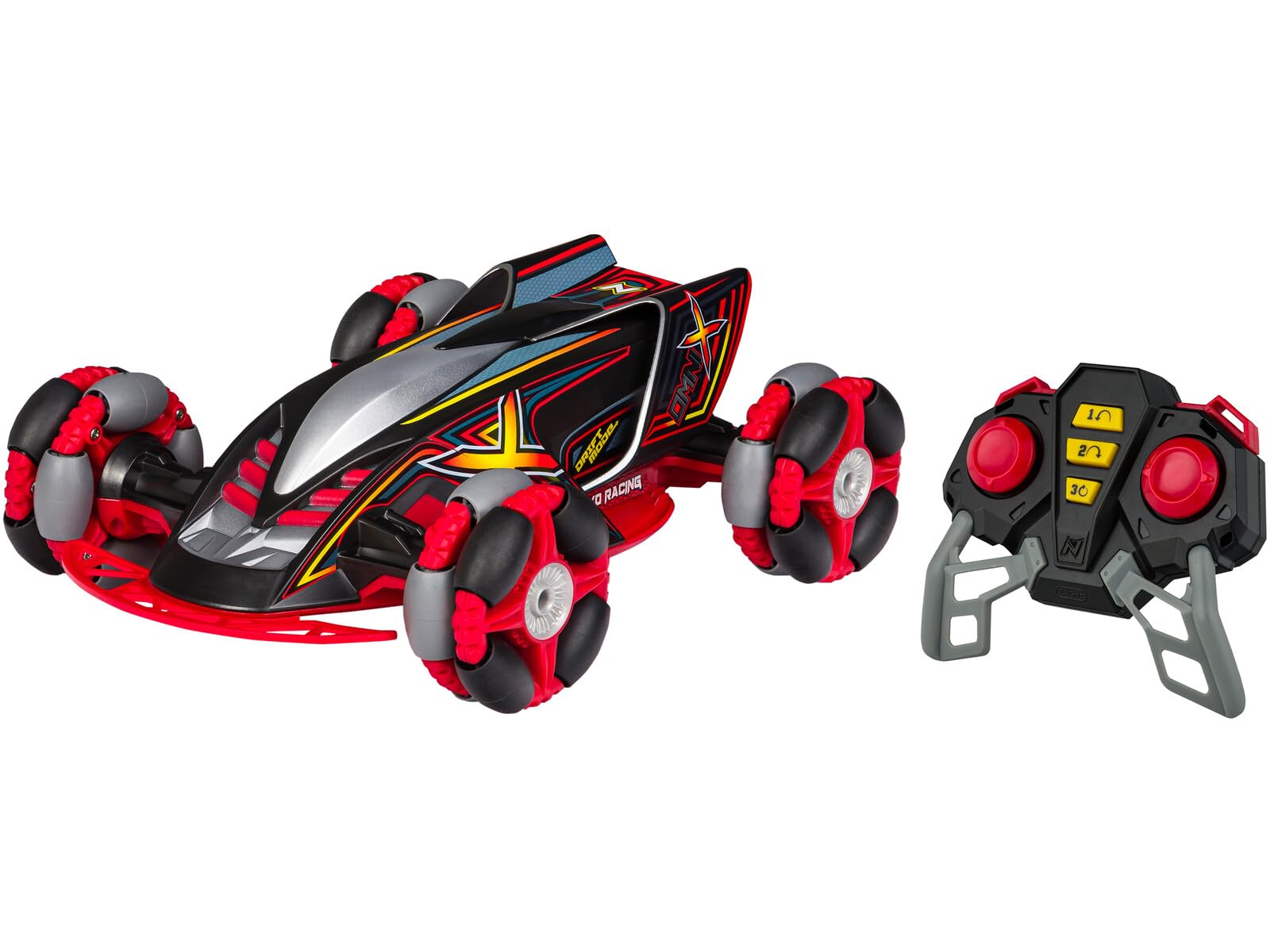
Image: The Nikko 1:12 Omni X RC Car and its remote controller, displayed within its retail packaging. The car features a black and red design with multi-directional wheels. The remote is black with red buttons. The packaging highlights features like "Full Function," "Multi-Band 10-Player Racing," "USB Powered," "6.4V LiFePo4 Battery USB Quick Charge," "2.4GHz Frequency," "Extreme Drift Technology," "9 MPH / 14 KPH Speed," and "Up to 40 Meters / 131 FT Range."
Setup
1. Charging the Car Battery
- Locate the 6.4V LiFePo4 battery pack and the USB Quick Charger.
- Connect the battery pack to the USB Quick Charger.
- Plug the USB charger into any standard USB power source (e.g., computer USB port, USB wall adapter).
- The charging indicator light on the charger will illuminate (color may vary, refer to charger for specifics).
- Allow approximately 60-90 minutes for a full charge. The indicator light will change or turn off when charging is complete.
- Once charged, disconnect the battery from the charger.
2. Installing the Car Battery
- Ensure the car's power switch is in the "OFF" position.
- Locate the battery compartment on the underside of the Omni X car.
- Open the battery compartment cover (you may need a small screwdriver).
- Connect the charged 6.4V LiFePo4 battery pack to the car's battery connector, ensuring correct polarity.
- Carefully place the battery inside the compartment and close the cover securely.
3. Installing Remote Controller Batteries
(Note: Remote controller batteries are typically not included and require 2x AA batteries.)
- Locate the battery compartment on the back of the remote controller.
- Open the battery compartment cover.
- Insert 2x AA batteries, observing the correct polarity (+/-) as indicated inside the compartment.
- Close the battery compartment cover securely.
4. Pairing the Remote Controller
The Nikko Omni X uses 2.4GHz frequency for automatic pairing.
- Turn on the RC car using the power switch.
- Turn on the remote controller.
- The car and remote should automatically pair within a few seconds. An indicator light on the remote (if present) may stop flashing or turn solid to confirm pairing.
- If pairing fails, turn both devices off and repeat the process.
Operating Instructions
Basic Controls
- Forward/Backward: Use the left joystick (or trigger) to move the car forward or backward.
- Steering (Left/Right): Use the right joystick (or wheel) to steer the car left or right.
- Full Function: The Omni X offers full directional control, allowing precise movements.
Extreme Drift Technology
The Omni X is equipped with specialized wheels and "Extreme Drift Technology" allowing for unique sideways and diagonal movements, as well as 360-degree spins. Experiment with combinations of forward/backward and steering controls to master these drift maneuvers.
Multi-Band 10-Player Racing
Thanks to its 2.4GHz frequency, up to 10 Nikko Omni X vehicles can be operated simultaneously without interference, allowing for multi-player racing and interaction. Ensure each car and remote is paired individually before starting a multi-player session.
Performance Overview
- Speed: Up to 9 MPH (14 KPH)
- Range: Up to 40 meters (131 feet)
Maintenance
- Cleaning: Use a soft, dry cloth to wipe down the car and remote after each use. Do not use water or chemical cleaners. Remove any debris from the wheels and chassis.
- Storage: When not in use, turn off both the car and the remote. Remove batteries from the remote controller if storing for extended periods. Store the vehicle in a cool, dry place away from direct sunlight and extreme temperatures.
- Battery Care: Always fully charge the LiFePo4 battery before storage and recharge it periodically (every 3-6 months) to maintain battery health if not used regularly.
Troubleshooting
| Problem | Possible Cause | Solution |
|---|---|---|
| Car does not respond to remote. |
|
|
| Car runs slowly or inconsistently. |
|
|
| Poor range or signal interference. |
|
|
Specifications
| Model Number | 10052 |
| Scale | 1:12 |
| Frequency | 2.4 GHz |
| Max Speed | 9 MPH (14 KPH) |
| Max Range | 40 meters (131 feet) |
| Car Battery | 6.4V LiFePo4 Rechargeable Battery |
| Charger | USB Quick Charger |
| Remote Batteries | 2x AA (not included) |
| Recommended Age | 6 years and up |
| Special Features | Full Function, Extreme Drift Technology, Multi-Band 10-Player Racing |
Warranty and Support
Nikko products are manufactured to high-quality standards. For warranty information, technical support, or replacement parts, please refer to the contact information provided on the product packaging or visit the official Nikko website. Please have your model number (10052) ready when contacting support.
Website: www.nikko-rc.com (Example link, verify official site)


