
Product Overview
The Livofloral Nightstand (Model ET003) is designed to provide convenient storage and charging capabilities with integrated LED lighting. This versatile piece of furniture can function as an end table in a living room or a bedside table in a bedroom. It features a built-in charging station, color-changing LED lights, and two wooden storage drawers.

Figure 1: Livofloral Nightstand in a living room setting.
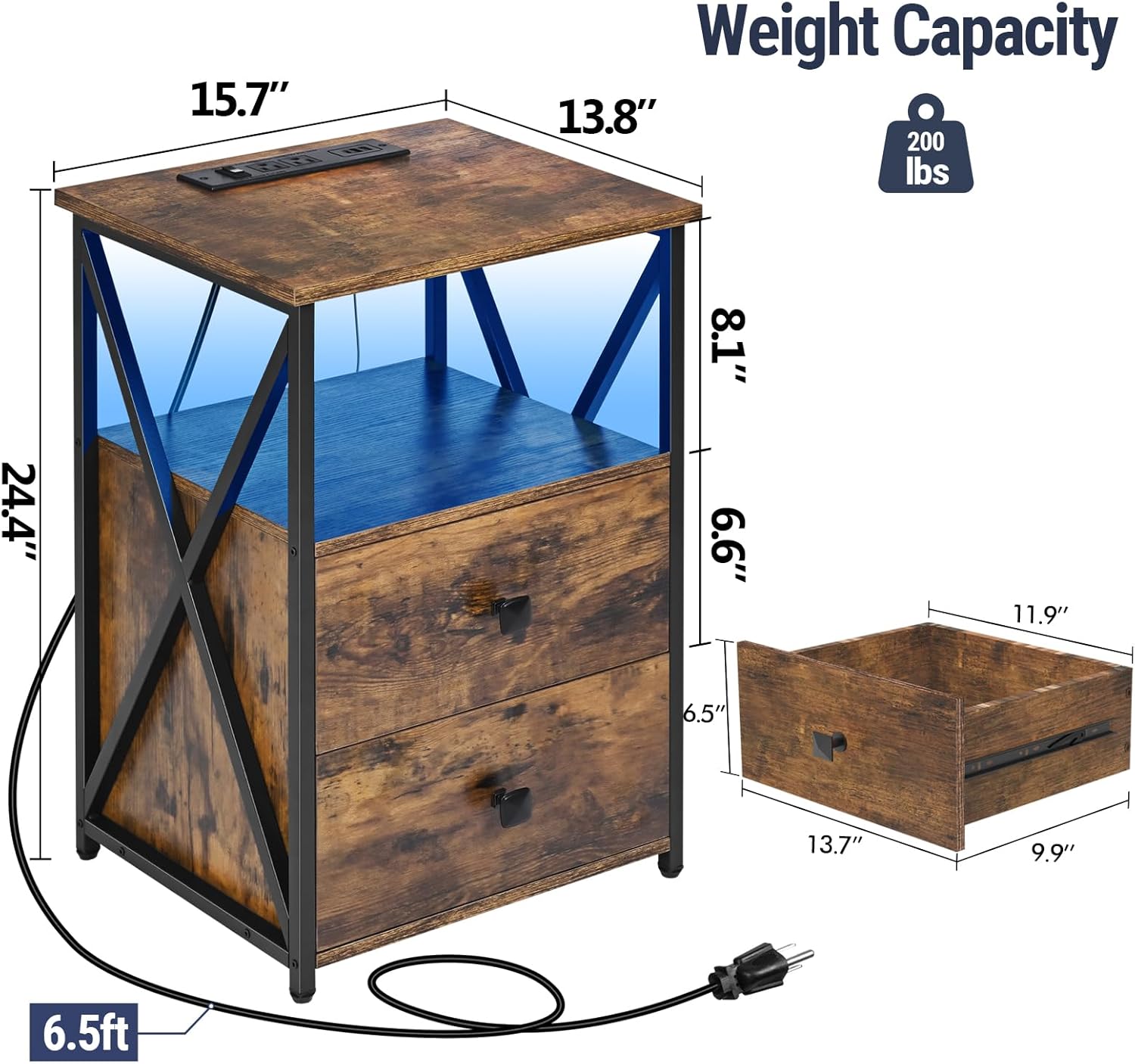
Figure 2: Product dimensions and key features.
Safety Information
- Do not overload the table; it can support up to 200 pounds (as per specifications).
- Always turn off the power switch on the charging station when not in use to prevent electrical hazards.
- Ensure all screws and fasteners are securely tightened during assembly and periodically check for looseness.
- Keep small parts away from children during assembly.
Package Contents
Before beginning assembly, ensure all parts and hardware are present. Refer to the included parts list in your package. An installation tool is provided.
Assembly Instructions
For a visual guide, please watch the official assembly video below. Detailed steps are also provided.
Video 1: Official Livofloral LED Nightstand Assembly Guide. This video demonstrates the step-by-step process for assembling the nightstand, including attaching drawer slides, constructing the frame, installing LED lights, assembling drawers, and integrating the charging station.
- Prepare Drawer Slides: Separate the inner and outer parts of the drawer slides. Attach the outer slides to the designated side panels (parts 3 and 4) using screws (D).
- Assemble Drawer Box: Connect the side panels (parts 8, 9, 10, 11, 12) to the front and back panels (parts 7 and 13) using screws (C) to form the drawer box. Ensure the grooves align for the drawer bottom.
- Attach Drawer Bottom: Slide the drawer bottom (part 5) into the grooves of the assembled drawer box. Secure with screws (B).
- Install LED Strip: Attach the LED light strip to the underside of the top panel (part 1) using the provided clips and screws (H). Connect the LED strip to the power cable.
- Assemble Main Frame: Attach the X-shaped metal frames to the side panels of the nightstand using screws (C). Secure the top panel (part 1) and bottom panel (part 2) to the side frames using screws (B).
- Install Power Strip: Insert the charging station power strip into the cutout on the top panel. Secure it with screws (H).
- Attach Drawer Handles: Secure the drawer handles (F) to the front of each drawer using screws (G).
- Insert Drawers: Carefully align the drawer slides on the drawer box with the slides on the nightstand frame and push the drawers into place.
- Cable Management: Use the provided cable ties to organize and secure any loose power cords.
Operating Instructions
LED Lighting Control
The nightstand features color-changing LED lights that can be controlled via a remote or a mobile application.
- Remote Control: Use the included remote to turn the lights on/off, change colors (thousands of options), adjust brightness (approximately 100 levels), and select from over 20 speed modes.
- Mobile App: Download the compatible mobile application to control the LED lights, including advanced color customization and music synchronization features.

Figure 3: LED light control via remote and app.
Charging Station Usage
The integrated charging station allows you to power multiple devices simultaneously.
- AC Outlets: Two (2) AC outlets (1500W) are available for standard electrical devices.
- USB Ports: Two (2) USB ports (5V/2A) are provided for charging USB-compatible devices.
- Type-C Port: One (1) Type-C port (20W) offers fast charging for compatible devices.
- Power Switch: A dedicated power switch allows you to turn off electricity to the charging station when not in use, enhancing safety and energy efficiency.
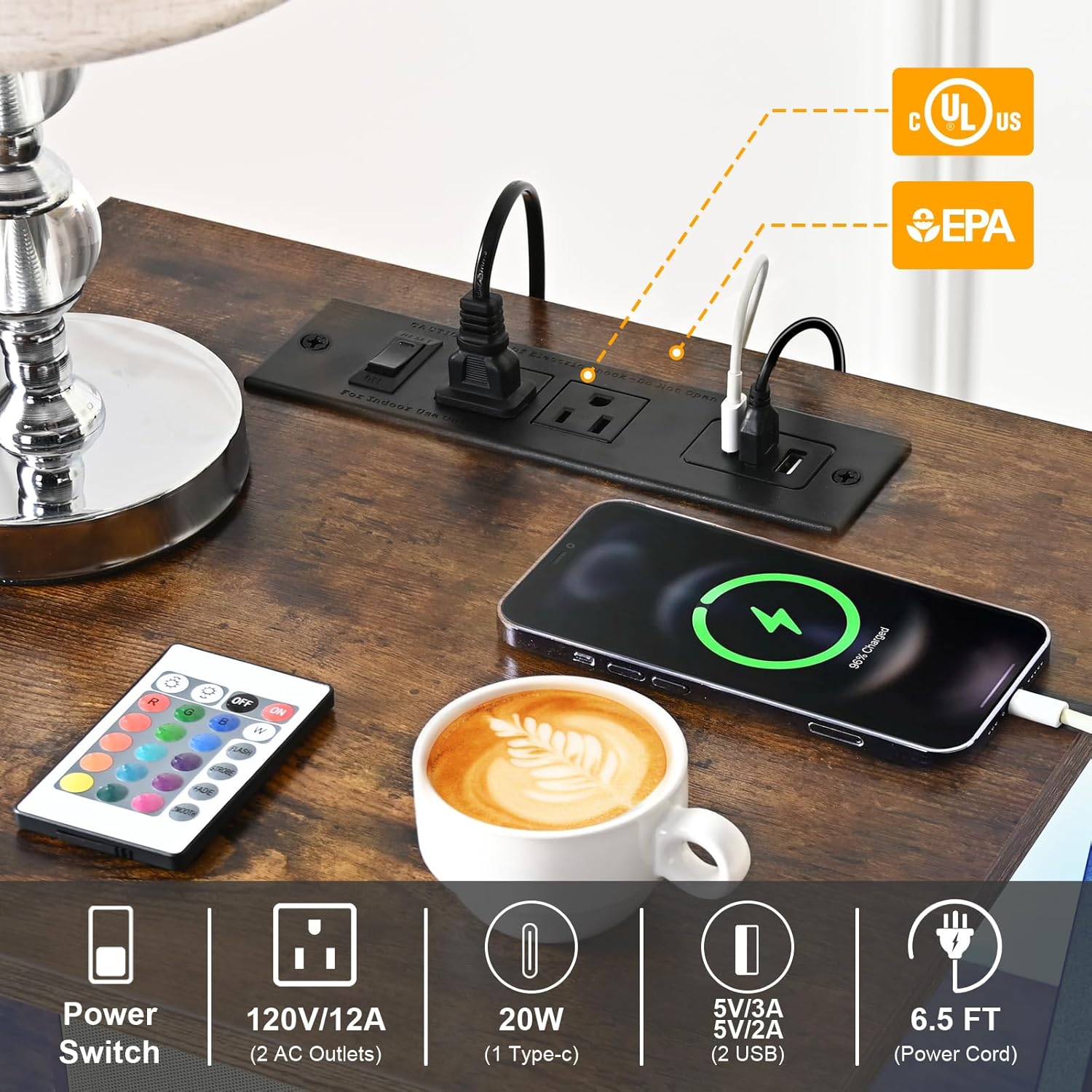
Figure 4: Detail of the integrated charging station.
Maintenance
- Cleaning: Wipe the nightstand with a dry cloth. Avoid using harsh chemicals or abrasive cleaners.
- Moisture and Heat: Avoid excessive moisture and direct heat exposure to prevent damage to the wood finish and electronic components.
- Fasteners: Periodically check all screws and fasteners to ensure they remain tight. Re-tighten if necessary.
Troubleshooting
- LED Lights Not Working:
- Ensure the LED strip is properly connected to its power source.
- Check the remote control battery and ensure it is pointed directly at the LED receiver.
- If using the app, ensure Bluetooth is enabled and the device is paired correctly.
- Charging Ports Not Functioning:
- Verify that the nightstand's main power cord is securely plugged into a working wall outlet.
- Ensure the power switch on the charging station is in the 'ON' position.
- Test with different devices and cables to rule out device-specific issues.
- Avoid overloading the charging station beyond its rated capacity (1500W for AC outlets).
- Drawers Not Sliding Smoothly:
- Check that the drawer slides are correctly installed and aligned.
- Ensure no objects are obstructing the slides.
- Verify that all screws securing the slides are tight.
Specifications
| Feature | Detail |
|---|---|
| Brand | Livofloral |
| Model Number | ET003 |
| Product Dimensions | 13.78"D x 15.75"W x 23.62"H |
| Maximum Weight Recommendation | 200 Pounds |
| Frame Material | Wood |
| Top Material Type | Engineered Wood |
| Color | Brown |
| Number of Drawers | 2 |
| Charging Station | 2 AC Outlets (1500W), 2 USB Ports (5V/2A), 1 Type-C Port (20W), 6.5 ft Cord |
| LED Lights | Color-changing, remote and app controlled |
| Assembly Required | Yes (Installation Tool Included) |
Warranty and Support
For warranty information, technical support, or any questions regarding your Livofloral Nightstand, please contact the manufacturer directly through your purchase platform or the official Livofloral website. Please have your model number (ET003) and purchase details ready.