
1. Product Overview
The Livofloral LED End Table is designed to provide convenient storage and charging capabilities. It features a wireless charging station, multiple power outlets, USB ports, and a Type-C port. Integrated LED lights offer customizable illumination, controlled via remote or a mobile application. The table includes two wooden drawers for organized storage and an open shelf for easy access items. Its robust construction ensures stability and durability.
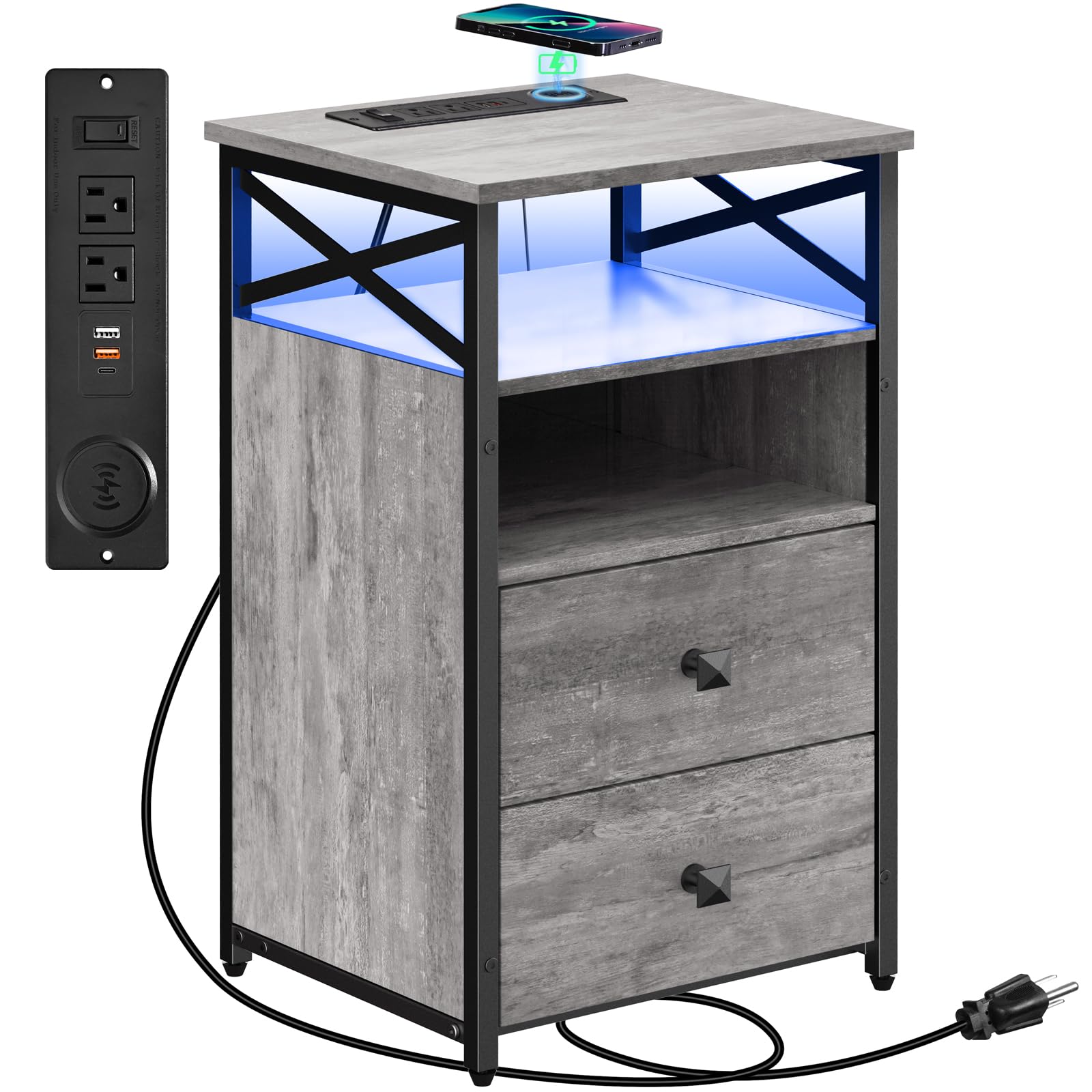
Figure 1: Livofloral LED End Table with Wireless Charging Station.
2. Important Safety Information
- Ensure all components are securely fastened during assembly to prevent instability.
- Do not exceed the maximum weight recommendation of 200 pounds on the tabletop.
- Keep electrical components away from water or excessive moisture.
- Use only the provided power cord and avoid overloading the electrical outlets.
- Children should not climb on or play with the end table.
- Refer to the manufacturer's guidelines for any specific safety warnings.
3. Package Contents
Before beginning assembly, verify that all parts and hardware are present and undamaged. If any items are missing or damaged, please contact customer support.
- Numbered parts for the table structure
- Required assembly hardware (screws, connectors)
- Installation instructions
- Wireless charger unit
4. Assembly Instructions
Assembly requires one person. Please follow the steps carefully. All necessary tools are included.
Video 1: Livofloral End Table Assembly Instruction. This video provides a visual guide for assembling your end table.
- Prepare the Top Panel: Attach the LED strip to the underside of the top panel (Part 1) using the provided clips and screws. Ensure the wiring is neatly secured.
- Assemble Side Frames: Attach the wooden side panels (Parts 2 and 3) to the metal frames (Parts 13 and 14) using the designated screws. Ensure the drawer slides are facing inward.
- Connect Back Panels: Secure the back panels (Parts 5 and 6) to the assembled side frames using screws.
- Attach Bottom Panel: Connect the bottom panel (Part 7) to the base of the side frames.
- Install Remaining Side Panel: Attach the remaining wooden side panel (Part 4) to complete the main structure.
- Install Power Strip: Insert the power strip with wireless charger (Part X) into the cutout on the top panel (Part 1) and secure it with screws.
- Assemble Drawers: Construct the two wooden drawers (Parts 8, 9, 10, 11, 12) by attaching the sides, back, and bottom to the front panel. Install the drawer handles (Part K) and the drawer slides (Part S).
- Insert Drawers: Carefully slide the assembled drawers into the main table structure, aligning them with the pre-installed drawer slides.

Figure 2: Product dimensions and weight capacity. The table measures 13.7"D x 15.7"W x 26.4"H and has a maximum weight capacity of 200 lbs.

Figure 3: Stability features including X-structure metal frame, wood drawers, and adjustable feet.
5. Operating Instructions
5.1 Wireless Charging and Power Outlets
The end table is equipped with a versatile charging station to power your devices.
- Wireless Charger: Place your Qi-compatible device on the designated wireless charging pad on the tabletop. Ensure the device is centered for optimal charging.
- AC Outlets: Two standard 120V/12A AC outlets are available for plugging in lamps, laptops, or other electronics.
- USB Ports: Two 5V/2A USB ports are provided for charging smaller devices like smartphones and tablets.
- Type-C Port: One 20W Type-C port offers faster charging for compatible devices.
- A power switch controls the entire charging station. Turn it on to activate power delivery.

Figure 4: Close-up of the integrated power strip with wireless charging, AC outlets, USB, and Type-C ports.
5.2 LED Lighting System
The integrated LED lights can be customized to suit your preference.
- Control Methods: The LED lights can be controlled using the included remote control or a dedicated mobile application.
- Color Options: Choose from thousands of colors to match your room's ambiance.
- Modes: Over 20 speed modes and approximately 100 brightness levels are available.
- Music Sync: The lights can be set to flash in rhythm with music.

Figure 5: The end table featuring RGB LED lights, controllable via remote or smartphone app.
6. Care and Maintenance
- Cleaning: Wipe the surface with a soft, damp cloth. Avoid using harsh chemicals or abrasive cleaners, as these may damage the finish.
- Spills: Clean up spills immediately to prevent staining.
- Electrical Components: Ensure the power is off before cleaning any electrical parts. Use a dry cloth for these areas.
- Regular Checks: Periodically check all screws and connections to ensure they remain tight.
7. Troubleshooting
- No Power to Charging Station:
- Ensure the main power cord is securely plugged into a working wall outlet.
- Check if the power switch on the charging station is in the 'ON' position.
- Wireless Charging Not Working:
- Verify your device is Qi-compatible.
- Ensure the device is correctly centered on the charging pad.
- Remove any thick phone cases that might interfere with wireless charging.
- LED Lights Not Responding:
- Check if the power to the table is on.
- If using the remote, ensure its battery is functional and there are no obstructions.
- If using the app, ensure Bluetooth or Wi-Fi connection is active and the app is correctly paired.
- Table Feels Unstable:
- Re-tighten all assembly screws.
- Adjust the leveling feet at the bottom of the table to compensate for uneven floors.
8. Product Specifications
| Feature | Detail |
|---|---|
| Brand | Livofloral |
| Product Dimensions (D x W x H) | 13.7" x 15.7" x 26.4" |
| Maximum Weight Recommendation | 200 Pounds |
| Frame Material | Metal |
| Top Material Type | Engineered Wood |
| Color | Grey |
| Number of Drawers | 2 |
| Number of Shelves | 2 (1 open, 1 semi-open) |
| Special Features | Wireless Charging, LED Lights, USB Ports, AC Outlets, Type-C Port |
| Assembly Required | Yes |
| Recommended People for Assembly | 1 |
9. Warranty and Support
For warranty information, technical support, or to report missing/damaged parts, please contact Livofloral customer service. Refer to your purchase documentation for specific contact details and warranty terms.
You can often find support information on the manufacturer's official website or through the retailer where the product was purchased.