
Satco S11585-24
Satco S11585 LED PAR30LN Bulb User Manual
Model: S11585-24 | Brand: Satco
1. Product Overview
The Satco S11585 PAR30LN LED bulb is an 11-watt, CCT selectable lighting solution designed for both residential and commercial directional lighting applications. Featuring a medium E26 base, this bulb offers precise beam intensity and control, making it ideal for spotlighting in various environments such as offices, stores, homes, and outdoor areas. It provides 1000 lumens of brightness and is dimmable, allowing for adjustable ambiance.
This LED bulb is engineered for energy efficiency, offering significant savings on electricity bills compared to traditional incandescent bulbs. Its robust design incorporates overload, short circuit, and over-temperature protection for reliable, long-term performance.

Image 1.1: Front view of the Satco S11585 PAR30LN LED bulb, showcasing its silver finish and E26 medium base.
2. Setup and Installation
2.1. Installation
- Safety First: Before installation, ensure the power to the light fixture is turned off at the circuit breaker to prevent electrical shock.
- Remove Old Bulb: Carefully unscrew the existing bulb from the fixture. Allow it to cool if it has been recently in use.
- Insert New Bulb: Screw the Satco S11585 LED bulb into the E26 medium base socket until it is finger-tight. Do not overtighten.
- Restore Power: Turn the power back on at the circuit breaker.
2.2. CCT (Correlated Color Temperature) Selection
The Satco S11585 features a CCT selectable switch, allowing you to choose from five different color temperatures to match your preference or decor. The switch is located on the body of the bulb.
- 2700K: Warm White
- 3000K: Soft White
- 3500K: Neutral White
- 4000K: Cool White
- 5000K: Natural Light / Daylight
To select the desired color temperature, simply set the switch to the corresponding Kelvin (K) value. This can be done even while the bulb is powered on.

Image 2.1: Close-up view of the CCT selection markings (2700K, 3000K, 3500K, 4000K, 5000K) on the bulb's body.
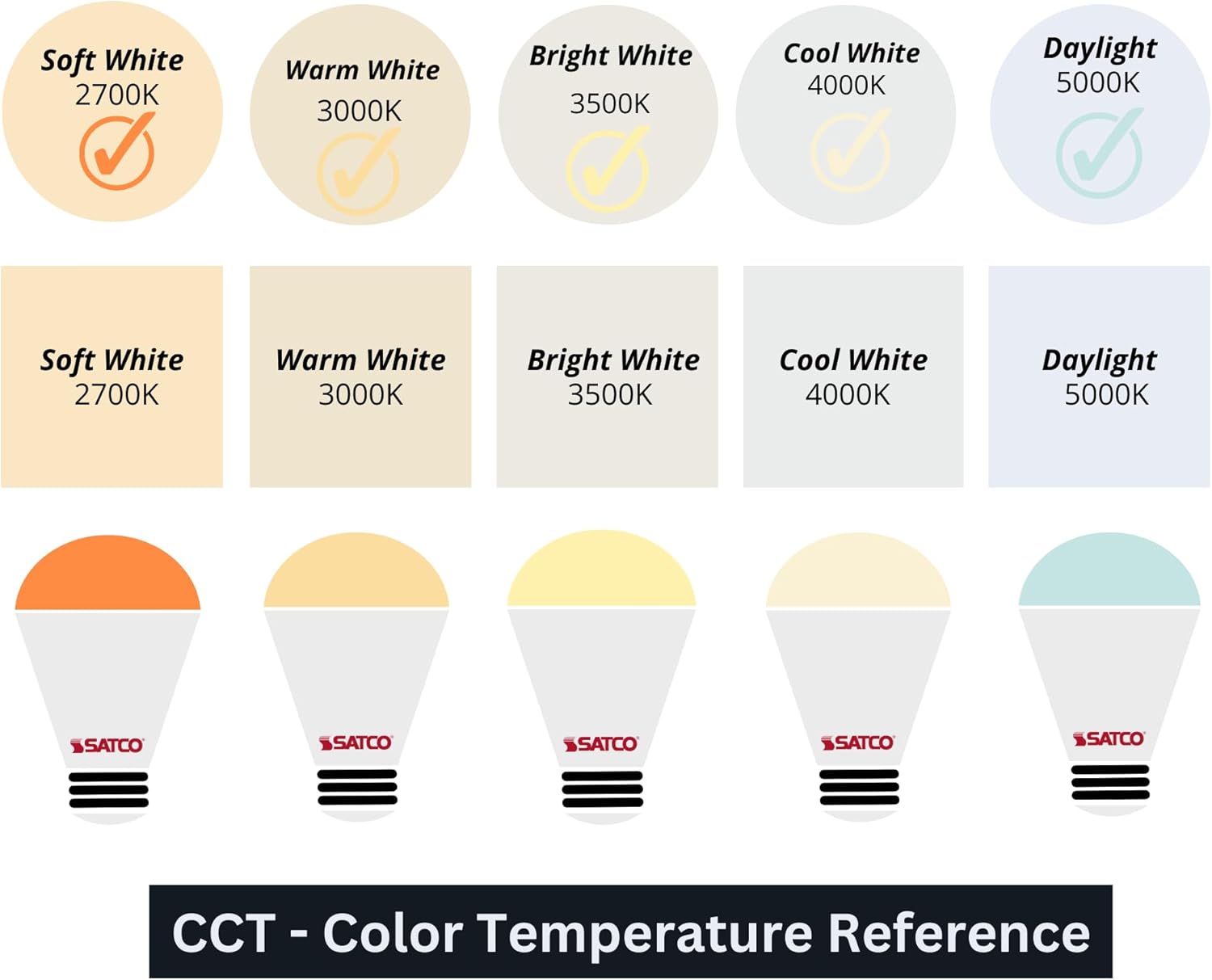
Image 2.2: Visual reference chart illustrating the appearance of different CCTs (Soft White, Warm White, Bright White, Cool White, Daylight).
3. Operating Instructions
3.1. General Operation
Once installed and powered, the Satco S11585 LED bulb will illuminate. The selected CCT will determine the color of the light emitted.
3.2. Dimmability
This LED bulb is designed to be dimmable and is consistent with most standard LED dimmers. It provides smooth dimming functionality, allowing you to adjust the light output from 10% to 100% to create your desired ambiance.
Note: For optimal performance and to avoid flickering or buzzing, ensure your dimmer switch is compatible with LED lighting.
4. Maintenance
The Satco S11585 LED bulb requires minimal maintenance due to its long lifespan and durable construction.
- Cleaning: To clean the bulb, ensure the power is off and the bulb is cool. Gently wipe the surface with a soft, dry cloth. Do not use liquid cleaners or abrasive materials.
- Handling: Always handle the bulb by its base when installing or removing it. Avoid touching the glass or lens surface directly to prevent smudges or damage.
- Storage: If storing bulbs, keep them in their original packaging in a cool, dry place to protect them from dust and physical damage.
5. Troubleshooting
| Problem | Possible Cause | Solution |
|---|---|---|
| Bulb does not light up | No power to the fixture; Bulb not screwed in properly; Faulty bulb or fixture. | Check circuit breaker; Ensure bulb is securely screwed in; Test bulb in another fixture or replace. |
| Bulb flickers or buzzes | Incompatible dimmer switch; Loose connection; Electrical interference. | Ensure dimmer is LED-compatible; Tighten bulb; Consult an electrician if problem persists. |
| CCT switch not changing color | Switch not fully engaged; Internal malfunction. | Ensure switch clicks into position; If problem persists, contact support. |
| Bulb not working with sensors/timers | Incompatibility with certain external devices. | This device is not compatible with all photo sensors, motion sensors, or timers. Consider alternative control methods or bulb types if these devices are essential. |
6. Specifications

Image 6.1: Official specifications sheet for the Satco S11585 LED bulb.
- Model: S11585-24
- Brand: Satco
- Light Type: LED
- Wattage: 11 Watts
- Incandescent Equivalent: 90W
- Bulb Shape Size: PAR30LN
- Bulb Base: E26 Medium
- Voltage: 120 Volts
- Brightness: 1000 Lumens
- Color Temperature: CCT Selectable (2700K, 3000K, 3500K, 4000K, 5000K)
- Color Rendering Index (CRI): 90
- Beam Angle: 25 Degrees
- Average Life: 25,000 Hours
- Frequency: 60Hz
- Material: Copper (internal components), Thermo Plastic (PBT) housing, Silver Finish
- Indoor/Outdoor Usage: Wet Location Rated (suitable for indoor and outdoor use)
- Dimensions (MOL): 4.65 inches
- Dimensions (MOD): 3.74 inches
- Included Components: Bulb included
- Power Source: AC/DC
- Certifications: FCC Compliant, RoHS Compliant, UL Listed
- Date First Available: December 5, 2023
7. Warranty Information
The Satco S11585 LED bulb comes with a 3-Year Warranty from the date of purchase.
This warranty covers defects in materials and workmanship under normal use. It does not cover damage resulting from improper installation, misuse, abuse, or natural disasters.
For complete warranty terms, conditions, and claim procedures, please consult the official Satco website or contact Satco customer support directly.
8. Support and Contact
For further assistance, technical support, or inquiries regarding your Satco S11585 LED bulb, please visit the official Satco website:
You may find additional resources, FAQs, and contact information for customer service on their website.
Ask a question about this manual
Ask about setup, troubleshooting, compatibility, parts, safety, or missing instructions. Manuals+ will review the question and use this page’s manual context to help answer it.