
Introduction
This manual provides comprehensive instructions for the CONTIA Replacement Filter Set, designed to maintain the optimal performance of your Bissell CrossWave vacuum cleaner. Regular filter replacement is crucial for efficient cleaning and extending the life of your appliance.
Compatibility
This filter set is compatible with the following Bissell CrossWave models:
- 1785, 1785G, 1785B, 1785F, 17853, 17854, 17855, 17856, 1785Q, 1785A, 17852, 17858, 1785P, 1785R, 1785T, 1785V
- 2303, 2305, 2305K, 2306, 2306A, 23062, 23068, 2328
- 2551, 25519, 2554, 2554A, 25542, 25548
- 25821, 2582N
- 2590, 2593, 2596, 2596M
- 17132, 2225N
This set is designed as a replacement for Bissell part number 1608684.
Package Contents
Your CONTIA Replacement Filter Set package typically includes the following items:
- Replacement Filters (quantity may vary, e.g., 2 or 4 filters)
- Cleaning Brush (1 unit)

Figure 1: Typical package contents including multiple filters and a cleaning brush.
Installation
Follow these steps to replace the filter in your Bissell CrossWave vacuum cleaner:
- Power Off and Unplug: Ensure your vacuum cleaner is turned off and unplugged from the power outlet before beginning any maintenance.
- Remove Dirty Water Tank: Locate and remove the dirty water tank from your Bissell CrossWave. The filter is typically housed within or near this tank.
- Access Filter: Depending on your specific model, you may need to open a latch or compartment to access the old filter. Carefully remove the used filter.
- Insert New Filter: Place the new CONTIA replacement filter into the designated slot. Ensure it is seated correctly and securely to prevent air leaks.
- Reassemble: Close any compartments and reattach the dirty water tank. Ensure all parts are securely in place before operating the vacuum.

Figure 2: The filter consists of an outer frame and an inner filter element, designed for easy replacement.
Operating Considerations
Once the new filter is installed, your Bissell CrossWave vacuum cleaner is ready for operation. Ensure the filter is dry before use to prevent damage and maintain optimal suction. A properly installed and clean filter is essential for the vacuum's performance in capturing dust and debris.
Maintenance
Regular cleaning and timely replacement of your CONTIA filter will ensure your Bissell CrossWave operates at its best.
Cleaning the Filter
The filter can be cleaned to extend its lifespan:
- Remove the filter from the vacuum cleaner as described in the Installation section.
- Rinse the filter thoroughly under clean, running water. Gently tap to dislodge debris.
- Allow the filter to air dry completely for at least 24 hours before reinserting it into the vacuum. Do not use heat to dry the filter.
- Use the provided cleaning brush to remove stubborn dirt or hair from the filter mesh.
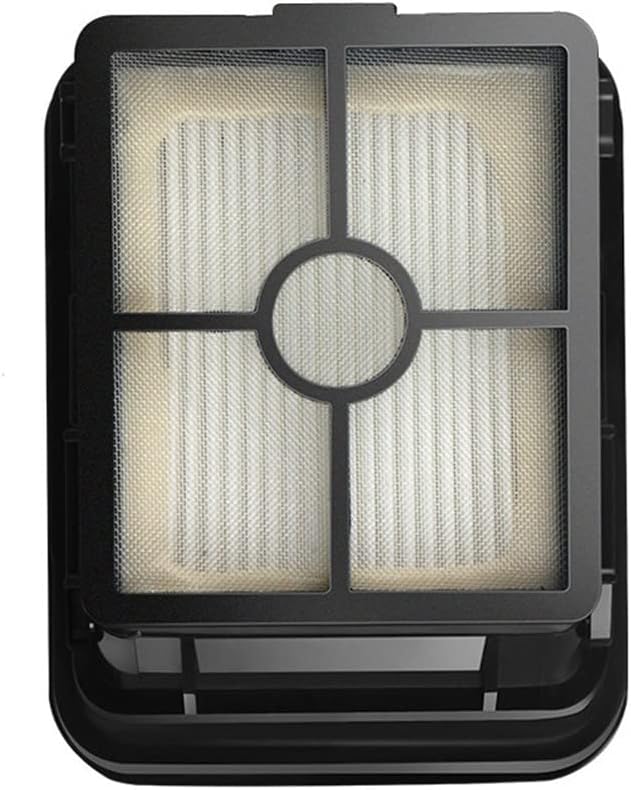
Figure 3: The fine mesh of the filter requires regular cleaning to maintain airflow and filtration efficiency.
Filter Replacement Frequency
For optimal performance, it is recommended to replace your CONTIA filter every 3 to 6 months, or more frequently if you use your vacuum often or notice a decrease in suction power.
Troubleshooting
If you encounter issues after installing your new filter, consider the following:
- Reduced Suction: Ensure the filter is completely dry before use. Check that the filter is correctly seated and that the dirty water tank is properly installed and sealed.
- Unusual Noise: Verify that the filter is installed correctly and not obstructing any moving parts.
- Filter Not Fitting: Double-check the compatibility list to ensure you have the correct filter set for your specific Bissell CrossWave model.
Specifications
| Feature | Detail |
|---|---|
| Product Model Number | WJJ-12-05 |
| Package Dimensions | 1.18 x 0.79 x 0.39 inches |
| Item Weight | 1.76 ounces |
| Manufacturer | WJJ-12-06 |
| Compatible Part Number | 1608684 |

Figure 4: Detailed dimensions of the replacement filter for precise fitment.
Warranty and Support
For specific warranty information regarding your CONTIA Replacement Filter Set, please refer to the product packaging or contact the retailer where the product was purchased. For further assistance or inquiries, please reach out to CONTIA customer support.