
NEO CHAIR Mesh Chair
NEO CHAIR Office Desk Chair User Manual
Model: Mesh Chair
Introduction
This manual provides detailed instructions for the assembly, operation, and maintenance of your NEO CHAIR Office Desk Chair. Please read this manual thoroughly before assembly and use to ensure proper function and safety.

Image Description: A front-facing view of the Ivory NEO CHAIR Office Desk Chair, highlighting its mesh back, padded seat, and five-star base with casters.
Safety Information
- Do not exceed the maximum weight recommendation of 250 pounds.
- Ensure all bolts are securely tightened before use. Periodically check and re-tighten as necessary.
- Keep hands and fingers clear of moving parts during adjustment.
- Use the chair on a flat, stable surface to prevent tipping.
- Do not stand on the chair.
- Keep children away from the chair during assembly and adjustment.
Parts List
Please verify that all components are present before beginning assembly. Refer to the assembly video for visual identification of parts.
Video Description: This video displays all components included with the NEO CHAIR Office Desk Chair, laid out on a white surface. It serves as a visual parts list for assembly verification.
Assembly Instructions
Follow these steps to assemble your NEO CHAIR Office Desk Chair. An assembly video is provided for visual guidance.
Video Description: This video provides a step-by-step guide for assembling the NEO CHAIR Office Desk Chair, demonstrating each stage of the process.
- Base Assembly:
- Insert the detachable legs into the base. Press down firmly until each leg is securely in place. If a leg is not fully assembled, disassemble and reassemble it.
- Insert the five wheels into the designated slots on the base. Apply force to push each wheel completely into the base until fully secured.
- Insert the gas lift into the center hole of the assembled base.
- Backrest Assembly:
- Attach the armrests to the backrest using the provided bolts. Under-tighten the bolts initially to allow for alignment.
- Assembly of Backrest to Seat:
- Place the seat upside down on a stable surface.
- Attach the backrest-armrest assembly to the seat using bolts and washers. Ensure the control mechanism is aligned with the bolt holes and check the front orientation.
- Once aligned, fully tighten all bolts using the included Allen key.
- Seat Installation on Gas Lift:
- Align the hole on the control mechanism (under the seat) with the top of the gas lift.
- Gently lower the assembled seat onto the gas lift until it is securely seated.
Operating Instructions
Your NEO CHAIR is designed with several adjustable features to enhance comfort and support.
Video Description: This video demonstrates the various adjustable features of the NEO CHAIR Office Desk Chair, including height, tilt, and swivel functions.
- Seat Height Adjustment: To adjust the seat height, pull the lever located under the right side of the seat upwards. While holding the lever, either lift your weight off the seat to raise it, or remain seated to lower it. Release the lever to lock the height.
- Tilt/Recline Function: The chair features a tilt mechanism allowing the backrest to recline.
- Tilt Lock Adjustment: Pull the lever (same as height adjustment) outwards to enable tilting. Push it inwards to lock the chair in an upright position.
- Tilt Tension Adjustment: Turn the round knob located under the seat (towards the front) clockwise to loosen the tilt tension, allowing for easier reclining. Turn it counter-clockwise to increase tension, making it harder to recline.
- 360-Degree Swivel: The chair is equipped with a 360-degree swivel function, allowing for easy rotation without moving the base.
- Lumbar Support: The mesh backrest includes built-in lumbar support designed to promote healthy posture and comfort.
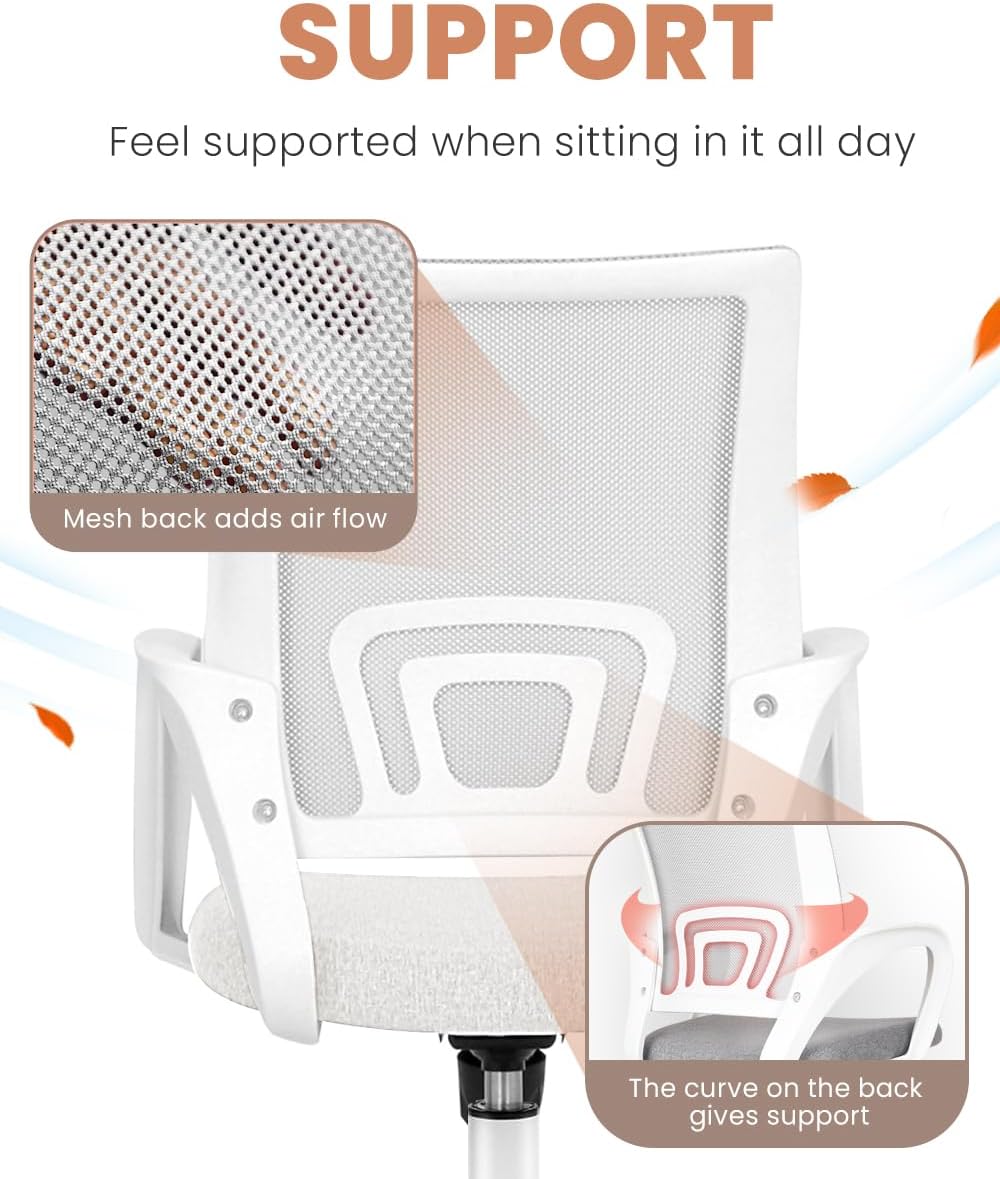
Image Description: A close-up view of the chair's backrest, illustrating the breathable mesh material and the integrated lumbar support structure.
- Cushioned Comfort: The seat features thick, supportive cushioning made of high-density foam sponge and soft fabric for comfort during extended use.

Image Description: A detailed image of the seat cushion, emphasizing its supportive cushioning with high-density sponge and soft fabric finish.
Maintenance
- Cleaning: Wipe clean with a damp cloth. Avoid harsh chemicals that may damage the mesh or fabric.
- Inspection: Periodically check all bolts and screws to ensure they are tight. Re-tighten as needed to maintain stability and safety.
- Casters: Keep casters clean from debris to ensure smooth rolling.
Troubleshooting
- Chair is wobbly: Ensure all assembly bolts are fully tightened. Check that the gas lift is properly seated in the base and the seat mechanism.
- Chair does not adjust height: Verify the height adjustment lever is functioning correctly. Ensure the gas lift is fully inserted and not damaged.
- Chair does not tilt or is too stiff/loose: Check the tilt lock lever to ensure it is in the unlocked position. Adjust the tilt tension knob to your desired resistance.
- Casters not rolling smoothly: Inspect casters for any trapped debris (hair, lint, etc.) and clean them.
Specifications
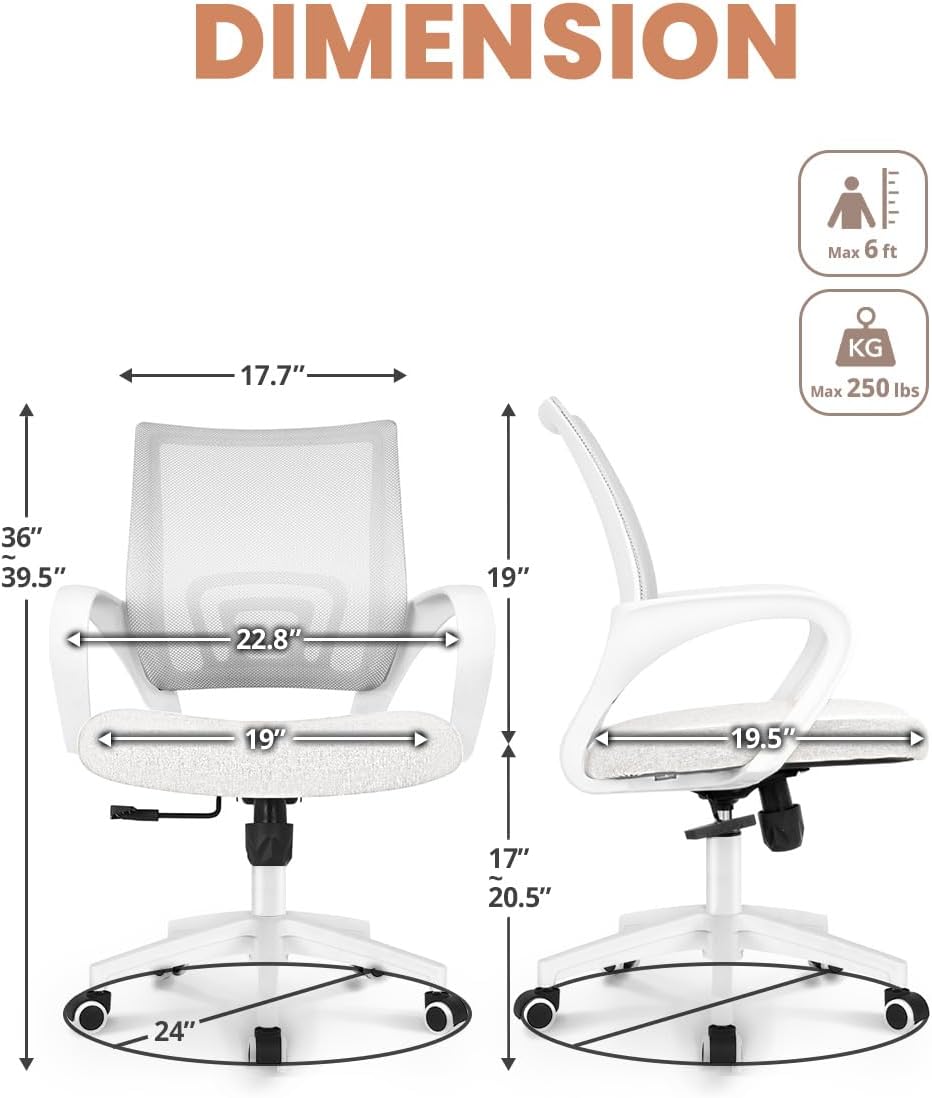
Image Description: A detailed diagram illustrating the dimensions of the NEO CHAIR, including seat width, depth, and overall height, along with maximum user height and weight capacity.
| Brand | NEO CHAIR |
| Model Name | Mesh Chair |
| Color | Ivory |
| Product Dimensions | 20.8"D x 22.8"W x 39.7"H |
| Item Weight | 19.6 pounds |
| Maximum Weight Recommendation | 250 Pounds |
| Material | Textile, Mesh, Sponge |
| Special Features | Adjustable Height, Arm Rest, Ergonomic, Rolling, Swivel, Tilt |
| Certifications | SGS, BIFMA Certified, FSC-Certified (wood support structure) |
Warranty & Support
For warranty information, technical support, or to inquire about missing parts, please contact NEO CHAIR customer service directly. Contact details can typically be found on the product packaging or the manufacturer's official website.
As per the assembly video, for any missing parts, please contact support@eneodirect.com.
Related documentsMesh Chair


Ask a question about this manual
Ask about setup, troubleshooting, compatibility, parts, safety, or missing instructions. Manuals+ will review the question and use this page’s manual context to help answer it.