
ORDRO 88R
ORDRO 4K Video Camera Camcorder Instruction Manual
Model: 88R | Brand: ORDRO
1. Introduction
The ORDRO 4K Video Camera Camcorder, Model 88R, is a versatile digital video camera designed for capturing high-quality video and still images. Featuring 4K Ultra HD recording, advanced zoom capabilities, and a user-friendly touchscreen, it is ideal for family events, vlogging, and various content creation needs. This manual provides essential information for setting up, operating, maintaining, and troubleshooting your camcorder.
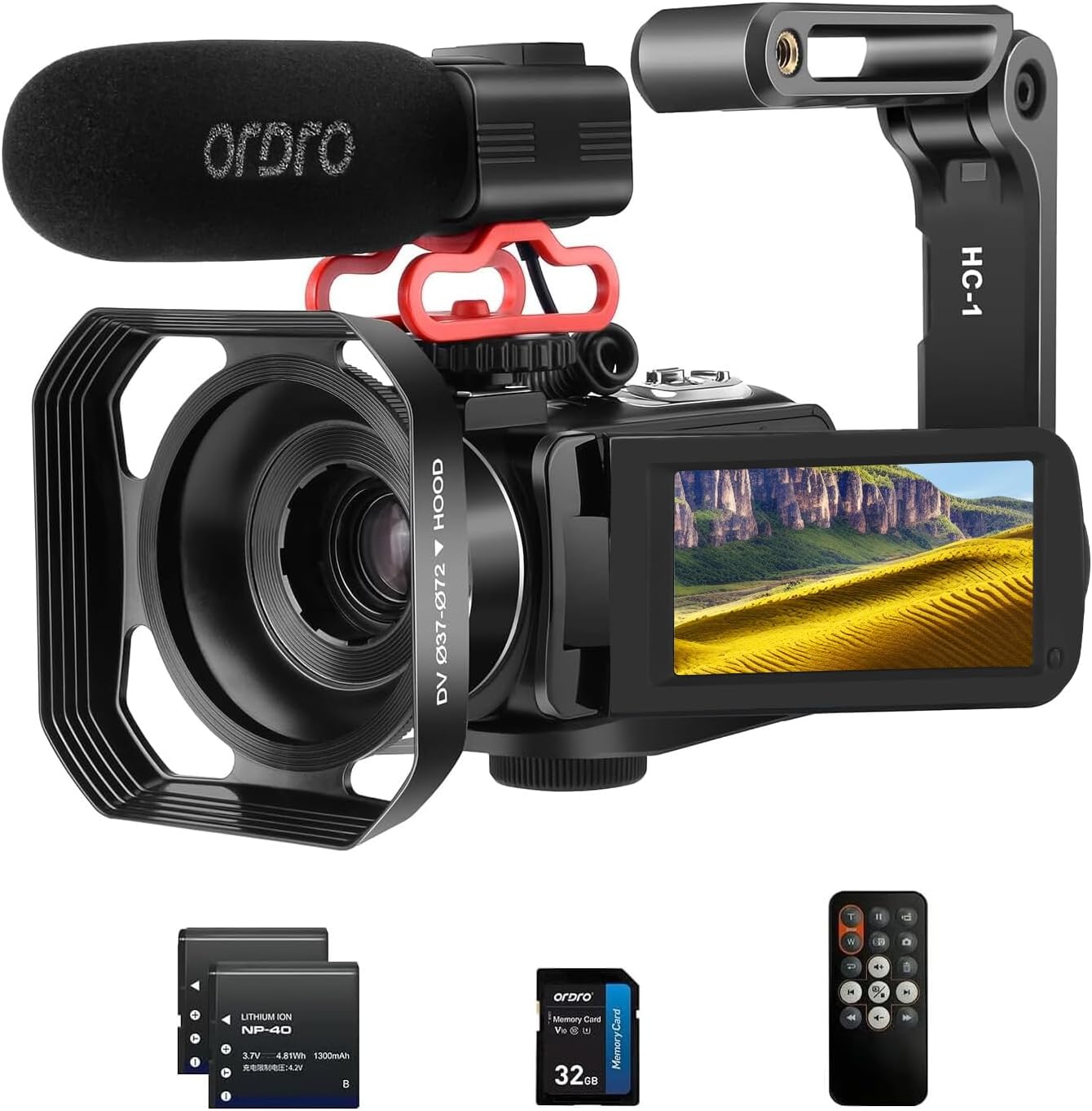
Figure 1: ORDRO 4K Video Camera Camcorder with included accessories.
2. What's in the Box
Verify that all items are present in your package:
- 1 x ORDRO 4K Video Camera Camcorder
- 1 x Lens Cap
- 2 x Rechargeable Lithium-Ion Batteries
- 1 x External Microphone
- 1 x Camera Bag
- 1 x HDMI Cable
- 1 x 2-in-1 Adapter
- 1 x Remote Control
- 1 x Card Reader
- 1 x USB Cable
- 1 x User Manual
- 1 x 32GB SD Card
- 1 x Handheld Holder

External Microphone

Handheld Holder

Rechargeable Batteries

Remote Control
3. Product Overview & Features
The ORDRO 88R camcorder offers a range of features for diverse recording needs:
- 4K Ultra HD Video: Capture super sharp video in 4K UHD at 24fps or 1080p Full HD at 60 fps.
- 30MP Still Photos: Preserve moments with stunning high-resolution photos.
- 10X Optical Zoom & 120X Intelligent Zoom: The 10x optical zoom allows for detailed long-distance shots, while 120X intelligent zoom enhances clarity without significant image degradation.
- 3.0" IPS Touch Screen: Intuitive control and clear viewing of your footage.
- Webcam Functionality: Connect the camera to your computer for video calls and live streaming on platforms like YouTube, Facebook, Zoom, Instagram, and Skype.
- Wi-Fi Connectivity: Share content instantly and wirelessly.
- Special Features: Includes Photo Burst, Face Detection, Video Pause Function, Color Filters, Scene Modes, and Time Lapse.
- Portable Design: Lightweight and compact, ideal for on-the-go filming and travel vlogging.

Figure 2: Multifunctional Optical Zoom 4K Camcorder.

Figure 3: Long Shooting Mode demonstrating 10X Optical and 120X Digital Zoom.

Figure 4: Close Micro Shooting & Auto-Focus capabilities.

Figure 5: Zoom and Color Filter examples.

Figure 6: Wi-Fi Wireless Connection for instant sharing.

Figure 7: Webcam functionality for live streaming.
Official Product Videos
Video 1: Overview of the ORDRO 4K Optical Zoom Camcorder in red color, showcasing its design and key features.
Video 2: An unboxing video for the 4K camcorder, detailing all included accessories and initial setup steps.
Video 3: Demonstration of the 4K camcorder with its handheld holder, illustrating improved stability and handling.
4. Setup
4.1. Battery Installation & Charging
To install the battery, open the battery compartment cover located at the bottom of the camcorder. Insert the provided Lithium-Ion battery, ensuring the correct orientation, and close the cover securely. For charging, use the included battery charger or connect the camcorder directly to a power source using the USB cable. The LED indicator will show charging status.
4.2. SD Card Insertion
The camcorder supports SDXC flash memory. Locate the SD card slot, typically near the battery compartment. Insert the 32GB SD card (or your own compatible card up to 256GB) until it clicks into place. Ensure the card is inserted correctly to avoid damage.
4.3. Attaching External Microphone & Handheld Holder
The external microphone connects to the camcorder's microphone input port. The handheld holder can be attached to the bottom of the camcorder via the 1/4-20 mount, providing enhanced stability and ergonomic grip for filming.
5. Operating Instructions
5.1. Powering On/Off
To power on the camcorder, simply open the 3.0" IPS touchscreen. The device will automatically power up. To power off, close the touchscreen or press and hold the power button located on the inside panel.
5.2. Recording Video
Once powered on, the camcorder is typically in video recording mode. Press the dedicated record button (usually located at the back or top) to start and stop recording. The screen will display recording indicators.
5.3. Taking Photos
To switch to photo mode, press the 'Mode' button on the inside panel. Once in photo mode, press the shutter button (often near the zoom rocker) to capture still images.
5.4. Using Zoom
Utilize the zoom rocker switch on top of the camcorder to control the 10X optical zoom and 120X intelligent zoom. Push the rocker forward to zoom in and backward to zoom out.
5.5. Wi-Fi and Webcam Functions
Access Wi-Fi settings through the menu to connect to a network for wireless content transfer. To use as a webcam, connect the camcorder to your computer via the USB cable. Select the webcam mode on the camcorder's screen when prompted by your computer.
6. Maintenance
Proper maintenance ensures the longevity and performance of your camcorder:
- Cleaning: Use a soft, lint-free cloth to clean the camera body and screen. For the lens, use a specialized lens cleaning cloth and solution. Avoid abrasive materials.
- Battery Care: Store batteries in a cool, dry place. Do not expose them to extreme temperatures. Fully charge batteries before extended storage and periodically recharge them if not used for long periods.
- Storage: When not in use, store the camcorder in its protective bag in a dry, dust-free environment. Ensure the lens cap is on to protect the lens.
7. Troubleshooting
If you encounter issues with your camcorder, refer to the following common solutions:
| Problem | Possible Cause | Solution |
|---|---|---|
| Camcorder does not power on | Low or no battery charge; incorrectly inserted battery | Charge the battery; ensure battery is inserted correctly. |
| Cannot record video/take photos | SD card full or not inserted; incorrect mode | Insert/replace SD card; format SD card; switch to correct mode. |
| Poor image/video quality | Dirty lens; low light conditions; incorrect settings | Clean the lens; use built-in light or external lighting; adjust exposure/scene modes. |
| Wi-Fi connection issues | Out of range; incorrect password | Move closer to Wi-Fi router; re-enter password. |
8. Specifications
- Brand: ORDRO
- Model Number: 88R
- Item Weight: 2.97 pounds
- Package Dimensions: 8.35 x 6.02 x 5.63 inches
- Country of Origin: China
- Batteries: 1 Lithium Ion batteries required (included)
- Color: Red
- Special Features: Touchscreen, Face Detection, Lightweight, Time Lapse, Built-In Light
- Photo Sensor Technology: CMOS
- Video Capture Resolution: 2.7K, 4K
- Maximum Focal Length: 4.95 Millimeters
- Maximum Aperture: 2.8 f
- Flash Memory Type: SDXC (up to 256GB)
- Video Capture Format: MP4
- Supported Audio Format: AAC
- Screen Size: 3 Inches
- Connectivity Technology: Wi-Fi
9. Warranty & Support
For warranty information and technical support, please refer to the contact details provided on the product packaging or visit the official ORDRO website. Keep your purchase receipt as proof of purchase for any warranty claims.
Related documents88R


Ask a question about this manual
Ask about setup, troubleshooting, compatibility, parts, safety, or missing instructions. Manuals+ will review the question and use this page’s manual context to help answer it.