
Introduction
This manual provides detailed instructions for the Fuzion Digital Pocket Gram Scale FZ-200 Pro. Designed for precision, this scale offers 0.01g accuracy up to 200g, making it suitable for various applications including weighing food, jewelry, herbs, spices, and coins. Please read this manual thoroughly before using your scale to ensure proper operation and longevity.
Product Features
- Precision Weighing: 0.01g accuracy with a capacity from 0.03g to 200g.
- Premium Build: Crafted with stainless steel and gold titanium plating for durability and a sleek finish.
- Pro Calibration: Includes a 100g calibration weight for maintaining accuracy.
- Versatile Weighing Modes: Six modes available (g, oz, ozt, dwt, ct, gn) for diverse applications.
- Tare Function & Clear Display: Easy net weight measurement and a backlit LCD for clear readings.
- Portable and Compact: Lightweight design (140g) for on-the-go use.
Setup
Battery Installation
The Fuzion Digital Pocket Gram Scale requires 2 AAA batteries (included).
- Open the battery compartment cover on the underside of the scale.
- Insert the 2 AAA batteries, ensuring correct polarity (+/-).
- Close the battery compartment cover securely.
Initial Power On
Press the ON/OFF button to turn the scale on. The display will show "88888" then "0.00g".
Operating Instructions
Weighing
- Place the scale on a flat, stable surface.
- Press the ON/OFF button to turn the scale on. Wait for "0.00g" to appear.
- Gently place the item to be weighed on the center of the weighing platform.
- Read the weight displayed on the LCD screen.

Figure 1: Overview of weighing, taring, and calibration instructions on the scale's lid.
Tare Function
The tare function allows you to subtract the weight of a container, so you only measure the net weight of its contents.
- Place an empty container on the weighing platform.
- Press the TARE button. The display will reset to "0.00g".
- Add the items to be weighed into the container. The display will show the net weight of the items.

Figure 2: Step-by-step guide for using the tare function.
Changing Weighing Units
The scale supports six different weighing modes: grams (g), ounces (oz), troy ounces (ozt), pennyweights (dwt), carats (ct), and grains (gn).
- With the scale turned on and displaying "0.00g", press the MODE button repeatedly.
- The display will cycle through the available units. Stop when your desired unit is shown.
Calibration
For optimal accuracy, periodic calibration is recommended. A 100g calibration weight is included with your scale.
- Turn the scale on and wait for "0.00g".
- Press and hold the MODE button until the display shows "CAL".
- Release the MODE button, then press it again. The display will flash "200.00g" (or the required calibration weight).
- Place the included 100g calibration weight on the center of the platform.
- The display will show "PASS" and then return to normal weighing mode, indicating successful calibration.

Figure 3: Calibrating the scale with the included 100g weight.
Maintenance
Cleaning
To clean the scale, wipe it with a slightly damp cloth. Do not immerse the scale in water or use abrasive cleaners.
Storage
Store the scale in a cool, dry place. The protective cover should be used when not in use to prevent damage to the weighing platform.
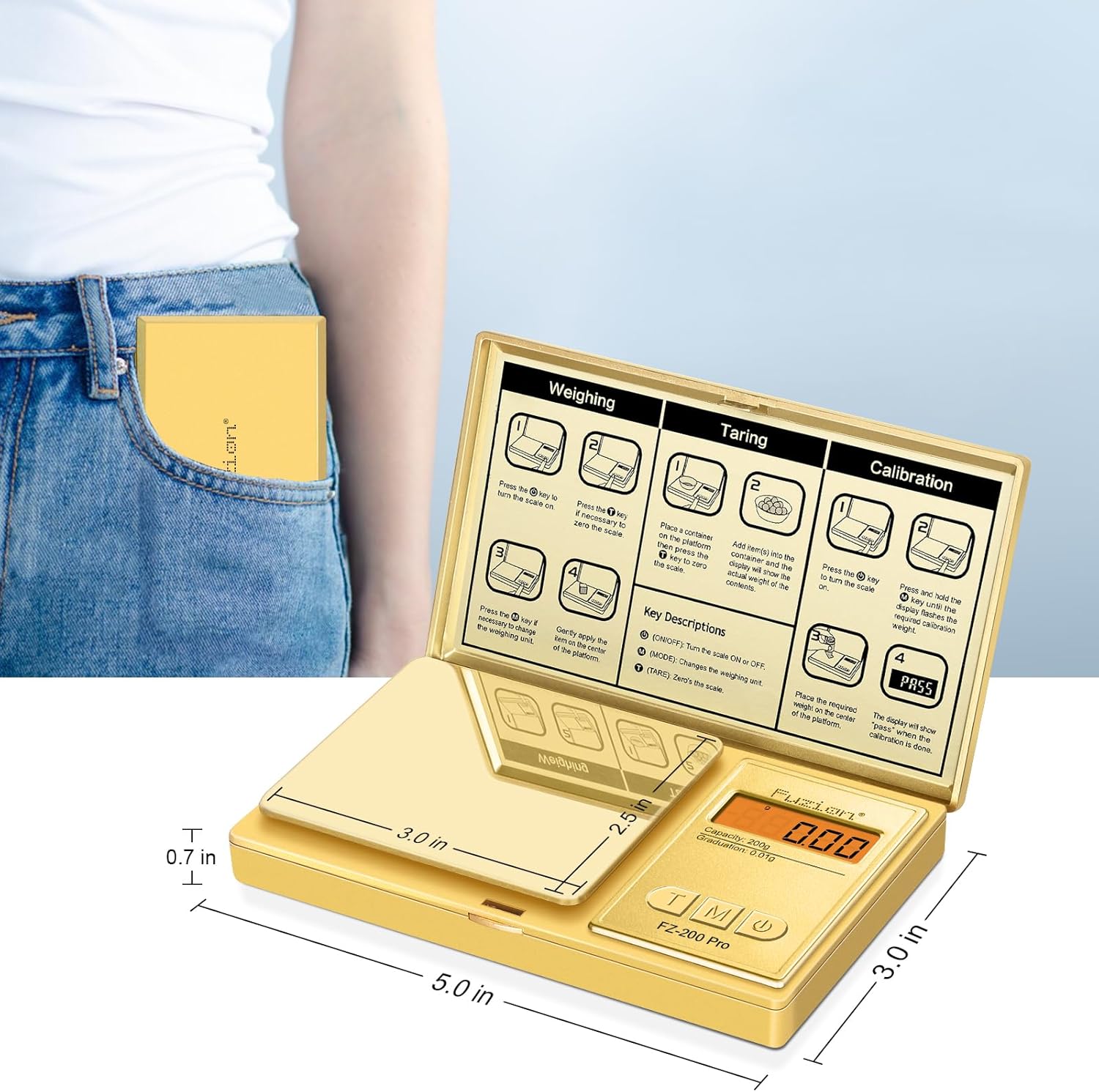
Figure 4: The compact Fuzion scale is easy to store and carry.
Troubleshooting
Common Issues and Solutions
| Problem | Solution |
|---|---|
| Display shows "Lo" | Batteries are low. Replace with new AAA batteries. |
| Display shows "OUE2" | Overload error. Remove excess weight from the platform. |
| Inaccurate readings | Ensure the scale is on a flat, stable surface. Recalibrate the scale using the 100g calibration weight. |
| Scale does not turn on | Check battery installation and ensure batteries are not depleted. |
If problems persist, please contact customer support.
Specifications
Technical Details
- Brand: Fuzion
- Color: Gold
- Recommended Uses: Food, Coins, Jewelry, Herbs, Spice, Gemstones
- Special Feature: Backlit Display
- Display Type: LCD
- Weight Limit: 200 Grams
- Form Factor: Mini
- Material: Gold Titanium Plating Stainless Steel, ABS
- Readout Accuracy: 0.01 Grams
- Item Weight: 8.4 ounces (0.24 Kilograms)
- Product Dimensions: 5 x 3 x 0.7 inches
- Batteries: 2 AAA batteries required (included)
- UPC: 628719230268
Warranty and Support
Warranty Information
The Fuzion Digital Pocket Gram Scale comes with a two-year warranty. This warranty covers manufacturing defects and ensures reliable performance.
Customer Support
For any questions, technical assistance, or warranty claims, please visit the official Fuzion website or contact our customer support team.

