Introduction
This manual provides comprehensive instructions for the operation and maintenance of your TAMPROAD Q55-1MIC Bluetooth Speaker. Please read this manual thoroughly before using the product to ensure proper function and longevity. This 80W peak wireless speaker features TWS capability, deep bass, LED colorful lights, and multiple connectivity options, making it suitable for various indoor and outdoor settings.
What's in the Box
- 1 x Q55 Karaoke Machine Bluetooth Speaker
- 1 x Wireless Microphone
- 1 x Remote Control
- 1 x USB-C Cable
- 1 x AUX Cable
- 1 x User Manual
Product Overview
The TAMPROAD Q55-1MIC speaker is designed for powerful audio performance and versatile use. It features dual 4-inch full-range high-performance drivers and dynamic LED lighting.

Figure 1: Front view of the TAMPROAD Q55-1MIC Bluetooth Speaker, showing the dual speakers, LED lights, and included accessories.
Speaker Components
The speaker is equipped with two 4-inch full-range high-performance drivers, delivering rich bass and clear sound across high, medium, and low frequencies.
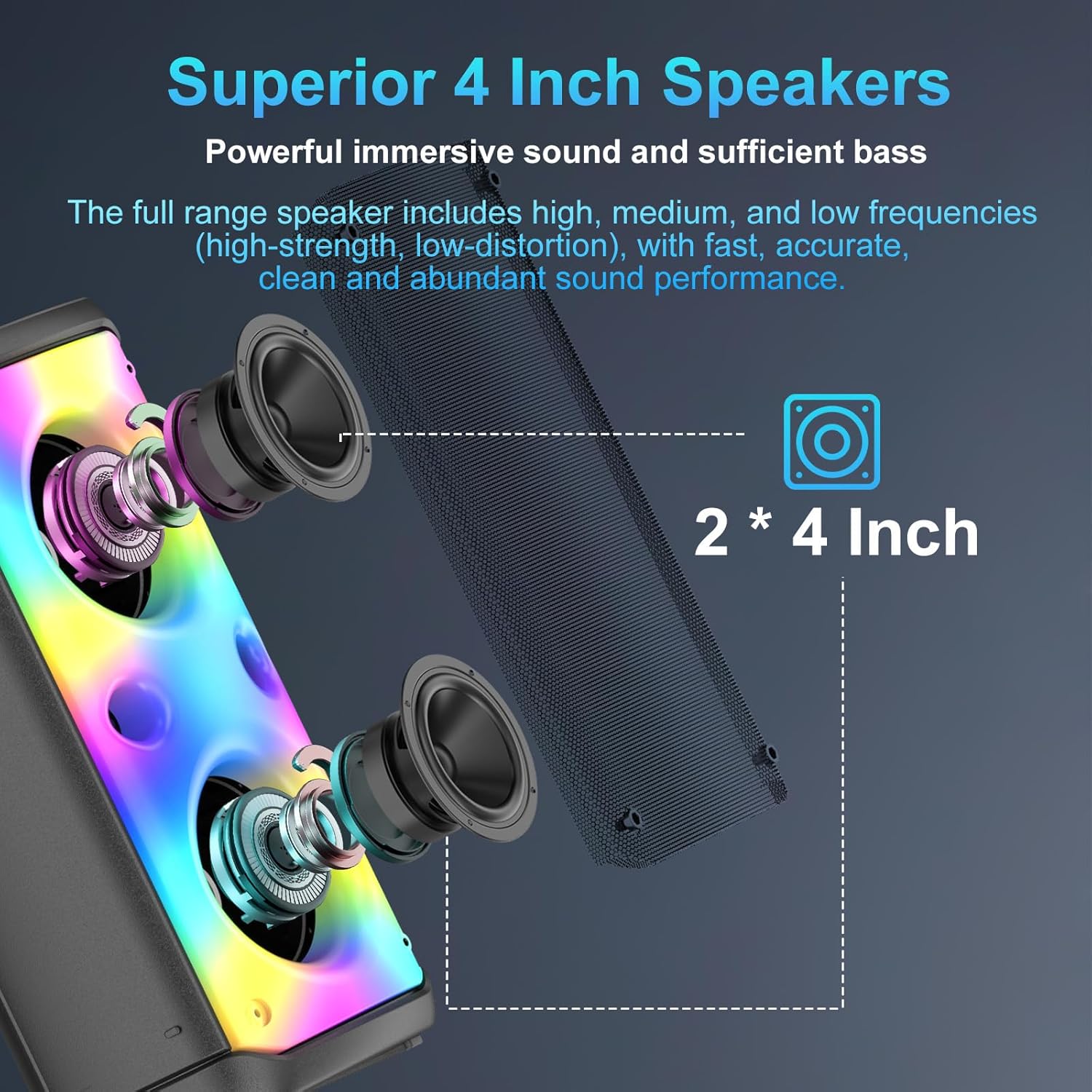
Figure 2: Illustration of the dual 4-inch full-range high-performance drivers within the speaker.
Control Panel and Ports
The top panel provides access to all controls and connectivity ports for easy operation.

Figure 3: Top control panel with power switch, mode button, volume knobs, playback controls, and various input ports.
- Power Switch: Turns the speaker on or off.
- Mode Button: Cycles through Bluetooth, FM Radio, USB/TF Card, and AUX modes.
- Volume Knobs: Separate controls for main speaker volume and microphone volume.
- Playback Controls: Play/Pause, Next/Previous track, Scan (for FM radio).
- Echo Control: Adjusts the echo effect for the microphone.
- EQ Button: Switches between Indoor (deep bass) and Outdoor (loud & clear) sound modes.
- LED Light Modes: Button to cycle through 6 dynamic flashing light modes or turn lights off.
- Ports: USB Port, TF Card Slot, AUX Input, Wired Microphone Socket, Type-C Charging Port.
Setup
1. Charging the Speaker
Before first use, fully charge the speaker using the provided USB-C cable. The charging indicator light will show charging status. A full charge typically takes 3-6 hours and provides 8-20 hours of playback depending on usage (e.g., volume level, LED lights on/off).

Figure 4: Battery life and charging duration details.
2. Bluetooth Pairing
- Turn on the speaker using the power switch on the top panel. The speaker will automatically enter Bluetooth pairing mode.
- On your mobile device (smartphone, tablet, etc.), enable Bluetooth and search for available devices.
- Select "Q55" from the list of devices. You will hear a confirmation sound once successfully paired.
3. Microphone Setup
The wireless microphone requires 2 AA batteries (not included). Insert the batteries into the microphone. Turn on the microphone using its power button. It will automatically connect to the speaker.
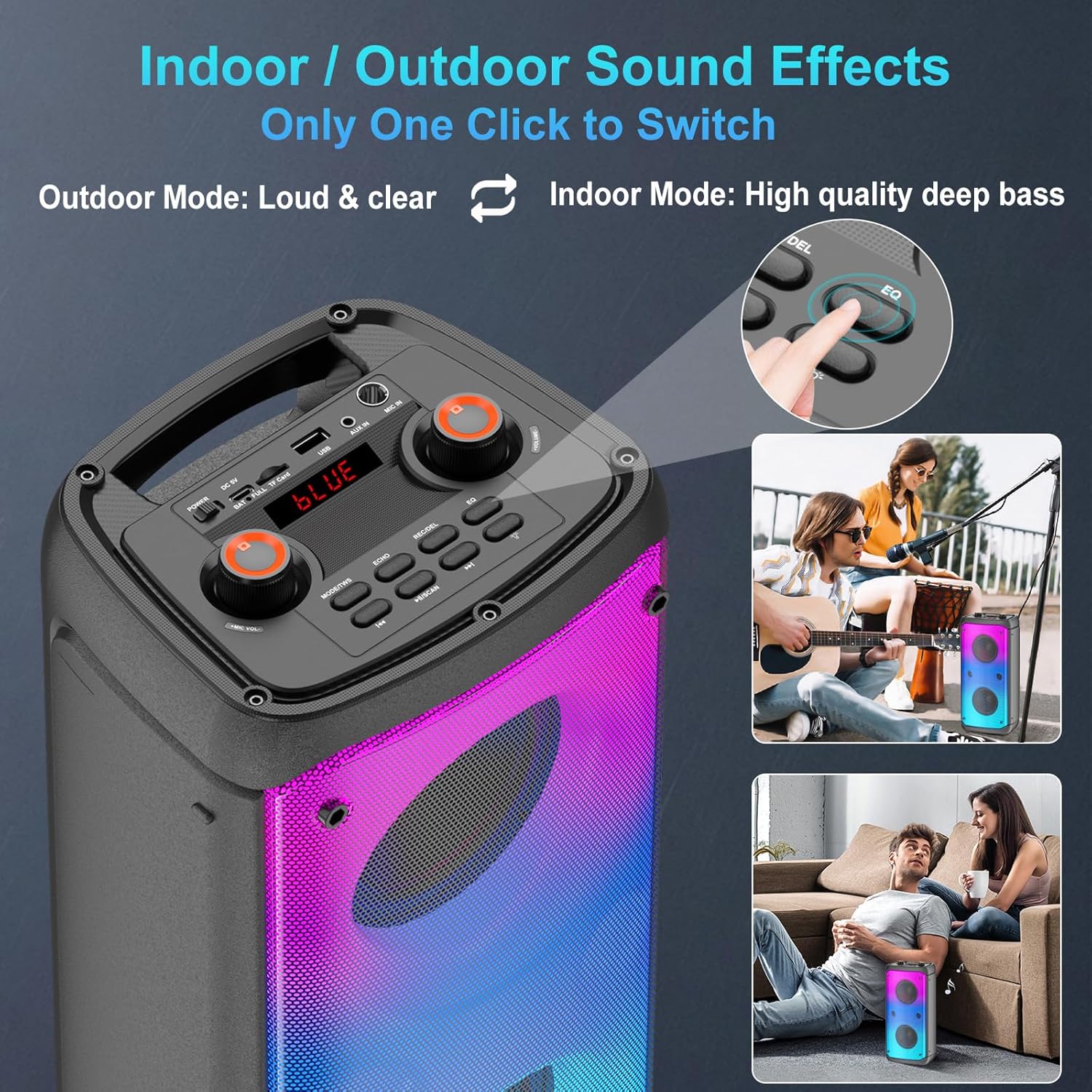
Figure 5: Wireless microphone with power button and display.
Operating Instructions
Switching Modes
Press the "Mode" button on the control panel or remote control to switch between Bluetooth, FM Radio, USB/TF Card, and AUX input modes.

Figure 6: Multiple connection options for the speaker.
Adjusting Volume and Echo
Use the dedicated volume knobs on the top panel to adjust the main speaker volume and the microphone volume independently. The "Echo" button allows you to cycle through different echo levels for the microphone.
LED Colorful Lights
The speaker features 6 dynamic flashing LED light modes that can be changed by pressing the dedicated light button on the control panel or remote. The lights can also be turned off if desired.
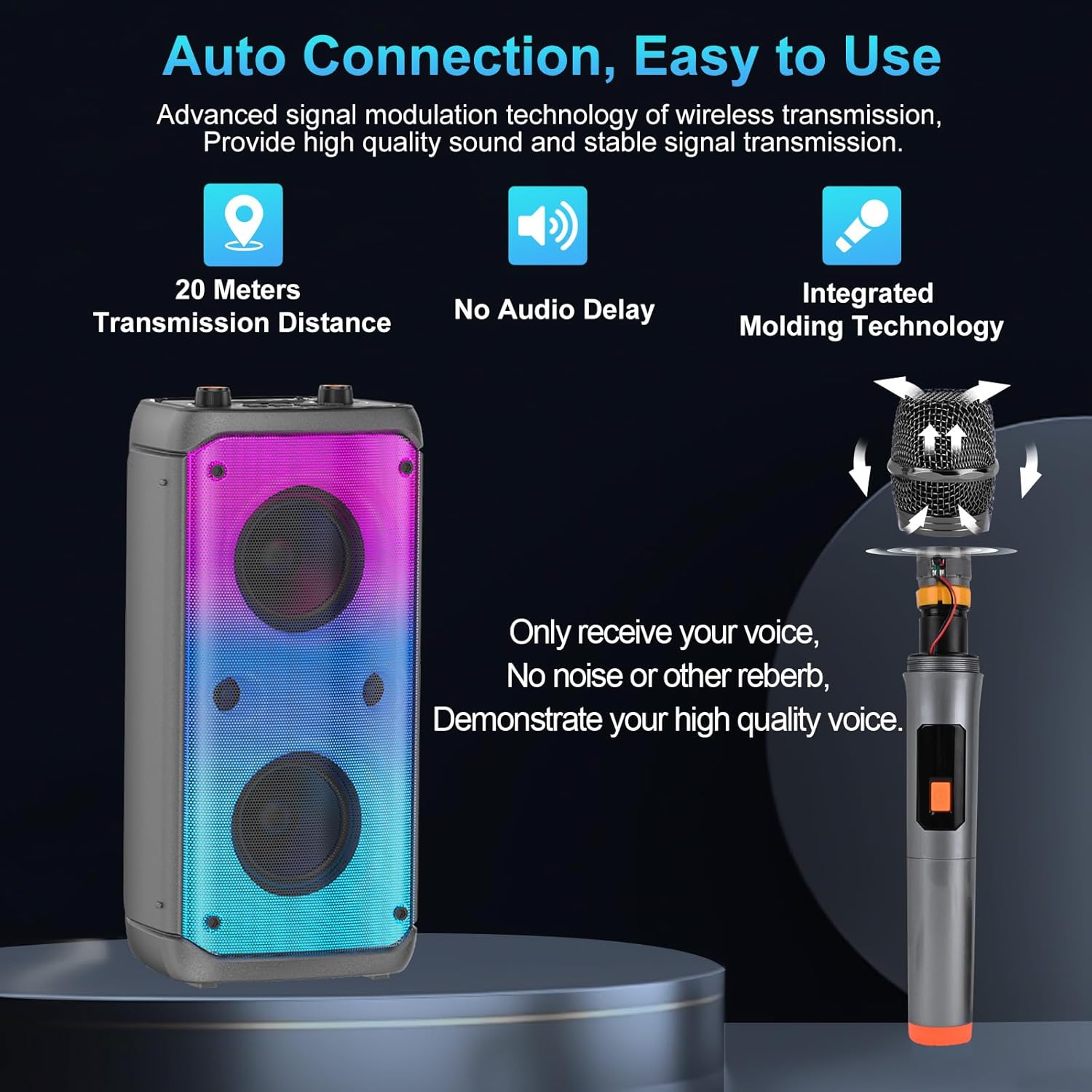
Figure 7: Disco Light Show driven by music beat with various modes.
Indoor / Outdoor Sound Effects
Press the "EQ" button to toggle between "Outdoor Mode" (loud & clear) and "Indoor Mode" (high quality deep bass) to optimize sound for your environment.
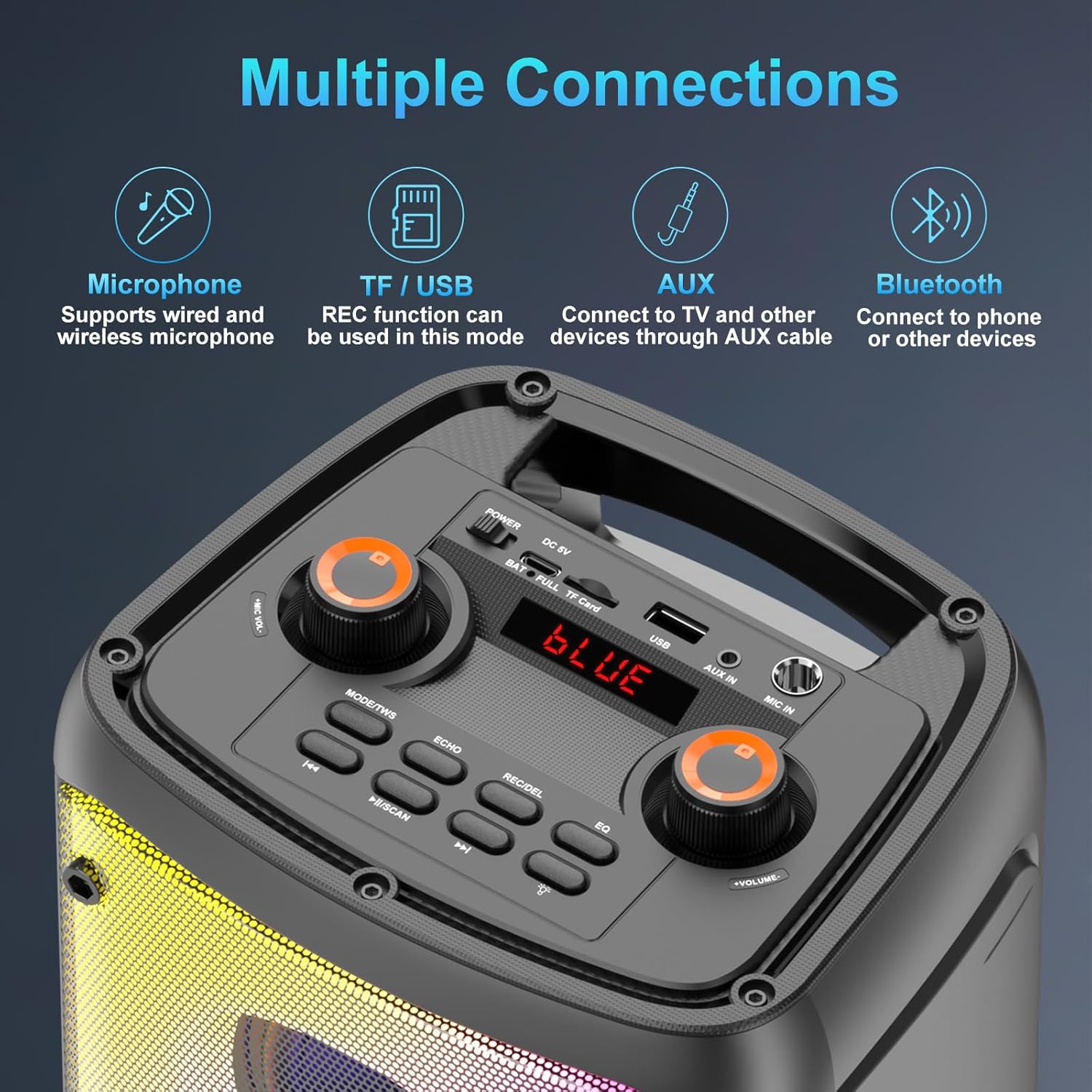
Figure 8: One-click switch between Indoor and Outdoor sound effects.
TWS Pairing (True Wireless Stereo)
To achieve a true stereo surround sound experience, you can pair two TAMPROAD Q55 speakers together. This feature creates distinct left and right audio channels for an immersive listening experience.
- Ensure both Q55 speakers are powered on and not connected to any other Bluetooth device.
- Short press the "TWS" button on one of the speakers. It will attempt to pair with the other speaker.
- Once successfully paired, you will hear a prompt sound.
- Now, connect your mobile phone's Bluetooth to one of the paired speakers to play synchronously.
- To disconnect TWS mode, short press the "TWS" button again.

Figure 9: Two Q55 speakers configured for 160W Powerful TWS Stereo Sound.
Maintenance
- Keep the speaker away from water, moisture, and extreme temperatures.
- Clean the speaker with a soft, dry cloth. Do not use abrasive cleaners or solvents.
- Store the speaker in a cool, dry place when not in use for extended periods.
- Avoid dropping or subjecting the speaker to strong impacts.
Troubleshooting
| Problem | Possible Cause | Solution |
|---|---|---|
| Speaker does not turn on. | Low battery or power switch off. | Charge the speaker. Ensure the power switch is in the ON position. |
| Cannot pair via Bluetooth. | Speaker not in pairing mode, or device Bluetooth is off. | Ensure speaker is in Bluetooth mode. Turn off and on your device's Bluetooth. Move closer to the speaker. |
| No sound from speaker. | Volume too low, incorrect mode, or device not playing. | Increase speaker volume. Check if the correct input mode is selected. Ensure your connected device is playing audio. |
| Microphone not working or has delay. | Microphone off, low batteries, or interference. | Ensure microphone is turned on and has fresh batteries. Adjust microphone volume. Reduce distance between microphone and speaker. |
| Poor FM radio reception. | Weak signal. | Adjust the speaker's position to improve signal reception. |
Specifications
| Feature | Detail |
|---|---|
| Mounting Type | Floor Standing |
| Power Source | Battery Powered |
| Connector Type | USB /AUX |
| Material | Acrylonitrile Butadiene Styrene (ABS) |
| Item Weight | 2.75 Kilograms (6.05 pounds) |
| Output Wattage | 80 Watts |
| Number of Channels | 2 |
| Audio Input | Bluetooth / Aux |
| Manufacturer | TAMPROAD |
| Product Dimensions | 0.39 x 0.39 x 0.39 inches |
| Item model number | Q55-1MIC |
| Batteries | 1 Lithium Polymer batteries required. (included) |
| Connectivity Technology | Bluetooth / wired / Aux /wireless |
| Color | Black |
| Compatible Devices | Smartphone |
Official Product Video
Video: An overview of the TAMPROAD 80W Bluetooth Speaker, demonstrating its features and capabilities.
Warranty and Support
All TAMPROAD products come with a 12-month warranty. For any questions or support needs, please contact our customer service. We offer 24-hour online customer service to assist you.
For further assistance, please refer to the contact information provided on the product packaging or the official TAMPROAD website.


