
1. Introduction
This manual provides detailed instructions for the setup, operation, and maintenance of the WWZMDiB XH-M543 High Power Digital Amplifier Board. This module features the TPA3116D2 chip, offering dual-channel high-power audio amplification with efficient Class D operation.

Image 1.1: Overview of the WWZMDiB XH-M543 Digital Amplifier Board. This image displays the top view of the blue circuit board with a central black heatsink, various capacitors, inductors, and terminal blocks for connections. A grey cable with white connectors is also visible.
2. Product Features
- Amplifier Chip: Utilizes TI's TPA3116D2 for efficient stereo digital amplification.
- Output Power: Capable of driving up to 120W per channel (2x120W) in dual-channel stereo mode.
- Efficiency: High efficiency Class D operation (greater than 90% power efficiency) with low idle loss, minimizing heat generation.
- PSRR: Feedback power level architecture with high Power Supply Rejection Ratio (PSRR) reduces power supply requirements.
- Protection: Integrated self-protection circuits including overvoltage, undervoltage, overheat, DC detection, and short circuit protection.
- Reliability: Features large capacity filter capacitors and relay protection diodes for enhanced reliability.
- Channels: Two-channel stereo output.
3. Specifications
| Feature | Detail |
|---|---|
| Product Name | TPA3116D2 Digital Power Amplifier Board |
| Supply Voltage | DC 12V - 26V (DC 24V recommended) |
| Output Power | 120W x 2 (Dual Channel) |
| Signal to Noise Ratio (SNR) | 100dB |
| Channel Number | Two-channel stereo |
| Dimensions | 92mm x 68mm x 16mm (3.62in x 2.68in x 0.63in) |
| Amplifier Chip | TPA3116D2 |
| Pre-amplifier Chip | TLO74C |

Image 3.1: Dimensions of the WWZMDiB XH-M543 Digital Amplifier Board. This image shows the amplifier board with measurements indicating its length (92mm / 3.62in) and width (68mm / 2.68in).
4. Setup and Connections
Follow these steps to correctly set up your WWZMDiB XH-M543 amplifier board:
- Power Input: Connect a DC power supply ranging from 12V to 26V to the power input terminal. A 24V DC power supply is recommended for optimal performance. Ensure correct polarity (+ and -).
- Audio Input: Connect your audio source (e.g., MP3 player, mobile phone, computer) to the audio input terminal. The board includes a TLO74C amplifier chip for pre-amplification of the input signal.
- Speaker Output: Connect your speakers to the audio output terminals. Pay close attention to the positive (+) and negative (-) poles for each channel. For best results, it is recommended to use professional stage speakers rated at more than 120W.
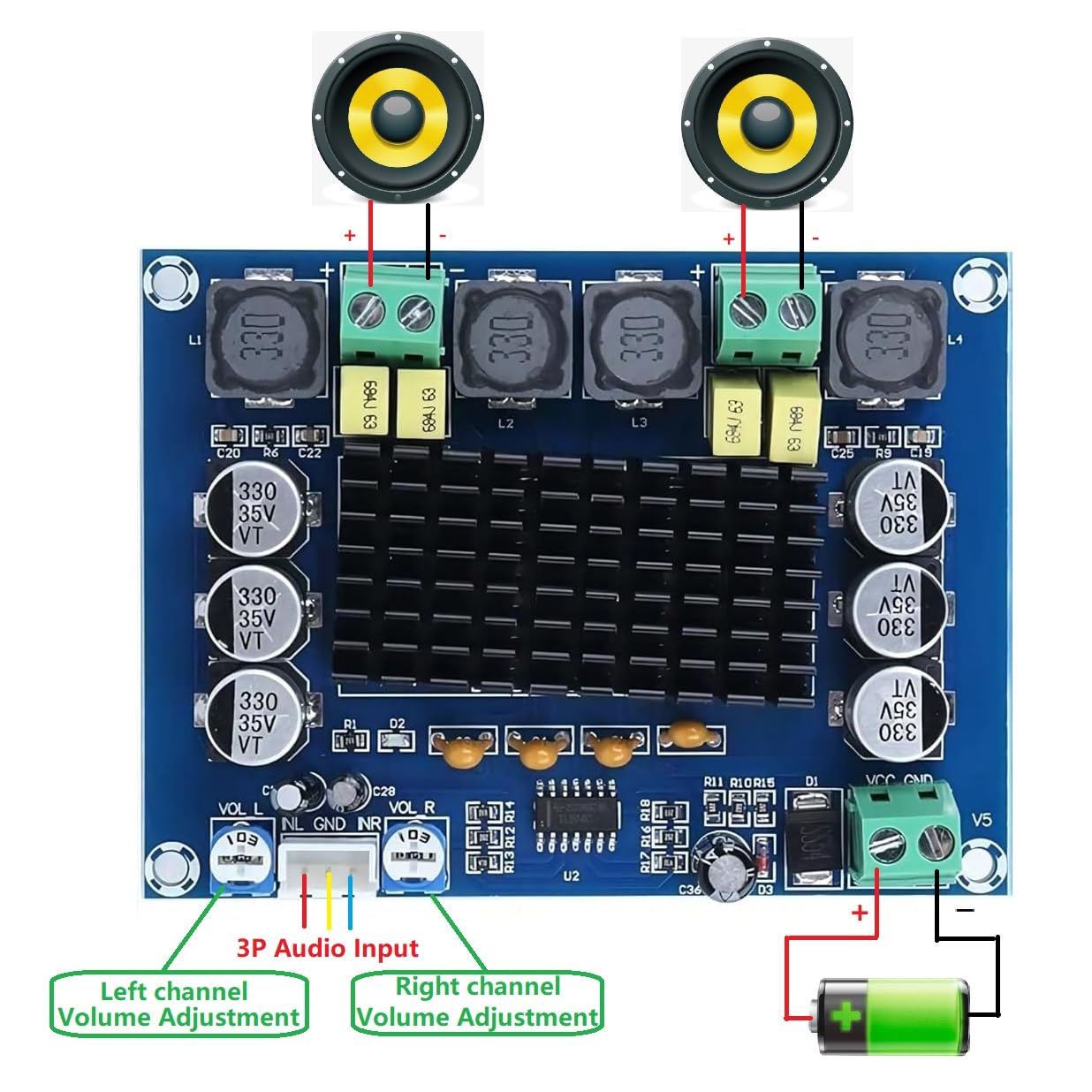
Image 4.1: Connection diagram for the WWZMDiB XH-M543 Digital Amplifier Board. This diagram illustrates how to connect the power source (battery), 3P audio input, and two speakers to the amplifier board, clearly marking left and right channel volume adjustments.
5. Operating Instructions
Once all connections are securely made and verified, you can begin operating the amplifier board:
- Power On: Apply power to the DC input terminal. The amplifier should power on.
- Volume Adjustment: The board features separate volume adjustment potentiometers for the left and right channels. Rotate these potentiometers to adjust the output volume to your desired level.
- Audio Playback: Start playing audio from your connected source. Sound should be output through the connected speakers.
- Power Off: Disconnect the DC power supply when the amplifier is not in use.
6. Troubleshooting
If you encounter issues with your amplifier board, refer to the following common problems and solutions:
- No Sound Output:
- Ensure the power supply is connected correctly and providing the specified voltage (DC 12-26V).
- Verify that the audio input source is active and properly connected.
- Check speaker connections for correct polarity and secure contact.
- Confirm that the volume potentiometers are not set to minimum.
- Distorted Sound:
- Reduce the input audio level from your source.
- Ensure the power supply is stable and within the recommended voltage range.
- Check speaker impedance compatibility with the amplifier.
- Overheating:
- Ensure adequate ventilation around the amplifier board, especially the heatsink.
- Verify that the speaker load is within the amplifier's specifications (e.g., not too low impedance).
- If operating at high power for extended periods, consider adding active cooling (e.g., a small fan).
- Intermittent Sound:
- Check all wiring connections for looseness or poor contact.
- Inspect the power supply for stability.
7. Maintenance
To ensure the longevity and optimal performance of your amplifier board, follow these maintenance guidelines:
- Cleaning: Keep the board free from dust and debris. Use a soft, dry brush or compressed air for cleaning. Do not use liquids.
- Environment: Operate the amplifier in a dry, well-ventilated area, away from extreme temperatures, humidity, and direct sunlight.
- Handling: Handle the board by its edges to avoid touching components, especially when powered.
- Power Off When Not in Use: Disconnect power when the module is not actively being used to prevent unnecessary wear and power consumption.
8. Warranty and Support
For warranty information or technical support regarding your WWZMDiB XH-M543 Digital Amplifier Board, please refer to the purchase documentation or contact WWZMDiB customer service through the platform where the product was purchased. Please provide your model number (XH-M543) and purchase details when seeking support.
