1. Introduction
Welcome to the user manual for your MESWAO MES-B3 15.6-inch Android 13 Tablet. This document provides essential information for setting up, operating, maintaining, and troubleshooting your device. The MES-B3 tablet features a large 15.6-inch IPS HD display, an Octa-Core processor, 6GB RAM, 128GB internal storage (expandable), and a 12000mAh battery, designed for a versatile user experience.

Figure 1: MESWAO MES-B3 Tablet Overview
2. Safety Information
Please read all safety instructions carefully before using your tablet to prevent injury or damage to the device. Keep this manual for future reference.
- Battery Safety: Do not attempt to replace the battery yourself. Do not expose the tablet to extreme temperatures, direct sunlight, or fire. Do not puncture, drop, or disassemble the battery.
- Water and Moisture: This tablet is not waterproof. Avoid exposing it to water, rain, or high humidity.
- Cleaning: Use a soft, dry cloth to clean the tablet. Do not use liquid cleaners or aerosols.
- Handling: Avoid dropping the tablet or subjecting it to strong impacts.
- Hearing Protection: When using headphones, set the volume to a moderate level to avoid hearing damage.
3. Package Contents
Verify that all items are present in the package:
- MESWAO MES-B3 15.6-inch Android 13 Tablet
- Power Adapter
- USB-C Cable
- User Manual (this document)
4. Device Overview
Familiarize yourself with the physical components of your MESWAO MES-B3 tablet.

Figure 2: Buttons and Connectors
- Power Button: Press and hold to turn the tablet on or off. Press briefly to turn the screen on or off.
- Volume Buttons: Adjust the audio volume.
- Front Camera: For video calls and selfies (5MP).
- Rear Camera with Flashlight: For taking photos and videos (13MP).
- Type-C Port: For charging the tablet and connecting to a computer.
- TF Card Slot: Insert a MicroSD card to expand storage.
- Stereo Speakers: Provide audio output.
5. Setup
5.1 Charging the Tablet
Before first use, fully charge your tablet. Connect the USB-C cable to the tablet's Type-C port and the other end to the power adapter. Plug the adapter into a wall outlet. The battery indicator on the screen will show charging status.
5.2 Powering On/Off
- To Power On: Press and hold the Power Button until the MESWAO logo appears.
- To Power Off: Press and hold the Power Button until the power options appear, then select 'Power off'.
- To Restart: Press and hold the Power Button until the power options appear, then select 'Restart'.
5.3 Initial Setup Wizard
Upon first power-on, the tablet will guide you through an initial setup process:
- Select your preferred language.
- Connect to a Wi-Fi network.
- Sign in with your Google account or create a new one.
- Review and accept the terms and conditions.
- Set up screen lock (PIN, pattern, password).
5.4 Inserting a MicroSD Card
To expand the tablet's storage, you can insert a MicroSD card (up to 256GB, as per some product information, though 1TB is also mentioned in images, please verify with product packaging for exact maximum). Locate the TF card slot on the side of the tablet. Gently insert the MicroSD card with the gold contacts facing down until it clicks into place.

Figure 3: Storage Expansion with MicroSD Card
6. Operating Your Tablet
6.1 Basic Navigation
The MESWAO MES-B3 runs on Android 13, offering an intuitive touch interface.
- Tap: Select an item or open an app.
- Swipe: Navigate through screens, scroll lists, or dismiss notifications.
- Pinch-to-Zoom: Enlarge or reduce content on the screen.
- Home Screen: Access your apps and widgets. Swipe down from the top for notifications and quick settings.
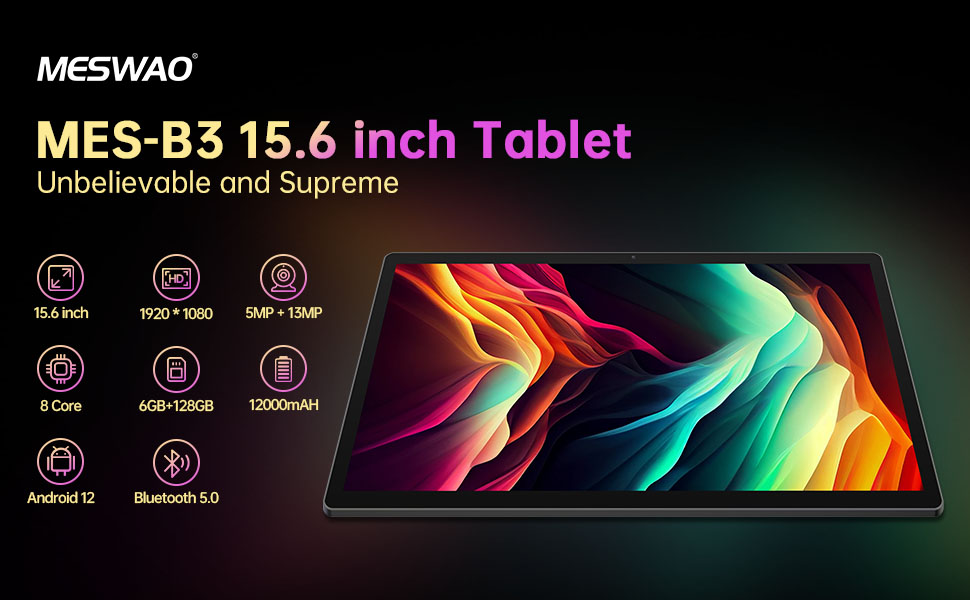
Figure 4: Android 13 Interface
6.2 Wi-Fi Connection
- Go to Settings > Network & internet > Internet.
- Turn on Wi-Fi.
- Select your desired network from the list and enter the password if prompted.
6.3 Bluetooth Pairing
The tablet supports Bluetooth 5.0 for connecting wireless accessories.
- Go to Settings > Connected devices > Connection preferences > Bluetooth.
- Turn on Bluetooth.
- Ensure your Bluetooth device is in pairing mode.
- Select your device from the 'Available devices' list and follow on-screen prompts to pair.
6.4 App Management
- Install Apps: Open the Google Play Store app, search for your desired app, and tap 'Install'.
- Uninstall Apps: Press and hold an app icon on the home screen or app drawer, then drag it to 'Uninstall' or select 'App info' and choose 'Uninstall'.
- Manage Apps: Go to Settings > Apps to view, force stop, or clear data for installed applications.
6.5 Display Settings
Customize your viewing experience:
- Go to Settings > Display.
- Adjust Brightness level.
- Set Screen timeout (sleep duration).
- Change Font size and Display size.
- Enable Dark theme for reduced eye strain.
6.6 Battery Management
The MES-B3 features a 12000mAh battery for extended use.

Figure 5: Extended Battery Life
- Go to Settings > Battery to view usage and optimize settings.
- Enable Battery Saver mode to extend battery life when needed.
- Close unused apps running in the background.
- Reduce screen brightness.
7. Maintenance
7.1 Cleaning
- Use a soft, lint-free cloth to gently wipe the screen and body.
- For stubborn smudges, slightly dampen the cloth with water or a screen cleaner specifically designed for electronics.
- Avoid using abrasive materials, alcohol, or chemical solvents.
7.2 Storage
- Store the tablet in a cool, dry place away from direct sunlight and extreme temperatures.
- If storing for an extended period, ensure the battery is charged to about 50% to prolong its lifespan.
7.3 Software Updates
Regularly check for software updates to ensure optimal performance and security.
- Go to Settings > System > System update.
- The tablet will check for available updates. Follow the on-screen instructions to download and install any updates.
8. Troubleshooting
Here are solutions to common issues you might encounter:
| Problem | Solution |
|---|---|
| Tablet won't turn on | Ensure the tablet is charged. Connect it to the charger for at least 30 minutes, then try powering it on again. |
| Wi-Fi connection issues | Restart your Wi-Fi router and the tablet. Go to Settings > Network & internet > Internet, forget the network, and reconnect. |
| Slow performance | Close unused apps. Clear cache for frequently used apps (Settings > Apps > [App Name] > Storage & cache > Clear cache). Restart the tablet. |
| Battery drains quickly | Reduce screen brightness. Disable Wi-Fi/Bluetooth when not in use. Close background apps. Check battery usage in Settings > Battery to identify power-hungry apps. |
| Apps crashing or freezing | Force stop the app (Settings > Apps > [App Name] > Force stop). Clear the app's cache. If the problem persists, uninstall and reinstall the app. |
9. Specifications
Detailed technical specifications for the MESWAO MES-B3 tablet:

Figure 6: Key Features and Specifications
| Feature | Specification |
|---|---|
| Brand | MESWAO |
| Model Number | MES-B3 |
| Operating System | Android 13 |
| Processor | MediaTek Octa-Core (MTK6789) |
| RAM | 6 GB |
| Internal Storage | 128 GB |
| Expandable Storage | Up to 256 GB (via TF/MicroSD card) |
| Screen Size | 15.6 Inches |
| Screen Resolution | 1920 x 1080 Pixels (IPS HD) |
| Front Camera | 5 MP |
| Rear Camera | 13 MP |
| Battery Capacity | 12000 mAh |
| Battery Life | Approximately 10 hours (usage dependent) |
| Connectivity | Bluetooth 5.0, Wi-Fi (802.11ac, 2.4G/5G) |
| Ports | USB Type-C, TF Card Slot |
| Color | Grey |
| Dimensions (L x W x H) | 36.85 x 22.25 x 0.93 cm |
| Weight | 1.1 Kilograms |
10. Warranty and Support
Your MESWAO MES-B3 tablet is covered by a standard manufacturer's warranty. Please refer to the warranty card included in your package for specific terms and conditions, including warranty duration and coverage details.
For technical support, troubleshooting assistance beyond this manual, or warranty claims, please contact MESWAO customer service through the retailer where you purchased the product or visit the official MESWAO website for contact information.


