
1. Introduction
Thank you for purchasing the SONAR SN-6015 Portable Electric Shaver. This versatile 3-in-1 device is designed for men's grooming, offering functions for shaving, hair clipping, beard trimming, and nose/ear hair removal. Please read this manual carefully before use to ensure safe and optimal performance of your device. Keep this manual for future reference.
2. Safety Instructions
- This appliance is intended for household use only.
- Do not immerse the main unit in water or other liquids.
- Keep the appliance away from children.
- Ensure the voltage of the power adapter matches your local power supply before charging.
- Do not use the appliance if the blades are damaged, as this may cause injury.
- Unplug the appliance from the power outlet before cleaning.
- Do not attempt to repair the appliance yourself. Contact qualified service personnel for repairs.
- Avoid using the appliance in extremely hot or cold environments.
3. Package Contents
Please check the package for the following items:
- 1 x SONAR SN-6015 Main Unit (Hair Clipper Head attached)
- 1 x Shaver Head
- 1 x Nose/Ear Trimmer Head
- 4 x Guide Combs (3mm, 6mm, 9mm, 12mm)
- 1 x Power Adapter
- 1 x Cleaning Brush
- 1 x Lubricating Oil (Cleaning Fluid)
- 1 x Instruction Manual
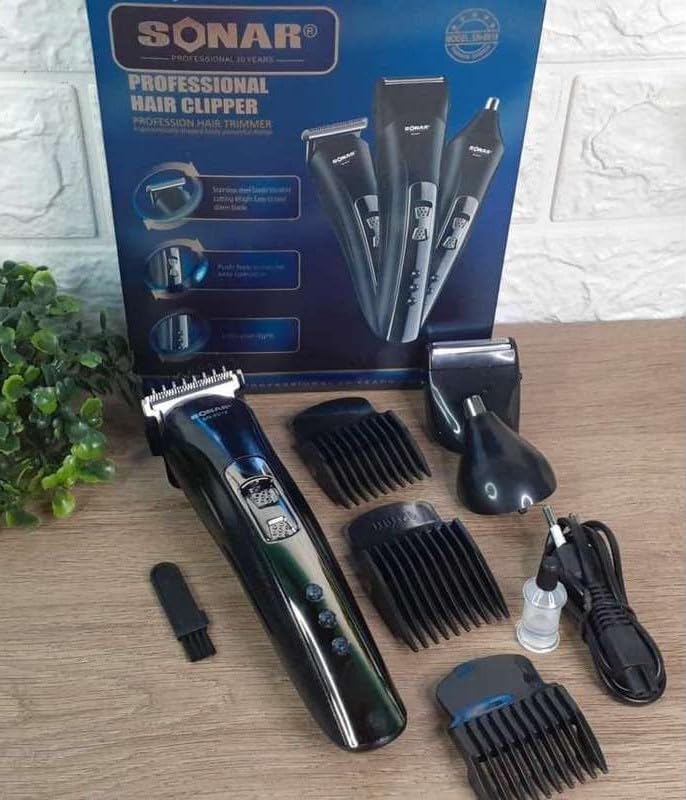
Figure 3.1: All included components of the SONAR SN-6015 electric shaver.
4. Product Overview
The SONAR SN-6015 features a main rechargeable unit with interchangeable heads for various grooming needs. The ergonomic design ensures comfortable handling.

Figure 4.1: The SONAR SN-6015 main unit shown with its three interchangeable heads.
4.1 Main Unit Features
- Power Switch: To turn the device on or off.
- Charging Indicator: Lights to show charging status.
- LCD Display: Shows operating time and selected cutting length (when applicable).
- Head Release Button: For easy attachment and detachment of heads.
4.2 Interchangeable Heads
- Hair Clipper Head: For general hair cutting and beard trimming.
- Shaver Head: For a close, smooth shave.
- Nose/Ear Trimmer Head: For safely removing unwanted nose and ear hair.

Figure 4.2: View of the main unit with the battery compartment and detached heads.
5. Setup
5.1 Charging the Device
- Ensure the device is switched off.
- Connect the power adapter to the charging port at the bottom of the main unit.
- Plug the adapter into a suitable electrical outlet (100-240V, 50/60Hz).
- The charging indicator lights will illuminate, indicating that the device is charging.
- A full charge takes approximately 3 to 8 hours. Do not overcharge the device.
- Once fully charged, the device provides 40 to 60 minutes of operating time.
5.2 Attaching and Detaching Heads
- To attach a head: Align the desired head with the main unit and press it down until it clicks into place.
- To detach a head: Press the head release button (if present, otherwise gently pull upwards) and lift the head off the main unit.
5.3 Using Guide Combs (for Hair Clipper Head)
- Select the desired guide comb (3mm, 6mm, 9mm, or 12mm) for your preferred cutting length.
- Slide the guide comb onto the hair clipper head until it securely locks into position.
- To remove, gently push the comb upwards and off the head.

Figure 5.1: The four limit combs (3mm, 6mm, 9mm, 12mm) for precise hair cutting.
6. Operating Instructions
6.1 General Operation
- Ensure the device is fully charged or connected to power.
- Press the power switch to turn the device on. The LCD display will show the operating time.
- After use, press the power switch again to turn the device off.
6.2 Using the Hair Clipper/Beard Trimmer
- Attach the hair clipper head to the main unit.
- Select and attach the appropriate guide comb for your desired hair length.
- Turn on the device.
- Hold the device with the blades facing the area to be trimmed. Move the clipper against the direction of hair growth for best results.
- For detailing or outlining, remove the guide comb and use the bare clipper head carefully.
6.3 Using the Shaver Head
- Attach the shaver head to the main unit.
- Turn on the device.
- Gently press the shaver head against your skin and move it in short, circular motions or straight strokes against the direction of hair growth.
- For dry shaving, ensure your skin is clean and dry.
6.4 Using the Nose/Ear Trimmer Head
- Attach the nose/ear trimmer head to the main unit.
- Turn on the device.
- Carefully insert the trimmer tip into your nostril or ear canal. Do not insert too deeply.
- Move the trimmer gently to cut unwanted hair.
7. Maintenance and Cleaning
Regular cleaning ensures optimal performance and extends the lifespan of your shaver.
- Turn Off and Unplug: Always ensure the device is switched off and unplugged from the power adapter before cleaning.
- Remove Head: Detach the used head from the main unit.
- Clean Blades: Use the provided cleaning brush to remove hair clippings from the blades and inside the head.
- Rinse (if applicable): Some heads may be rinseable under running water. Refer to specific head instructions. Ensure the main unit is never rinsed.
- Lubricate Blades: After cleaning and drying, apply a small drop of the provided lubricating oil to the blades. Turn on the device for a few seconds to distribute the oil evenly. This helps maintain blade sharpness and smooth operation.
- Dry and Store: Allow all parts to air dry completely before reassembling or storing. Store the device and its accessories in a dry, safe place.
8. Troubleshooting
| Problem | Possible Cause | Solution |
|---|---|---|
| Device does not turn on. | Battery is depleted. | Charge the device for 3-8 hours. |
| Device does not turn on. | Power switch is not fully engaged. | Ensure the power switch is pushed firmly to the 'ON' position. |
| Poor trimming/shaving performance. | Blades are clogged with hair. | Clean the blades and head thoroughly with the cleaning brush. |
| Poor trimming/shaving performance. | Blades are not lubricated. | Apply a drop of lubricating oil to the blades. |
| Device makes unusual noise. | Head is not properly attached. | Re-attach the head, ensuring it clicks into place. |
9. Specifications
| Feature | Specification |
|---|---|
| Model Name | SN-6015 |
| Brand | Genérico |
| Input Voltage (Main Unit) | 5V / 1000 mA |
| Power | 3W |
| Adapter Input Voltage | 100-240V, 50/60Hz |
| Charging Time | 3 to 8 hours |
| Operating Time | 40 to 60 minutes |
| Blade Material | Stainless Steel |
| Weight | 350 Grams |
| Special Features | Dry shaving, interchangeable heads, ergonomic design, portable, rechargeable |
10. Warranty and Support
This product is manufactured by Genérico. For any questions, technical support, or warranty claims, please refer to your purchase documentation or contact the retailer where the product was purchased. Please retain your proof of purchase for warranty purposes.
The battery has an estimated lifespan of 2 years under normal usage conditions.