
1. Important Safety Instructions
WARNING: Do not use this appliance near water. Exercise extreme caution during use to prevent injury. Always ensure your hands are dry before handling the trimmer or charger.
- Read all instructions before using the appliance.
- Keep the appliance away from children.
- Do not immerse the appliance in water or other liquids.
- Do not use the appliance if it is damaged or malfunctioning.
- Only use the charger supplied with the appliance.
- Unplug the appliance before cleaning.
2. Product Overview
2.1 Components
The Rowenta TN1603 Cordless Beard Trimmer comes with the following components:
- Trimmer Body
- Multiple Comb Attachments (for various cutting lengths)
- Foil Shaver Head
- Charging Cable (USB)
- Cleaning Brush
- Lubricating Oil Bottle
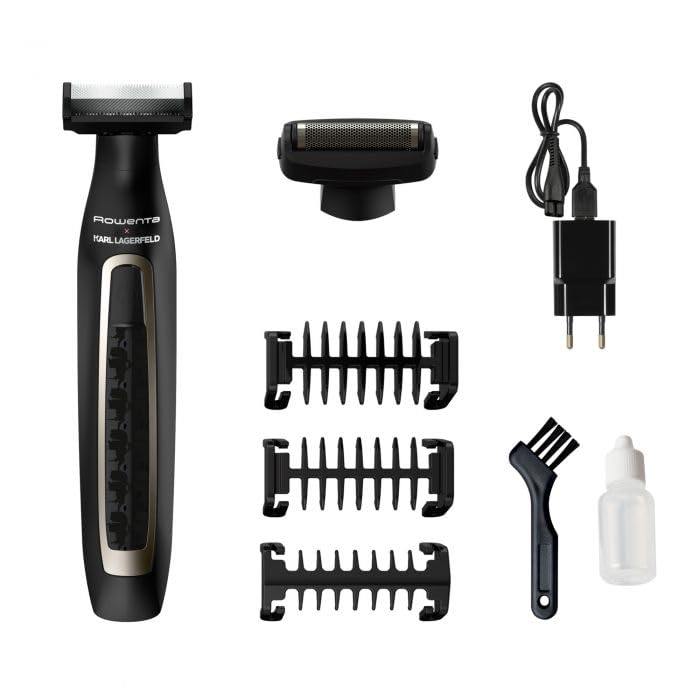
Image 2.1: The Rowenta TN1603 trimmer shown with all included accessories, including various comb attachments, a foil shaver head, charging cable, cleaning brush, and oil bottle.
2.2 Key Features
- Cordless Operation: Provides flexibility and ease of use without being tethered to an outlet.
- Self-Sharpening Blades: Ensures long-lasting sharpness and consistent cutting performance.
- 120-Minute Battery Life: Offers extended use on a single charge.
- Stainless Steel Blades: Durable and precise for effective trimming.
- Multiple Attachments: Includes various comb guides and a foil shaver head for versatile grooming.
3. Setup
3.1 Charging the Trimmer
- Ensure the trimmer is switched off.
- Connect the charging cable to the trimmer's charging port.
- Plug the USB end of the charging cable into a compatible USB power adapter (not included) or a USB port.
- The charging indicator light will illuminate (typically green) to show that the trimmer is charging.
- Allow approximately 120 minutes for a full charge. The indicator light may change or turn off when fully charged.

Image 3.1: Close-up view of the Rowenta TN1603 trimmer's power button and charging indicator light, which glows green when charging.
3.2 Attaching and Detaching Accessories
- Ensure the trimmer is switched off before attaching or detaching any accessories.
- To attach a comb attachment: Align the comb with the trimmer head and gently push it down until it clicks into place.
- To detach a comb attachment: Gently pull the comb upwards from the trimmer head.
- To attach the foil shaver head: Align the foil head with the trimmer body and push it firmly until it locks.
- To detach the foil shaver head: Press the release buttons (if present) on the sides of the head and pull it away from the body.

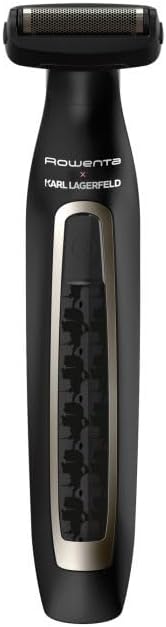
Image 3.2: The Rowenta TN1603 trimmer shown with a comb attachment (left) and with the foil shaver head attached (right).
4. Operating Instructions
4.1 Basic Trimming
- Ensure the trimmer is fully charged.
- Attach the desired comb attachment for your preferred hair length.
- Press the power button to turn on the trimmer.
- Hold the trimmer with the blades facing the area to be trimmed.
- Move the trimmer against the direction of hair growth for best results.
- After use, press the power button to turn off the trimmer.
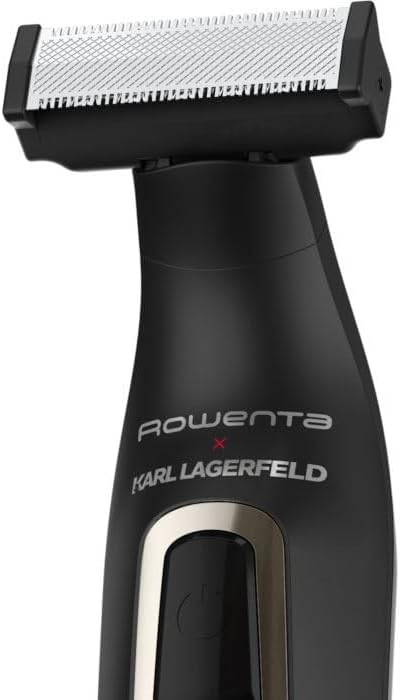
Image 4.1: A close-up view of the Rowenta TN1603 trimmer head, showing the self-sharpening stainless steel blades.
4.2 Using the Foil Shaver Head
- Ensure the trimmer is switched off and the foil shaver head is securely attached.
- Turn on the trimmer.
- Gently press the foil shaver head against your skin and move it in short, circular motions or straight lines.
- This head is designed for a close shave on smaller areas or for finishing edges.
- After use, turn off the trimmer.
5. Maintenance
5.1 Cleaning
- Always ensure the trimmer is switched off and unplugged before cleaning.
- Remove any comb attachments or the foil shaver head.
- Use the provided cleaning brush to remove hair clippings from the blades and inside the trimmer head.
- The blades can be rinsed under running water. Ensure they are completely dry before reattaching or storing.
- Wipe the trimmer body with a damp cloth. Do not use abrasive cleaners or immerse the body in water.
5.2 Lubrication
- After cleaning and drying the blades, apply 1-2 drops of the lubricating oil (provided) to the blades.
- Turn on the trimmer for a few seconds to allow the oil to distribute evenly.
- Wipe off any excess oil. Regular lubrication helps maintain blade performance and longevity.
5.3 Storage
Store the trimmer and its accessories in a cool, dry place, away from direct sunlight and moisture. Ensure the trimmer is clean and dry before storing.
6. Troubleshooting
| Problem | Possible Cause | Solution |
|---|---|---|
| Trimmer does not turn on. | Battery is depleted. | Charge the trimmer fully. |
| Poor trimming performance. | Blades are dirty or not lubricated. | Clean and lubricate the blades as per maintenance instructions. |
| Trimmer makes unusual noise. | Hair caught in blades or lack of lubrication. | Clean the blades thoroughly and apply lubricating oil. If the issue persists, contact customer support. |
| Battery does not charge. | Charging cable or adapter is faulty; poor connection. | Ensure the charging cable is securely connected. Try a different USB power adapter. |
7. Technical Specifications
- Model Number: TN1603
- Power Source: Battery Powered (Rechargeable)
- Battery Life: Up to 120 minutes
- Blade Material: Stainless Steel
- Special Features: Cordless, Self-sharpening
- Color: Black
- Product Dimensions (L x W x H): 31.5 x 23.5 x 24.8 cm (Note: These dimensions seem unusually large for a trimmer, likely packaging dimensions. Please refer to product packaging for exact device dimensions.)
8. Warranty and Support
This Rowenta product is covered by a manufacturer's warranty. Please refer to the warranty card included in your product packaging for specific terms and conditions, including warranty duration and coverage details.
For technical support, spare parts, or service inquiries, please visit the official Rowenta website or contact their customer service department. Contact information can typically be found on the Rowenta website or in your product documentation.


