
1. Introduction
This manual provides instructions for the proper setup, operation, and maintenance of your ECONTROLLY Z607 remote control. This remote is designed for compatibility with LOGITECH Z6060 and Z607 5.1 Surround Sound Speaker Systems.
Please read this manual thoroughly before using the remote control to ensure optimal performance and longevity.
2. Setup: Battery Installation
The ECONTROLLY Z607 remote control requires two (2) AAA alkaline batteries for operation. Batteries are not included with the remote control.
- Locate the battery compartment on the back of the remote control.
- Gently slide the battery compartment cover downwards or press the release tab (if present) and lift the cover off.
- Insert two AAA batteries, ensuring the positive (+) and negative (-) terminals align correctly with the markings inside the compartment. Incorrect insertion can prevent the remote from functioning.
- Replace the battery compartment cover by sliding it back into place until it clicks securely.

Figure 2.1: Rear view of the remote control, illustrating the battery compartment. The compartment is designed for two AAA batteries, with clear markings for positive and negative terminals.
No programming is required. Once batteries are correctly installed, the remote control is ready for use with compatible LOGITECH speaker systems.
3. Operating Instructions
The ECONTROLLY Z607 remote control provides direct access to various functions of your LOGITECH Z6060 or Z607 5.1 Surround Sound Speaker System. Ensure a clear line of sight between the remote control and the speaker system's receiver for optimal performance.
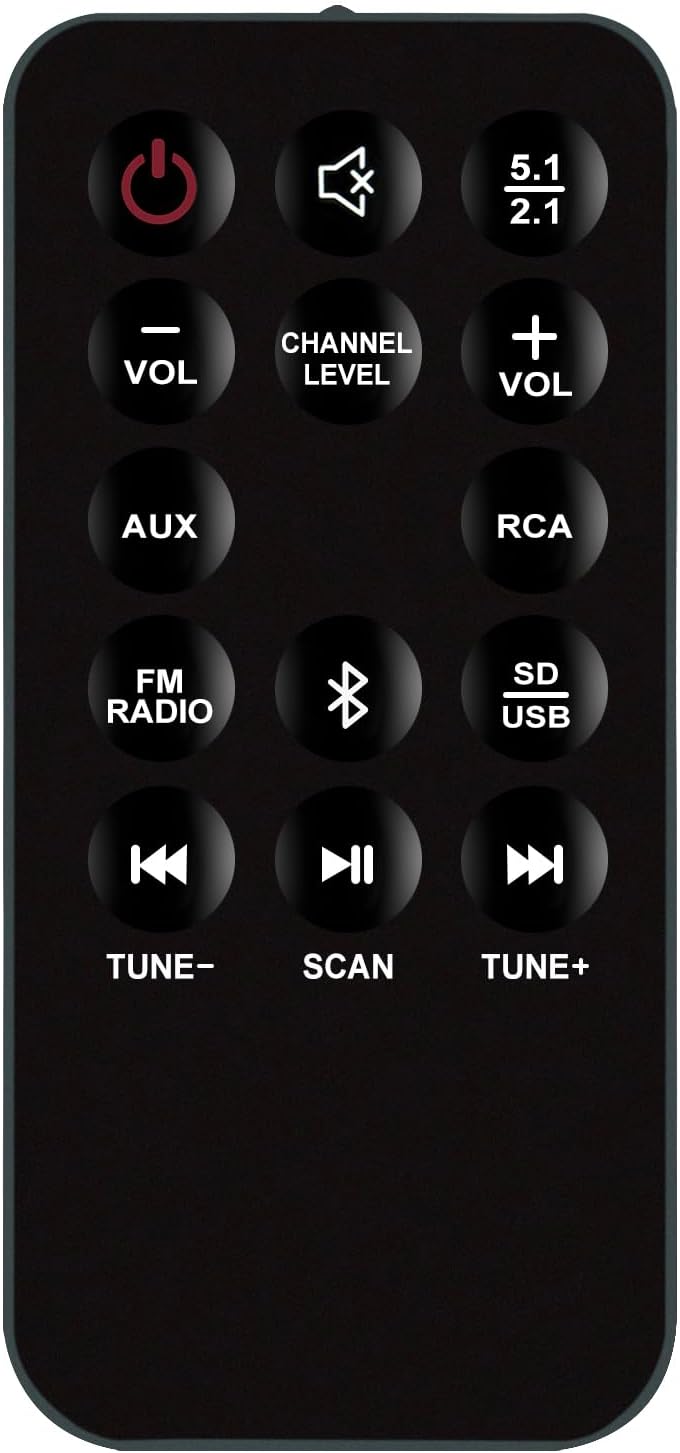
Figure 3.1: Front view of the ECONTROLLY Z607 remote control, displaying all function buttons. Each button is clearly labeled for its specific operation.
Button Functions:
- Power (⏻): Turns the speaker system on or off.
- Mute (🔇): Mutes or unmutes the audio output.
- 5.1 / 2.1: Toggles between 5.1 surround sound and 2.1 stereo sound modes.
- VOL - / VOL +: Decreases or increases the master volume level.
- CHANNEL LEVEL: Adjusts the volume level for individual speaker channels (e.g., center, rear, subwoofer). Press repeatedly to cycle through channels, then use VOL +/- to adjust.
- AUX: Selects the Auxiliary input source.
- RCA: Selects the RCA input source.
- FM RADIO: Switches to FM radio mode.
- Bluetooth (Ⓑ): Activates Bluetooth pairing mode or switches to Bluetooth input.
- SD / USB: Selects the SD card or USB drive input source for media playback.
- TUNE - / TUNE +: In FM radio mode, tunes down or up the frequency. In media playback modes, navigates to the previous or next track.
- SCAN (⏸): In FM radio mode, scans for available stations. In media playback modes, plays or pauses the current track.
4. Maintenance
To ensure the longevity and proper functioning of your remote control, follow these maintenance guidelines:
- Cleaning: Use a soft, dry cloth to clean the remote control. Do not use liquid cleaners, abrasive pads, or chemical solvents, as these can damage the surface or internal components.
- Battery Replacement: Replace batteries promptly when the remote control's performance diminishes. Remove batteries if the remote will not be used for an extended period to prevent leakage.
- Storage: Store the remote control in a cool, dry place away from direct sunlight, extreme temperatures, and high humidity.
- Handling: Avoid dropping the remote control or subjecting it to strong impacts, which can damage internal circuitry.
5. Troubleshooting
If you experience issues with your ECONTROLLY Z607 remote control, refer to the following common troubleshooting steps:
- Remote Not Responding:
- Check if the batteries are inserted correctly with the correct polarity (+/-).
- Replace the batteries with new AAA alkaline batteries.
- Ensure there are no obstructions between the remote control and the speaker system's infrared receiver.
- Verify that the remote control is pointed directly at the speaker system's receiver.
- Limited Range:
- Ensure batteries are fresh. Weak batteries can reduce the remote's effective range.
- Minimize sources of infrared interference, such as direct sunlight or strong fluorescent lighting.
- Specific Button Not Working:
- Clean the remote control's surface, especially around the buttons, to remove any dirt or debris that might be obstructing button presses.
- If only one button is unresponsive after checking batteries and cleaning, the remote may require replacement.
If these steps do not resolve the issue, please contact the manufacturer for further assistance.
6. Specifications
| Model Number | Z607 |
| Brand | ECONTROLLY |
| Compatible Devices | LOGITECH Z6060, LOGITECH Z607 5.1 Surround Sound Speaker Systems |
| Power Source | 2 x AAA Alkaline Batteries (not included) |
| Dimensions | 7 x 2 x 0.65 inches (approximately) |
| Item Weight | 2.3 ounces (approximately) |
| Color | Black |
7. Warranty and Support
Warranty information for the ECONTROLLY Z607 remote control is typically provided at the time of purchase or included with the product packaging. Please refer to your purchase documentation for specific warranty terms and conditions.
For technical support, troubleshooting assistance beyond what is provided in this manual, or inquiries regarding warranty claims, please contact the manufacturer, ECONTROLLY, directly through their official support channels.
