
1. Introduction
The Sensative Strips Drip Z-Wave 800 is an ultra-thin water leak and temperature sensor designed for smart home environments. It utilizes Z-Wave 800 technology to detect water leaks and monitor ambient temperatures, providing timely notifications to your Z-Wave controller. Its slim design allows for discreet placement in hard-to-reach areas, offering comprehensive monitoring for potential water damage or freezing conditions.
2. Safety Information
- Do not attempt to open or modify the sensor. Internal components are not user-serviceable.
- Keep the sensor away from direct heat sources or open flames.
- Ensure the sensor is installed in a location where it will not be physically damaged or submerged in water beyond its intended detection area.
- Dispose of the product and its battery according to local regulations. Do not incinerate.
- The provided magnet is for setup and reset purposes only. Keep it away from children.
3. Package Contents
Verify that your package contains the following items:
- Sensative Strips Drip Sensor
- Magnet (for setup)
- Quick Start Guide (this manual)

Image: The Sensative Strips Drip sensor shown in its retail packaging, which includes the sensor and a small magnet.
4. Product Overview
The Sensative Strips Drip sensor is designed to be discreet and highly functional. It features an ultra-thin profile, allowing it to be placed in tight spaces where traditional sensors cannot fit. The sensor detects water presence across its length and reports ambient temperature.
Key Features:
- Water Leak Detection: Senses water on most hard surfaces in 1-100% increments.
- Temperature Monitoring: Reports ambient room temperature.
- Z-Wave 800 Technology: Extended wireless range and enhanced security (S2 and Secure Vault).
- Long Battery Life: Up to 10 years with the built-in LiMnO2 battery.
- Universal Installation: Suitable for indoor and outdoor applications.
5. Setup
To set up your Sensative Strips Drip sensor, you will need a compatible Z-Wave controller or hub (sold separately). The sensor uses a magnet for activation and pairing.
5.1. Adding the Sensor to Your Z-Wave Network (Inclusion)
- Prepare your Z-Wave Controller: Put your Z-Wave controller into inclusion (pairing) mode. Refer to your controller's manual for specific instructions.
- Activate the Sensor: Hold the provided magnet against the marked area on the sensor (usually indicated by a small indentation or symbol) for approximately 3 seconds, then remove it. The sensor's LED (if visible) may blink to indicate activation.
- Confirm Inclusion: Your Z-Wave controller should detect and add the sensor. If successful, the controller will confirm the inclusion. The sensor may appear as multiple devices (e.g., leak sensor, temperature sensor, brightness sensor) depending on your controller's capabilities.
- Smart Start (if supported): If your Z-Wave controller supports Smart Start, you can scan the QR code on the sensor or its packaging to automatically add it to your network.
Note: The timing of holding and removing the magnet is crucial. If inclusion fails, repeat the process. Some Z-Wave hubs may require several attempts due to timing sensitivities.
5.2. Placement Recommendations
The ultra-thin design allows for flexible placement. Consider areas prone to leaks or where temperature monitoring is critical.
- Under sinks (kitchen, bathroom)
- Behind toilets
- Near water heaters
- Under washing machines or dishwashers
- In basements or utility rooms
- Near pipes that may freeze
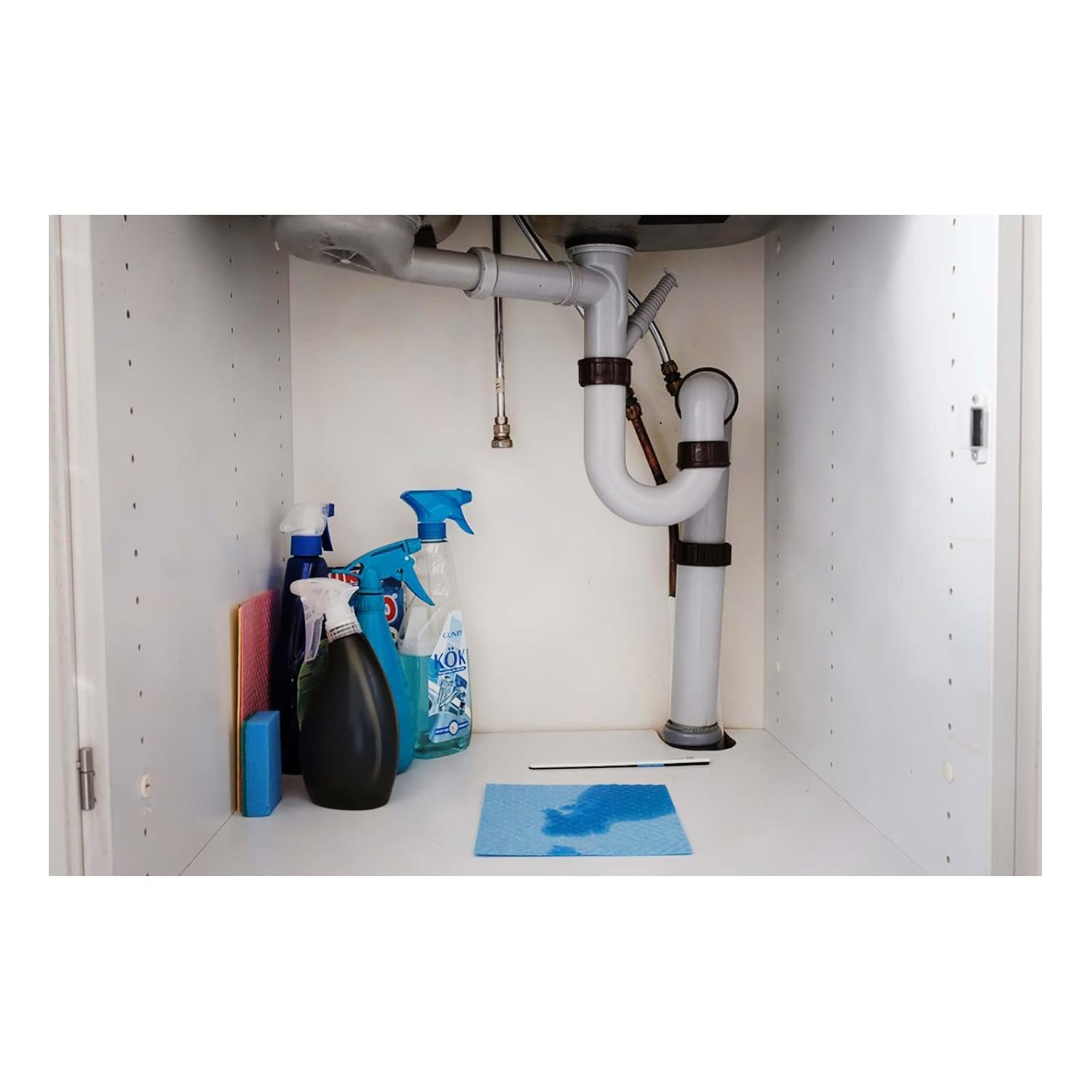
Image: The thin Sensative Strips Drip sensor positioned on the floor directly in front of a washing machine, illustrating discreet placement for leak detection.

Image: The Sensative Strips Drip sensor lying on the cabinet floor under a kitchen sink, near plumbing, demonstrating its use in a common leak-prone area.
6. Operating the Sensor
Once successfully included in your Z-Wave network, the Strips Drip sensor will automatically begin monitoring for water leaks and reporting temperature data.
6.1. Water Leak Detection
When water comes into contact with the sensor's detection strip, it will trigger a leak alarm. This alarm is sent to your Z-Wave controller, which can then execute predefined actions (e.g., send notifications, activate a siren, shut off a water valve if integrated).
Note: The sensor's felt strip requires a few seconds to absorb water before triggering. This is normal operation.
6.2. Temperature Monitoring
The sensor continuously monitors the ambient temperature in its vicinity and reports this data to your Z-Wave controller at regular intervals (default wake-up interval is 24 hours, but can be configured). You can use this information to monitor for extreme temperatures that could indicate freezing pipes or other issues.

Image: A smartphone screen displaying a smart home application interface, showing a "Water Leak Detected" alert and a temperature reading of 21°C, with the Sensative Strips Drip sensor visible under a sink in the background.
7. Maintenance
7.1. Battery Life
The Sensative Strips Drip sensor is equipped with a built-in LiMnO2 battery designed to last up to 10 years under normal operating conditions. The battery is not replaceable by the user. When the battery is low, the sensor will report its status to your Z-Wave controller.
7.2. Cleaning
If the sensor becomes dirty, gently wipe it with a soft, damp cloth. Do not use harsh chemicals or abrasive cleaners. Ensure the sensor is dry before placing it back in its monitoring location.
8. Troubleshooting
If you encounter issues with your Sensative Strips Drip sensor, refer to the following common problems and solutions:
| Problem | Possible Cause | Solution |
|---|---|---|
| Sensor not pairing with Z-Wave controller. | Incorrect timing during inclusion, sensor too far from controller, controller not in inclusion mode. |
|
| No leak alerts received. | Sensor not properly included, communication issue, water not reaching detection strip, controller configuration. |
|
| Temperature readings are inaccurate or not updating. | Sensor placed in an area with fluctuating temperatures, long wake-up interval, communication issue. |
|
| Sensor battery appears to drain quickly. | Frequent reporting, poor network signal requiring more power, extreme temperatures. |
|
9. Specifications
| Feature | Detail |
|---|---|
| Model Number | 11040321 |
| Z-Wave Version | 800 Series (Z-Wave Plus v3) |
| Frequency | 915 MHz |
| Z-Wave Security | S2 and Secure Vault |
| Power Supply | Built-in LiMnO2 battery |
| Battery Life | Up to 10 years |
| Operating Conditions | -20 to 60°C (-4 to 140°F) |
| Temperature Accuracy | ± 2 °C between -20 to 0°C (-4 to 32°F) ± 1 °C between 0 to 30°C (32 to 86°F) ± 2 °C between 30 to 60°C (86 to 140°F) |
| Wireless Range (Line of Sight) | Up to 390 ft (120 meters) |
| Wireless Range (Z-Wave Network) | Up to 1640 ft (500 meters) |
| Wireless Range (Z-Wave LR) | Up to 2620 ft (800 meters) |
| Dimensions (Sensor) | 195 H x 15 W x 3 D mm (7.68 H x 0.59 W x 0.11 D in) |
| Wake Up Intervals | 30 minutes to 24 hours (default 24H) |
10. Warranty and Support
For warranty information and technical support, please refer to the official Sensative website or contact their customer service directly. Keep your purchase receipt and product model number (11040321) handy for any inquiries.
Manufacturer: Sensative
Website: www.sensative.com