
Lamshaw Magnetic USB Charging Cable
Lamshaw Magnetic USB Charging Cable User Manual
Compatible with BIGGERFIVE BW01 & BW02 Kids Fitness Tracker Watches
1. Product Overview
The Lamshaw Magnetic USB Charging Cable is designed to provide efficient and reliable charging for your BIGGERFIVE BW01 and BW02 Kids Fitness Tracker Watches. This cable features a magnetic connector for easy attachment and a standard USB-A plug for broad compatibility with various power sources.

Image: Two Lamshaw Magnetic USB Charging Cables, showing the magnetic connector and USB-A plug.
Key Features:
- Magnetic Connection: Ensures secure and stable charging.
- USB-A Compatibility: Connects to standard USB ports on computers, laptops, power banks, and wall chargers.
- Durable Design: Constructed for long-lasting use.
- Efficient Charging: Designed for optimal charging speed for compatible devices.
2. Setup Instructions
Setting up your Lamshaw charging cable is straightforward. Follow these steps to begin charging your fitness tracker.
2.1 Connecting to the Fitness Tracker
- Locate the charging contacts on the back of your BIGGERFIVE BW01 or BW02 fitness tracker.
- Align the magnetic charging head of the cable with the charging contacts on the tracker. The magnets will automatically pull the connector into the correct position.
- Ensure the connection is firm and the charging pins are properly aligned with the contacts.

Image: A BIGGERFIVE fitness tracker with the magnetic charging cable securely attached to its charging contacts.
2.2 Connecting to a Power Source
- Insert the USB-A end of the charging cable into a compatible USB power source. This can be:
- A USB wall adapter (recommended 5V/1A output).
- A USB port on a computer or laptop.
- A power bank with a USB output.
- Once connected, the fitness tracker should indicate that it is charging (e.g., a battery icon with a charging animation).
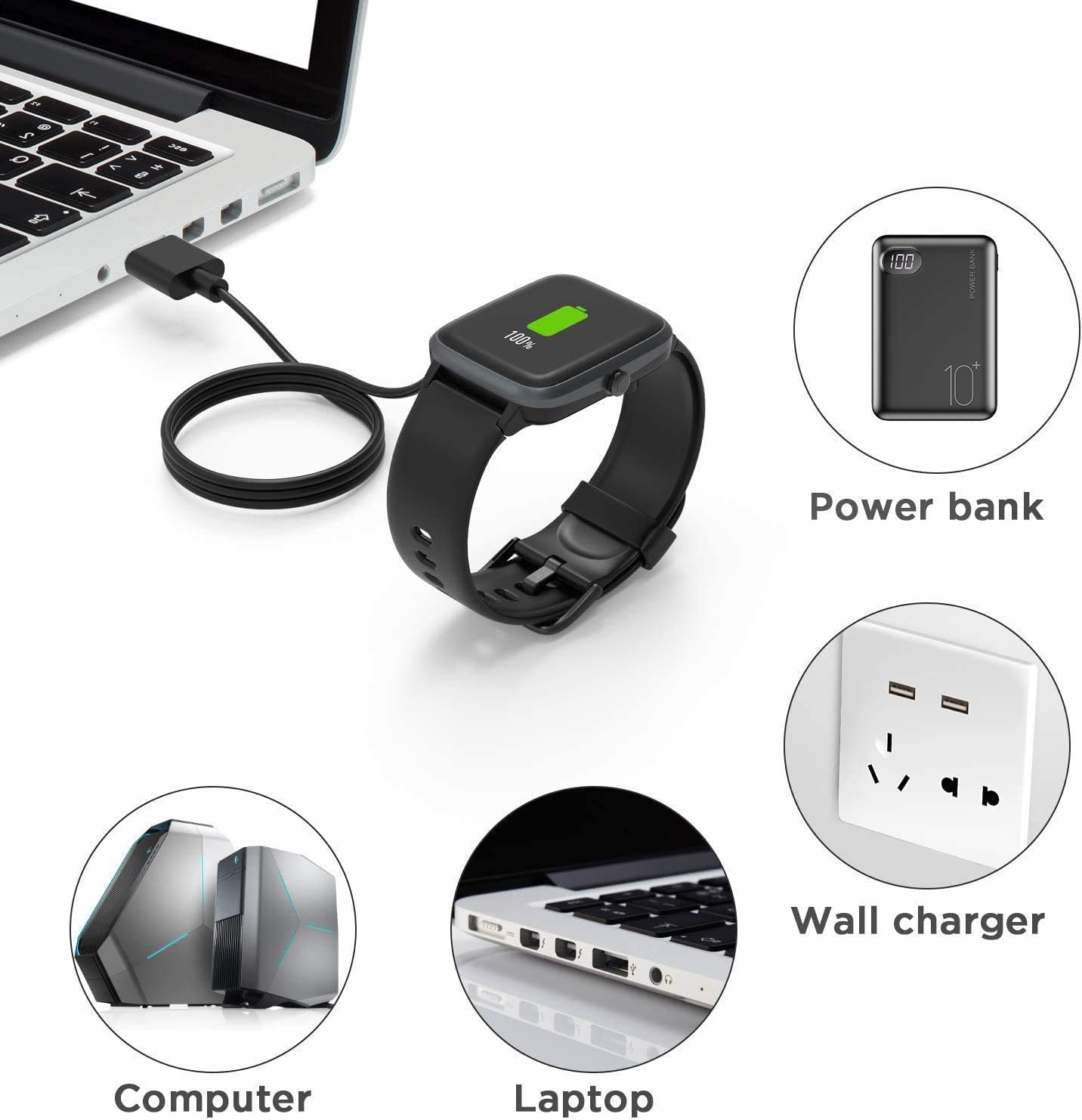
Image: Illustrations of a fitness tracker being charged from a computer, laptop, power bank, and wall charger.
3. Operating Instructions
The Lamshaw Magnetic USB Charging Cable is designed for simple operation. Once connected, the charging process is automatic.
3.1 Charging Process
- After connecting the cable to both the fitness tracker and a power source, the tracker's screen will typically display a charging indicator.
- A full charge for the BIGGERFIVE BW01/BW02 fitness tracker typically takes approximately 2.5 hours when using a 1A output current.
- Once fully charged, the tracker's display will show a full battery icon. You may disconnect the charger at this point.

Image: A fitness tracker connected to the charger, with an overlay indicating a 2.5-hour charging time for a full charge with 1A output current.
3.2 Important Note on Magnetic Connection
The magnetic connection is crucial for proper charging. Ensure the magnets attract and hold the connector firmly in place. If the magnets repel, the connection is incorrect, and the device will not charge.
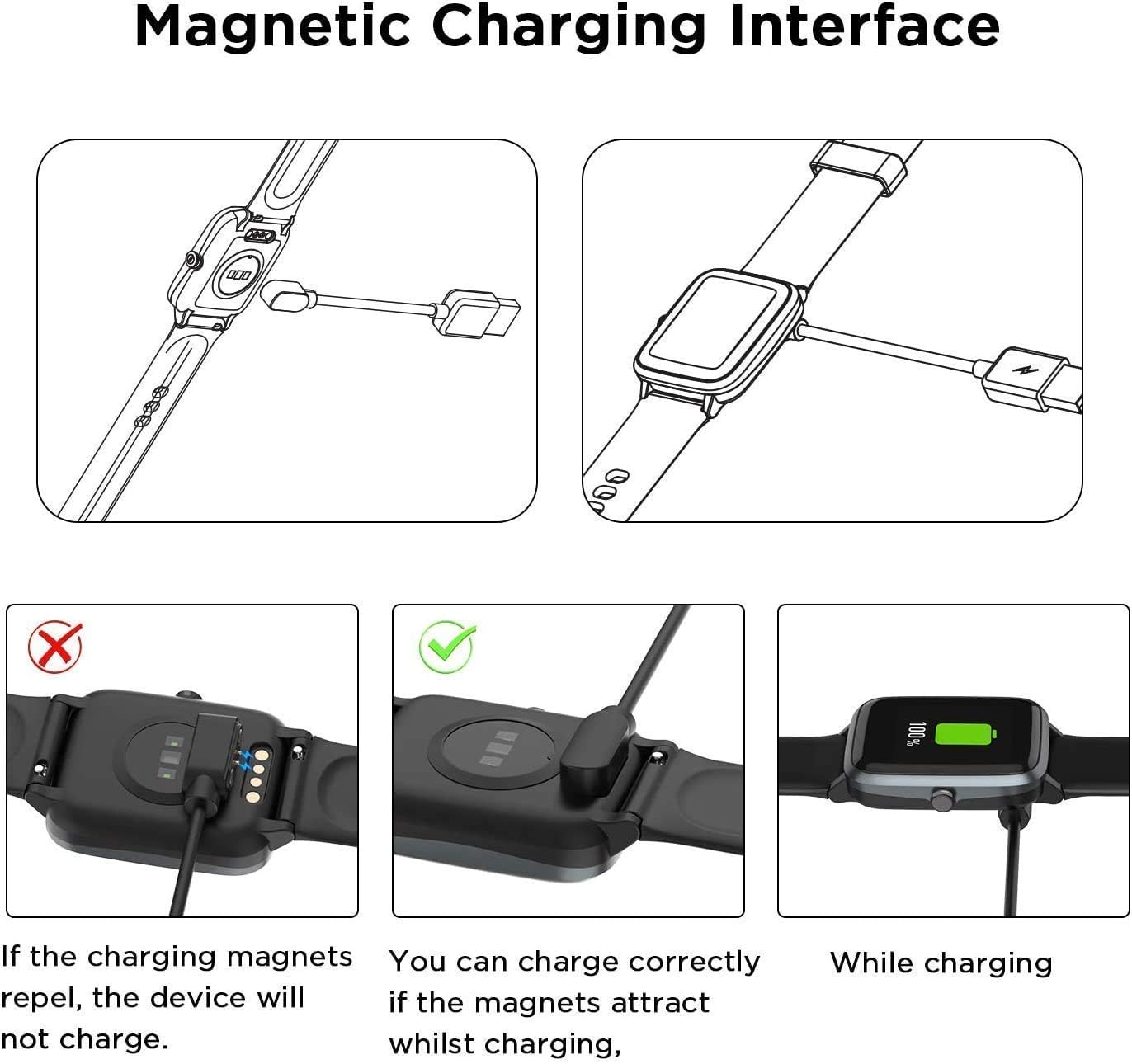
Image: A diagram illustrating the correct magnetic charging connection (magnets attract) versus an incorrect connection (magnets repel), and the appearance of the device while charging.
4. Maintenance
To ensure the longevity and optimal performance of your Lamshaw Magnetic USB Charging Cable, follow these simple maintenance guidelines:
- Keep Clean: Regularly wipe the cable and magnetic contacts with a soft, dry cloth to remove dust or debris. Avoid using abrasive cleaners or solvents.
- Store Properly: When not in use, coil the cable loosely and store it in a dry, cool place away from direct sunlight and extreme temperatures. Avoid sharp bends or kinks in the cable.
- Handle with Care: Do not pull the cable forcefully from the device or power source. Always grasp the plug when disconnecting.
- Inspect for Damage: Periodically check the cable for any signs of wear, fraying, or damage to the insulation or connectors. Discontinue use if any damage is observed.
5. Troubleshooting
If you encounter issues while charging your device, refer to the following troubleshooting tips:
- Device Not Charging:
- Ensure the magnetic connector is correctly aligned and firmly attached to the fitness tracker. Refer to the magnetic connection diagram in Section 3.2.
- Verify that the USB-A plug is fully inserted into a working power source. Try a different USB port or wall adapter.
- Check if the fitness tracker itself is powered on or has sufficient battery to display charging indicators.
- Inspect the charging contacts on both the cable and the tracker for any dirt, dust, or corrosion. Clean gently if necessary.
- Slow Charging:
- Ensure your power source provides adequate current (e.g., 1A output). Charging from a computer USB port may be slower than a dedicated wall adapter.
- Avoid using damaged or worn-out USB ports or adapters.
- Cable Damage:
- If the cable appears physically damaged (frayed wires, bent connectors), discontinue use immediately and replace it.
6. Specifications
| Feature | Detail |
|---|---|
| Brand | Lamshaw |
| Model Compatibility | BIGGERFIVE BW01, BW02 Kids Fitness Tracker Watch |
| Connector Type | Magnetic (device end), USB-A (power source end) |
| Color | Black |
| Package Dimensions | 5.79 x 3.46 x 1.46 inches |
| Item Weight | 1.06 ounces |
| Number of Items | 2 (for 2 Pack-Black+Black variant) |
7. Warranty and Support
This Lamshaw product is manufactured with quality and reliability in mind. For specific warranty information, please refer to the product packaging or contact the seller directly.
If you require further assistance or have questions not covered in this manual, please reach out to the seller or manufacturer's customer support channel through your purchase platform.
Ask a question about this manual
Ask about setup, troubleshooting, compatibility, parts, safety, or missing instructions. Manuals+ will review the question and use this page’s manual context to help answer it.