
1. Introduction
This manual provides detailed instructions for the safe and effective use of your Yonvim BM07 Baby Monitor. Please read this manual thoroughly before operating the device and retain it for future reference. The Yonvim BM07 is designed to provide reliable monitoring of your baby using secure 2.4GHz FHSS technology, ensuring privacy without requiring a Wi-Fi connection.
2. Package Contents
- Parent Unit (Monitor)
- Baby Unit (Camera)
- Power Adapter for Parent Unit
- Power Adapter for Baby Unit
- User Manual
3. Product Overview

Image 3.1: Yonvim BM07 Baby Monitor Parent Unit and Baby Unit. The parent unit features a 5.3-inch screen and control buttons, while the baby unit is a dome-shaped camera with a night light base.
3.1 Parent Unit (Monitor)
- 5.3-inch 1080P Display: For clear video feed.
- Antenna: For signal reception.
- Menu Button: Accesses settings.
- OK/Directional Buttons: Navigation and selection.
- Call Button: Activates two-way talk.
- Volume Buttons: Adjusts audio level.
- Microphone: For two-way communication.
- Speaker: For audio output.
3.2 Baby Unit (Camera)
- 2K HD Camera Lens: Captures high-resolution video.
- Infrared LEDs: For automatic night vision.
- Microphone: Picks up baby's sounds.
- Speaker: For two-way communication and lullabies.
- Temperature Sensor: Monitors room temperature.
- Night Light: Provides soft, adjustable illumination.
- Power Port: Connects to power adapter.
- Mounting Hole: For wall mounting (hardware not included).
- SD Card Slot: For local video recording (SD card not included).
4. Setup
4.1 Charging the Parent Unit
- Connect the smaller end of the parent unit power adapter to the charging port on the parent unit.
- Plug the larger end of the power adapter into a power outlet.
- Charge the parent unit for at least 4 hours before first use to ensure optimal battery performance. The battery indicator on the screen will show charging status.
4.2 Powering the Baby Unit
- Connect the smaller end of the baby unit power adapter to the power port on the baby unit.
- Plug the larger end of the power adapter into a power outlet. The baby unit will automatically power on.
4.3 Positioning the Baby Unit (Camera)
- Place the baby unit on a flat surface, such as a dresser or shelf, at least 3 feet (1 meter) away from the baby.
- Ensure the camera has a clear, unobstructed view of the baby's crib or play area.
- For optimal viewing, consider wall mounting the camera using the integrated mounting hole.
- Keep the baby unit and its power cord out of reach of children.
4.4 Initial Pairing (if necessary)
Your Yonvim BM07 baby monitor units are typically pre-paired at the factory. If the parent unit does not display video from the baby unit after powering on both devices, follow these steps to re-pair:
- On the parent unit, press the Menu button.
- Navigate to the 'Camera' or 'Pairing' option using the directional buttons and press OK.
- Select an available camera channel (e.g., Camera 1).
- Follow the on-screen prompts to initiate pairing. You may need to press a pairing button on the baby unit (refer to the camera unit for specific button location, usually on the back or bottom).
- Once successfully paired, the video feed will appear on the parent unit screen.
5. Operating Instructions
5.1 Basic Monitoring
- Turn on both the parent unit and baby unit. The parent unit will automatically display the live video feed from the baby unit.
- Adjust the volume using the dedicated volume buttons on the parent unit.
5.2 Pan, Tilt, and Zoom (PTZ)

Image 5.1: The parent unit displaying a baby with arrows indicating pan and tilt movement, and a separate image showing the camera unit's 355-degree pan and 130-degree tilt capabilities. Zoom levels (2x, 4x, 10x) are also illustrated.
- Use the directional buttons on the parent unit to remotely pan (move horizontally) and tilt (move vertically) the camera lens to get a full view of the room (355° pan, 130° tilt).
- To zoom in or out, press the designated zoom button (often integrated with directional controls or a separate button). The monitor supports 2x, 4x, and 10x digital zoom.
5.3 Two-Way Audio Communication

Image 5.2: A parent speaking into the monitor, and a baby in the crib, illustrating the two-way audio feature for real-time communication.
- Press and hold the Call button on the parent unit to speak to your baby through the camera's speaker.
- Release the button to hear your baby's sounds again.
5.4 HD Night Vision
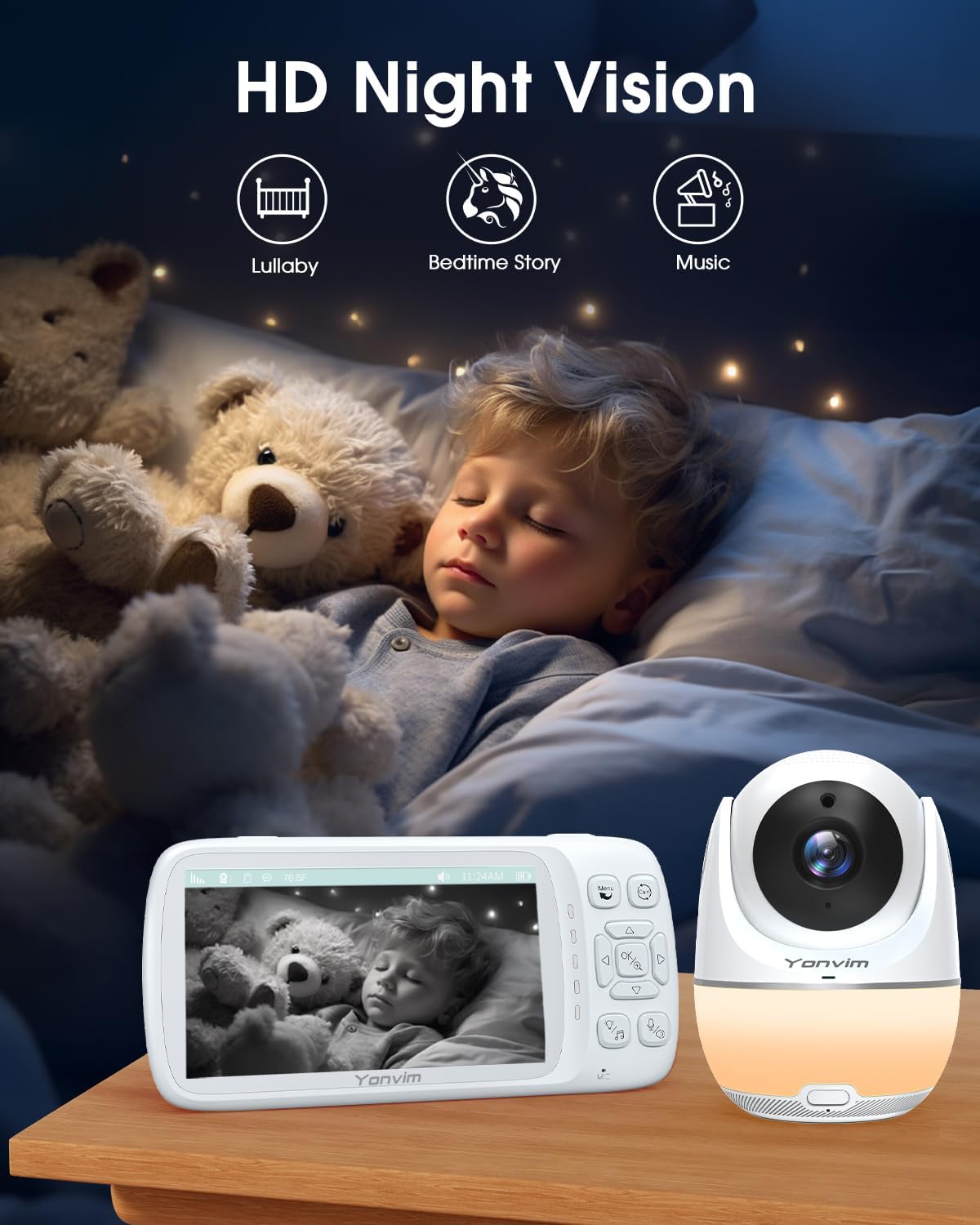
Image 5.3: The parent unit displaying a clear black-and-white image of a sleeping child in a dark room, demonstrating the HD night vision capability.
- The baby unit automatically activates infrared night vision in low-light conditions, providing a clear black-and-white image on the parent unit.
5.5 Night Light Function

Image 5.4: The baby unit emitting various colors of light, illustrating the 7 adjustable night light options to create a soothing environment.
- Access the night light settings through the Menu on the parent unit.
- Select from 7 adjustable colors to provide a soft, comforting glow in the baby's room.
5.6 Sound, Temperature, and Feeding Alerts

Image 5.5: The parent unit displaying a crying baby, with icons for sound, temperature, and feeding alerts, indicating the monitor's smart alert capabilities.
- Sound Detection: Configure sound sensitivity levels in the menu to receive alerts when your baby cries or makes significant noise.
- Temperature Monitoring: The parent unit displays the real-time temperature of the baby's room, detected by the baby unit's sensor. Set temperature thresholds for alerts.
- Feeding Reminder: Set timed reminders for feeding schedules through the parent unit's menu.
5.7 Local Recording and Playback

Image 5.6: A couple viewing recorded footage of their baby on the parent unit, with a filmstrip graphic and an SD card icon, highlighting the local recording and playback feature.
- Insert a compatible SD card (up to 128GB, not included) into the baby unit's SD card slot to enable local video recording.
- Access recording options (manual, scheduled, or motion-activated) via the parent unit's menu.
- To view recorded footage, navigate to the 'Playback' option in the menu.
5.8 Lullabies and Music

Image 5.7: The baby unit emitting musical notes towards a sleeping baby in a crib, illustrating the audio storybook and lullaby feature.
- Select from pre-loaded lullabies or play custom audio (if loaded onto an SD card) through the baby unit's speaker to soothe your baby.
- Control music playback and volume from the parent unit's menu.
5.9 Split Screen Viewing (Multiple Cameras)

Image 5.8: The parent unit displaying two camera feeds simultaneously, demonstrating the split screen function that supports up to 4 cameras.
- If you have multiple baby units (sold separately), you can view up to four camera feeds simultaneously on the parent unit's split screen.
- Access the 'Split Screen' option in the menu to configure and switch between camera views.
5.10 Battery Life

Image 5.9: Graphics illustrating the 7000mAh battery capacity, providing up to 30 hours with the display off and voice on, or 18 hours with the display on and voice on.
- The parent unit features a 7000mAh battery.
- Expected battery life: approximately 30 hours with the display off (audio monitoring only) and 18 hours with the display continuously on (video and audio).
6. Maintenance
- Cleaning: Use a soft, dry cloth to clean the surfaces of the parent and baby units. Do not use abrasive cleaners or solvents.
- Storage: If storing the monitor for an extended period, ensure both units are fully charged, then power them off. Store in a cool, dry place.
- Battery Care: To prolong battery life, avoid fully discharging the parent unit frequently. Charge it regularly.
7. Troubleshooting
| Problem | Possible Cause | Solution |
|---|---|---|
| No video/audio on parent unit | Baby unit not powered on; Out of range; Units not paired; Low battery on parent unit. | Ensure baby unit is plugged in and powered on. Move parent unit closer to baby unit. Re-pair units (Section 4.4). Charge parent unit. |
| Poor video quality/signal interference | Obstructions (walls, furniture); Other 2.4GHz devices nearby; Out of range. | Reduce distance between units. Remove obstructions. Move monitor away from other wireless devices (e.g., routers, microwaves). |
| Parent unit battery drains quickly | Continuous display on; Old battery. | Reduce screen brightness. Use display-off mode for audio-only monitoring. Contact support if battery life significantly degrades. |
| Two-way talk not working | Call button not pressed/held; Volume too low. | Ensure the Call button is pressed and held during speaking. Increase volume on both units. |
8. Specifications
- Model: BM07
- Brand: Yonvim
- Parent Unit Display: 5.3-inch 1080P HD
- Baby Unit Camera Resolution: 2K HD
- Wireless Technology: 2.4GHz FHSS (No Wi-Fi required for operation)
- Operating Range: Up to 1500 feet (line of sight)
- Pan/Tilt: 355° horizontal, 130° vertical
- Zoom: 2x, 4x, 10x Digital Zoom
- Battery Capacity (Parent Unit): 7000mAh
- Battery Life (Parent Unit): Up to 30 hours (display off, voice on), 18 hours (display on, voice on)
- Local Storage: Supports Micro SD card up to 128GB (not included)
- Features: Two-way audio, HD night vision, temperature sensor, sound detection, feeding reminder, lullabies, adjustable night light, split screen (up to 4 cameras).
- Item Weight: Approximately 1.86 pounds
- Package Dimensions: 7.68 x 7.24 x 4.13 inches
- Mounting Type: Wall Mount (hardware not included)
9. Warranty and Support
For warranty information, technical support, or any questions regarding your Yonvim BM07 Baby Monitor, please refer to the contact information provided on the product packaging or visit the official Yonvim website. Please have your model number (BM07) and purchase details ready when contacting support.