
OLIGHT JAVELOT-MTBK#300000
OLIGHT Javelot Tactical Flashlight User Manual
Model: JAVELOT-MTBK#300000
1. Introduction
The OLIGHT Javelot is a powerful and versatile tactical flashlight designed for various applications, including everyday carry (EDC), searching, and hunting. It features a high output of 1,350 lumens and an impressive beam distance of 700 meters, making it suitable for long-range illumination. Its robust construction and dual-switch design ensure reliability and ease of use in demanding environments.

Figure 1: OLIGHT Javelot Tactical Flashlight (OD Green)
2. What's in the Box
- Javelot Flashlight (Battery Included) x 1
- Charging Cable x 1
- Holster x 1
- Pocket Clip x 1
- User Manual x 1
3. Setup
3.1. Charging the Battery
The Javelot flashlight comes with a high-capacity rechargeable battery. To charge, connect the magnetic charging cable to the tail cap of the flashlight. The indicator light on the charging cable will show red during charging and turn green when fully charged. The flashlight can be charged even when docked in its nylon-reinforced holster.

Figure 2: Magnetic Charging of Javelot Flashlight
3.2. Attaching the Pocket Clip
The reversible two-way pocket clip can be attached to the flashlight body for convenient carry. Slide the clip onto the designated groove on the flashlight body until it snaps securely into place.

Figure 3: Convenient Carry Options with Holster and Clip
4. Operating Instructions
4.1. Dual Switches Operation
The Javelot features both a metal side switch for everyday use and a programmable tail switch for quick deployment in tactical scenarios. This dual-switch design offers flexibility and practicality for various lighting needs.

Figure 4: Dual Switches for Any Setting
4.2. Lighting Modes
The flashlight offers 6 side switch accessible lighting modes, including Turbo, High, Medium, Low, Moonlight, and Strobe. Refer to the user manual for specific instructions on how to cycle through these modes and activate the strobe function.
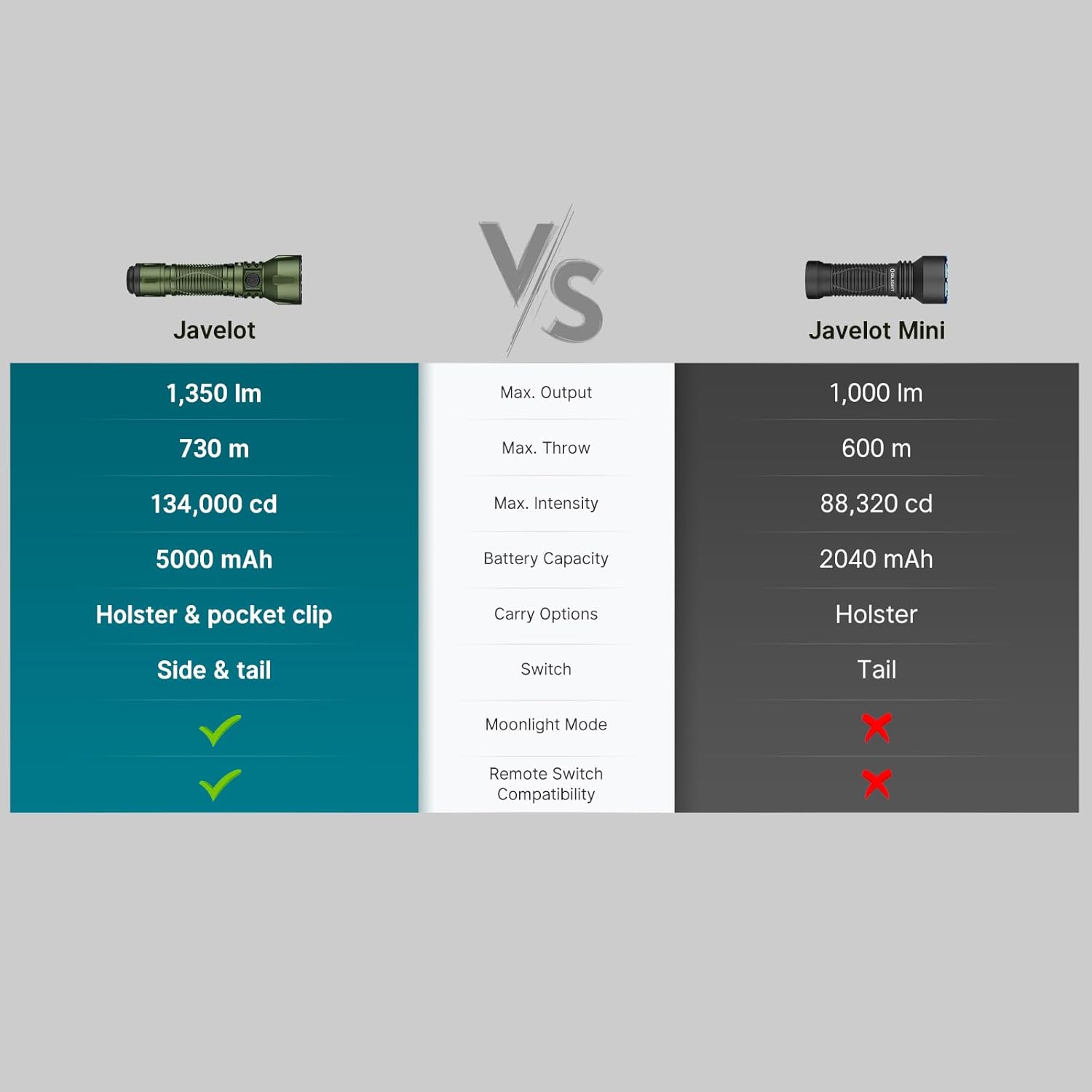
Figure 5: 6 Side Switch Accessible Lighting Modes
4.3. Quick Deployment Tail Switch
The tail switch is programmable for tactical use, allowing for quick access to specific modes like momentary on/off or direct access to Turbo/Strobe. Consult the full user manual for detailed programming instructions.

Figure 6: Quick Deployment Tail Switch Functionality
4.4. Rail-Mounted Light Functionality
The Javelot can be mounted on your setup and used as a rail-mounted light. This requires optional OLIGHT remote switches and magnetic mounts (sold separately) for enhanced control during night hunting or tracking activities.

Figure 7: Javelot as a Rail-Mounted Light
4.5. Product Overview Video
Video 1: An overview of the OLIGHT Javelot tactical EDC flashlight, demonstrating its features, dual-switch operation, and various lighting modes in different outdoor and urban environments. The video highlights its powerful beam and versatile carry options.
5. Maintenance
To ensure the longevity and optimal performance of your OLIGHT Javelot flashlight, follow these maintenance guidelines:
- Cleaning: Regularly clean the flashlight body with a soft, damp cloth. For the lens, use a lens cleaning cloth to avoid scratches.
- Lubrication: Apply a thin layer of silicone grease to the O-rings periodically to maintain waterproof sealing.
- Battery Care: Store the flashlight with a partially charged battery if not in use for extended periods. Avoid fully discharging the battery frequently.
- Storage: Store the flashlight in a cool, dry place away from direct sunlight and extreme temperatures.

Figure 8: Javelot Durability Features
6. Troubleshooting
If you encounter issues with your OLIGHT Javelot flashlight, refer to the following common problems and solutions:
| Problem | Possible Cause | Solution |
|---|---|---|
| Flashlight does not turn on | Low battery; Loose tail cap; Lockout mode activated | Charge the battery; Tighten the tail cap; Deactivate lockout mode (refer to full manual) |
| Light is dim or flickers | Low battery; Dirty contacts; Loose components | Charge the battery; Clean battery and flashlight contacts; Ensure all parts are securely tightened |
| Magnetic charging not working | Charging cable not properly connected; Dirty charging port; Faulty cable/charger | Ensure firm connection; Clean the magnetic charging port; Try a different charging cable or power source |
7. Specifications
| Feature | Detail |
|---|---|
| Brand | OLIGHT |
| Model | JAVELOT-MTBK#300000 |
| Special Feature | Portable, High Power, Adjustable Light Modes, Rechargeable, Perdurable |
| Color | OD Green |
| Power Source | Battery Powered |
| Light Source Type | LED |
| Material | Aluminum |
| White Brightness | 1350 Lumens |
| Product Dimensions | 1.57"D x 1.06"W x 5.43"H |
| Light Path Distance | 730 Meters |
| Battery Cell Composition | Lithium Ion |
| Item Weight | 0.43 Pounds (6.9 ounces) |
| Number of Batteries | 1 Lithium Ion (included) |
| Water Resistance Level | Waterproof (IPX8) |
| Runtime | 72 minutes (on highest setting) |
8. Warranty and Support
The OLIGHT Javelot Tactical Flashlight comes with a Lifetime Warranty, ensuring peace of mind regarding its quality and durability. For any support inquiries, technical assistance, or to explore other OLIGHT products, please visit the official OLIGHT store:
Related documentsJAVELOT-MTBK#300000


Ask a question about this manual
Ask about setup, troubleshooting, compatibility, parts, safety, or missing instructions. Manuals+ will review the question and use this page’s manual context to help answer it.