
1. Introduction
Thank you for choosing the VOLT PLUS TECH Pro Earbuds Wireless V5.3 LED. These earbuds are designed to provide a superior audio experience with advanced features such as Bluetooth 5.3 connectivity, active noise cancellation, and a convenient digital LED display charging case. This manual will guide you through the setup, operation, and maintenance of your new earbuds to ensure optimal performance and longevity.

Image 1.1: The Pro Earbuds Wireless V5.3 LED, showcasing both earbuds and the charging case with its digital LED display.
2. What's in the Box
Please check the package contents to ensure all items are present:
- VOLT PLUS TECH Pro Earbuds (Left and Right)
- Charging Case with Digital LED Display
- USB-C Charging Cable
- Ear Tips (Small, Medium, Large sizes)
- User Manual (this document)
3. Product Overview
The VOLT PLUS TECH Pro Earbuds are equipped with several advanced features for an enhanced audio experience:
- Bluetooth 5.3: Ensures stable and efficient wireless connectivity.
- Digital LED Display: Shows battery levels of the charging case and individual earbuds.
- Quad Noise-Cancelling Microphones: Two microphones per earbud with CVC 8.1 technology for clear calls.
- Long Battery Life: Up to 5+ hours of playtime per charge, with an additional 20+ hours from the 2000mAh charging case.
- IPX3 Waterproof: Resistant to sweat and light splashes, suitable for sports (charging case is NOT waterproof).
- Touch Controls: Intuitive touch sensors for music, calls, and voice assistant.
- Single/Dual Earbud Operation: Use one or both earbuds independently.
- 8D Stereo Surround Sound: Immersive audio quality.

Image 3.1: An infographic highlighting key features such as Game/Video/Music modes, Bluetooth 5.3 chip, Type-C quick charge, intelligent digital display, HiFi stereo sound, smart noise reduction, emergency charging, dual host switching, and carving breathing lamp effect.
4. Setup
4.1 Initial Charging
Before first use, fully charge the earbuds and the charging case.
- Place both earbuds into the charging case.
- Connect the USB-C charging cable to the charging port on the case and plug the other end into a USB power adapter (not included).
- The digital LED display on the case will show the charging status and battery levels. Ensure both earbuds and the case are fully charged before proceeding.

Image 4.1: The charging case connected via USB-C cable, illustrating the charging process and the digital display indicating battery levels.
4.2 Pairing with Your Device
- Power On: Remove both earbuds from the charging case. They will automatically power on. A blue indicator light will flash to confirm. If they do not power on automatically, press and hold the touch area on both earbuds for 3-5 seconds until the blue indicator light flashes.
- Bluetooth Activation: On your smartphone or audio device, go to the Bluetooth settings and ensure Bluetooth is turned on.
- Search for Device: In the list of available Bluetooth devices, search for "YD03".
- Connect: Select "YD03" to pair. Once connected, the earbuds will provide a voice prompt "Connected".
- Single Earbud Mode: You can use either earbud independently. Simply remove one earbud from the case, and it will automatically connect. The other earbud can remain in the case or be used later.
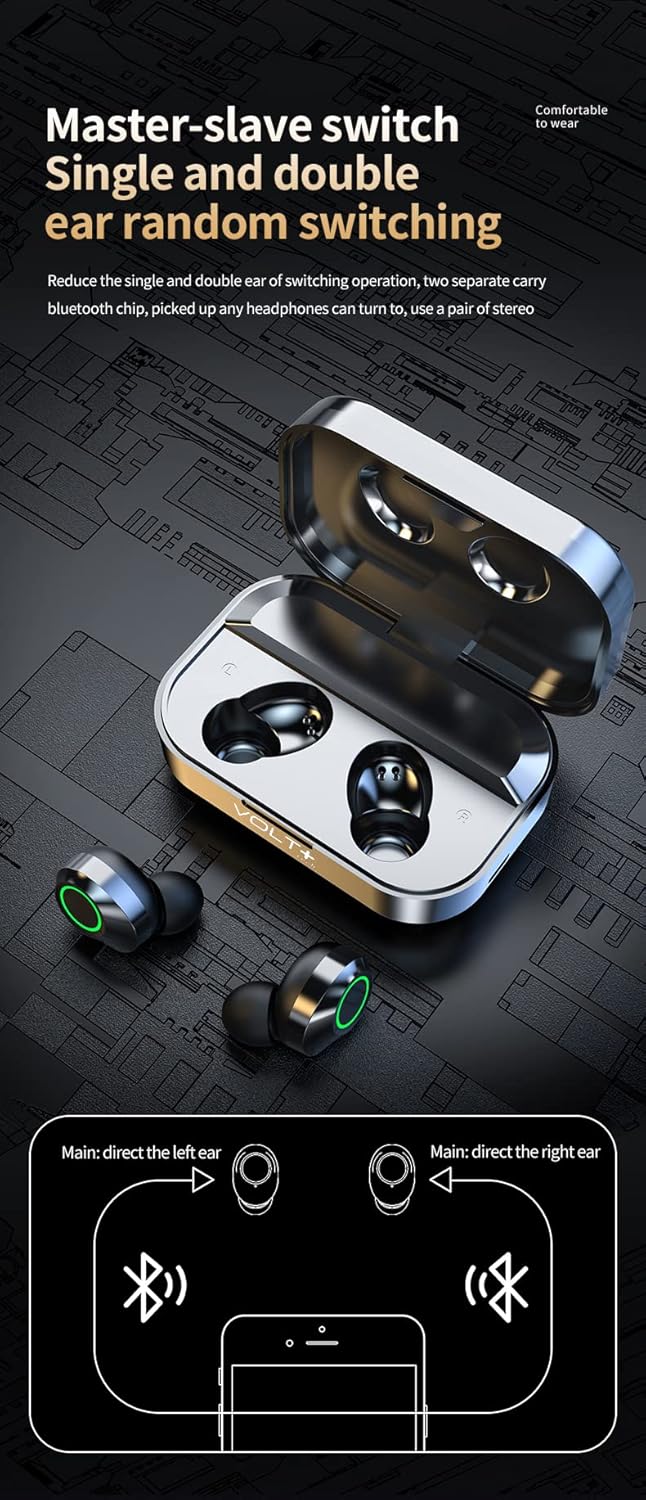
Image 4.2: A diagram explaining the "Master-slave switch" functionality, allowing for single or dual earbud operation by directing the left or right earbud as the main unit.
5. Operating Instructions
The earbuds feature intuitive touch controls on their outer surface. Refer to the diagram below for specific functions:

Image 5.1: A visual guide to the touch controls on the earbuds. It shows double-click on the left earbud for previous song and triple-click for volume reduction, and double-click on the right earbud for next song and triple-click for volume increase. It also illustrates long press for calls (short press to answer, 1.5 seconds to reject), short press for play/pause, and long press for 1.5 seconds to activate voice assistant (eSiri).
5.1 Music Playback
- Play/Pause: Single tap on either earbud.
- Next Song: Double tap the Right earbud.
- Previous Song: Double tap the Left earbud.
- Volume Up: Triple tap the Right earbud.
- Volume Down: Triple tap the Left earbud.
5.2 Call Management
- Answer Call: Short press on either earbud.
- Reject Call: Long press on either earbud for 1.5 seconds.
- End Call: Short press on either earbud during a call.
5.3 Voice Assistant
- Activate Voice Assistant (e.g., Siri): Long press on either earbud for 1.5 seconds (when not on a call).
5.4 Power On/Off
- Power On: Remove from charging case, or long press for 3-5 seconds.
- Power Off: Place back into the charging case, or long press for 5 seconds.
6. Maintenance
Proper care will extend the life of your earbuds:
- Cleaning: Use a soft, dry, lint-free cloth to clean the earbuds and charging case. Do not use harsh chemicals or abrasive materials. Gently clean ear tips with a damp cloth and mild soap if necessary, ensuring they are completely dry before reattaching.
- Storage: When not in use, always store the earbuds in their charging case to protect them and keep them charged. Store in a cool, dry place away from extreme temperatures.
- Water Resistance: The earbuds are IPX3 waterproof, meaning they are resistant to light splashes and sweat. Do not submerge them in water. The charging case is NOT waterproof; keep it dry.
7. Troubleshooting
| Problem | Possible Cause | Solution |
|---|---|---|
| Earbuds not pairing with device. | Bluetooth is off; earbuds are out of charge; earbuds are already paired to another device; pairing mode not activated. | Ensure Bluetooth is on your device. Charge earbuds. Disconnect from other devices. Remove earbuds from case to activate pairing mode, or manually power on. |
| Only one earbud is working. | One earbud is out of charge; earbuds are not properly synced; single earbud mode is active. | Place both earbuds back into the charging case, then remove them together. Ensure both are charged. If still an issue, try resetting the earbuds (refer to manufacturer support if needed). |
| Earbuds not charging. | Charging cable is faulty; charging port is dirty; earbuds not seated correctly in case. | Try a different USB-C cable and power adapter. Clean the charging contacts on the earbuds and in the case. Ensure earbuds are properly seated in the case. |
| Poor sound quality or connection drops. | Distance from device; interference; low battery. | Move closer to your device. Avoid areas with strong Wi-Fi or other Bluetooth signals. Ensure earbuds are fully charged. |
8. Specifications
| Model Name | YD03 |
| Bluetooth Version | 5.3 |
| Connectivity Technology | Wireless |
| Wireless Communication Technology | Bluetooth |
| Noise Control | Active Noise Cancellation (CVC 8.1) |
| Water Resistance Level | IPX3 (Earbuds only, charging case not waterproof) |
| Battery Capacity (Charging Case) | 2000mAh (approx. 20+ hours additional playtime) |
| Playtime per Charge | 5+ hours |
| Frequency Range | 20Hz - 120Hz (Music), 150Hz (Phone Calls) |
| Control Method | Touch |
| Ear Placement | In Ear |
| Material | Acrylonitrile Butadiene Styrene (ABS), Hi-Impact Plastic, Stainless Steel, Titanium |
| Product Dimensions | 1.5 x 1 x 1.5 inches |
| Item Weight | 4 ounces |

Image 8.1: A visual representation emphasizing the Bluetooth 5.3 core upgrade chip for more stable transmission and simpler connection.

Image 8.2: An illustration detailing the graphene composite diaphragm, highlighting its light quality and fast response for high fidelity audio and abundant detail.
9. Safety Information
- Do not expose earbuds or charging case to extreme temperatures, direct sunlight, or fire.
- Do not attempt to disassemble or modify the product.
- Keep away from children and pets.
- Avoid using earbuds at high volume for extended periods to prevent hearing damage.
- Do not use the earbuds in situations where inability to hear ambient sounds could be dangerous (e.g., driving, cycling, walking in traffic).
10. Warranty and Support
For warranty information and customer support, please refer to the documentation provided at the time of purchase or contact your retailer. You may also visit the official VOLT PLUS TECH website for further assistance.
For technical support or inquiries, please contact:
- Manufacturer: VOLT PLUS TECH
- Model: YD03
- ASIN: B0CP8HHQWK