
1. Introduction
Thank you for choosing the VOLT PLUS TECH Pro Earbuds Wireless V5.3 LED. This manual provides essential information for the safe and efficient use of your new earbuds. Please read it thoroughly before use and retain it for future reference.
Key Features:
- Bluetooth 5.3 for stable and efficient wireless connectivity.
- Digital LED display on charging case for battery status.
- Quad Microphones with CVC 8.1 noise reduction for clear calls.
- IPX4 water and sweat resistance (earbuds only).
- Intuitive touch controls.
- Portable charging case with power bank function.
2. Package Contents
Ensure all items are present in your package:
- VOLT PLUS TECH Pro Earbuds (Left and Right)
- Charging Case with LED Display
- USB-C Charging Cable
- User Manual (this document)
- Ear Tips (Small, Medium, Large)

Image: The VOLT PLUS TECH Pro Earbuds shown with their charging case, featuring a digital LED battery display.
3. Setup and First Use
3.1 Initial Charging
Before first use, fully charge the earbuds and the charging case.
- Place both earbuds into the charging case.
- Connect the USB-C charging cable to the charging port on the case and to a compatible USB power source (e.g., wall adapter, computer USB port).
- The LED display on the charging case will show the charging status. A full charge typically takes approximately 2 hours.

Image: The charging case with its USB-C port connected to a charging cable, illustrating the charging process.
3.2 Selecting Ear Tips
For optimal sound quality and comfort, choose the ear tips that best fit your ears. The package includes Small, Medium, and Large sizes. Experiment to find the most secure and comfortable fit.
3.3 Pairing with Your Device
Follow these steps to pair your earbuds with a Bluetooth-enabled device:
- Power On: Open the charging case. The earbuds will automatically power on, and a blue indicator light will flash to confirm. If they do not power on automatically, press and hold the touch area on both earbuds for 3-5 seconds until the blue indicator light flashes.
- Activate Bluetooth: On your smartphone, tablet, or computer, go to the Bluetooth settings and ensure Bluetooth is enabled.
- Search for Device: In the list of available Bluetooth devices, search for "YD03".
- Connect: Select "YD03" to pair. Once connected, you will hear a voice prompt "Connected" from the earbuds.
- Single Earbud Use: The earbuds support independent use. You can use either the left or right earbud alone. Simply take one earbud out of the case, and it will connect.
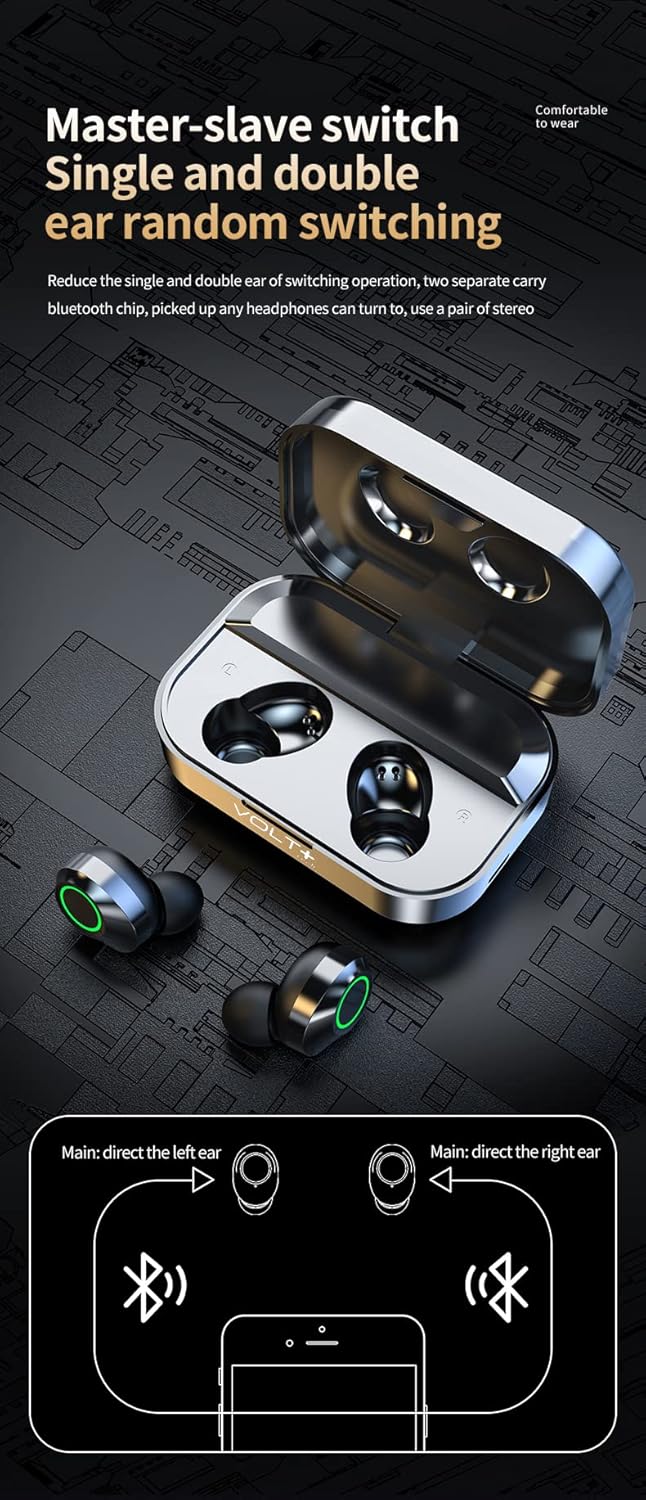
Image: A diagram illustrating the flexibility of using either the left or right earbud independently, or both together for stereo sound.
4. Operating Instructions
4.1 Touch Controls
The earbuds feature touch-sensitive controls on their outer surface. Refer to the following table for common functions:
| Action | Left Earbud (L) | Right Earbud (R) |
|---|---|---|
| Play/Pause Music | Single Tap | |
| Previous Song | Double Tap | N/A |
| Next Song | N/A | Double Tap |
| Volume Down | Triple Tap | N/A |
| Volume Up | N/A | Triple Tap |
| Answer/End Call | Single Tap | |
| Reject Call | Press and Hold for 2 seconds | |
| Activate Voice Assistant (Siri/Google Assistant) | Press and Hold for 1.5 seconds | |
| Switch Game/Music/Video Mode | Quadruple Tap (4 taps) | |

Image: Visual representation of the touch control functions for the left and right earbuds.
4.2 Power On/Off
- Power On: Open the charging case, or press and hold the touch area on both earbuds for 3-5 seconds.
- Power Off: Place the earbuds back into the charging case and close the lid. They will automatically disconnect and power off. Alternatively, if disconnected from a device for 5 minutes, they will power off automatically.
4.3 LED Display on Charging Case
The digital LED display on the charging case provides real-time battery information:
- The large central number indicates the charging case's battery percentage.
- "L" and "R" indicators show the individual battery levels of the left and right earbuds.

Image: The charging case's LED display clearly showing the battery percentage for the case and individual earbuds (L and R).
5. Maintenance and Care
- Cleaning: Regularly clean the earbuds and charging case with a soft, dry, lint-free cloth. Do not use harsh chemicals or abrasive materials.
- Water Resistance: The earbuds are IPX4 water and sweat resistant, suitable for workouts and light rain. The charging case is NOT waterproof. Do not submerge the earbuds or expose the charging case to water.
- Storage: When not in use, store the earbuds in their charging case to protect them and keep them charged. Store in a cool, dry place away from extreme temperatures.
- Battery Care: To prolong battery life, avoid fully discharging the battery frequently. Charge the device regularly, even if not used for extended periods.
6. Troubleshooting
If you encounter issues with your earbuds, please refer to the following common solutions:
- Earbuds not pairing:
- Ensure both earbuds are charged.
- Place earbuds back in the case, close the lid, then open it again to reset.
- Turn off Bluetooth on your device, then turn it back on.
- Delete "YD03" from your device's Bluetooth list and attempt to pair again.
- Ensure no other Bluetooth devices are interfering.
- Only one earbud working:
- Ensure both earbuds are charged.
- Place both earbuds back in the charging case, close the lid, wait a few seconds, then open it again.
- Check your device's audio settings to ensure stereo output is selected.
- Earbuds not charging:
- Ensure the charging cable is securely connected to both the case and the power source.
- Check if the charging case itself has power (indicated by the LED display).
- Ensure the charging contacts on the earbuds and inside the case are clean and free of debris.
- Try a different USB-C cable or power adapter.
- Poor sound quality or disconnections:
- Ensure the earbuds are fully charged.
- Move closer to your paired device to reduce interference.
- Check for physical obstructions between the earbuds and your device.
- Clean the ear tips and speaker mesh.
- Try resetting the earbuds by placing them in the case and re-pairing.
7. Specifications
| Feature | Detail |
|---|---|
| Model Name | YD03 |
| Bluetooth Version | 5.3 |
| Wireless Range | Up to 33 feet (10 meters) |
| Earbud Battery Life | Approximately 5+ hours (single charge) |
| Total Playtime (with charging case) | Up to 25+ hours |
| Charging Case Battery Capacity | 2000mAh (provides multiple recharges) |
| Charging Time | Approximately 2 hours (earbuds and case) |
| Charging Port | USB-C |
| Water Resistance Rating | IPX4 (earbuds only) |
| Noise Control | CVC 8.1 Noise Reduction (Quad Mics) |
| Audio Driver Size | 26 mm |
| Sensitivity | 103 dB |
| Impedance | 25.94 Ohms |
| Compatible Devices | Android, iOS, Mac, Windows (including Lenovo IdeaPad Miix 300) |
| Item Weight (Earbuds + Case) | Approximately 4 ounces (113 grams) |
| Case Dimensions (L x W x H) | 2.7 x 1.3 x 1.2 inches |
8. Warranty and Support
Specific warranty information is not provided in the product details. For warranty claims or technical support, please contact the retailer or VOLT PLUS TECH customer service through their official channels. Retain your proof of purchase for any warranty inquiries.
For further assistance, please refer to the contact information provided with your purchase or visit the VOLT PLUS TECH official website.